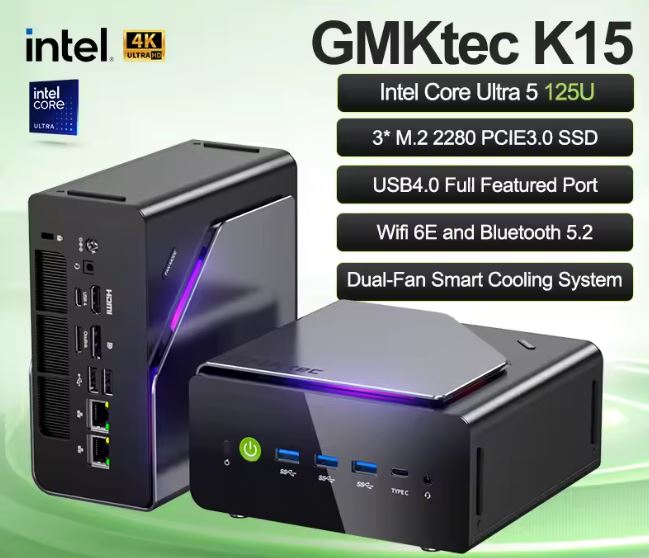
The GMKtec NucBox K15 is a surprisingly quiet and well-connected mini PC that shines in productivity, HTPC, and networking environments.
With support for three simultaneous SSDs (up to 24 TB), 96 GB of DDR5 RAM, OCuLink and USB4, its level of expandability is almost unique in this price range.
However, the integrated Intel Arc quad-core graphics card is not up to the task for serious 1080p gaming.
| ✅ Pros | ❌ Cons |
|---|---|
| Silent and cool | Weak integrated graphics for gaming |
| 3 M.2 NVMe slots (up to 24 TB) | Bulky external power supply |
| OCuLink + USB4 for eGPU | Larger than other U-series mini PCs |
| RAM expandable up to 96 GB DDR5 | |
| Wi-Fi 6E, BT 5.2, dual 2.5G LAN | |
| Quad simultaneous screens |
👉 See Prices for the GMKtec NucBox K15 Mini PC
📦 Unboxing and Box Contents
Upon opening the NucBox K15 box, we found clean packaging with no excess plastic inside. The contents include:
-
🖥️ NucBox K15 Mini PC
-
🔌 Power adapter
-
📺 HDMI cable
-
🔩 VESA mounting kit
-
📄 Service card and instruction manual
The unit itself conveys a sense of solidity from the very first moment. It weighs 885 grams, noticeably more than its U-series rivals, which is consistent with its more generous chassis.
📊 Key Technical Specifications
| Component | Detail |
|---|---|
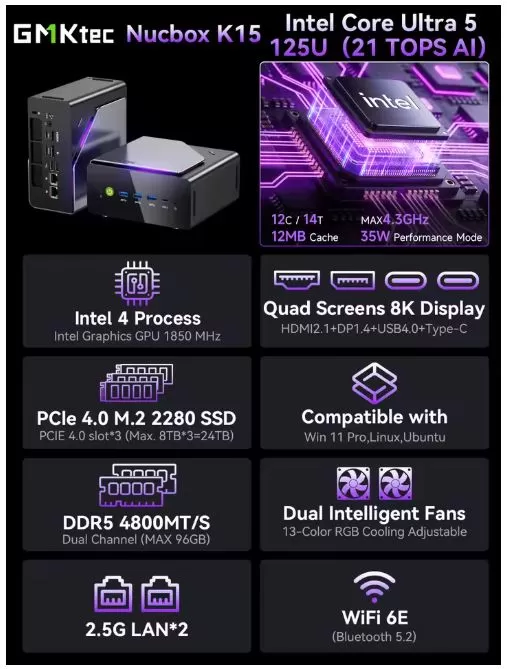
| CPU | Intel Core Ultra 5 125U — 12 cores (2P + 8E + 2 LP-E), 14 threads, up to 4.3 GHz |
| Integrated GPU | Intel Arc Graphics 4 cores, up to 1.85 GHz |
| NPU (AI) | Intel AI Boost — up to 21 total TOPS |
| RAM | DDR5-4800 MHz, 2 SO-DIMM slots, expandable up to 96 GB |
| Storage | 3× M.2 2280 PCIe 4.0×4 — up to 8 TB each ( 24 TB total ) |
| SW | Windows 11 Pro |
| Wi-Fi | Wi-Fi 6E (MediaTek RZ616) |
| Bluetooth | 5.2 |
| LAN | 2× 2.5G Ethernet (Realtek RTL8125) |
| Video | HDMI 2.1 + DP 1.4 + USB4 + USB-C → up to 4 simultaneous 8K displays |
| USB | 1× USB4 40 Gbps, 3× USB 3.2 Gen2 Type-A, 1× USB-C, 2× USB 2.0 |
| eGPU | OCuLink PCIe Gen4x4 |
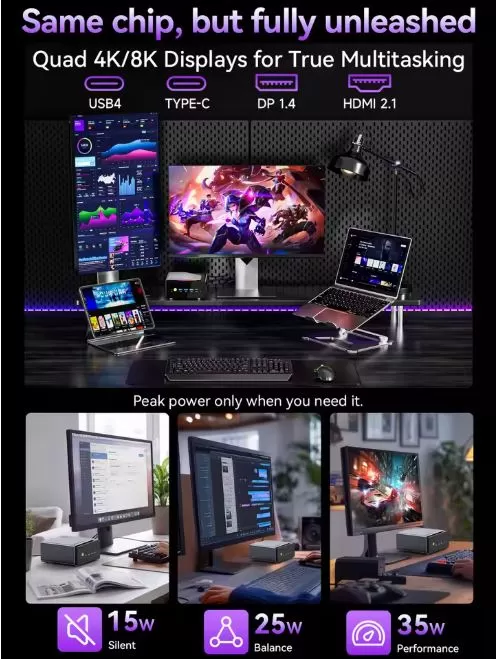
| Power modes | Silent 15W / Balanced 25W / Performance 35W |
| Size | 155 × 151 × 78 mm |
| Weight | 885 g (+ 496 g the source) |
🏗️ Design and Construction Quality
GMKtec NucBox K15 mini PC
The NucBox K15 shares the same chassis as its AMD sibling, the NucBox K12. It's noticeably larger than other U-series CPU mini PCs, a deliberate decision by GMKtec to accommodate more ports, three M.2 slots, and more ample cooling. The exterior finish is plastic and metal with matte black accents, and an RGB strip on top feels a bit out of place on such a productivity-oriented machine.
The "Fan-Mode" button on top only changes the RGB colors—it doesn't adjust the fan speed or performance, which might be initially confusing. Accessing the interior is straightforward: a Phillips screwdriver is all it takes to reach the SSD and RAM slots, making it one of the easiest mini PCs to maintain in its class.
🖥️ Screen and Multimedia
The NucBox K15 doesn't include its own screen, but its graphics output is one of its strengths: four simultaneous video outputs via HDMI 2.1 (up to 4K/120Hz or 8K/30Hz), DisplayPort 1.4, USB4, and USB-C. This quad-screen configuration makes it an interesting option for multi-monitor work setups or as a media center connected to a 4K TV.
The chip supports hardware decoding of modern formats (H.265, AV1, VP9), ensuring smooth playback of 4K video streams or local files without any issues. The multimedia experience is, in short, outstanding for a device of this size and price.
⚙️ Performance and Software
The Core Ultra 5 125U (Meteor Lake architecture) offers multithreaded performance in line with the average for its class, scoring around 9,600 points in Cinebench R23 Multi. For office tasks, light editing, web browsing, and streaming, the system performs smoothly. Where it falls short is in the integrated graphics: the quad-core Intel Arc lags significantly behind the Radeon 780M in the NucBox K12 in any graphics test.
Windows 11 Pro comes pre-installed and activated, without excessive bloatware. GMKtec typically provides reasonably timely BIOS and driver updates. A bonus: Linux compatibility (Ubuntu and Batocera) has also been verified , giving advanced users room to experiment. The system also includes Linux support , and the Intel AI Boost NPU chip (21 TOPS) allows for working with lightweight local AI models.
👉 See Prices for the GMKtec NucBox K15 Mini PC
🔋 Energy Consumption and Cables
The K15 has three power modes configurable from the BIOS or software:
-
🔇 Silent: 15W — ideal for office work or HTPC
-
⚖️ Balanced: 25W — general daily use
-
🚀 Performance: 35W — maximum CPU potential
One of the downsides is that, despite its large size, the K15 still requires an external power supply (brick), something competitors like the Beelink GTi15 Ultra have solved by integrating the PSU into the chassis. The box includes an HDMI cable, but not a DisplayPort or USB-C to USB-C cable, which you'll have to purchase separately if needed.
🌡️ Temperature and Noise (Actual Thermal)
This is probably the K15's most outstanding feature: it's exceptionally quiet. The dual-fan cooling system with copper heat pipes takes advantage of the larger chassis to dissipate heat from the Core Ultra 5 125U without straining the fans. In real-world tests, the machine "barely makes a peep," according to NotebookCheck.
Under sustained load, temperatures remain controlled and the system exhibits no worrisome throttling. The 15W silent mode makes the K15 virtually inaudible in quiet environments, making it an excellent choice for living rooms or quiet desks.
🔌 Connectivity and Extras
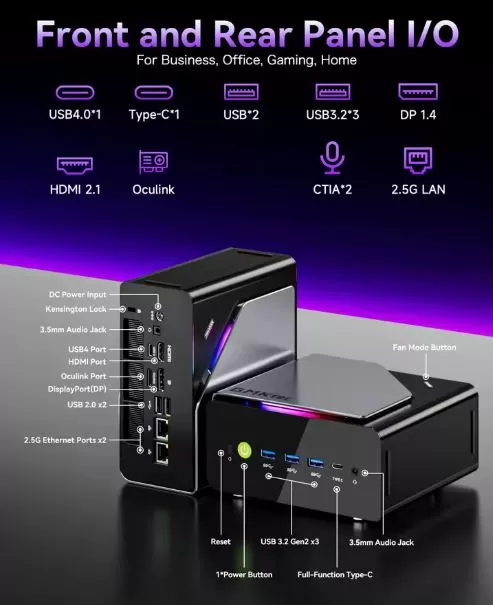
The K15's port selection is generous for its class:
Front panel:
-
1× USB4 40 Gbps
-
1× USB-C 3.2 Gen2
-
2× CTIA audio connector (microphone + headphones)
Rear panel:
-
1× HDMI 2.1
-
1× DisplayPort 1.4
-
3× USB 3.2 Gen2 Type-A
-
2× USB 2.0
-
2× RJ-45 2.5G LAN
-
1× OCuLink PCIe Gen4×4
-
1× DC input
Wireless: Wi-Fi 6E (6 GHz band available), Bluetooth 5.2.
⚠️ Note: Does not include SD card reader, fingerprint sensor or IP water resistance certification.
🔧 Expansion and Upgrades
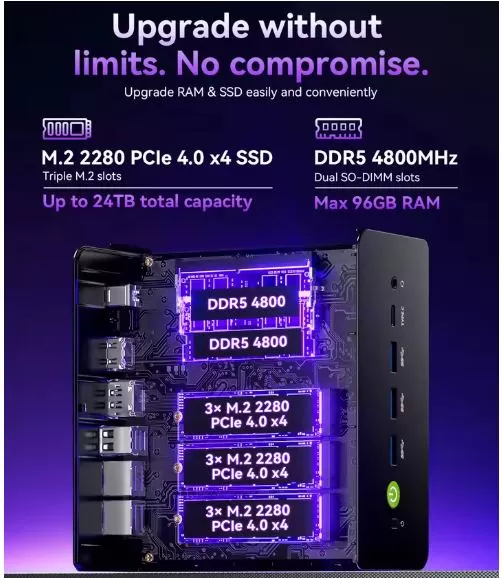
One of the great advantages of the NucBox K15 is its enormous expansion potential:
-
RAM: 2 SO-DIMM DDR5-4800 MHz slots. Currently expandable up to 96 GB (2 x 48 GB). The modules are standard and easy to find. 👉 See DDR5 SO-DIMM RAM
-
Primary SSD: M.2 2280 PCIe 4.0 slot — replaceable with any compatible NVMe SSD. 👉 View M.2 NVMe SSD
-
Additional slots: 3 M.2 2280 PCIe 4.0 slots in total, each supporting up to 8 TB → maximum capacity of 24 TB in NVMe storage
-
Does not include 2.5" SATA bay — only NVMe M.2
👉 See Prices for the GMKtec NucBox K15 Mini PC
🆚 Comparison with Direct Competitors
| Feature | GMKtec NucBox K15 | GMKtec NucBox K12 | Beelink GTi15 Ultra | MSI Cubi NUC AI+ 2MG |
|---|---|---|---|---|
| CPU | Core Ultra 5 125U | Ryzen 7 H 255 | Core Ultra 9 285H | Core Ultra 7 258V |
| GPU iGPU | Intel Arc 4c | Radeon 780M | Intel Arc (Battlemage) | Intel Arc 140V |
| Cinebench R23 Multi | ~9,600 pts | ~15,870 pts | ~17,995 pts | ~10,524 pts |
| SSD slots | 3× M.2 | 2× M.2 | 2× M.2 | 1× M.2 |
| max RAM | 96 GB DDR5 | 96 GB DDR5 | 96 GB DDR5 | 64 GB LPDDR5X |
| OCuLink eGPU | ✅ | ✅ | ✅ | ❌ |
| Integrated PSU | ❌ (external) | ❌ (external) | ✅ | ❌ (external) |
| Approx. price (16GB/1TB) | ~€790 | ~€700 | ~€900 | ~€850 |
| Ideal for | Productivity/NAS | Gaming/Creation | Intensive gaming | AI/Pro Work |
The NucBox K12 AMD far surpasses the K15 in graphics and CPU performance, but the K15 wins in storage expandability and port connectivity.
💬 Reviews on Well-Known Pages
Reviews from specialized media outlets are consistent in their conclusions:
-
NotebookCheck (February 2026) highlights that it is "oversized and quiet"—the large chassis results in a virtually silent system. Its main drawbacks: weak graphics and external power supply. ⭐⭐⭐⭐ (approx. 80/100)
-
Neowin (March 2026) titles its review clearly: "USB4, OCuLink, DDR5 memory — but no gaming Mini PC", perfectly summarizing the strengths and main limitation of the device.
-
TechRadar describes it as "the cheapest OCuLink mini PC you can buy right now," highlighting its flexibility for homelabs and creative work setups.
-
Reddit (r/MiniPCs) — users who have tried it in the community highlight how surprisingly quiet it is, confirming that it is not an option for native gaming, but is for productivity and light retro emulation.
-
YouTube (PandoryTool, March 2026) — after real-world benchmark, gaming, emulation and Batocera Linux tests, concludes that "this system makes more sense for office and productivity setups where low noise and efficiency matter".
🧪 Technical Tests
The benchmarks of the GMKtec NucBox K15 tell a clear story: this is an honest mini PC, well-balanced for productivity, but without pretensions of raw power.
💻 CPU — Competent, but not brilliant
With approximately 9,600 points in Cinebench R23 Multi, the Core Ultra 5 125U sits at the top of the Intel U-series processors, which is good news. However, this score pales in comparison to the Ryzen 7 H 255 in the NucBox K12, which achieves approximately 15,870 points—almost 65% more multithreaded performance. For tasks like 4K video editing, code compilation, or exporting large projects, this difference is truly noticeable in everyday use. That said, for web browsing, office applications, video calls, and multitasking, the K15 performs flawlessly. The approximately 1,570 single-core score is also solid and ensures smooth performance in everyday applications.
🎨 GPU — The Achilles' heel
There's no way around it here: the ~8,322 KRay/s in AIDA64 FP32 Ray-Trace of the 4-core Intel Arc is approximately 3 times lower than the Radeon 780M of the equivalent AMD model.
For any task that relies on the GPU—gaming, graphics-accelerated video editing, light 3D rendering, or emulation of modern consoles—this difference is crucial.
The quad-core Intel Arc isn't a gaming GPU: it's a survival GPU. It handles 4K video, multiple displays, and light AI tasks, but that's about it.
📊 PCMark 10 — The benchmark that matters most to the real user
The score of approximately 6,421 points in PCMark 10 is perhaps the most representative of everyday use. This score places the K15 at a level perfectly suitable for professional work environments: documents, spreadsheets, video conference meetings, basic image editing, and intensive web browsing. It's not a spectacular number, but it's functional and stable.
💾 SSD — Speeds that won't disappoint
The TWSC 1TB PCIe 4.0 SSD's read speeds of approximately 3,502 MB/s and write speeds of approximately 2,469 MB/s are perfectly respectable mid-to-high-range figures . The system boots quickly, applications open without any noticeable delays, and transferring large files (multimedia projects, backups) is smooth and effortless. It's not an elite SSD, but there's nothing reasonable to complain about.
📶 Wi-Fi 6E — A very pleasant surprise
Here the K15 truly shines: 1,583 Mbps upload and 1,749 Mbps download speeds on the 6 GHz band are excellent figures, surpassing several direct competitors. In environments with Wi-Fi 6E routers, the K15 makes the most of the channel, making it a very capable option for those who work with network transfers, wireless NAS, or simply want the best possible Wi-Fi experience without running cables.
⚡ Consumption — Your most silent calling card
The K15's power consumption of 8-10W at idle and 35W under full load is a strong argument for its adoption as an always-on device—home server, HTPC, mini NAS, or lightweight workstation in 24/7 mode. To put this in perspective: a gaming laptop consumes between 80W and 150W under load. The K15 does more with less, and that has real value both in terms of your electricity bill and the longevity of the device.
🔎 Technical Conclusion
The NucBox K15 is an efficient, power-efficient, and well-connected mini PC , with an SSD and Wi-Fi that leave no room for doubt. Its only structural weakness is the integrated GPU, which rules it out as a dedicated gaming machine. However, if you plan to connect an eGPU via OCULink, this weakness disappears completely. For everything else, the specs perfectly support its promise: a serious mini PC for serious work.
🎮 Gaming and Emulation
The NucBox K15 isn't a mini gaming PC with its stock specifications. The quad-core Intel Arc Graphics doesn't offer a playable experience in modern titles at 1080p. However, there's an important caveat:
Native gaming (iGPU only):
-
🟢 Indie and 2D games: fluid
-
🟡 Lighter titles (League of Legends, CS2 on low): playable in 720p
-
🔴 Modern AAA games (1080p): not recommended
Retro emulation:
-
🟢 PS1, N64, SNES, Mega Drive, GBA: perfect
-
🟢 PS2 (PCSX2), GameCube (Dolphin): very good
-
🟡 PS3 (RPCS3), Wii U (Cemu): Simple titles work, demanding ones have problems
-
🟡 Switch (Ryujinx): Some games, variable performance
With eGPU via OCuLink: 🚀 The K15's biggest advantage. By connecting an RTX 4070 or better through the OCuLink port, the system transforms into a capable gaming/creation workstation. This is the use case that justifies the K15's performance compared to its rivals.
❓ Frequently Asked Questions (FAQ)
Is the NucBox K15 good for gaming?
With the integrated graphics, no. But by connecting an eGPU via OCuLink, it can be transformed into a serious gaming system.
How much RAM does it support exactly?
Two SO-DIMM DDR5 slots. The RAM is 4800 MHz, expandable up to 96 GB with 48 GB modules.
Are all three SSDs really PCIe 4.0?
Yes, all three M.2 2280 slots are PCIe 4.0x4, supporting up to 8 TB each.
Does it work with Linux?
Yes, compatibility has been verified with Ubuntu and Batocera Linux.
Can it be used as a home NAS server?
It's an excellent option: dual 2.5G LAN, three SSD slots, low power consumption in silent mode, and Windows 11 Pro included.
Does the barebones price include RAM and SSD?
No. The "NO DDR NO SSD NO OS" version (€369.95) is for those who want to install their own components.
🏁 Final Conclusion
The GMKtec NucBox K15 is the ideal mini PC for those seeking maximum expandability in a compact, quiet form factor. It's perfect for professionals who need multiple monitors, home labs with high NVMe storage, 4K HTPC/media center users, or those planning to add an eGPU via OCULink. It's not the right choice if your priority is native gaming or maximum CPU/GPU performance without an external GPU.
Possible alternatives to consider:
-
🏆 For more CPU/GPU performance: GMKtec NucBox K12 (AMD Ryzen 7 H 255, Radeon 780M) — much more powerful in graphics
-
💰 For a more affordable price: Beelink EQ14 or NiPoGi AM06 Pro
-
🎯 For AI and professional work: MSI Cubi NUC AI+ with Core Ultra 258V (Lunar Lake)
🛒 Where to Buy It at the Best Price?
Choose the configuration that best suits your needs:
| Configuration | Price |
|---|---|
| Barebones (no RAM, SSD or OS) | €369.95 |
| 16GB RAM + 512GB SSD + Win 11 Pro | €790 |
| 16 GB RAM + 1 TB SSD + Win 11 Pro | €856 |
👉 Buy GMKtec NucBox K15 — Offer Link
🛍️ Recommended accessories: