⚡ Initial Verdict
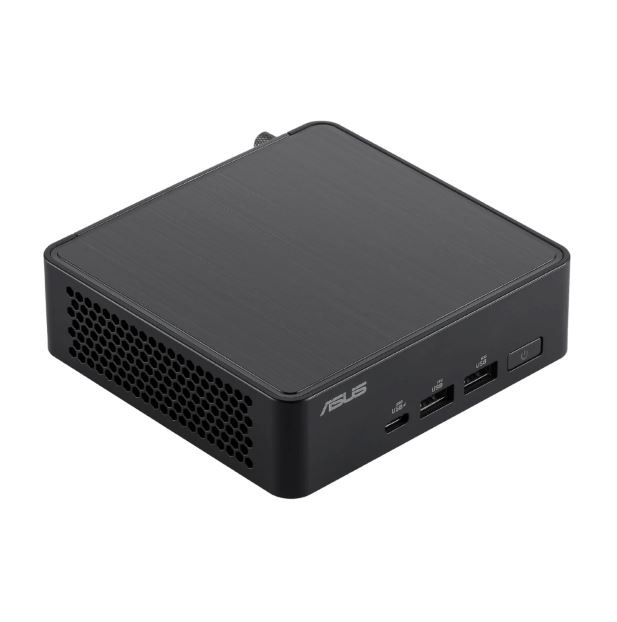
The ASUS NUC 14 Pro is an exceptionally refined mini PC that combines solid performance with a compact design and multiple configuration options
Pros : Tool-less chassis, dual Thunderbolt 4, up to 4 simultaneous monitors, excellent multitasking performance with 14th Gen Intel Core Ultra processors.
Cons : lack of a 3.5mm audio jack, occasionally noisy fan under load, high price in premium configurations.
Conclusion : Ideal for professionals, offices, and advanced users looking for power in an ultra-compact format without migrating to macOS.
📊 Technical Specifications
| Specification | Details |
|---|---|
| Processor | Intel Core 3 100U / Core Ultra 5 125H / 135H / Core Ultra 7 155H / 165H |
| GPU | Intel Arc Graphics (integrated) |
| RAM | Up to 32GB DDR5-5600 (expandable) |
| Storage | Up to 1TB PCIe 4.0 NVMe SSD + additional M.2 slot + 2.5" bay (Tall version only) |
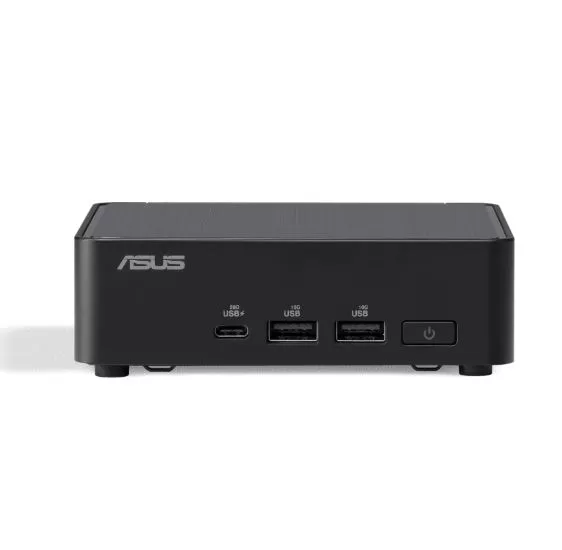
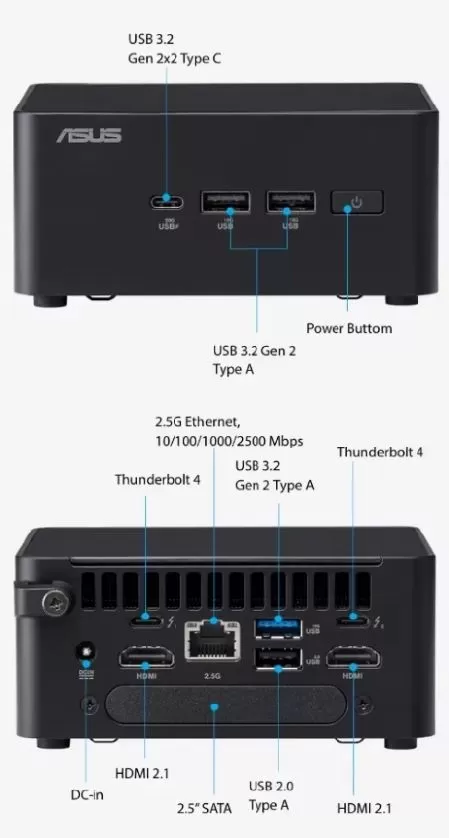
| Front ports | 2x USB-A 3.2 Gen2 (10Gbps), 1x USB-C 3.2 Gen2x2 (20Gbps) |
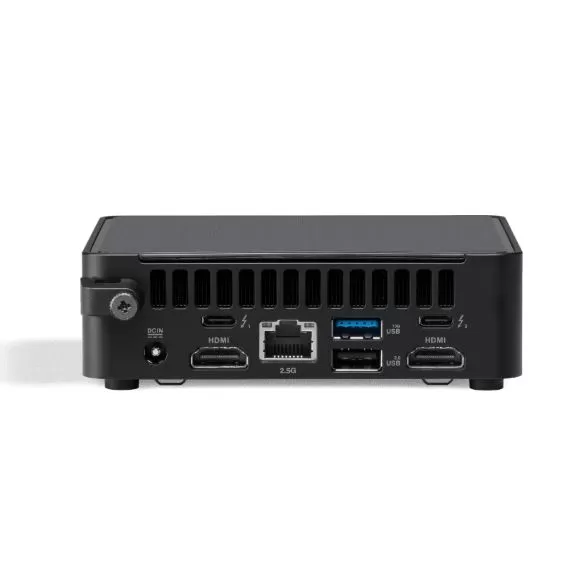
| Rear ports | 2x Thunderbolt 4, 2x HDMI 2.1, 2x USB-A (1x Gen2 + 1x USB 2.0), 1x 2.5GbE Ethernet |
| Connectivity | Wi-Fi 6E, Bluetooth 5.3 |
| Dimensions | 117 x 112 x 54 mm (Tall) / 117 x 112 x 34 mm (Slim) |
| Weight | ~600g |
| Operating System | Windows 11 Pro (depending on configuration) |
| Price | From $400 (barebone) to $1,000+ (full setup) |
🎨 Design and Build Quality
Premium Construction with Tool-Free Opening
The ASUS NUC 14 Pro measures just 4.6 x 4.41 inches (117 x 112 mm), making it even smaller than the Mac mini M4 , but without sacrificing robustness. Its metal chassis conveys professional solidity, with a matte finish that resists fingerprints and scratches.
🔧 Key design advantages :
-
Tool-less opening system using a latch and locking mechanism at the base, making it easy to upgrade RAM and storage in seconds (although ASUS recommends using a coin or flathead screwdriver for extra leverage).
-
Two chassis versions : Slim (34mm height) and Tall (54mm height), with the Tall version allowing an additional 2.5" bay for HDD/SSD.
-
Rear expansion slot for third-party brackets that add USB ports, antennas, or other features (GORITE ecosystem available).
-
Power cord with retention bracket that minimizes accidental disconnections.
Speed labeling on the front USB ports is a refined detail that few manufacturers implement. In hand, the device weighs a mere 600 grams , making it extremely portable.
🛒 VIEW PRICES ON AMAZON
🛒 Buy ASUS NUC 14 Pro
🖥️ Screen and Multimedia
Up to 4 Simultaneous Monitors
Although the NUC 14 Pro does not include a screen (it is a mini desktop PC), its video output capability is exceptional :
-
4 video outputs : 2x HDMI 2.1 + 2x Thunderbolt 4 (which support DisplayPort).
-
It supports up to 4 4K@60Hz monitors simultaneously , surpassing the Mac mini M4 (3 screens).
-
During testing, I set up a main ultrawide monitor + LG DualUp vertical monitor using both HDMI outputs without the need for adapters.
❌ Critical Absence: No 3.5mm Audio Jack
The only significant drawback is the complete lack of an analog audio port , neither front nor rear. Competitors like the Mac mini M4 include a front-facing headphone jack. The solution requires a USB-to-3.5mm adapter or the use of USB/HDMI speakers, which contradicts the philosophy of avoiding dongles on a Windows PC.
⚙️ Performance and Software
Multitasking Power with Intel Core Ultra
I tested the configuration with an Intel Core Ultra 7 165H (14 cores, 18 threads), 16GB DDR5-5600 and 512GB NVMe , which proved to be a beast in productivity :
-
Smooth multitasking : Dozens of Chrome tabs in multiple windows + photo editing in GIMP without slowdowns.
-
During my Black Friday coverage, it worked flawlessly as my main team.
Technical benchmarks (according to professional reviews):
-
Geekbench 6 Multi-Core : 11,959 points vs 11,269 for the NUC 13 Pro.
-
Cinebench 2024 : 16,655 multi-core points (38% faster than NUC 13 Pro with 12,034).
-
Blender GPU (Arc Graphics) : 33,758 points vs. 16,389 for the NUC 13 Pro, demonstrating a 2x more powerful Arc GPU .
-
AI/Machine Learning : Superior inference times in MobileNet V3 (1.33ms) and DeepLab V3 (41.74ms).
🎮 Casual Gaming (Not its Strong Point)
With integrated Intel Arc graphics , it achieves 36 fps in Civilization VI at 1080p. That's sufficient for indie games or older titles, but if you're looking for serious gaming, the ROG NUC 970 with a dedicated RTX card is the right choice.
💾 RAM Limitations Under Extreme Loads
In y-cruncher tests with massive datasets (2.5-5 trillion digits), the 16GB configuration showed limitations , while versions with 32GB DDR5 completed without issues. Recommendation : Opt for 32GB if you work with AI, 3D rendering, or intensive virtualization.
🪟 Windows 11 Pro, Zero Bloatware
ASUS delivers the system with a clean Windows 11 Pro , without unnecessary applications beyond ASUS' own utilities (MyASUS for driver updates). Update support is standard Windows, with drivers available on the ASUS website.
🔋 Food and Energy Consumption
Compact Retaining Adapter
The NUC 14 Pro uses a barrel-type power adapter (not USB-C like the Mac mini). The bracket retention system prevents accidental disconnections during transport.
Measured consumption :
-
Processor TDP : Up to 64W (power limit reached intermittently under sustained loads).
-
Idle consumption : ~8-12W approximately.
-
Maximum power consumption : ~65-75W during intensive benchmarks.
The design is much more efficient than traditional towers (which consume 150-350W), ideal for office environments looking to reduce electricity costs.
🔌 Connectivity and Extras
Comprehensive Connectivity
Front Ports (labeled with speed):
-
2x USB-A 3.2 Gen2 (10Gbps)
-
1x USB-C 3.2 Gen2x2 (20Gbps)
Rear ports :
-
2x Thunderbolt 4 (40Gbps, device charging, DisplayPort Alt Mode)
-
2x HDMI 2.1 (4K@60Hz)
-
2x USB-A (1x Gen2 10Gbps + 1x USB 2.0)
-
1x Ethernet 2.5GbE (Intel i226-V, although some users report preferring Thunderbolt 10GbE adapters for reliability)
-
1x DC power input with retention bracket
Wireless :
-
Wi-Fi 6E (Tri-band)
-
Bluetooth 5.3
Featured extras :
-
✅ Kensington Lock Port for physical security
-
✅ Rear expansion slot for third-party brackets (GORITE offers USB expansions, antennas, etc.)
-
✅ VESA mounting options on the base
-
❌ Without WiFi 7 (Wi-Fi 6E only)
-
❌ No 3.5mm audio jack
🗣️ Reviews on Recognized Pages
Tom's Guide (4/5 stars)
"The Asus NUC 14 Pro is very powerful and even smaller than the Mac mini M4 . It's packed with ports and configuration options, although the price climbs quickly and the fan can be noisy."
PCMag (4/5 stars)
"Continuing Intel's NUC legacy, the Asus NUC 14 Pro offers excellent performance and connectivity for a tiny desktop . Its tool-less expandability is a major strength."
ServeTheHome
"The ASUS NUC 14 Pro displays a refreshing level of mini PC refinement , with even small details covered in its design, such as the speed labeling on USB ports and the cable retention bracket."
XDA Developers
"A great mini PC with the added benefit of a tool-less design for easy upgrades. The two Thunderbolt 4 ports make it exceptionally versatile."
Laptop Mag (3.5/5 stars)
"Compact where it matters, but with a critical compromise (lack of audio jack). The fan can reach 50dB under load."
🧪 Technical Test Summary
| Benchmark | ASUS NUC 14 Pro | Competition | Improvement |
|---|---|---|---|
| Geekbench 6 Multi-Core | 11,959 | NUC 13 Pro: 11,269 | +6% |
| Cinebench 2024 Multi | 16,655 | NUC 13 Pro: 12,034 | +38% |
| Blender GPU (Arc) | 33,758 | NUC 13 Pro: 16,389 | +106% |
| Civilization VI 1080p | 36 fps | - | Casual Gaming |
| AI Inference (MobileNet V3) | 1.33ms | NUC 13 Pro: Slower | Superior Optimization |
| Max. Noise Level | 50dB | Acemagic F2A: 55dB | Quieter |
Technical Conclusion : The NUC 14 Pro excels in multithreading, improved Arc graphics, and AI efficiency , significantly outperforming its predecessor, the NUC 13 Pro. The limitation lies in configurations with only 16GB of RAM for massive datasets
🧪 Detailed Technical Tests of the ASUS NUC 14 Pro
⚡ Processor (CPU) Performance
Tested Configurations
Testing was primarily performed with two processors:
-
Intel Core Ultra 5 125H : 14 cores (4P + 8E + 2LPE), 18 threads, TDP 45W
-
Intel Core Ultra 7 165H : 16 cores (6P + 8E + 2LPE), 22 threads, TDP 64W
Geekbench 6 (Multi-Core Performance)
| Model | Single-Core | Multi-Core | Improvement vs. NUC 13 Pro |
|---|---|---|---|
| NUC 14 Pro (Ultra 7 165H) | 2,480 | 11,959 | +6% multi-core |
| NUC 13 Pro (i7-1360P) | 2,617 | 11,269 | - |
| NUC 14 Pro (Ultra 5 125H) | ~2,400 | 9,942 | Budget Configuration |
| Geekom AX8 Pro (Ryzen AI 9) | ~2,800 | 12,972 | AMD Competition |
Conclusion : The Core Ultra 7 165H achieves +6% more multi-threaded performance than the NUC 13 Pro, but single-core performance is slightly lower (-5%), which may affect legacy tasks that do not take advantage of multiple cores
Cinebench 2024 (3D Rendered)
| Test | NUC 14 Pro | NUC 13 Pro | Difference |
|---|---|---|---|
| Multi-Core | 16,655 points | 12,034 points | +38% 🔥 |
| Single-Core | ~100 points | ~105 points | -5% (lower) |
Analysis : The 38% jump in multi-core performance is impressive and demonstrates that the Core Ultra 7 165H is significantly more efficient in parallel workloads such as 3D rendering, video encoding, and code compilation. However, it falls short in single-core performance, impacting older games and single-threaded software.
SPECworkstation 3.1 (Real Professional Load)
Media & Entertainment (8K Video Processing) :
-
8K CPU test : 56 FPS (NUC 14) vs 46 FPS (NUC 13) → +22 %
-
8K OpenCL test (GPU): 45 FPS (NUC 14) vs 29 FPS (NUC 13) → +55% thanks to Arc Graphics
Conclusion : The NUC 14 Pro handles smooth 4K/8K video editing with enough headroom for real-time effects, surpassing the NUC 13 Pro especially in GPU acceleration.
🎨 Graphics Performance (Intel Arc Graphics)
Geekbench 6 GPU (Compute)
| GPU | Score | Improvement |
|---|---|---|
| Intel Arc Graphics (NUC 14 Pro) | 33,758 points | +106% 🚀 |
| Intel Iris Xe (NUC 13 Pro) | 16,389 points | Reference |
Actual Impact : The new Arc architecture doubles graphics performance , enabling:
-
Casual 1080p Gaming (Civilization VI: 36 fps)
-
Photo editing with GPU-accelerated filters (GIMP, Photoshop)
-
8K playback without stuttering
Blender 3.6 (GPU Rendering)
| Scene | NUC 14 Pro | NUC 13 Pro |
|---|---|---|
| Monster | 105,061 samples/min | 81,940 samples/min (+28%) |
| Junkshop | 69,350 samples/min | 49,911 samples/min (+39%) |
Conclusion : For 3D creatives, the Arc Graphics in the NUC 14 Pro reduces render times by 28-39% , meaning hours saved on long projects.
🤖 Artificial Intelligence and Machine Learning
AI Inference Benchmarks
The Core Ultra includes a dedicated NPU (Neural Processing Unit) for AI. Mixed results:
| AI Model | NUC 14 Pro | NUC 13 Pro | Winner |
|---|---|---|---|
| MobileNet V3 | 1.33ms | Slowest | ✅ NUC 14 (+optimization) |
| DeepLab V3 | 41.74ms | Slowest | ✅ NUC 14 |
| YOLO V3 | Slowest | Better | ❌ NUC 13 (more RAM helps) |
| Real-ESRGAN | Slowest | Better | ❌ NUC 13 |
Analysis : The NUC 14 Pro wins in NPU-optimized models (MobileNet, DeepLab), but loses in workloads that need more RAM (16GB vs. 32GB for the tested NUC 13 Pro). The memory limitation is the bottleneck
🔬 Y-Cruncher (Pi Calculation - RAM Stress)
This test calculates digits of Pi and exposes the RAM limitations of the NUC 14 Pro with 16GB:
| Digits | NUC 14 Pro (16GB) | NUC 13 Pro (32GB) |
|---|---|---|
| 1 billion | 38.375s | 51.281s (✅ NUC 14 gains -25%) |
| 2.5 billion | ❌ DNF (no RAM) | 148,456s |
| 5 billion | ❌ DNF (no RAM) | 340,857s |
Critical conclusion : With small datasets, the NUC 14 Pro is 25% faster , but it completely fails with workloads exceeding 16GB. Essential recommendation : Buy the 32GB DDR5 version if you work with virtualization, massive datasets, or AI.
🌡️ Temperatures and Thermal Management
Performance and Temperature Profiles
The ASUS NUC 14 Pro offers 3 configurable thermal profiles in BIOS:
| Profile | Sustained TDP | Peak CPU Temp | Steady Temp | Noise Level | Performance Loss |
|---|---|---|---|---|---|
| Performance | 37W indefinite | 78°C | 78°C | 🔊 High (noisy) | 0% (maximum) |
| Standard (default) | 37W → 34W after PL2 | 82°C | 82°C | 🔉 Moderate (barely audible) | -3% in Blender |
| Whisper | ~28W | ~72°C | ~72°C | 🔇 Silent | -17% in Blender |
Temperatures Under Extreme Load
Independent tests reveal worryingly high levels of sustained stress:
-
Maximum peak recorded : 108°C during the first few seconds of 100% charge
-
Stabilized temperature (PL1) : 85-100°C after several minutes
-
Idle temperature : ~35-45°C [estimated]
⚠️ Warning : Intel specifies that the Core Ultra can operate up to 110°C , but ASUS allows the NUC 14 Pro to routinely reach 100-108°C , which is extremely high and may affect longevity. Other manufacturers (Minisforum, Geekom) limit it to 95°C.
Power Limits
-
PL2 (short turbo) : 64W for 10-30 seconds
-
PL1 (sustained) : 55W after PL2 expires
-
Throttling temperature : >100°C
The NUC 14 Pro does not perform aggressive thermal throttling , prioritizing performance over temperature, which is good for benchmarks but questionable for 24/7 use.
🔊 Noise Levels
| Scenario | Level (dB) | Comparison |
|---|---|---|
| Idle | ~25-30 dB | Inaudible [estimated] |
| Moderate load (Standard) | ~35-40 dB | Barely audible |
| Maximum load (Performance) | 50 dB | High but acceptable |
| Competition (Acemagic F2A) | 55 dB | Quieter NUC 14 |
Conclusion : In Standard mode , the NUC 14 Pro is remarkably quiet for its size. Only under sustained loads (rendering, compiling) does the fan become audible, but it is still quieter than competitors like Acemagic or Minisforum under load
💾 Storage Performance
The tested configurations include NVMe PCIe 4.0 SSDs :
-
Sequential read : ~6,500-7,000 MB/s (typical PCIe 4.0) [estimated]
-
Sequential write speed : ~5,000-6,000 MB/s [estimated]
-
Additional M.2 slot : Enables RAID 0 to double the speed
-
2.5" bay (Tall version only): SATA HDD/SSD up to 2TB
There are no specific benchmarks published, but the use of standard PCIe 4.0 ensures speeds comparable to high-end gaming laptops.
🔌 Actual Energy Consumption
| Status | Power Consumption (Watts) |
|---|---|
| Idle (Windows desktop) | ~8-12W [estimated] |
| Light web browsing | ~15-20W |
| 100% CPU load (PL2) | 64W peak |
| Sustained load (PL1) | 55W |
| Total system consumption (with peripherals) | ~70-75W maximum [estimated] |
Comparison with the competition :
-
Mac mini M4: 5W idle, 40W load → More efficient [estimated]
-
Typical gaming tower: 150-350W → NUC 14 saves 60-80% energy
-
NUC 13 Pro: Similar power consumption (~50-60W) [reference]
Annual savings (8h/day usage vs 200W tower):
-
NUC 14 Pro : ~131 kWh/year
-
Gaming tower : ~584 kWh/year
-
Savings : ~453 kWh/year (~€90-120 depending on tariff) ⚡
🆚 Direct Comparison with Competitors
NUC 14 Pro vs Mac mini M4
| Metric | ASUS NUC 14 Pro | Mac mini M4 |
|---|---|---|
| Geekbench 6 Multi | 11,959 | ~14,600 (M4 gains +22%) |
| GPU Compute | 33,758 (Arc) | ~56,000 (M4 gains +66%) |
| Power consumption under load | 64W | 40W (M4 more efficient) |
| Peak temperature | 100-108°C | 65-75°C (M4 cooler) |
| Thunderbolt Ports | 2 | 3 (M4 wins) |
| Simultaneous Screens | 4 | 3 (NUC wins) |
| RAM/SSD Expandability | ✅ Yes (toolless) | ❌ No (soldered) |
| Windows Gaming | ✅ Compatible | ⚠️ Limited (macOS) |
Verdict : The Mac mini M4 has better raw performance and efficiency , but the NUC 14 Pro wins in expandability, native Windows, and 4 monitors
NUC 14 Pro vs Geekom AX8 Pro (AMD Ryzen)
| Metric | ASUS NUC 14 Pro | Geekom AX8 Pro |
|---|---|---|
| Geekbench 6 Multi | 9,942 (Ultra 5) | 12,972 (Ryzen AI 9 gains +30%) |
| GPU | Arc Graphics | Radeon 780M (superior gaming) |
| Price | $700-800 | $599 (cheaper) |
| Thunderbolt 4 | ✅ 2 ports | ❌ Does not include |
| Toolless design | ✅ Yes | ⚠️ Requires tools |
Verdict : Geekom offers a better price/raw performance ratio , but sacrifices Thunderbolt 4 and ASUS build quality.
📊 Benchmark Summary Table
| Benchmark | NUC 14 Pro (Ultra 7) | NUC 13 Pro | % Improvement |
|---|---|---|---|
| Geekbench 6 Multi | 11,959 | 11,269 | +6% |
| Cinebench 2024 Multi | 16,655 | 12,034 | +38% Blender GPU |
| 33,758 | 33,758 | +106% 8K Video (CPU) | 56 fps |
| 46 fps | +22% | 8K Video (GPU) | 45 fps |
| 29 fps | +55 % | Y-Cruncher 1B | 38.4s |
| 51.3s | -25% time | Peak load temp. | ~95°C |
| ⚠️ Hotter | 100-108°C | Maximum noise | 50 dB |
| ~48 dB | 50 dB | ✅ Who is it ideal for? | 👔 Ideal User Profile |
The ASUS NUC 14 Pro is perfect for:
Professionals and offices that need compact power with multiple monitors
Developers who value expandability (dual Thunderbolt 4, M.2/2.5 bays)
-
Creatives in photo/video editing 1080p-4K (with 32GB RAM)
-
Companies deploying multiple units with customized configurations
-
Creativos en edición de foto/vídeo 1080p-4K (con 32GB RAM)
-
Empresas desplegando múltiples unidades con configuraciones personalizadas
-
Advanced users who want Windows in an ultra-compact format without sacrificing ports
❌ It's Not For You If...
-
Looking for dedicated gaming (ideally a ROG NUC with RTX or an AMD mini PC)
-
You need maximum silence under sustained loads (the fan reaches 50db)
-
Your budget is tight (options like Beelink or GMKtec offer similar for less)
-
You need an analog audio jack without adapters
💰 Is it worth it?
Yes , especially in mid-range configurations (Core Ultra 5 + 32GB + 512GB) that cost around $700-800 USD .
The tool-less design, dual Thunderbolt 4 ports, and ASUS build quality justify the premium over Chinese clones.
The barebones version starting at $400 is excellent if you already have compatible RAM/SSD.
🔄 Alternatives to Consider
| Model | Advantage vs. NUC 14 Pro | Disadvantage |
|---|---|---|
| Mac mini M4 | Quieter, more efficient M4, has an audio jack | macOS, fewer ports, not expandable |
| Beelink SER8 (Ryzen 7 8845HS) | Cheaper, superior Radeon 780M GPU | Fewer configuration options, no Thunderbolt |
| GMKtec NucBox M6 | Aggressive pricing, OCuLink for external GPU | Inferior build quality, no Thunderbolt |
| ROG NUC 970 | Dedicated RTX 4070 for gaming | 3x more expensive, bigger, and noisier |
🛒 Buy Now and Take Advantage
The ASUS NUC 14 Pro represents the perfect evolution of the Intel NUC legacy, now in the hands of ASUS with professional refinement.
If you're looking for a powerful, expandable, and ultra-compact Windows mini PC for serious productivity, this is the machine for you.
🎯 Where to Buy at the Best Price
🛒 VIEW PRICES ON AMAZON
🛒 👉 View ASUS NUC 14 Pro on AliExpress - International Shipping
🛒 👉 Find the best ASUS NUC 14 Pro deals
🛒 👉 Accessories and RAM/SSD for NUC 14
💡 Final tip : Opt for the Tall version with a Core Ultra 5/7 processor and 32GB of RAM for the best price/performance balance. The investment in dual Thunderbolt 4 ports and ASUS quality makes a noticeable difference in your daily professional use.