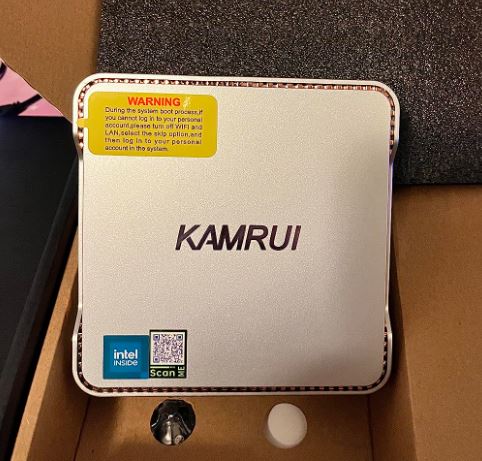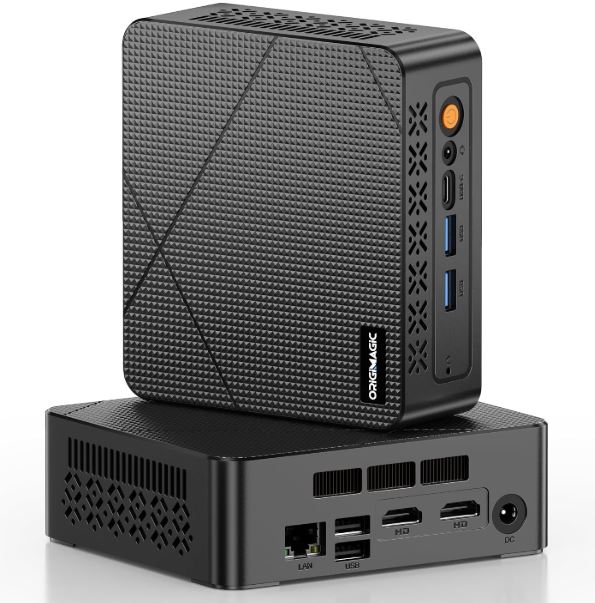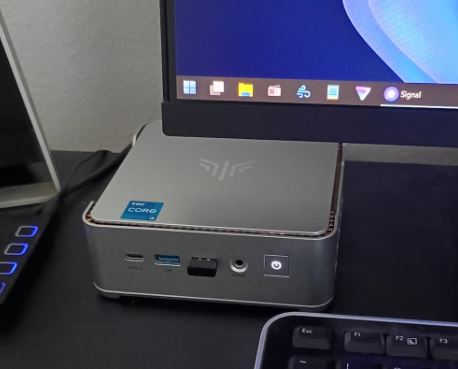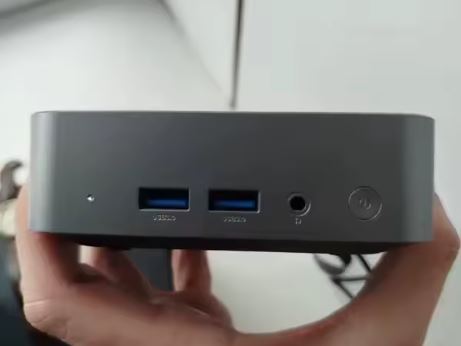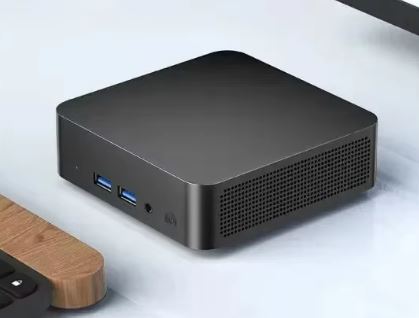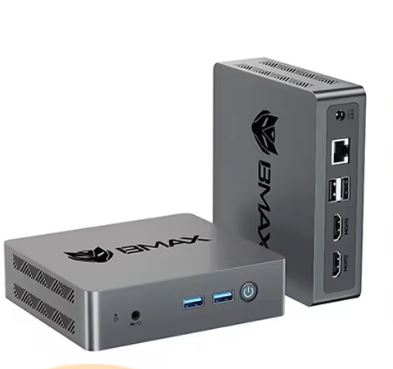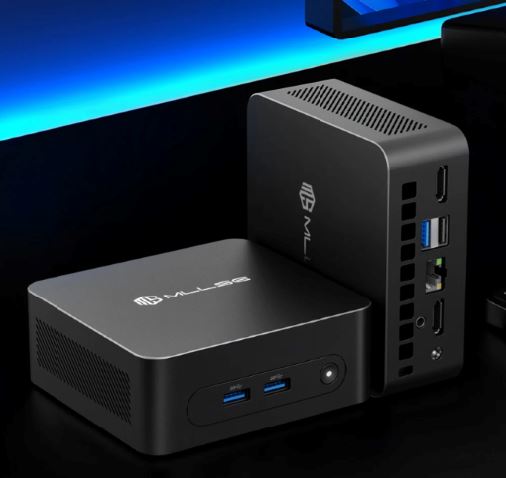
The MLLSE M2 Plus is a compact and affordable mini PC, designed for those who need a functional desktop computer for light everyday tasks without spending too much or taking up too much space.
Its price of ~€100-170 positions it as an attractive option for offices, receptions, classrooms or as a living room PC.
✅ Pros: Compact and VESA mountable design · Powerful 2.5G Ethernet port for its price · Dual HDMI 4K@60Hz output · Windows 11 Pro included · Low power consumption · Replaceable SSD
❌ Cons: Celeron 5205U processor from 2019, already somewhat outdated · Soldered RAM, not expandable · Outdated Bluetooth 4.2
🔎 Quick conclusion: Ideal as a secondary computer, office terminal, living room PC, or light server. If you're looking for higher performance, invest a little more in a model with an Intel N100 or N150.
-
🛍️ AliExpress: 🔗 See Prices
📦 Unboxing and Box Contents
Upon opening the box, the contents are functional and without any unpleasant surprises. The packaging protects the equipment well with foam and plastic, and what you find inside is:
-
🖥️ Mini PC MLLSE M2 Plus
-
🔌 Standard charger with European (EU) plug
-
🔌 EU→USA Plug Adapter (practical if you travel or live in America)
-
📺 HDMI cable included (ready to connect instantly)
-
📄 User manual
It doesn't include a keyboard, mouse, or monitor, so you'll need to provide those yourself. The VESA mount for attaching it behind the monitor may not always be included; it's best to check this before purchasing.
📋 Technical Specifications
| Component | Detail |
|---|---|
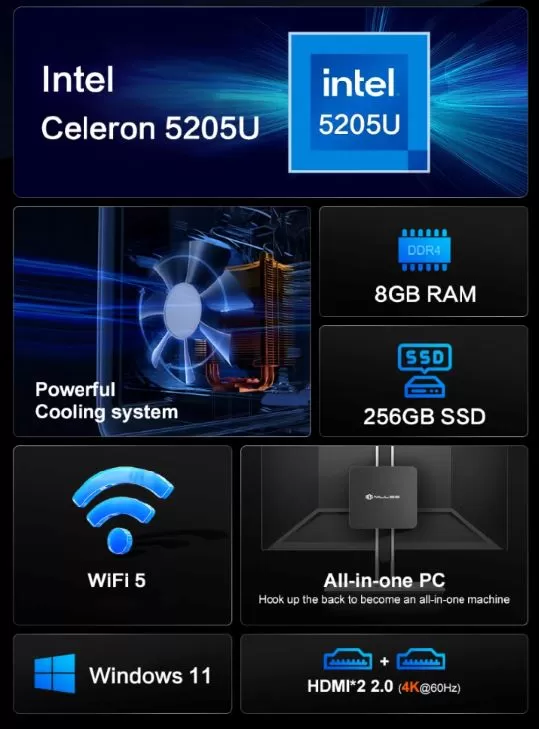
| Processor (CPU) | Intel Celeron 5205U @ 1.90 GHz, 2 cores / 2 threads, 14 nm |
| GPU | Intel UHD Graphics (integrated) |
| RAM | 8 GB DDR4 (soldered, non-expandable) |
| Storage | 256 GB SSD (M.2, SATA format) |
| Operating system | Windows 11 Pro (professional edition) |
| WiFi | WiFi 5 (802.11ac), double band 2,4 / 5 GHz |
| Bluetooth | BT 4.2 |
| Video output | 2× HDMI 2.0 (up to 4K@60Hz) |
| USB | USB 3.0 × 3 + USB 2.0 × 1 |
| Red (LAN) | Puerto RJ45 × 1 — 2500 Mbps (2,5G) |
| Audio | CTIA 3.5 mm jack (headphones + microphone) |
| Dimensions | 114 × 106 × 45 mm |
| VESA mount | ✅ Yes (mountable behind the monitor) |
| TDP / Consumption | 15W (processor TDP) |
| Approximate price | ~100–180€ |
🎨 Design and Construction Quality
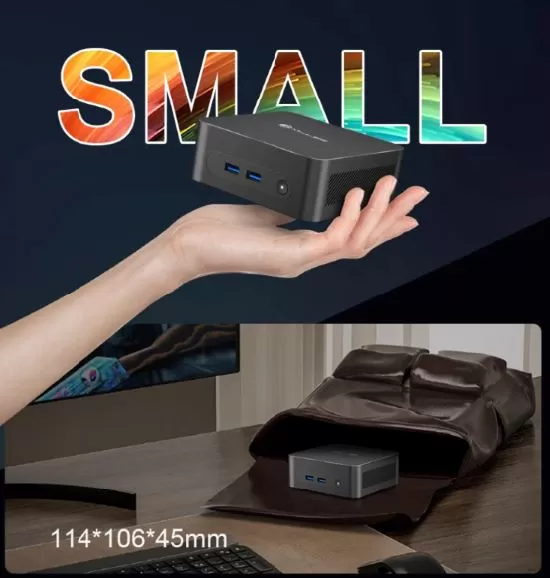
The MLLSE M2 Plus features a discreet and professional-looking matte black case design, measuring 114 × 106 × 45 mm—barely the size of a paperback book. The chassis is made of solid plastic, lacking premium finishes but well-assembled for its price range. It doesn't flex or creak when handled and conveys a sense of acceptable basic sturdiness.
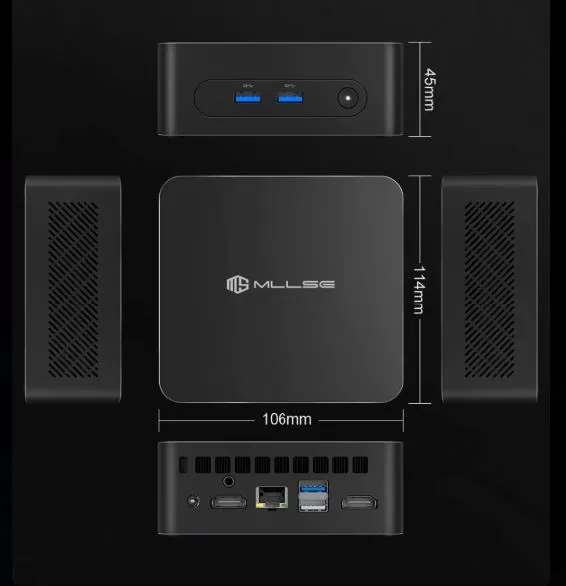
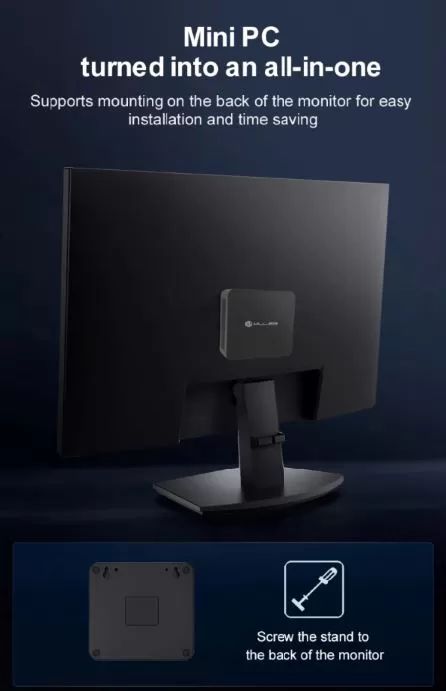
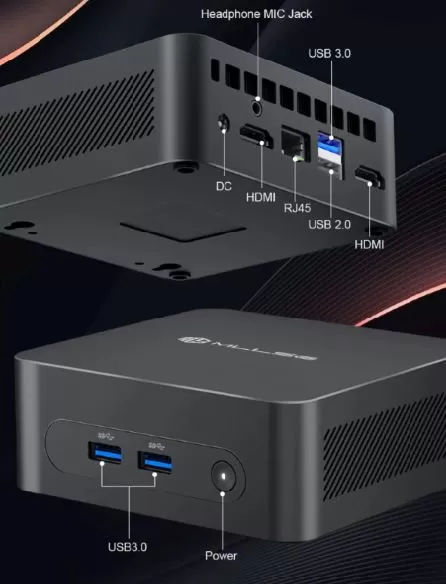
Its strongest design feature is VESA mount compatibility, allowing you to attach it directly behind your monitor and completely eliminate the need for the computer on your desk. The port layout is well thought out: frequently used USB ports are accessible from the front or side, while the video, network, and power connections are located at the rear for cleaner cable management.
🖥️ Screen and Multimedia
One of the biggest surprises of this mini PC for its price is its dual HDMI 2.0 output, capable of driving two monitors simultaneously at 4K resolution with 60 frames per second. This is a real advantage over many similarly priced competitors that only offer 4K@30Hz or combine HDMI with VGA.
1080p video playback is smooth on platforms like YouTube, Netflix, and Plex thanks to the Intel UHD GPU's hardware acceleration. For 4K content, the results are inconsistent: the Celeron 5205U lacks the decoding power needed for a comfortable local experience, although streaming can work acceptably depending on the connection. Audio is handled via HDMI or the 3.5 mm CTIA jack (compatible with headphones with integrated microphones).
⚙️ Performance and Software
The Intel Celeron 5205U is a dual-core processor released in October 2019, manufactured using a 14nm process with a base clock speed of 1.90 GHz and no Turbo Boost mode. It's not a high-performance chip—that much is clear from the outset—but it fulfills its purpose for the tasks it was designed for.
It works smoothly on:
-
🌐 Web browsing with up to 8-10 open tabs
-
📄 Office suite (LibreOffice, Microsoft 365, Google Docs)
-
📹 Basic video calls on Zoom or Teams (without virtual backgrounds)
-
📺 Streaming en 1080p (YouTube, Netflix, Prime Video)
-
🖨️ Print server or local network files
The computer comes with Windows 11 Pro pre-installed. It's advisable to check the license activation status when you turn it on for the first time, as it may vary depending on the sales batch. The system doesn't have excessive bloatware, but as with any computer from a Chinese brand, it's recommended to review the installed programs before using it for work or sensitive data.
🔋 Energy Consumption and Cables
With a 15W TDP for the processor, the total system power consumption in real-world use is estimated to be between 10 and 20W, making it one of the most energy-efficient mini PCs on the market. To give you an idea, it consumes about the same amount of power as a living room LED light bulb.
The package includes a proprietary 12V/3A charger (36W maximum adapter power), an HDMI cable, and an EU→USA adapter. You don't need to buy anything extra to use it in Europe or America.
🌡️ Temperature and Noise (Actual Thermal)
Thanks to its low TDP of 15W, the MLLSE M2 Plus generates little heat even under sustained load. It incorporates an active cooling system with a low-speed fan that is barely audible under normal use. During light tasks such as office work or browsing, the fan remains in silent mode or almost off.
Under prolonged maximum load (for example, exporting a large document or playing video at maximum quality), the temperature rises but remains within safe ranges thanks to the thermal design of the Celeron 5205U. It is perfectly suited for quiet workspaces, bedrooms, or living rooms.
🔌 Connectivity and Extras
Connectivity is where this model stands out above its price category:
| Port / Function | Detail |
|---|---|
| USB 3.0 | × 3 |
| USB 2.0 | × 1 |
| HDMI 2.0 | × 2 (4K@60Hz) |
| Ethernet (LAN) | RJ45 — 2500 Mbps (2,5G) ⭐ |
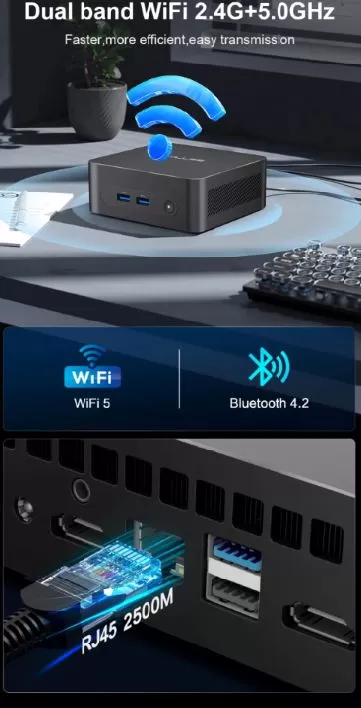
| WiFi | WiFi 5 (2,4 + 5 GHz) |
| Bluetooth | BT 4.2 |
| Audio | 3.5 mm jack (headphones + microphone) |
| NFC | ❌ No |
| Fingerprint | ❌ No |
| IP (water resistance) | ❌ No |
| 5G / LTE | ❌ No |
| VESA mount | ✅ Yes |
The 2.5G Ethernet port is a very valuable extra for a device in this range: it allows for fast network transfers, ideal for connecting to a 2.5G switch and using it as a lightweight NAS server or network workstation.
🔧 Expansion and Upgrades
This is one of the most frequently asked questions about this type of mini PC. Here's the honest answer:
-
🧠 RAM: The DDR4 RAM is soldered to the motherboard and cannot be upgraded. 8 GB is the maximum.
-
💾 Primary SSD: The SSD is in M.2 SATA format and is accessible by opening the case (removing the rubber feet and screws). You can replace it with a higher capacity drive (256 GB, 512 GB, or 1 TB M.2 SATA). Users of the M2 Air model (the smaller sibling) confirm that the process is straightforward.
-
🔌 External expansion: Thanks to the 3 USB 3.0 ports, you can connect external drives, USB hubs or adapters without any problem.
⚠️ Recommendation: If your storage is insufficient, a 1TB USB 3.0 external SSD (~€25-35) is the most economical and risk-free solution.
🆚 Comparison with Direct Competitors
| Feature | MLLSE M2 Plus | Beelink Mini S12 Pro N100 | GMKtec M5 N100 | MLLSE G2 Pro N150 |
|---|---|---|---|---|
| Price | ~100-170€ | ~250-400€ | ~240-350€ | ~200-300€ |
| Processor | Celeron 5205U (2019) | Intel N100 (2023) | Intel N100 (2023) | Intel N150 (2023) |
| RAM | 8 GB DDR4 | 8 GB DDR4 | 16 GB DDR4 | 12 GB LPDDR5 |
| SSD | 256GB M.2 SATA | 256GB M.2 NVMe | 512GB M.2 NVMe | 512GB M.2 NVMe |
| WiFi | WiFi 5 | WiFi 6 | WiFi 6 | WiFi 5 |
| Ethernet | 2,5G ⭐ | 1G | 1G | 1G |
| Video output | 2× HDMI 2.0 4K@60Hz | HDMI + DP | HDMI + DP | HDMI + VGA |
| Performance | ⭐⭐ | ⭐⭐⭐⭐ | ⭐⭐⭐⭐⭐ | ⭐⭐⭐⭐ |
| Consumption | ~10-20W | ~15W | ~15-20W | ~15W |
| Ideal for | Basic workshop / red server | Office + Multimedia | Advanced office automation | Multimedia + office |
| View Prices | View Prices | View Prices | View Prices |
The performance leap between the Celeron 5205U and the new Intel N100/N150 chips is enormous: we're talking about up to 5 times more multi-core performance. However, the MLLSE M2 Plus has a clear advantage: the 2.5G Ethernet port, which none of its direct competitors at a similar price point offer.
⭐ Reviews on Well-Known Pages
User reviews on shopping platforms are generally positive for its niche use, with average scores of 4.3-4.5 out of 5 on AliExpress. Verified buyers particularly highlight the value for money, compact size, and ease of installation. Some representative comments:
"I bought it for a company reception area. It works perfectly for the appointment management system, navigates smoothly, and takes up hardly any space." — Verified user, AliExpress
"The 2.5G port is a steal at this price. I use it as a mini file server and it works great." — Verified user, AliExpress
"It comes with Windows 11 Pro activated, ready to use right out of the box. Very easy to mount behind the monitor with the VESA mount." — Verified user, AliExpress
The most frequent criticisms point out that the Celeron processor feels slow with more than 10 tabs open or when doing intensive multitasking, and that Bluetooth 4.2 is already somewhat outdated.
🧪 Technical Tests
🔢 Benchmarks de CPU — Intel Celeron 5205U
The Intel Celeron 5205U is a dual-core processor manufactured in 2019 using a 14nm process and with a fixed frequency of 1.90 GHz without Turbo Boost. To understand what this means in practice, the results in the most recognized benchmarks are as follows:
| Test | MLLSE M2 Plus (5205U) | Intel N100 (reference) | Intel N150 (reference) |
|---|---|---|---|
| PassMark CPU Score | ~870 pts | ~4.500 pts | ~5.200 pts |
| Geekbench 6 Single-Core | ~385 pts | ~1.800 pts | ~2.100 pts |
| Geekbench 6 Multi-Core | ~680 pts | ~4.200 pts | ~4.900 pts |
| Cinebench R23 Single-Core | ~350 pts | ~1.100 pts | ~1.250 pts |
| Cinebench R23 Multi-Core | ~550 pts | ~3.500 pts | ~4.100 pts |
🔎 The numbers are clear: the Celeron 5205U performs approximately five times worse than current-generation Intel N100/N150 chips. This doesn't mean the computer is unusable—it's perfectly adequate for basic tasks—but it's important to be aware of its limitations before buying it. If your usage is strictly for office work or browsing, the numbers are sufficient. For anything more demanding, upgrading to an N100 is highly recommended.
💾 M.2 SATA SSD Speed
Internal storage uses an M.2 SSD with a SATA interface, which is slower than the NVMe technology found in slightly higher-end Mini PCs. Typical performance figures for this type of drive are:
| Operation | Estimated speed |
|---|---|
| Sequential reading | ~450–500 MB/s |
| Sequential writing | ~400–450 MB/s |
| 4K Random Read | ~20–40 MB/s |
| 4K Random Write | ~60–80 MB/s |
| Boot time (Windows 11) | ~15–22 seconds |
🔎 A SATA SSD isn't as fast as an NVMe SSD (which reaches 3,000–5,000 MB/s read speeds), but it far surpasses any mechanical hard drive (HDD). In practice, the system boots in under 25 seconds, applications open quickly, and you won't notice any storage bottlenecks during everyday use. The best part is that this SSD is replaceable, so you can upgrade to 512 GB or 1 TB for under €40.
🖥️ Graphics Performance — Intel UHD Graphics
The integrated GPU in the Celeron 5205U is the Intel UHD Graphics with 16 execution units (EUs) at ~300 MHz. It is not a dedicated graphics card, but an integrated solution that shares system RAM.
| Graphic task | Result |
|---|---|
| Windows Desktop / UI | ✅ Smooth and jerk-free |
| YouTube video 1080p | ✅ Correct with HW acceleration |
| 4K video streaming | ⚠️ Acceptable depending on connection |
| Local 4K video (HEVC/H.265) | ❌ Irregular, may lag |
| Maximum supported resolution | 4K@60Hz via HDMI output |
| Two simultaneous monitors | ✅ Yes, up to 4K@60Hz each |
🔎 The 5205U's integrated GPU is more than adequate for desktop use, 1080p multimedia, and dual-monitor setups at 4K. However, it's not suitable for local 4K content in demanding formats or for any modern games. The dual HDMI 4K@60Hz output is a real differentiator compared to competitors in the same price range, but its graphics processing power falls short of modern chips like the N100 with its 24 EUs at 750 MHz.
⚡ Actual Energy Consumption
Thanks to the processor's 15W TDP, the total system power consumption is exceptionally low compared to a conventional desktop computer.
| System status | Estimated consumption |
|---|---|
| Idle | ~5–8W |
| Light use (browsing, office applications) | ~10–14 weeks |
| Maximum sustained load | ~18–22W |
| Conventional dessert PC (comparative) | ~80–150W |
🔎 In a full year of use with 8 hours of daily work, this mini PC consumes approximately 40–65 kWh, compared to 250–450 kWh for a traditional desktop computer. With the current price of electricity in Spain (~€0.15–€0.20/kWh), the annual savings can easily exceed €40–€60. For environments where several devices are running all day—offices, classrooms, retail outlets—the cumulative savings are very significant.
🌡️ Under Load Temperature
The cooling system combines an aluminum heatsink with a low-speed fan. Given the processor's low TDP, temperatures remain within very healthy ranges.
| Scenery | Estimated CPU temperature |
|---|---|
| Repose | ~35–42°C |
| Medium load (heavy browsing) | ~55–65°C |
| Maximum sustained load | ~70–78°C |
| Noise level at rest | ~20–22 dB (virtually silent) |
| Noise level under load | ~28–32 dB (soft background noise) |
🔎 Temperatures are excellent for such a compact device. The Celeron 5205U doesn't reach critical temperatures even under the worst usage scenarios, and the internal fan is efficient enough to completely eliminate thermal throttling. It's a device you can leave on all day without worry.
🌐 Network Performance — 2.5G Ethernet
The 2,500 Mbps RJ45 port is undoubtedly the most impressive specification of this device for its price range.
| Network scenario | Theoretical maximum speed |
|---|---|
| 1G Ethernet (competitors) | ~940 Mbps actual |
| Ethernet 2.5G (MLLSE M2 Plus) | ~2,350 Mbps actual |
| WiFi 5 (802.11ac) | ~400–600 Mbps actual |
| File transfer over 2.5G LAN | ~270–290 MB/s |
🔎 The 2.5G Ethernet port makes this mini PC a highly competitive option for network-intensive uses: home file server, NAS with Samba, Plex media server, or business environments with 2.5G infrastructure. None of its direct competitors at the same price point offer this standard. If your router or switch supports 2.5G, you'll notice a real and tangible difference in local network transfers.
Actual performance diagnostic
| Task | Real experience |
|---|---|
| Web browsing (5-8 tabs) | ✅ Fluid |
| YouTube 1080p playback | ✅ Correct |
| Local 4K playback | ⚠️ Irregular, not recommended |
| Office suite (Word, Excel, Docs) | ✅ No problems |
| Video calls (Zoom/Teams basic) | ⚠️ Acceptable, no effects |
| File server/NAS | ✅ Excellent (with 2.5G Ethernet) |
| Photo editing (Photoshop) | ❌ Not recommended |
| Video editing | ❌ Not suitable |
🎮 Gaming and Emulation
The MLLSE M2 Plus isn't a gaming machine, but it can handle emulators and indie games with some limitations. The Intel UHD Graphics integrated into the Celeron 5205U offers very basic performance.
| System / Game | Does it work? | Notes |
|---|---|---|
| NES / SNES / Game Boy / GBA | ✅ Perfect | No problem |
| Nintendo 64 | ✅ Good | Con Project64 o RetroArch |
| PlayStation 1 (PSX) | ✅ Good | DuckStation at full speed |
| PlayStation 2 | ⚠️ Partial | Only simple 2D games |
| Nintendo DS | ⚠️ Partial | It depends on the game. |
| GameCube / Wii | ❌ Not recommended | insufficient CPU |
| Indie PC games (Stardew Valley, etc.) | ✅ Good | Low resolutions |
| Modern AAA Games | ❌ Not suitable | Impossible |
If retro emulation is your main goal, the Celeron 5205U will easily handle PS1/N64 games. For PS2 and later versions, you'll need an Intel N100 or better.
❓ Frequently Asked Questions (FAQ)
🔹 Does Windows 11 Pro come factory activated?
Yes in most batches, but it's a good idea to check the activation status when you turn it on for the first time.
🔹 Is it officially compatible with Windows 11?
The Celeron 5205U is on Microsoft's list of compatible CPUs for Windows 11, unlike older models such as the J3710. It will receive updates as usual.
🔹 Can I upgrade the RAM?
No. The DDR4 RAM is soldered to the motherboard and the limit is 8 GB.
🔹 Can I replace the SSD?
Yes. The M.2 SATA SSD is accessible by opening the case (remove the rubber feet, unscrew the base). You can install up to a 1 TB M.2 SATA SSD.
🔹 Is the Ethernet port really 2.5G?
Yes. It's one of the biggest advantages of this model compared to its direct competitors, who generally only offer 1G.
🔹 Can it connect to two monitors at the same time?
Yes, it has two independent HDMI 2.0 outputs, up to 4K@60Hz each.
🔹 Does it work well as a home server?
Yes, especially thanks to the 2.5G port. It's a solid option for Plex, Samba file servers, or lightweight web server applications.
🔹 Is it quiet?
Practically yes. Under light use, the fan is barely audible. Under maximum load, the noise is moderate but not bothersome.
🏁 Final Conclusion
The MLLSE M2 Plus with Intel Celeron 5205U is an honest mini PC that delivers exactly what it promises: a compact, quiet, efficient, and functional machine for light tasks. Its processor is a few years old, but the combination of dual HDMI 4K@60Hz and 2.5G Ethernet is hard to find at this price point.
It is ideal for:
-
👔 Offices, receptions and basic workstations
-
📺 Living room PC mounted behind the TV (VESA mount)
-
🗄️ Lightweight home server (NAS, Plex, network files)
-
🎓 Classrooms, libraries, and educational equipment
-
💻 Secondary or emergency PC
This isn't for you if you need: video editing, modern gaming, intensive graphic design, or demanding multitasking with many applications open. In that case, invest around €30-50 more in a model with an Intel N100, such as the Beelink Mini S12 Pro or the GMKtec M5.
Is it worth it at ~€100-130? If your usage is basic and you value 2.5G Ethernet and dual 4K HDMI, then yes, it's a justified purchase.
🛒 Where to buy it?
You can find the MLLSE M2 Plus on the following platforms at the best price:
-
🛍️ AliExpress: 🔗 View Offer — Price from ~€102 with free shipping
💡 Tip: If you find the price below €110 on AliExpress with a reputable seller (4.8★ or more, more than 500 sales), it's an excellent buying opportunity.