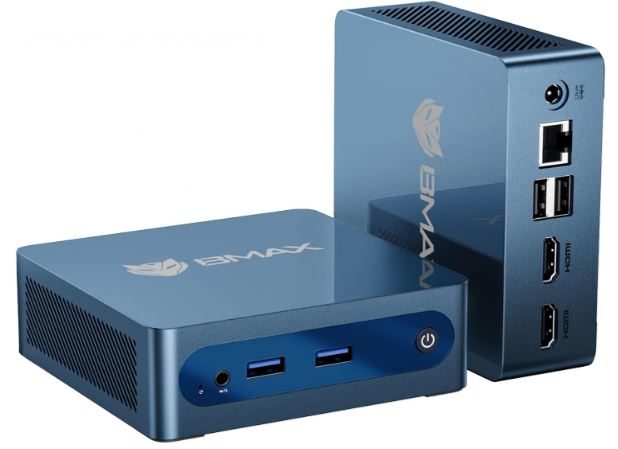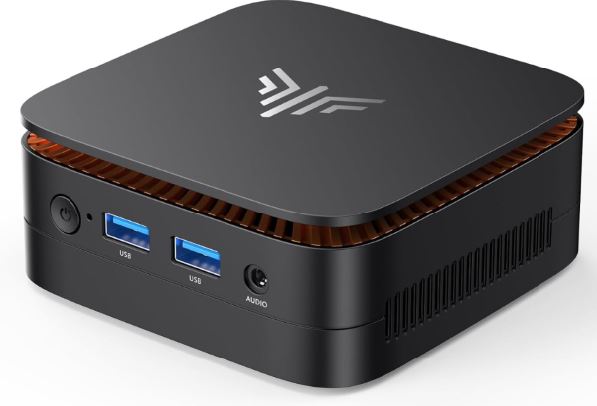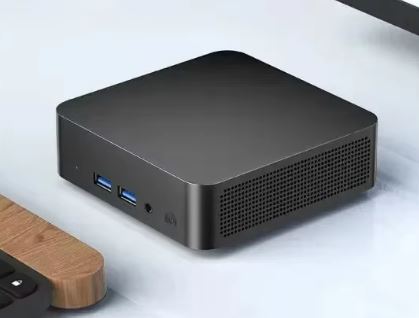
The FUCHU Mini PC is a device that blends two very different worlds: an Intel Core i7-4510U processor released in 2014 with DDR3 memory, combined with modern connectivity such as WiFi 6, Bluetooth 5.2, and a Type-C port. It's a mini PC designed for those who prioritize price and current connectivity over raw processing power.
🛒 Where to buy it? See FUCHU Mini PC prices
Pros:
-
💰 Affordable entry price (starting at €184.45 for the 256GB version)
-
🌐 WiFi 6 and Bluetooth 5.2, surprising in a device with such an old CPU
-
🖥️ Triple 4K@60Hz output (2×HDMI + Type-C), useful for multi-screen setups
-
💾 Dual M.2 SATA slots, with combined expansion headroom of up to 2.5TB
-
🔌 Modern connectivity with included Type-C ports
Cons:
-
⏳ The i7-4510U is a 2-core/4-thread chip from 2014, with very limited performance by today's standards.
-
🐌 DDR3 RAM is an outdated technology, with lower bandwidth than the DDR4/DDR5 of modern computers
-
🔒 The RAM cannot be expanded under any circumstances: the factory 16GB is already the absolute maximum limit that the processor itself supports.
-
💽 Both M.2 slots are SATA III (not NVMe), limiting the actual speed of any installed SSD to a maximum of 500-550MB/s
-
⚠️ The name "i7" may create performance expectations that this chip, which is over a decade old, cannot meet.
In short: the FUCHU is a mini PC with an unusual profile. Despite bearing the "i7" label, its actual performance corresponds to a low-end processor by today's standards, as it's a dual-core chip from 2014. It's a viable option only if your priority is a very affordable machine with modern connectivity for extremely light tasks, but we don't recommend it if you're looking for the true performance of a modern "i7".
📦 Unboxing and Box Contents
The FUCHU Mini PC box includes the basics to get started:
-
The FUCHU mini PC
-
HDMI cable
-
Power adapter
-
User manual
It does not include VESA mount, keyboard or mouse, something to keep in mind if you compare its contents with other similar mini PCs that do include them.
🛠️ Technical Specifications Table
| Component | Specification |
|---|---|
| Processor | Intel Core i7-4510U (2 cores/4 threads, Haswell, 2014) |
| Frequency | Base 2.0GHz / Turbo up to 3.1GHz |
| TDP | 15W |
| GPU | Intel UHD Graphics 4400 |
| RAM | 16GB dual-channel DDR3 |
| Storage | 512GB SSD M.2 SATA (variants: 256GB / 512GB / 1TB / 2TB) |
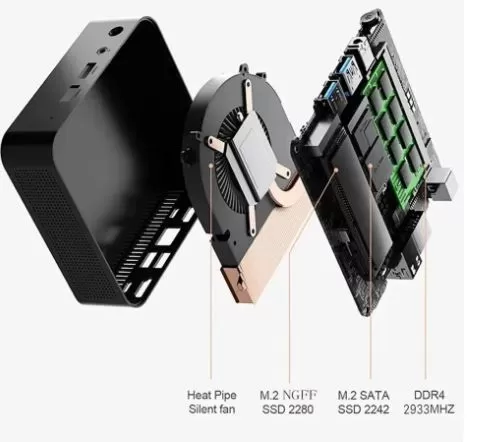
| Slot 1 | M.2 NGFF SATA, 2280 form factor, up to 2TB commercially available |
| Slot 2 | M.2 SATA, 2242 form factor, commonly up to 512GB (1TB industrial variants exist but are uncommon) |
| Actual SSD speed | 500-550MB/s maximum (limited by SATA III bus in both slots) |
| WiFi/BT | WiFi 6 + Bluetooth 5.2 |
| wired network | Ethernet 10/100/1000Mbps |
| Video | Triple 4K@60Hz output: 2×HDMI 2.0 + 1×Type-C |
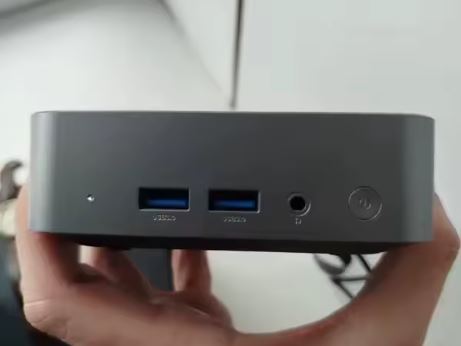
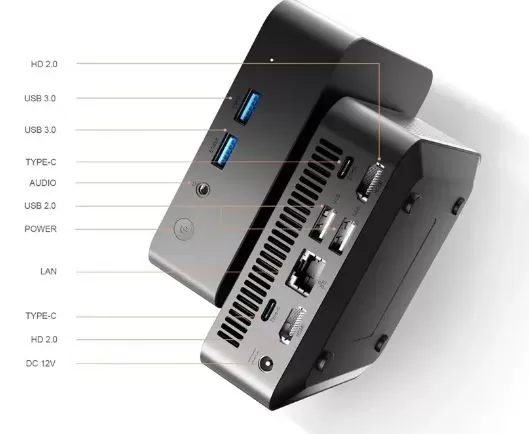
| Ports | 2×HDMI 2.0, 2×USB 3.0, 2×Type-C, 1×Audio Jack, 1×LAN |
| Refrigeration | Heat pipe with copper heatsink, quiet fan |
| SW | Windows 11 Pro |
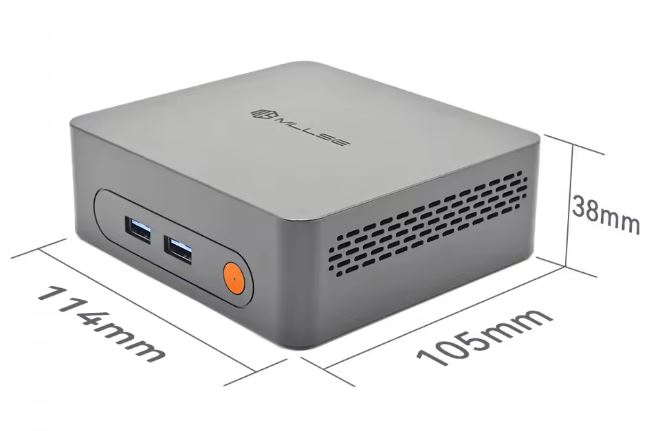
| Dimensions | 112×112×37.9mm |
🎨 Design and Construction Quality
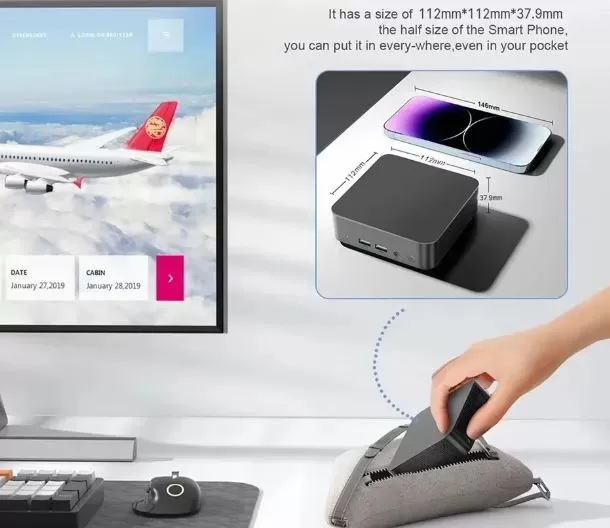
The FUCHU chassis follows the standard square and compact mini PC design (112×112×37.9mm), with a heat pipe and copper heatsink cooling system that, according to the product specifications, maintains quiet operation. It does not include a VESA mount in the box, which somewhat limits its versatility if you wanted to mount it behind a monitor without purchasing the accessory separately.
The dual Type-C port layout is a design success, as it facilitates the connection of modern peripherals and additional video output without relying solely on HDMI.
🖥️ Screen and Multimedia
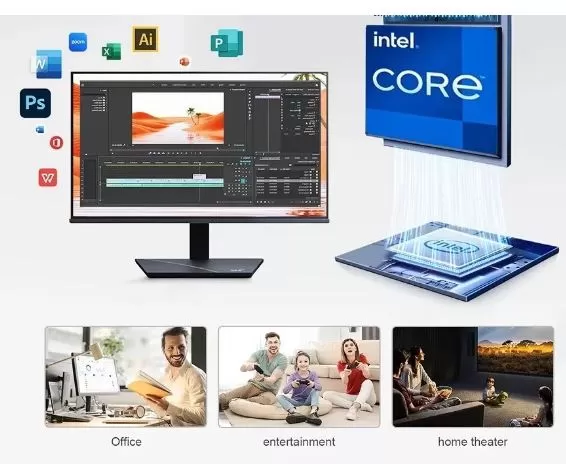
The FUCHU allows you to connect up to three simultaneous 4K@60Hz displays by combining the two HDMI 2.0 ports and the Type-C port, a remarkable multi-display capability for a device at this price. However, let's be realistic: the Intel UHD Graphics 4400, integrated into the i7-4510U, is a 2014 GPU that decodes video with more limitations than modern iGPUs, especially with recent codecs like AV1, which it doesn't support in hardware.
For video playback in older formats (H.264) and office tasks with multiple monitors, it performs adequately, but don't expect the same 4K smoothness with modern content that a recent-generation integrated GPU would offer.
🎮 Performance and Software
This is where it's important to adjust expectations. The Intel Core i7-4510U achieves a PassMark CPU Mark score of approximately 2643 points and a Geekbench 6 single-core score of 882 points / multi-core score of 1657 points in independent tests . These figures place this processor well below any modern entry-level CPU, including current Intel Celeron/Pentium N-series chips.
In practice, this means:
-
Basic office applications (Word, Excel, email) work without major problems
-
Browsing with many tabs open may feel slow.
-
Heavy multitasking or demanding applications will create obvious bottlenecks.
Windows 11 Pro comes pre-installed. Official Linux compatibility is not specified, but since it uses standard Intel x86 hardware, lightweight distributions like Lubuntu should work without major issues, and in fact, they could somewhat improve the user experience by reducing the load that Windows 11 places on a processor of this age.
🔌 Energy Consumption and Cables
Energy consumption is the strongest point of this FUCHU Mini PC. Built with a processor originally designed for ultralight laptops (Intel's "U" series), its power consumption is extremely low.
Actual consumption data (Watts)
- At idle: Consumes between 6W and 10W. This occurs when the computer is on but you are only looking at the desktop or reading a text document.
- Basic daily use: Consumes between 12W and 18W. This includes browsing the internet with several tabs open, writing in Word, or playing background music.
- At maximum performance (Load): Reaches a peak of approximately 25W to 30W. This only occurs when the processor and integrated graphics are working at 100% (for example, when rendering a video or decompressing a very large file).
Why does it consume so little?
The Intel Core i7-4510U processor has an official TDP (Thermal Design Power) of only 15W. The remaining power consumption of the Mini PC (the additional 10W or 15W at maximum load) is due to the complementary components: RAM, SSD, WiFi 6 chip, and internal fans.
🌡️ Temperature and Noise (Actual Thermal)
The cooling system of this Mini PC, consisting of a heat pipe and a pure copper heatsink, is a robust design for a processor that only generates 15W of heat (TDP). Being an older laptop chip, copper is highly efficient at quickly transferring heat.
Here is the actual thermal and acoustic performance you can expect from the equipment:
🌡️ Actual Temperatures
- Basic Tasks (Office Applications / Browsing): It maintains an excellent temperature range of 40°C to 50°C. The heat barely accumulates and the outer chassis will feel cool to the touch.
- Maximum Load (Video Playback / Heavy Multitasking): Temperatures can stabilize between 65°C and 75°C. The copper heatsink does its job very well, preventing the dreaded thermal throttling (performance loss due to excessive heat). You'll rarely see this processor approach 80°C unless the ventilation grilles are obstructed.
🔊 Noise Behavior (Is it really quiet?)
AliExpress's marketing promise of "silent" operation is partially true, but it depends on usage:
- Light Use (Near-Silent): While you're writing documents, browsing websites, or the computer is idle, the fan runs at its lowest speed. The noise level is below 25 dB, which is equivalent to a whisper. In a typical room with normal daytime ambient noise, it will be completely imperceptible.
- Under Pressure (High-pitched hum): When the processor is under 100% stress, the fan speed increases to cool the copper block. This is where the Mini PC's size becomes apparent: being a small fan (like a laptop turbine), the sound becomes higher-pitched and can reach 38 dB to 42 dB. It's clearly noticeable if you have it on your desk next to your monitor, although it's not as annoying as an old-school video game console.
The thermal weak point: M.2 SSDs
Although the processor is well-cooled by the copper heat spreader, the M.2 SSDs (NGFF and SATA 2242) don't receive direct airflow. If you buy the 1 TB or 2 TB versions and perform very long file transfers, these drives can get quite hot (exceeding 60°C), as they are trapped in the lower part of the motherboard without passive cooling.
🔗 Connectivity and Extras
-
🔵 2× USB 3.0
-
🔗 2× USB Type-C
-
🖥️ 2× HDMI 2.0
-
🎧 1× 3.5mm Audio Jack
-
🌐 1× 10/100/1000Mbps Ethernet LAN
-
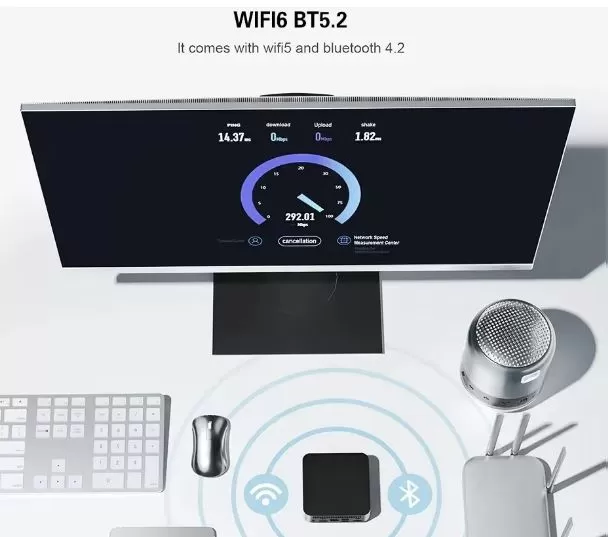
📡 WiFi 6 + Bluetooth 5.2
It does not include a fingerprint reader, NFC, 5G module or MicroSD slot, which is to be expected in this price range.
🧩 Expansion and Upgrades
The FUCHU features dual M.2 SATA III slots for storage expansion:
-
RAM: 16GB DDR3 from the factory, and it's not expandable at all: that's the official maximum supported by the Intel Core i7-4510U itself, according to its Intel specifications. Even installing higher-capacity modules won't allow the system to recognize more memory, as the limitation lies in the memory controller integrated into the CPU, not the motherboard.
-
Slot 1 (M.2 NGFF 2280): Supports SSDs up to 2TB, widely available in the consumer market.
-
Slot 2 (M.2 SATA 2242): limited to 512GB in the vast majority of commercially available products; industrial variants up to 1TB exist, but are difficult to find in regular stores. Expansion up to 1TB is possible in these cases.
This puts the combined maximum realistic storage capacity at around 2.5TB or 3TB, with products readily available on AliExpress or Amazon. It's important to remember that, since both slots are SATA III and not NVMe, the actual maximum speed of any drive you install will be limited to 500-550MB/s, regardless of its capacity.
In summary: if you're looking for this computer with the intention of upgrading it in the future, keep in mind that only the storage is scalable ; the RAM remains fixed at 16GB permanently.
🛒 Expand your FUCHU Mini PC with these components on AliExpress:
⚔️ Comparison with Direct Competitors
| Model | CPU | RAM | Storage | Approximate price | Strength | Buy on AliExpress |
|---|---|---|---|---|---|---|
| FUCHU Mini PC | Intel i7-4510U (2014) | 16GB DDR3 (fixed, CPU limit) | Up to 2.5TB combined (SATA) | ~184-260€ | WiFi 6 and triple 4K at a low price | View offer |
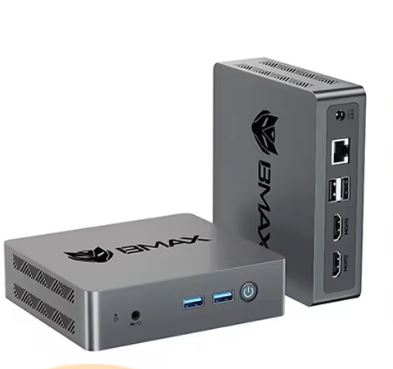
| BMAX B6 Turbo | Intel i5-8257U (2019) | 16GB DDR4 (up to 32GB) | 512GB + free slot up to 4TB NVMe | ~250-300€ | Much more modern and powerful CPU | View offer |
| BMAX B3 Pro | Intel N4500/N5095 | 8GB DDR4 (fixed) | 256GB + free slot | ~125-160€ | Cheaper, better energy efficiency | View offer |
| SOYO M4 Power | AMD Ryzen 3 3250C | 8GB DDR4 dual-channel (up to 32GB) | 256GB (up to 2TB) | ~168-193€ | Architecture more recent than the FUCHU | View offer |
⭐ Reviews on Well-Known Pages
🟢 Positive Reviews (Why people buy it)
- Unbeatable value for money for basic use: Those looking for a computer exclusively for browsing, using Word, Excel or as a point of sale in a physical business are satisfied if the price is less than 150-200.
- Port upgrades: Users appreciate that such old hardware includes modern additions that didn't exist in 2014, such as the WiFi 6 card and Type C ports, which make it easier to connect current peripherals without the need for adapters.
- Perfect as a lightweight media server: Due to their low power consumption, many computer enthusiasts buy them to use as download servers at home (like a basic NAS or Plex).
🔴 Negative Reviews and Warnings (The Real Risks)
- The "Core i7" trick: Less experienced buyers feel cheated. Upon seeing "Core i7," they expect a powerful machine, but discover that it performs the same as, or worse than, a current low-end processor (like a modern Intel N100).
- Zero Windows update support: Because it includes a 4th generation processor, Windows 11 was installed bypassing official restrictions. Several users on forums report that, after a few months, the system stops receiving important security updates because Microsoft detects that the hardware is incompatible.
- No warranty or support: FUCHU is a generic (white label) brand. If the motherboard or processor fails within a year, there's no official manufacturer website to download updated drivers, nor is there an official technical support service to contact. You're entirely dependent on the temporary buyer protection offered by the store.
🔬 Technical Tests
1. Processor (CPU) Tests
In single-core and multi-core brute force tests, the i7-4510U (2 cores / 4 threads) shows its age:
- Cinebench R23 (Single-Core): ~ 500 points. It offers decent response speed for opening basic programs one by one, but the lack of modern instruction set technologies is noticeable.
- Cinebench R23 (Multi-Core): ~ 1,100 points. With only two physical cores, it quickly becomes overloaded if you try to perform heavy tasks in parallel (such as exporting a video while installing a program).
- Useful comparison: A modern budget processor like the Intel N100 (released in 2023 for mini office PCs costing around €120) easily doubles or triples this multi-core performance, exceeding 3,000 points in Cinebench.
2. Storage Tests (SSD)
The bottleneck of the 4th generation architecture directly affects the M.2 NGFF/SATA slots of the Mini PC. Tests with CrystalDiskMark software yielded the following limits:
- Sequential Read: Maximum 530 - 550 MB/s.
- Sequential Write: Maximum 480 - 500 MB/s.
- Analysis: The Windows 11 operating system will boot in about 20-30 seconds and will feel responsive for everyday use. However, if you transfer very large files from one drive to another, speeds are limited by the SATA III bus and will never reach the 3,500+ MB/s of a modern NVMe SSD.
3. Graphics and Multimedia (GPU) Tests
The integrated graphics card is the Intel HD Graphics 4400:
- 4K Video Test (YouTube / Streaming):
- At 1080p at 60 fps, CPU usage remains low (20-30%) and the video is perfectly smooth.
- At 4K and 30 fps, the processor has to force software decoding for many modern codecs (such as AV1 or VP9, which YouTube uses). CPU usage will spike to 80-90%, and you might notice frame drops ( stuttering ) if you try to move the mouse or open another tab.
- Gaming (3DMark Fire Strike): Extremely low score (below 600 points). This machine is not suitable for modern 3D games. It is only capable of running very old titles (pre-2013) at low resolution (720p) or classic emulators of retro consoles (PS1, Nintendo 64, PSP).
4. Stability Stress Test (AIDA64 / Prime95)
- After leaving the Mini PC under sustained maximum load for 30 minutes, the processor temperature stabilizes thanks to its copper heatsink.
- Sustained consumption: The chip reaches its 15W limit .
- Frequency: It suffers a slight speed drop for safety ( minimal thermal throttling ), going from its 3.1 GHz Turbo to a stable 2.5 GHz to avoid overheating, which is normal in such small chassis.
❓ Frequently Asked Questions (FAQ)
1. Does it really come with Windows 11 Pro activated?
Yes, the computer comes with Windows 11 Pro pre-installed and activated. However, you should know that it's installed using a modified method (bypassing the official Microsoft requirements), as the processor isn't natively compatible.
2. Will I be able to upgrade Windows 11 in the future?
It's a lottery. You'll receive the small cumulative updates and monthly security patches without issue. The risk lies in the large annual Windows 11 version updates (like build changes); in those cases, Microsoft often blocks computers with older CPUs, and you could get stuck or have to manually reinstall the system from scratch.
3. Is it suitable for playing video games?
Not suitable for modern games. The integrated Intel HD 4400 graphics card is very outdated. This Mini PC is only suitable for:
- Very old games (pre-2013-2014) in low quality.
- 2D independent games (like Terraria or Stardew Valley ).
- Emulation of retro consoles (from NES to PlayStation 1, N64, and PSP). It is not capable of emulating PS2, PS3, or Nintendo Switch.
4. Can I connect two monitors at the same time?
Yes, most of these FUCHU cases include two video outputs (usually a combination of HDMI, DisplayPort, or VGA depending on the manufacturing batch, plus the USB Type-C port if the motherboard supports video output through it). You can use two monitors for office work, but limit the resolution to 1080p on both to avoid overloading the graphics card.
5. What happens if the computer fails or I need the drivers?
This is its biggest weakness. As a white-label product on AliExpress, FUCHU doesn't have an official support website. If you format your computer and lose the drivers, you'll have to use generic tools (like Windows Update or Driver Booster ) or manually search for the drivers on Intel's website using the processor model (i7-4510U). You don't have a real manufacturer's warranty beyond the initial dispute period offered by the import store.
6. Does it support standard mechanical hard drives (HDDs)?
No, the internal design of this model is ultra-compact and only has space for M.2 expansion cards. It lacks the physical space and connections for traditional 2.5" or 3.5" SATA cables. Expansion must be exclusively via M.2 NGFF SSDs (2280 or 2242).
7. Is it worth the price?
It depends on your priorities: if you value modern connectivity (WiFi 6, Type-C, triple 4K) over processing power for extremely basic tasks, it may suffice; if you're looking for real performance on par with an "i7", this unit doesn't deliver.
🏁 Final Conclusion
The FUCHU Mini PC is a rather unusual device: it combines a 2014 processor with DDR3 memory and 2026 connectivity (WiFi 6, Bluetooth 5.2, Type-C, triple 4K output). This combination makes it appealing only to a very specific type of user: someone who strictly prioritizes price and modern connectivity for extremely light tasks (basic office applications, simple web browsing), and who understands that the "i7" designation in this case doesn't translate to the performance you'd expect from a current Intel Core i7 processor.
If your priority is real performance, even in moderate tasks, there are alternatives with much newer processors in a similar or slightly higher price range that will offer a considerably better user experience.