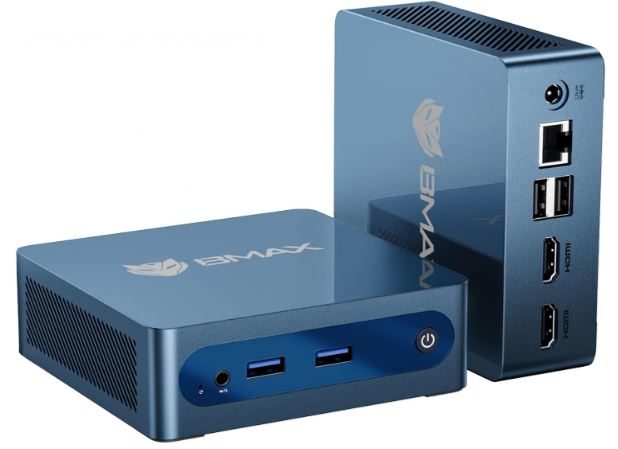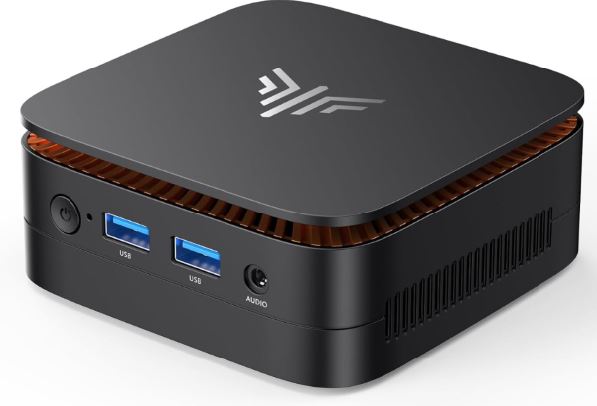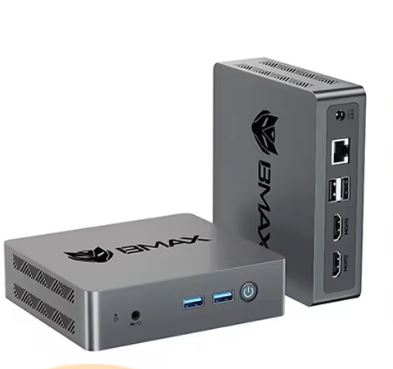
The BMAX B3 Pro is an ultra-compact mini PC weighing just 270 grams that prioritizes energy efficiency over raw power.
There are two CPU variants on the market, Intel N4500 (2C/2T, 6W) and N5095 (4C/4T, 15W), and that difference is more important than it seems when deciding which one to buy.
Pros:
-
💰 Very competitive price (from ~€125-180 depending on the variant).
-
💾 Base storage already on real M.2 SSD (not eMMC), with dual slot for expansion.
-
🎬 The N4500 variant decodes AV1 by hardware, greatly relieving the CPU load on YouTube 4K.
-
🌐 Dual-band WiFi, Gigabit Ethernet and dual 4K HDMI as standard.
-
🐧 Linux/Ubuntu compatibility confirmed and tested by the manufacturer (Ubuntu 22.04.4 LTS).
Cons:
-
⚠️ 8GB of soldered and non-expandable RAM, tuned for heavy multitasking.
-
🐌 The N5095 variant, despite having 4 cores, has a low per-core performance that some users describe as "unbearably slow" when browsing or watching YouTube.
-
🎮 Not suitable for gaming beyond very light titles.
In short: For basic office tasks, as a 4K HTPC, and as a low-power Plex/Kodi client, the B3 Pro is more than adequate, especially the N4500 variant thanks to its AV1 decoder. If you're going to buy it, prioritize the N4500 version over the N5095, despite having fewer cores, because in real-world use (browsing, video) it performs better and consumes less power. With 8GB of RAM, don't expect it to be your go-to PC for heavy multitasking.
🛒 Where to buy it?
-
AliExpress: See BMAX B3 Pro PRICES
-
Amazon: 🛒 BMAX B3 Pro mini PC
📦 Unboxing and Box Contents
The B3 Pro box is simple and functional. Inside you'll find:
-
The B3 Pro mini PC
-
DC 12V/2A power adapter
-
HDMI cable
-
VESA mount with screws
-
Basic User Manual (Multi-Language)
It does not include a keyboard or mouse, as is typical in this price segment.
🛠️ Technical Specifications Table
| Component | Specification |
|---|---|
| CPU | Intel Celeron N4500 (2C/2T, up to 2.8GHz, TDP 6W) — N5095 variant (4C/4T, up to 2.9GHz, TDP 15W) in some batches |
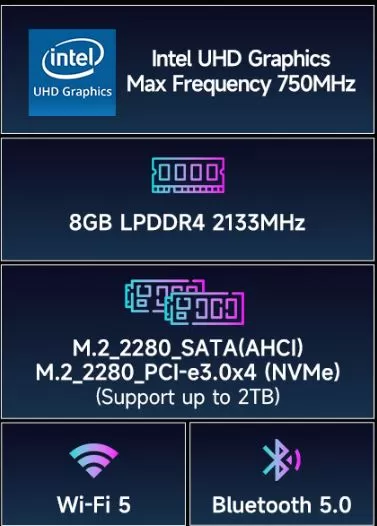
| GPU | Intel UHD Graphics 750MHz (supports 4K@60Hz, hardware AV1 decoding on N4500) |
| RAM | 8GB LPDDR4 2133MHz soldered to the board (not expandable) |
| Base storage | 256GB SSD M.2 2280 SATA (slot 1, factory occupied) up to 2TB |
| Extension | Slot 2 available: M.2 2280 NVMe PCIe, up to an additional 2TB |
| WiFi/BT | WiFi 5 dual band 2.4/5GHz (802.11ac) + Bluetooth 5.0 |
| wired network | RJ45 Gigabit (1000Mbps) |
| Video ports | 2×HDMI 2.0 (simultaneous dual 4K@60Hz display) |
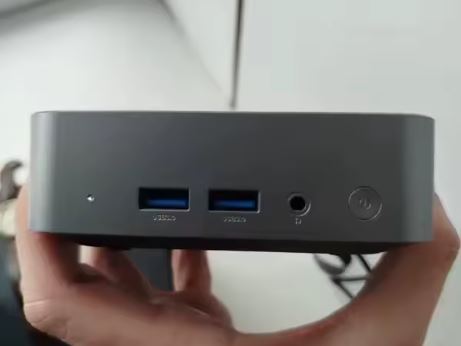
| Data ports | 2×USB 3.0, 2×USB 2.0 |
| Audio | 3.5mm combo jack |
| SW | Windows 11 Pro (64-bit) pre-installed with license, compatible with Linux/Ubuntu (tested on Ubuntu 22.04.4 LTS) |
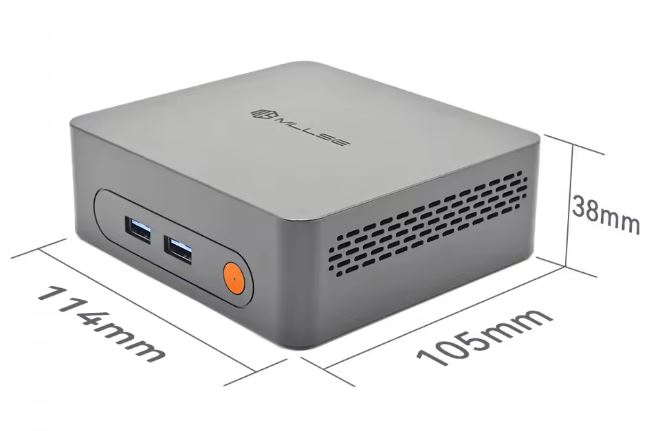
| Dimensions | 12.5×11.2×3.4cm |
| Weight | 270 grams |
Other Functions: Wake On LAN, Auto Power On
Source: official manufacturer's data sheet, technical manual and verified listings.
🎨 Design and Construction Quality
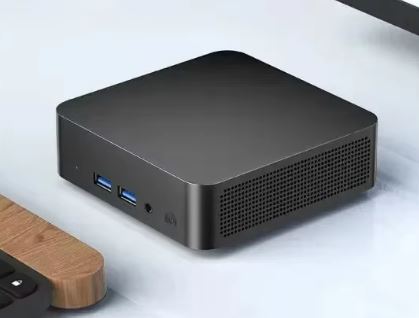
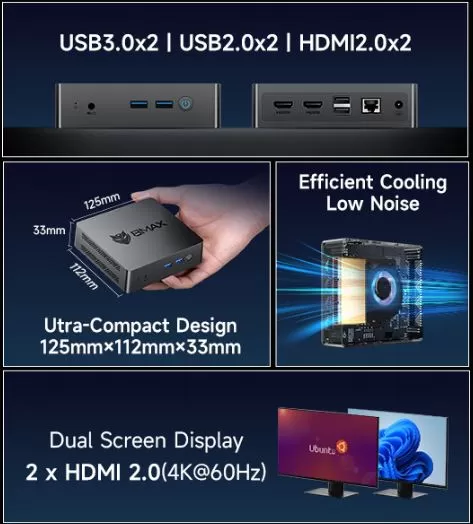
The chassis is made of plastic, lightweight (270g), and features a low-profile smart fan that regulates the temperature without generating annoying noise during normal use. The construction is simple yet solid for its category, with no loose parts or creaking plastic.
Its small size (little bigger than the palm of your hand) and included VESA mount make it perfect for hiding behind a monitor or TV, ideal for a clutter-free desk or as a discreet media player in the living room.
🖥️ Screen and Multimedia
The B3 Pro supports two simultaneous 4K@60Hz monitors via its two HDMI 2.0 ports, enough for a dual-screen workstation or for connecting a TV and a secondary monitor.
This is where the CPU choice really matters: the N4500 variant includes hardware AV1 decoding, meaning that playing YouTube videos in this increasingly common codec barely uses any CPU. A recent test confirms that AV1 streams that pushed an N5095 to 90% CPU usage play smoothly on the N4500 thanks to the GPU handling the processing. For use as an HTPC with Kodi or Plex, this translates to lower power consumption and less heat generation.
🎮 Performance and Software: Windows and Linux
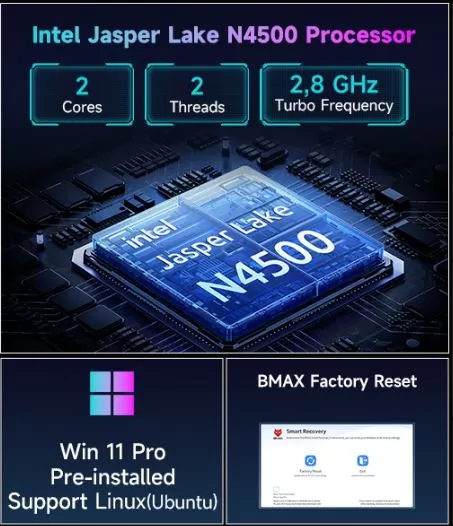
In everyday tasks—office work, browsing, streaming—the B3 Pro performs well, but with important nuances depending on the CPU variant:
-
The N4500 (2 cores), despite having fewer threads, benefits from a more modern architecture and the AV1 decoder, offering a smoother experience in typical tasks of a mini PC in this segment (browsing, office, video).
-
The N5095 (4 cores) has, on paper, more cores, but low per-core performance. In Geekbench 6, it scores 509 in single-core and 1489 in multi-core, modest figures even for light tasks. Some users describe their actual experience browsing or watching YouTube as "unbearably slow."
Windows 11 Pro comes pre-installed with an active license and works without excessive bloatware.
The manufacturer officially confirms compatibility with Linux and Ubuntu, and some distributors have specifically tested Ubuntu 22.04.4 LTS without any driver issues. Switching to a lightweight distribution (Lubuntu, Linux Lite) frees up additional RAM from the available 8GB, which is especially useful if you have the N5095 variant and want to get the most out of its four cores without the overhead of Windows running in the background.
🔌 Energy Consumption and Cables
The B3 Pro is very efficient. Real-world measurements show the N4500 variant consumes around 4W in standby mode and 11W while playing 4K video in AV1 mode, which translates to an electricity cost of just about $5 per year if you leave it on as a Plex client. The N5095 variant consumes slightly more: between 11-13W in standby mode and up to 24W under full load.
The included adapter is a compact DC 12V/2A charger, requiring no additional ventilation of its own.
🌡️ Temperature and Noise (Actual Thermal)
The B3 Pro incorporates a low-profile, intelligent fan. In sustained stress tests with the N5095 variant, the CPU temperature stabilized around 85°C, a high figure but within safe limits for this type of chip, without aggressive thermal throttling that degrades the experience in normal tasks. At idle or during light use, the fan noise is virtually imperceptible.
🔗 Connectivity and Extras
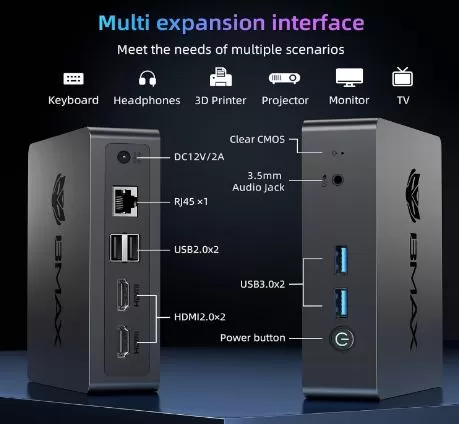
-
🔵 2× USB 3.0
-
⚪ 2× USB 2.0
-
🖥️ 2× HDMI 2.0 (4K@60Hz, dual display)
-
🎧 1× Audio Jack 3.5mm combo
-
🌐 1× RJ45 Gigabit Ethernet
-
📡 Dual band WiFi 2.4/5GHz + Bluetooth 5.0
-
📺 Integrated VESA mount
-
🔘 Clear CMOS button (useful for resetting the BIOS if something goes wrong)
It does not include a fingerprint reader, NFC or a 5G module, which is to be expected in this entry-level category.
🧩 Expansion and Upgrades
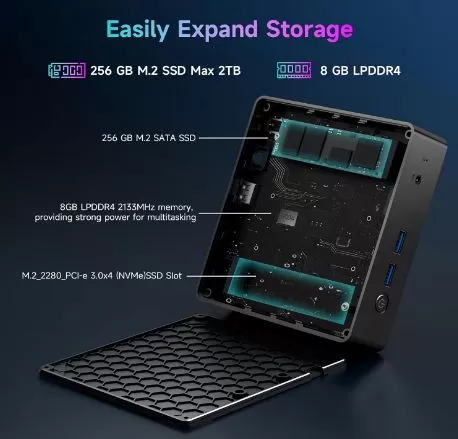
The strongest point of the B3 Pro compared to even more basic models like the BMAX B1 Plus is that its factory storage is already a real M.2 SSD (not eMMC), and it has a dual expansion slot:
-
Slot 1 (M.2 2280 SATA): factory occupied by the 256GB SSD. It can be replaced with a higher capacity SSD (up to 1-2TB depending on the manufacturer) if you need more system disk space.
-
Slot 2 (M.2 2280 NVMe, PCIe): completely free, supports up to 2TB additional for heavy files, multimedia libraries or a second Linux installation in dual-boot.
-
RAM: The 8GB LPDDR4 are soldered to the motherboard and cannot be expanded.
🛒 Upgrade your BMAX B3 Pro with these components on AliExpress:
⚔️ Comparison with Direct Competitors
| Model | CPU | RAM | Storage | Approximate price | Strength | Buy on AliExpress |
|---|---|---|---|---|---|---|
| BMAX B3 Pro | N4500 / N5095 | 8GB (fixed) | 256GB SSD + 2 M.2 slots | ~125-180€ | Genuine SSD as standard + dual M.2 | View offer |
| BMAX B1 Plus | Celeron J3355 | 6GB (fixed) | 128GB eMMC + 2 M.2 slots | ~116-160€ | Cheaper, but with slower base eMMC | View offer |
| Beelink EQ12/EQR5 | Intel N100 | 8-16GB DDR4 | 256GB-1TB NVMe | ~150-200€ | More modern CPU, better performance per core | View offer |
| GMKtec G3 Plus | Intel N100/N150 | 8-16GB DDR4 | 256GB-1TB NVMe | ~140-180€ | Better modern price/performance balance | View offer |
If your priority is sustained performance in browsing and multitasking, an Intel N100 (Beelink EQ12 or GMKtec G3 Plus) clearly outperforms both CPU variants of the B3 Pro, albeit at a slightly higher price.
⭐ Reviews on Well-Known Pages
The BMAX B3 Pro boasts a 4.6/5 rating with 58 reviews on Amazon, solid figures within its price range. Another independent source, specifically testing the model for use as a media center, gives it 4.5/5 stars, highlighting the advantage of the N4500 variant's AV1 decoder for 4K streaming.
It's not all good news: on Reddit, a user with the N5095 variant and 8GB of RAM described their experience browsing or watching YouTube as "abysmal," questioning whether it's worth keeping or replacing it with another device. This reinforces the recommendation to prioritize the N4500 variant if you have the option, as it offers a better user experience in practice despite having fewer cores.
🔬 Technical Tests
💻 1. Processor Tests (CPU Benchmarks)
Synthetic tests evaluate pure processing capacity in office tasks, compression, and data calculation:
- Geekbench 6 (Single-core / Everyday tasks): ~457 points. It shows a responsive feel when opening basic applications such as browsers or word processors, being 25% faster than the previous generation Celeron (N4000).
- Geekbench 6 (Multi-core/Multitasking): ~662 points. With only 2 cores and 2 physical threads, heavy multitasking is its Achilles' heel. Performance remains smooth if you have 10-15 Chrome tabs open and background music, but it drops if you try to render or export files simultaneously.
- Cinebench R23 (3D Performance and Continuous Load): ~843 points. This reinforces that it is a computer focused exclusively on entry-level computing and not on professional editing or complex mathematical calculations.
🎬 2. Multimedia and Video Tests
The graphics are handled by an 11th Generation Intel UHD Graphics (up to 750 MHz), and this is one of its strongest points due to modern hardware decoders:
- Streaming on YouTube/Netflix (1080p and 4K at 60Hz): Passed with flying colors. The graphics card features native decoding for modern formats like the AV1 codec. It plays native 4K video smoothly at 60 frames per second without overloading the processor (CPU usage remains low because the graphics card handles all the heavy lifting).
- Dual monitor: Perfectly supports two screens connected simultaneously via HDMI at 4K resolution without slowing down the operating system interface.
🕹️ 3. Game Testing (Gaming & Emulation)
- Modern PC Games (Valorant, Fortnite): Unplayable. Does not achieve stable frame rates even at the lowest resolutions (720p).
- Casual / Classic Games: Low-requirement titles like Minecraft (with optimized graphics) or Roblox work playably.
- Emulation: It's excellent for emulating classic consoles (NES, SNES, Megadrive, Game Boy, PlayStation 1, and Nintendo 64). Anything from the 16-bit and 32-bit era runs at maximum speed.
🌡️ 4. Thermal, Noise and Consumption Tests (24/7)
This is the scenario where the N4500 processor shines above more powerful variants:
- Temperature under maximum stress: During continuous 100% stress tests for 30 minutes, the internal temperature remains stable below 65°C - 70°C.
- Fan noise: Its smart fan barely needs to spin to dissipate the 6W of heat. At idle it is completely inaudible, and under maximum load it emits a soft whisper that is not at all bothersome.
- Power Consumption: In standby mode, it consumes only 4-5W, and under maximum load, it consumes around 12-15W (including motherboard and hard drive). This means that leaving it on 24 hours a day as a home server consumes practically the same amount of power as a standard LED light bulb.
💾 5. Storage Speed (SSD)
- The original 256GB M.2 SATA drive delivers sequential read speeds of around 500-530 MB/s. It allows Windows 11 Pro to fully boot in under 15 seconds and apps to open instantly.
- Technical note: By adding a second drive to its empty M.2 NVMe PCIe slot , read speeds scale up to 1600-1800 MB/s, drastically accelerating the transfer of very large files.
-
The 256GB M.2 SATA SSD achieves sequential read speeds of 500-520MB/s, a typical and consistent performance for SATA III SSDs, confirmed in independent testing.
-
In Geekbench 6, the N5095 variant scores 509 single-core and 1489 multi-core points, figures that explain why some users perceive slowness in browsing tasks dependent on single-core performance.
-
The N4500 variant consumes only 4W at rest and 11W playing AV1 video in 4K, compared to 11-13W at rest and 24W under load for the N5095 variant.
-
The manufacturer confirms a 25.2% performance improvement of the N4500 compared to its predecessor, the N4000, thanks in part to its 4MB of smart cache.
❓ Frequently Asked Questions (FAQ)
Which variant should I buy, the N4500 or the N5095?
Although the N5095 has 4 cores compared to the N4500's 2, in real-world use (browsing, video) the N4500 offers a better experience thanks to its AV1 decoder and lower power consumption. If you have the choice, prioritize the N4500.
Can I install Linux or Ubuntu without problems?
Yes, the manufacturer confirms official compatibility, and some distributors have specifically tested Ubuntu 22.04.4 LTS without any driver issues.
How much storage can I add?
You can replace the 256GB SATA SSD with one of up to 1-2TB, or add a second NVMe SSD of up to 2TB in the free slot.
Can I upgrade the RAM?
No, the 8GB LPDDR4 are soldered to the motherboard and are not expandable.
Is it suitable for gaming?
Only for very light titles (Minecraft, League of Legends on low settings). Demanding games like Fortnite are unplayable.
Is it a good option as a multimedia center (HTPC)?
Yes, especially the N4500 variant thanks to hardware AV1 decoding, which greatly reduces CPU usage when watching YouTube content and streaming in that codec.
🏁 Final Conclusion
The BMAX B3 Pro is a solid option if you're looking for an affordable mini PC for office work, browsing, and 4K HTPC, with the advantage of a built-in SSD and dual M.2 slots for easy storage expansion. The key is choosing the right variant: the N4500 offers a better real-world experience despite having fewer cores than the N5095, thanks to its AV1 decoder and lower power consumption.
If your budget allows and you prioritize overall performance for browsing and multitasking, a mini PC with an Intel N100 (like the Beelink EQ12 or GMKtec G3 Plus) offers a significant improvement in smoothness. However, for basic office tasks, 4K streaming, and as a lightweight home server, the B3 Pro (N4500 variant) remains a very reasonable purchase within its price range.
🛒 Where to buy it?
-
AliExpress: See BMAX B3 Pro PRICES
-
Amazon: 🛒 BMAX B3 Pro mini PC