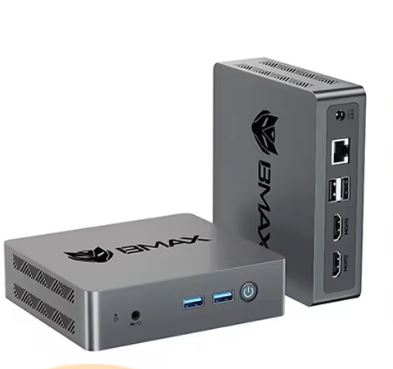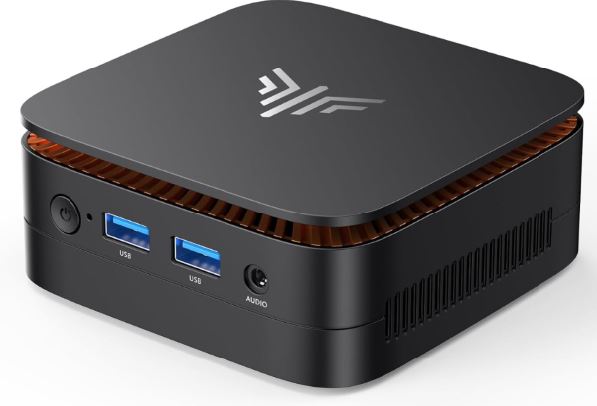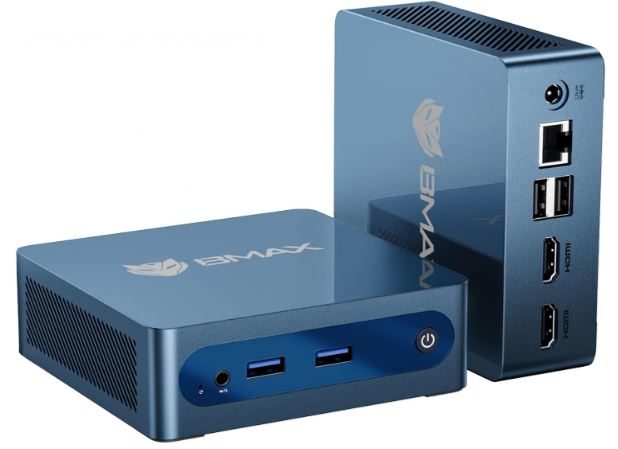
The BMAX B1 Plus is an entry-level mini PC, about the size of a video game controller, designed for light tasks. With Windows 11, it feels adequate but limited; installing a lightweight Linux distribution transforms the same hardware into a noticeably faster machine, as it frees up the RAM and CPU that Windows consumes in the background.
Pros:
-
💰 Very low entry price (from €116-145)
-
🔧 Dual M.2 2280 slots (1x SATA + 1x NVMe) in revision J3355, up to 2TB per slot without touching the original eMMC
-
🌐 Dual-band WiFi + Gigabit Ethernet, amazing for its range
-
🐧 Official and confirmed compatibility with Linux/Ubuntu
Contras:
-
⚠️ Only 6GB of soldered RAM (not expandable), a real bottleneck with Windows 11
-
🐌 The base storage is eMMC (slower than a real SSD), not NVMe
-
🐢 Very basic Celeron/J3355 CPU, not suitable for demanding tasks
-
⚙️ The NVMe slot only runs at PCIe 2.0, so a modern SSD won't reach its true maximum speed.
In short: with Windows 11 pre-installed, it's a functional machine, but its performance is limited by the RAM and slow eMMC storage. With a lightweight Linux distribution (Lubuntu, Linux Lite, or Mint XFCE) installed in one of the M.2 slots, the same hardware performs noticeably better in basic tasks, booting faster and without memory bottlenecks. It's the ideal purchase if you're looking for an ultra-budget HTPC, home server, or office PC and don't mind spending 10 minutes configuring Linux.
-
AliExpress: View Prices and Availability of the BMAX B1 Plus Mini PC
-
Amazon: 🛒 BMAX B1 Plus mini PC
📦 Unboxing and Box Contents
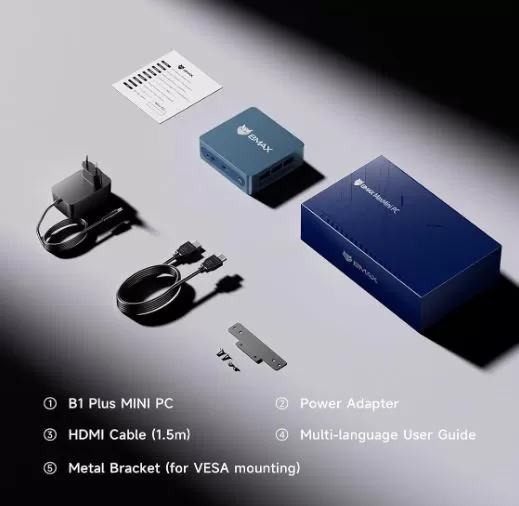
The BMAX B1 Plus box is minimalist, as befits its price. Inside you'll find:
-
The B1 Plus mini PC
-
Compact power adapter (12V/2A)
-
Cable HDMI 1.5m
-
VESA mount with screws for rear monitor mounting
-
Basic multilingual manual
🛠️ Technical Specifications Table
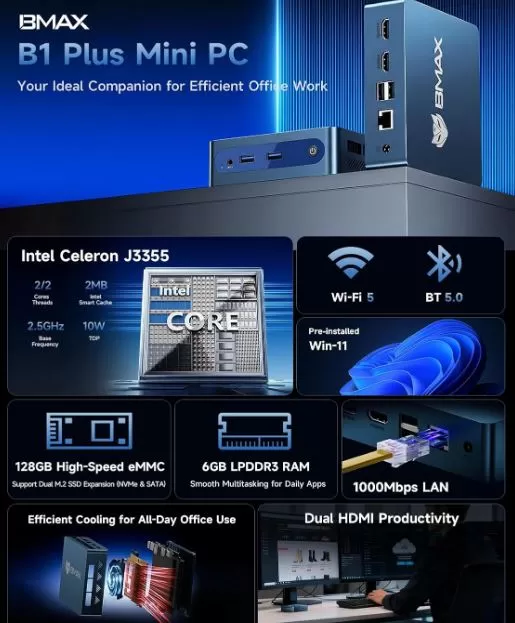
| Component | Specification |
|---|---|
| CPU | Intel Celeron J3355 (2C/2T, up to 2.5GHz), 14nm |
| GPU | Intel HD Graphics 500 (soporte 4K@60Hz) |
| RAM | 6GB LPDDR3 soldered (not expandable) |
| Base storage | 128GB eMMC soldered to motherboard (Windows comes pre-installed here, it is not replaced) |
| Expansion | Dual Slot M.2 2280: 1x SATA (AHCI) + 1x NVMe (PCIe 2.0), up to 2TB each |
| WiFi/BT | WiFi doble banda 2.4/5GHz (802.11ac) + Bluetooth 5.0 |
| wired network | RJ45 Gigabit (1000Mbps) |
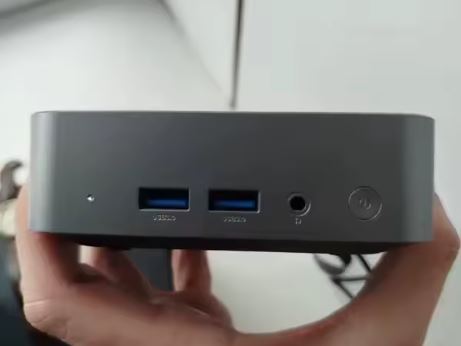
| Ports | 2×USB 3.0, 2×USB 2.0, 2×HDMI 1.4b, 1×Audio Jack 3.5mm, 1×DC Jack |
| SO | Windows 11 Home preinstalado, compatible con Linux/Ubuntu |
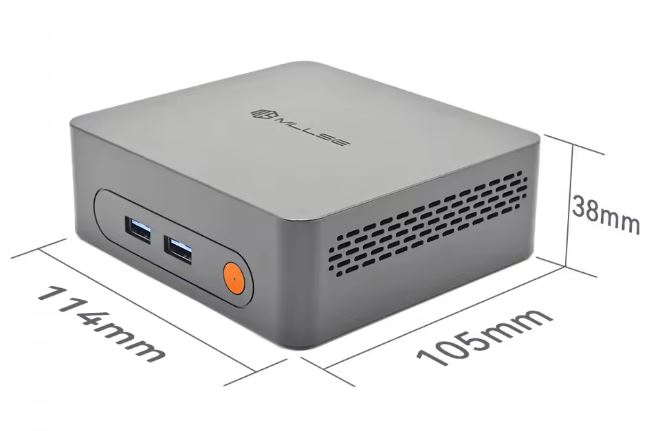
| Dimensions | 108×105×36mm |
| Weight | 223 grams |
📌 Note on revisions: There is an earlier variant with a Celeron N3350, 6GB LPDDR4, and 64GB eMMC that only has one M.2 SATA slot (no NVMe). The newer revision, J3355/128GB, which is the one we documented in this review, does include dual M.2 slots, as confirmed by the official manual, the manufacturer BMAX, and major retailers. If you buy a used or imported unit, be sure to check which revision you receive.
🎨 Design and Construction Quality
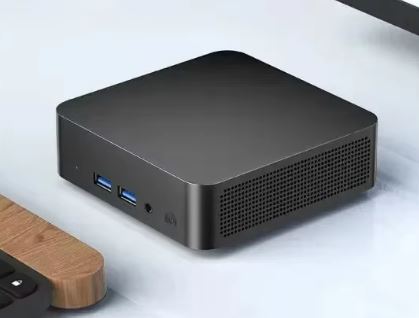
The chassis is made of rigid plastic with a matte finish, is lightweight (223g), and features passive ventilation holes on the top and bottom. It incorporates a low-profile "smart fan," so noise during normal use is minimal. It feels like a budget product, lacking the solidity of premium aluminum, but it performs well without creaking or looseness.
Its small size and included VESA mount make it perfect for hiding behind a monitor or TV, ideal for digital signage or as a discreet multimedia center in the living room.
🖥️ Screen and Multimedia
The B1 Plus doesn't have its own screen, but it stands out for supporting dual HDMI 1.4ba 4K@60Hz outputs, allowing you to connect two monitors simultaneously. The Intel HD Graphics 500 decodes H.264/H.265 video in hardware, so playing 4K movies on Kodi, Plex, or Netflix (with compatible apps) is smooth and stutter-free, as confirmed by third-party tests with Kdenlive and YouTube playback.
It does not have built-in speakers, so you will need a monitor/TV with its own audio or connect a sound system via the 3.5mm jack.
🎮 Performance and Software: Windows vs Linux
Here's the key point of this review. With Windows 11 pre-installed, the computer suffers from a double bottleneck: on the one hand, the 6GB of RAM is very limited (the system can consume 2.5-3GB just at idle), and on the other hand, the base storage is an eMMC chip, much slower than a true SATA or NVMe SSD, which is especially noticeable when installing Windows updates or opening several applications at once.
🐧 Why installing Linux improves performance so much
By switching to a lightweight Linux distribution, idle RAM usage drops to 400-800MB, freeing up a full 4-5GB for your applications. The Linux kernel is also more efficient at managing I/O, and if you install the system in one of the two M.2 slots instead of the eMMC, the difference in performance is even greater.
Community testing confirms this improvement:
-
An ExplainingComputers reviewer installed Linux Mint without any driver problems; even the WiFi was configured automatically.
-
Another channel specifically tested Linux Lite to see if the computer performed better than with standard Ubuntu.
-
The manufacturer itself confirms official compatibility with Ubuntu in the most recent technical specifications.
💡 The best strategy: SATA or NVMe, which one to choose for Linux?
With the dual slot available, you have two options to install your Linux distro without touching the Windows on the eMMC:
-
SSD M.2 SATA: cheaper option, more than enough performance for a lightweight distro like Lubuntu.
-
M.2 NVMe SSD: theoretically faster, but remember that the J3355 only offers PCIe 2.0, so a modern NVMe drive will perform well below its rated speed. For this chip, a good SATA SSD more than covers the needs of a lightweight distro, so it's not worth paying extra for a high-end NVMe drive.
🏆 Best Linux distros for the BMAX B1 Plus
| Distro | Why choose it | RAM usage at idle |
|---|---|---|
| Lubuntu | Ultra-lightweight LXQt environment, ideal for 6GB of RAM. | ~400-500MB |
| Linux Lite | User-friendly Windows-like interface, good hardware support | ~500-600MB |
| Linux Mint XFCE | Very stable, automatic WiFi drivers confirmed | ~600-700MB |
| Zorin OS Lite | Polished interface, a good option if you're coming from Windows | ~500-600MB |
🔧 Quick guide to installing Linux on the BMAX B1 Plus
-
Purchase an M.2 2280 SATA or NVMe SSD (depending on your budget, remember the PCIe 2.0 limitation) and mount it in the corresponding slot by opening the bottom cover of the chassis.
-
Download the ISO of your chosen distro and create a bootable USB drive (Ventoy is recommended, as some older BMAX drives with 32-bit booting require special adjustments).
-
Restart the mini PC and press F11 (or Esc in some revisions) to access the fast boot menu.
-
Select the USB in UEFI mode and choose "Try or install" the distro, selecting the new SSD as the installation destination (so Windows remains intact on the eMMC).
-
Disable Secure Boot from the BIOS if the installer does not boot correctly.
-
After installation, check the WiFi; in most cases it is detected automatically, although in models with the Realtek RTL8812BU chip it may require an additional driver that the community has already documented.
With this change, tasks such as browsing the internet, watching 4K video, or using it as a Home Assistant/Pi-hole server are noticeably smoother and boot up much faster than with the original eMMC running Windows.
🔌 Energy Consumption and Cables
The BMAX B1 Plus is extremely efficient: its total TDP is around 6-10W thanks to the 14nm manufacturing process of the Celeron J3355, well below that of a conventional desktop PC.
The included adapter is a compact 12V/2A charger, and does not require any additional ventilation of its own.
Ideal for leaving on 24/7 as a home server without a noticeable impact on the electricity bill, and features Auto Power-On and Wake-on-LAN for remote management.
🌡️ Temperature and Noise (Actual Thermal)
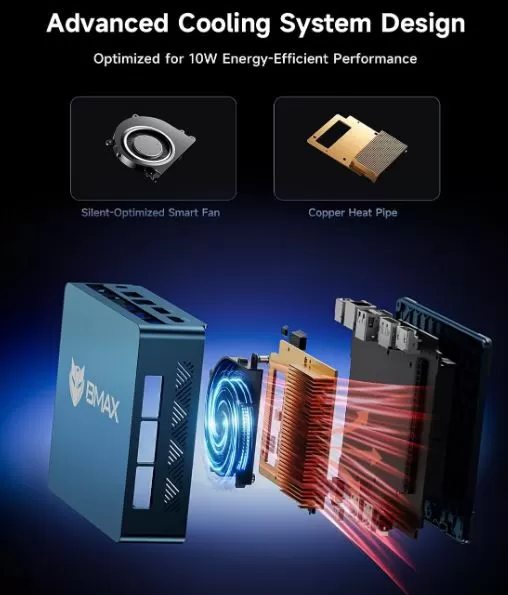
The B1 Plus incorporates a small, low-profile "smart fan," so it's not completely passive, but the noise in normal use is virtually imperceptible.
Under light loads (browsing, office applications) temperatures remain moderate; under sustained loads (video transcoding, compilations), the Celeron J3355 may apply throttling to stay within its reduced TDP, which is normal and expected in a chip of this range.
🔗 Connectivity and Extras
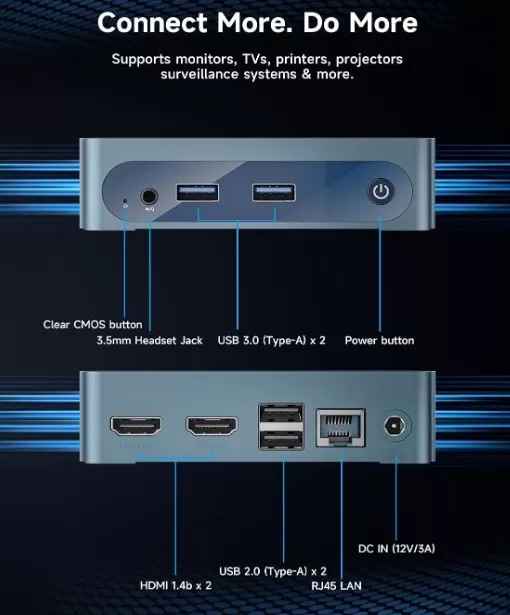
-
🔵 2× USB 3.0
-
⚪ 2× USB 2.0
-
🖥️ 2× HDMI 1.4b (4K@60Hz)
-
🎧 1× Combined 3.5mm Audio Jack
-
🌐 1× RJ45 Gigabit Ethernet
-
📡 WiFi doble banda 2.4/5GHz + Bluetooth 5.0
-
📺 Integrated VESA mount
-
🔁 One-click system restore (F9), Auto Power-On, Wake-on-LAN
It does not include a fingerprint reader, NFC or a 5G module, which is logical given its entry-level focus.
🧩 Expansion and Upgrades
The J3355/128GB revision that we document in this review includes:
-
Base storage: 128GB eMMC soldered to the motherboard, where Windows is pre-installed. It is not removable or replaceable.
-
Slot 1 (M.2 2280 SATA): factory unlocked, up to 2TB of expansion.
-
Slot 2 (M.2 2280 NVMe, PCIe 2.0): also factory unlocked, up to 2TB, although limited in speed by the chip's PCIe 2.0 bus.
-
RAM: The 6GB LPDDR3 is soldered to the motherboard and cannot be expanded under any circumstances.
You can use both slots at the same time: for example, Windows on the eMMC, Linux on the SATA, and a third NVMe drive to store your media library or backups, all without sacrificing any existing installation.
🛒 Upgrade your BMAX B1 Plus with these components on AliExpress:
⚔️ Comparison with Direct Competitors
| Model | CPU | RAM | Storage | Approximate price | Strength | Buy on AliExpress |
|---|---|---|---|---|---|---|
| BMAX B1 Plus | Celeron J3355 | 6GB (fixed) | 128GB eMMC + 2 slots M.2 (SATA+NVMe) | ~116-160€ | Double M.2 at the lowest market price | View offer |
| BMAX B1 Pro | Celeron N4000 | 8GB (fixed) | 512GB | ~160-180€ | A little more RAM and storage | View offer |
| Beelink Mini S12 Pro | Intel N100 | 8-16GB DDR4 | 256-500GB NVMe (PCIe 3.0) | ~150-190€ | More modern CPU and NVMe at real speed | View offer |
| GMKtec G3 Plus | Intel N100/N150 | 8-16GB DDR4 | 256GB-1TB NVMe | ~140-180€ | Good balance of price/performance, modern | View offer |
If your budget allows, a model with Intel N100 (Beelink Mini S12 Pro or GMKtec G3 Plus) offers a generational leap in efficiency and, above all, NVMe at real PCIe 3.0 speed, something the B1 Plus cannot offer due to the limitations of its chipset.
⭐ Reviews on Well-Known Pages
In specialized stores and online portals, the BMAX B1 Plus receives solid reviews for its price range: a recent review gives it a score of 4.5/5 based on 165 reviews. Reference channels like ExplainingComputers confirm in real-world tests that Linux Mint runs smoothly without driver issues, including automatic Wi-Fi detection.
On Reddit, the r/BMAX community points out that there have been audio issues on some Linux distributions in the past, although users report that these problems are mostly resolved on newer models. There are also specific community guides for running Linux on older revisions with 32-bit booting, something to keep in mind if you're buying a used drive. It's important to note that some users with the older N3350 revision have reported that their drive wasn't detecting an NVMe SSD, as that variant only had a SATA slot.
🔬 Technical Tests
-
eMMC base storage is noticeably slower than a SATA or NVMe SSD in random reads/writes, resulting in Windows update installations and program launches that are slower than expected for the CPU specs.
-
The NVMe slot runs at PCIe 2.0, so a modern SSD will perform well below its advertised maximum speed; even so, it's still noticeably faster than stock eMMC.
-
In playback and light editing tests with Kdenlive, the Celeron J3355 handles 1080p video correctly but shows its limitations with 4K in editing (not in playback, which it does support natively).
-
With lightweight Linux distributions installed in one of the M.2 slots, boot time is noticeably improved compared to the original eMMC with Windows 11, which can take 25-35 seconds to boot completely.
-
Dual-band WiFi maintains stable speeds on both Windows and Linux, with most chipsets automatically detected by the kernel of modern distributions.
🕹️ Gaming and Emulation
With Intel HD Graphics 500, the BMAX B1 Plus isn't designed for gaming. It can run emulators of very old retro systems (NES, SNES, Game Boy, and some Mega Drive) smoothly, but it falls short for PS1/N64 and is completely out of reach for more recent systems like PS2 or GameCube, which require much more CPU/GPU power than this entry-level chip offers.
Its true purpose is not gaming, but efficiency as a home server or silent HTPC.
❓ Frequently Asked Questions (FAQ)
Does installing Linux really improve performance that much?
Yes, especially because it frees up RAM that Windows consumes in the background and avoids the slow I/O of the eMMC if you also install the system in one of the M.2 slots. With only 6GB of RAM available, every extra gigabyte makes a significant difference in overall smoothness.
Does it have one or two M.2 slots?
It depends on the revision. The most recent version (Celeron J3355, 128GB eMMC), which is the one reviewed here, has two M.2 2280 slots (1x SATA + 1x NVMe), confirmed by the official manual and the manufacturer. An earlier revision with a Celeron N3350 and 64GB eMMC only had one SATA slot.
Is it worth installing an NVMe SSD instead of a SATA drive?
Not really. The NVMe slot only runs at PCIe 2.0, so the actual speed difference compared to a SATA drive is less than you might expect. For installing Linux, a quality SATA SSD is sufficient and more economical.
Which Linux distro do you recommend for this mini PC?
Lubuntu or Linux Lite are the best options due to their low resource consumption and good hardware compatibility confirmed by the community.
Can I keep Windows and add Linux without losing my data?
Yes. Since Windows resides on the soldered eMMC chip and the M.2 slots are free from the factory, you can install a new SSD (SATA or NVMe) and install Linux there without affecting your original installation.
Can I upgrade the RAM?
No, the 6GB LPDDR3 are soldered to the motherboard and cannot be upgraded under any circumstances.
Does it work as a 24/7 home server?
Yes, that's one of its best uses: very low power consumption, a quiet fan, and enough power for Home Assistant, Pi-hole, or a lightweight file server, plus it has Wake-on-LAN for remote management.
🏁 Final Conclusion
The BMAX B1 Plus (revision J3355/128GB) is a smart buy if you're looking for the most affordable mini PC for basic tasks, an HTPC, or a home server, and you're willing to take advantage of its dual M.2 slots to add an SSD and install Linux, getting the most out of otherwise limited hardware. It performs adequately with Windows 11 pre-installed, but the limitations of 6GB of fixed RAM and the slow eMMC storage are noticeable; with an additional SSD and Lubuntu or Linux Lite installed, the same machine feels considerably faster and more responsive.
If your budget allows for a step up, a mini PC with an Intel N100 (like the GMKtec G3 Plus or the Beelink Mini S12 Pro) will offer true NVMe speed out of the box and more future-proofing without significantly impacting the price. But for those who only need to browse the web, stream 4K video, or set up a quiet home server, the B1 Plus with the storage upgrade and Linux pre-installed is hard to beat in terms of price-performance.