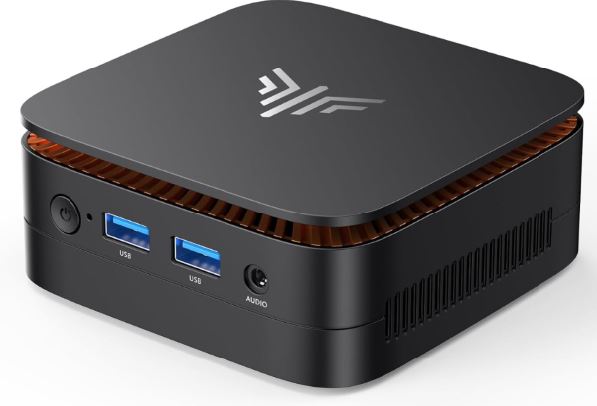
The NiPoGi AK1PLUS is an entry-level mini PC designed for office work, study, and light home use, not for demanding raw performance.
Pros: Silent operation, very low power consumption (6W), dual 4K output, Windows 11 Pro pre-installed, and surprising storage expandability for its price (up to 10 TB combining M.2 and 2.5" SATA).
Cons: Soldered RAM (not expandable), N5030 CPU (already somewhat outdated in 2026), no USB-C port, and a graphics card that's not ideal for demanding games.
In short: if you're looking for a cheap PC for browsing, working with documents, watching 4K content, setting up a home server or even a home NAS thanks to its huge storage capacity, this one is more than adequate; if you want to edit video or play games, look for the N97/N100 variant.
👉 Amazon: 🛒 NiPoGi AK1PLUS N5030 12 GB RAM
🔗 AliExpress: View Offer - Check Availability
📦 Unboxing and Box Contents
Inside the box we found:
- Mini PC NiPoGi AK1PLUS.
- External power supply.
- VESA mount for attaching it behind the monitor or TV.
- Cable HDMI.
- Mounting screws.
- Multilingual manual.
Everything comes well protected in foam, with no loose parts or poor quality cables.
🔧 Key Technical Specifications
| Component | Detail |
|---|---|
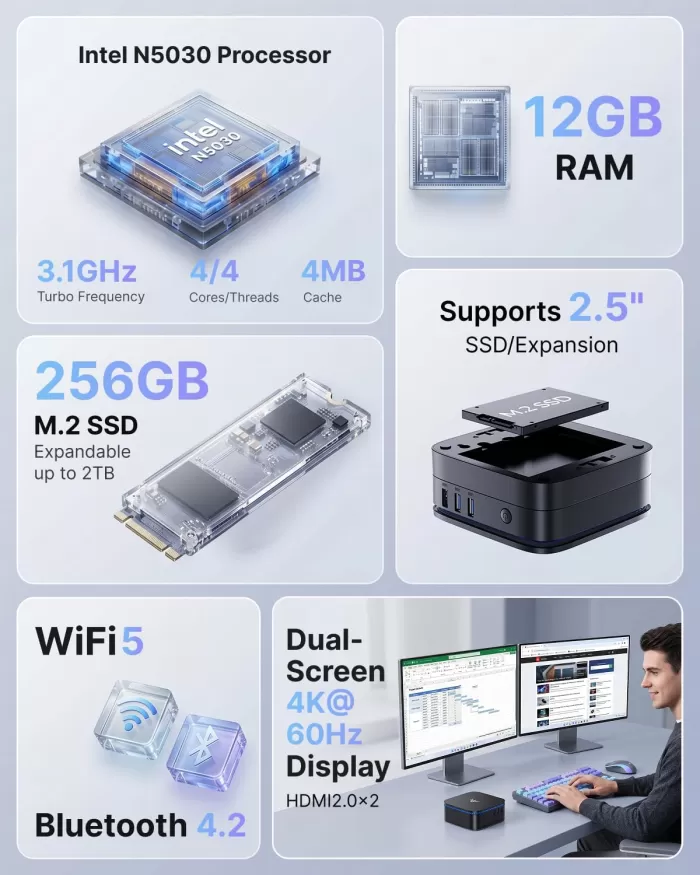
| Processor | Intel Pentium Silver N5030 (up to 3.1 GHz, 4 cores/4 threads, 4MB cache) |
| Graphic design | Intel UHD Graphics 605 |
| RAM | 8 GB / 12 GB LPDDR4 (soldered, non-expandable) |
| Main storage | M.2 2280 SSD, 256 GB (compatible with NVMe PCIe 3.0 or SATA), expandable up to 2 TB |
| Secondary storage | Additional bay for 2.5" SATA III (6 Gb/s) SSDs, up to 8 TB, max. thickness 7 mm |
| Maximum total storage | Up to 10 TB combining both slots |
| Operating system | Windows 11 Pro pre-installed |
| Connectivity | WiFi 5 doble banda, Bluetooth 4.2, LAN Gigabit |
| Video | 2× HDMI 2.0, dual 4K@60Hz |
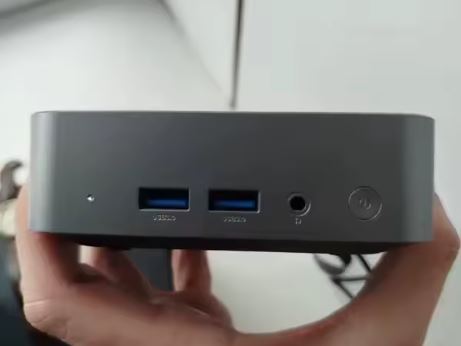
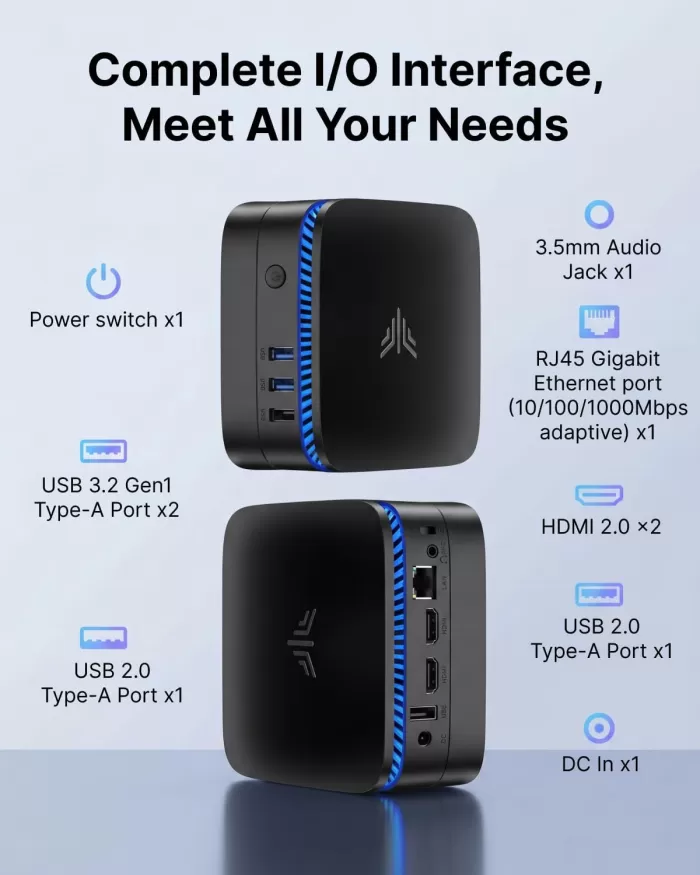
| USB | 2× USB 3.2 Gen1, 2× USB 2.0 (sin USB-C) |
| Consumption | 6 in |
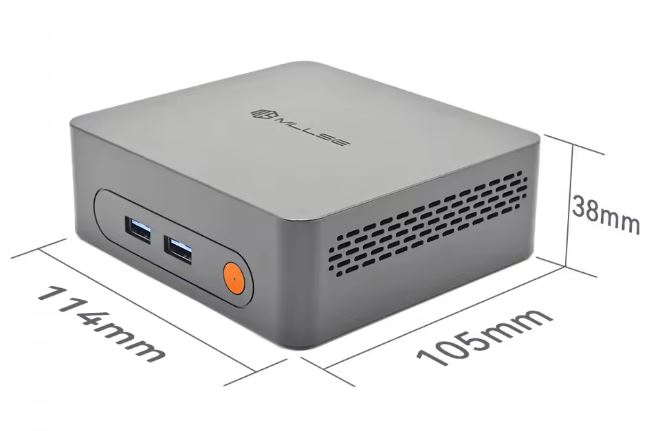
| Dimensions / Weight | 12,8 × 12,8 × 5,1 cm / 386 g |
| Price | €175 (8GB RAM version) / €229 (12GB RAM version) |
🎨 Design and Construction Quality
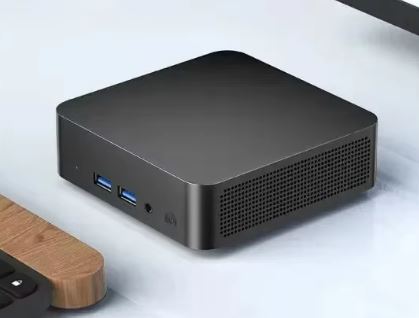
The casing is made of fingerprint-resistant matte plastic with a sober black finish.
There is no creaking or flexing when handling it, although as with most budget mini PCs in this segment, the plastic is lightweight and does not convey a "premium" feel.
Its pocket size (less than 400g) makes it easy to carry or hide behind a TV thanks to the included VESA mount.
🖥️ Screen and Multimedia
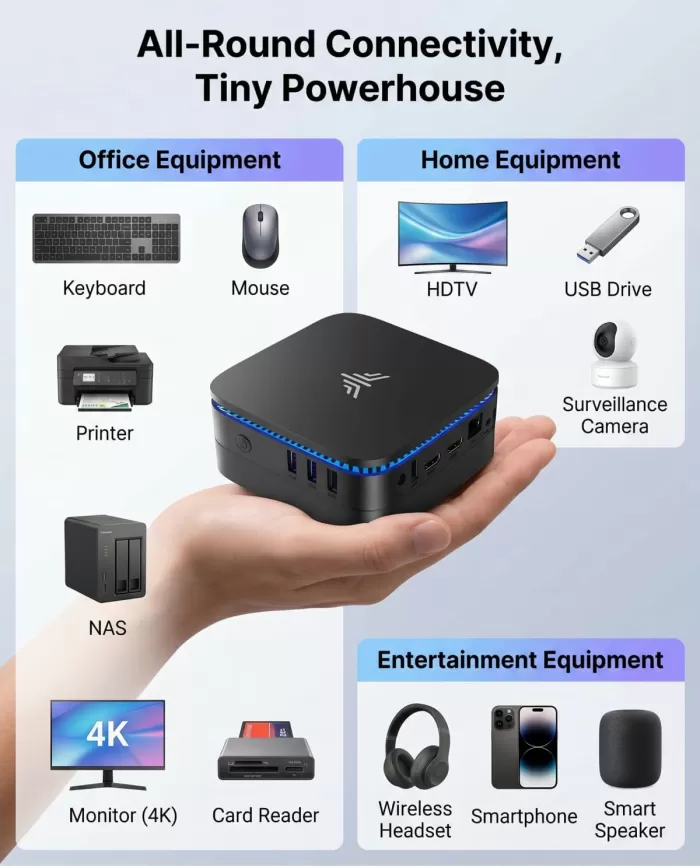
The AK1PLUS does not include its own screen (it is a mini desktop PC), but it stands out for supporting dual 4K output at 60Hz via HDMI 2.0, something uncommon in this price range.
The experience of watching 4K streaming is smooth thanks to the hardware decoding of the UHD 605, although the integrated sound is basic: for music or calls we recommend adding external Bluetooth speakers.
⚙️ Performance and Software
This is where we need to get real. The N5030 is a very basic chip, and the benchmarks confirm it: in Cinebench R23 it scores around 313 points single-core / 628 multi-core in comparable tests, clearly below the more recent N100/N97 family used by other versions of the same AK1 Plus chassis.
In day-to-day use, this translates to: smooth web browsing with multiple tabs, seamless Office and video calls.
Windows 11 Pro comes clean, without bloatware added by the manufacturer, and receives normal updates from Microsoft.
🔋 Energy Consumption and Cables
With a power consumption of only 6W, it is one of the most efficient mini PCs on the market, ideal if you are going to leave it on 24/7 as a home server or lightweight NAS.
Includes a compact external power supply, "laptop charger" type, without any additional poor quality cables.
🌡️ Temperature and Noise (Actual Thermal)
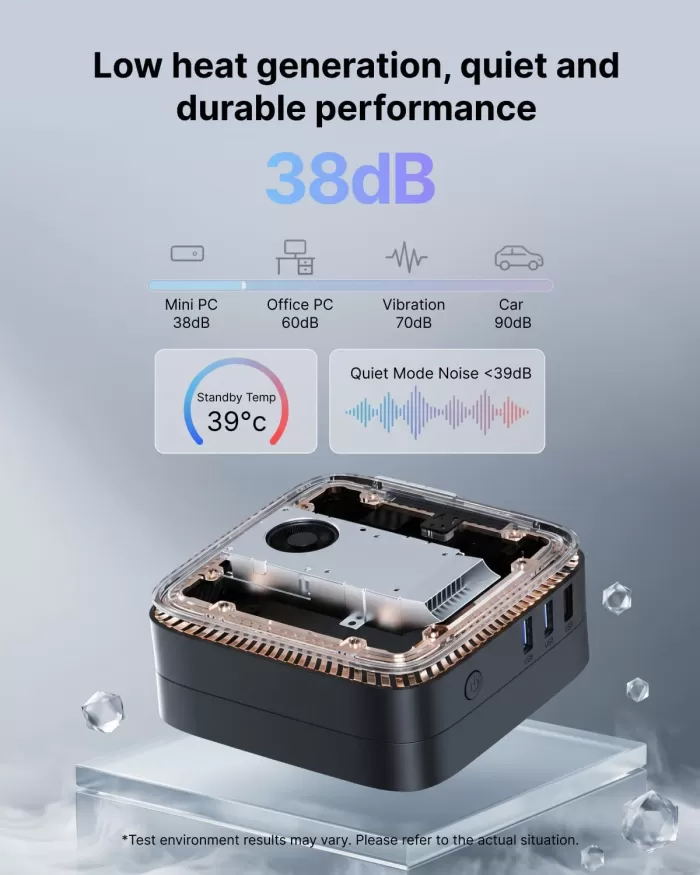
Thanks to the dual 180° fan, the device stays below 38 dB even under sustained load, and user reviews confirm that the noise is "a slight hum, not at all annoying."
There is no noticeable throttling in light tasks, although in prolonged CPU loads at 100% the temperature rises noticeably, something common in such compact chassis.
🔌 Connectivity and Extras
-
Dual-band WiFi 5 + Bluetooth 4.2 (no WiFi 6)
-
Wired Gigabit Ethernet LAN
-
Wake on LAN, PXE boot, power on by RTC
-
Without USB-C, a weak point compared to newer models
-
Without NFC, fingerprint reader or IP certification (normal in this category)
🔧 Expansion and Upgrades
-
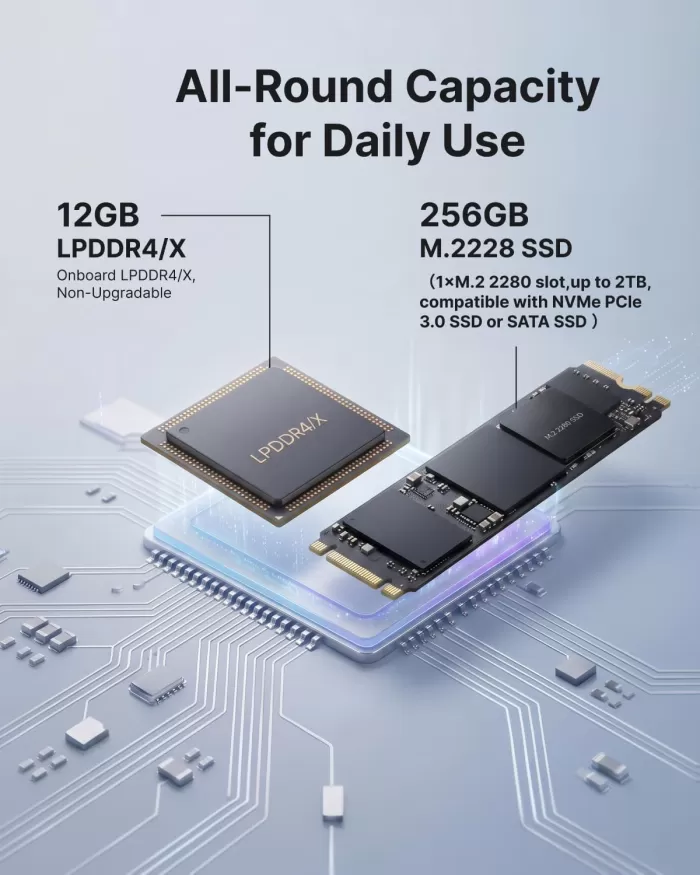
RAM: The 12GB are soldered to the motherboard — they cannot be upgraded. This is the most important limitation to consider before buying.
-
Primary SSD: The system includes a 256GB M.2 2280 SSD, housed in its single M.2 2280 slot, compatible with both NVMe PCIe 3.0 and SATA SSDs. You can replace it with one of up to 2TB if you need more speed or capacity.
-
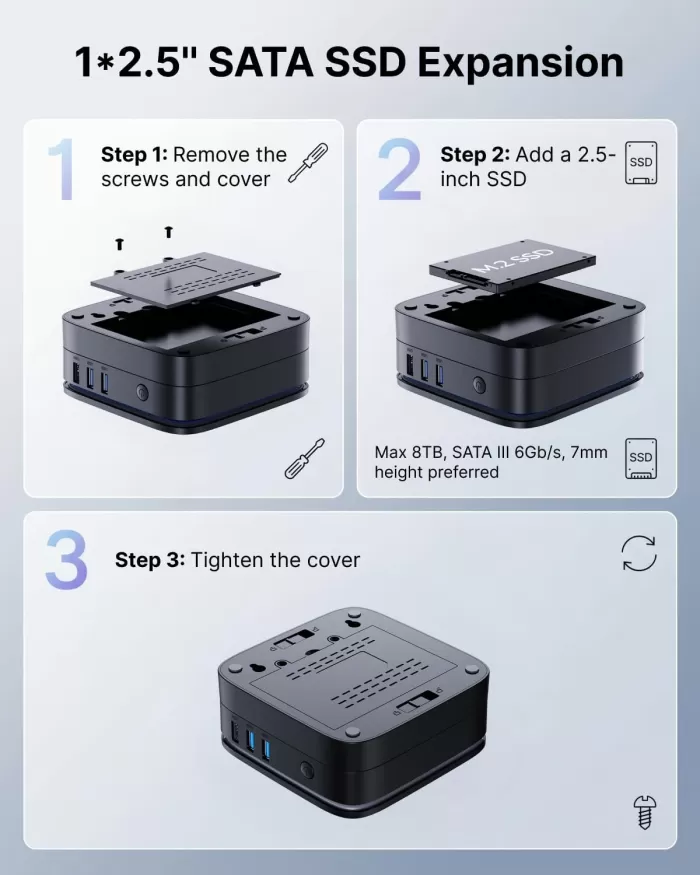
Second drive bay (2.5" SATA): In addition to the M.2 slot, the chassis includes an extra bay for installing a 2.5" SATA III (6 Gb/s) SSD, supporting drives up to 8 TB and a maximum thickness of 7 mm. This makes the AK1PLUS an interesting option if you're looking to combine speed (M.2) with high storage capacity (2.5") in the same device, something uncommon in mini PCs at this price point.
-
Installation process: According to the manufacturer and confirmed by users in their reviews, access to both bays is simple, which greatly facilitates the upgrade even for users without technical experience.
🆚 Comparison with Direct Competitors
| Model | CPU | RAM | Storage | Approximate price | Ideal for |
|---|---|---|---|---|---|
| NiPoGi AK1PLUS (N5030) | Pentium Silver N5030 | 12GB (fixed) | 256GB SSD | 229 € | Basic office software, home server |
| NiPoGi AK1 Plus (N97) | Intel N97 | 16GB DDR4 | 512GB SSD | ~250-280 € | Office suite + lightweight multimedia |
| Beelink Mini S12 | Intel N95 | 8-16GB | 256-500GB | ~180-220 € | Alternative similar to basic range |
| GMKtec N100 | Intel N100 | 16GB | 512GB | ~220-260 € | Best performance/price ratio |
The N97 offers up to 15% more performance than the N100/N95 according to independent testing, so if your budget allows, that variant is preferable to the N5030 we reviewed here.
💬 Reviews on Well-Known Pages
Verified reviews on Amazon consistently highlight its quiet operation and value for money: one user describes it as a viable Raspberry Pi replacement for setting up home servers (OpenVPN, web), emphasizing the ease of adding a second SSD without screws. Another buyer favorably compares its boot times to a much more powerful desktop computer (Ryzen 7 + RTX 4080), although they clarify that it's intended for non-gaming tasks.
Reviews from specialized media outlets of similar chassis variants (N97) are somewhat more critical: iMTest gives it a "satisfactory" score (3.2/5), noting that "for demanding tasks such as video editing, the mini PC is not powerful enough," and highlighting the lack of USB-C as a weak point. AndroidPC.es rates the N97 version at 67%, with clear pros (dual video output, VESA support, low noise) and specific cons (no USB-C, slower than NVMe SATA M.2 SSD).
🧪 Technical Tests (12GB RAM version)
Cinebench R23 (CPU):
Single-core: ~313-495 points | Multi-core: ~628-1293 points.
📌 Conclusion: Typical performance for an entry-level chip. Sufficient for light tasks, but falls short in heavy rendering or video compression.
Geekbench 6:
Single-core: ~411 points | Multi-core: ~868 points.
📌 Conclusion: In single-core, it barely reaches a third of a modern Core i3, although in multi-core it matches an AMD Athlon Silver 3050U — adequate for basic multitasking (multiple tabs, Office, streaming).
PassMark CPU Benchmark:
Multithread: 2,522 points | Single-thread: 1,199 points.
📌 Conclusion: It ranks around 3,400 out of more than 5,900 CPUs tested, confirming that it is a very basic processor designed for minimal power consumption, not performance.
Comparison with the N97 variant of the same chassis (reference):
The N97 achieves 780-865 single-core and 1,965-2,314 multi-core points in Cinebench R23, with a PCMark 10 score of ~3,134 points.
📌 Conclusion: the N97 performs between 100% and 150% better than the N5030 in multi-threaded workloads, the most significant difference between the two AK1PLUS versions.
Storage (factory-installed SATA SSD):
In CrystalDiskMark tests on the equivalent chassis, the factory-installed SSD achieved approximately 529 MB/s read and 483 MB/s write speeds.
📌 Conclusion: These are decent speeds for a SATA SSD, but they are significantly improved if you upgrade to an NVMe PCIe 3.0 drive in the available M.2 slot.
Power consumption under load:
In laboratory tests on similar chassis, power consumption is around 16W under normal use and rises to only 18W under maximum load.
📌 Conclusion: This confirms the enormous energy efficiency of this family of mini PCs, ideal for 24/7 use as a home server.
Overall technical verdict: the numbers confirm what you already suspected from the price—the N5030 is an overheated 2019 processor suitable for office tasks and browsing, not for serious workloads. If your budget allows, the N97 variant in the same chassis offers a significantly higher performance leap for a moderate price difference.
🎮 Gaming and Emulation (12GB RAM version)
The Intel UHD Graphics 605 is a very low-end integrated graphics card, so this mini PC isn't designed for modern gaming. In tests with equivalent hardware, titles like Fortnite, Cyberpunk 2077, and Battlefield barely reach 2-8 FPS at low resolutions, and popular games like Roblox run in the 9-18 FPS range, with noticeable drops even in simple scenes.
Where does it perform well? In very light or 2D games: titles like Minecraft (on low settings), Fall Guys, Valorant on minimum settings, or browser games and casual gaming are more than adequate. For anything more demanding, the device clearly falls short.
Retro emulation: here the picture improves considerably. Thanks to the CPU's ability to handle software emulation well (it doesn't depend as much on the GPU), platforms like RetroArch allow for smooth gameplay of consoles from previous generations.
-
✅ NES, SNES, Game Boy Advance, Mega Drive: perfect performance, no glitches.
-
✅ PS1, N64: work well in most games.
-
⚠️ PS2 and GameCube: playable in undemanding titles, but with frame rate drops in graphically intensive scenes; it is recommended to adjust the internal resolution lower.
-
❌ PS3, Switch, Wii U: out of reach — the CPU and iGPU don't have enough power for these newer, more demanding cores.
❓ Frequently Asked Questions (FAQ)
Can the RAM of the NiPoGi AK1PLUS be upgraded?
No, in this 12GB or 8GB version, the memory is soldered to the motherboard and is not expandable.
Is it suitable for working with Photoshop or video editing?
For light touch-ups in Photoshop, yes, but for video editing, the N5030 falls short; it's better to opt for the N97 variant.
Is it compatible with two 4K monitors at the same time?
Yes, through its two HDMI 2.0 ports it supports dual 4K displays at 60Hz.
Does it come with Windows 11 legally activated?
It comes with Windows 11 Pro pre-installed; it is recommended to verify activation upon receipt.
🏁 Final Conclusion
The NiPoGi AK1PLUS with an N5030 processor is only a viable option if you're on a very tight budget and your needs are limited to office applications, web browsing, 4K streaming, or a lightweight home server. If you can stretch your budget by about €20-30, the variant with an Intel N97 processor and 16GB of RAM offers a significant performance boost and better value for money in the long run.
Ideal for: students, offices, digital signage, low-load home servers.
Not recommended for: gaming, video editing, intensive professional workloads.
🛒 Where to buy it?
-
👉 Amazon: 🛒 NiPoGi AK1PLUS N5030 12 GB RAM
-
🔗 AliExpress: View offer - Check availability