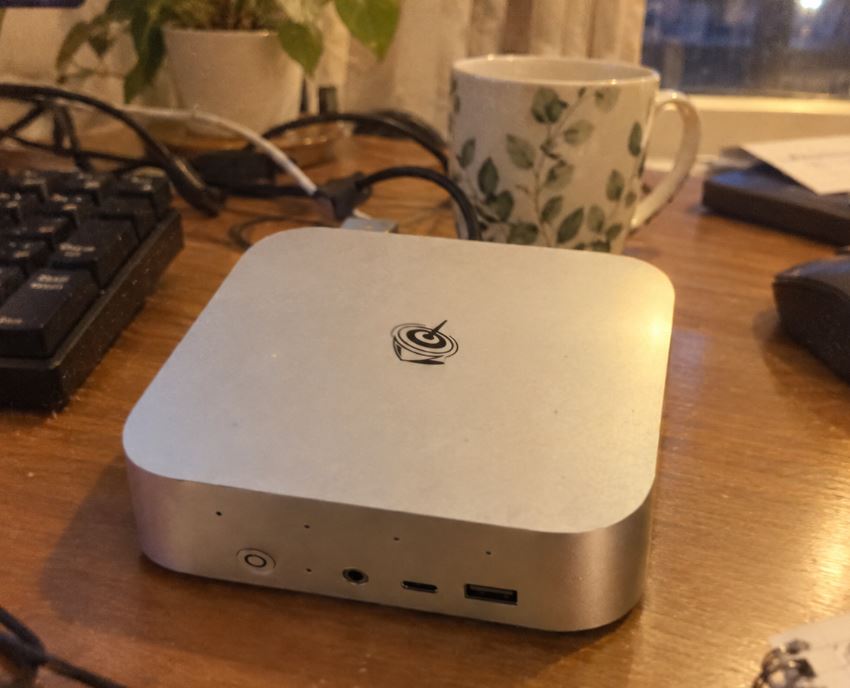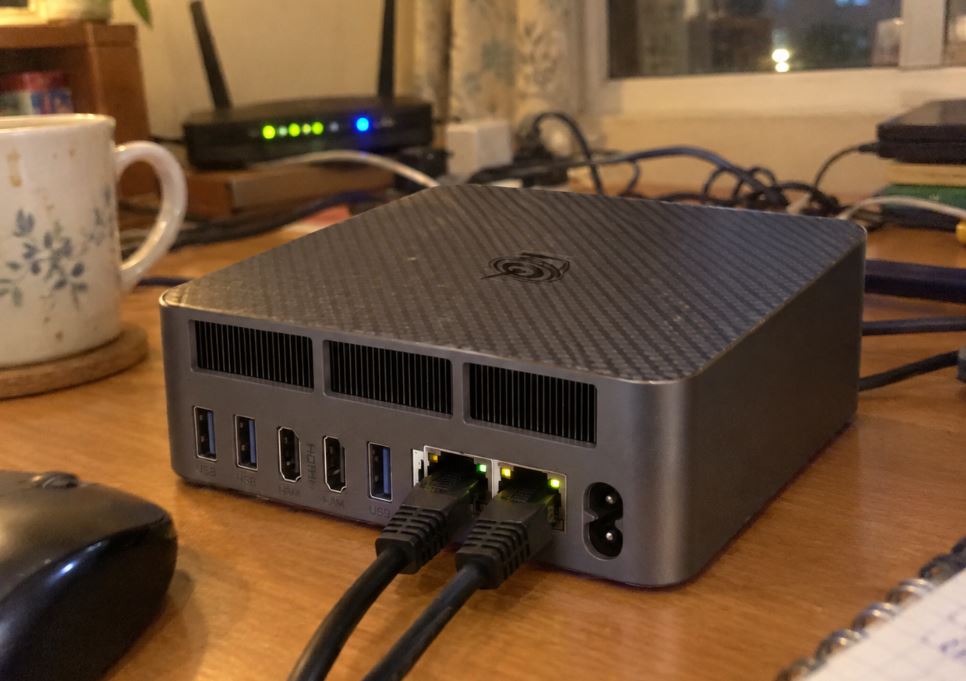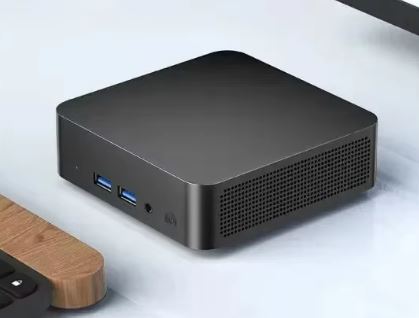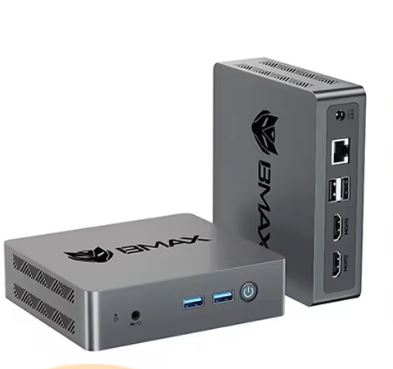
The Xiaman Mini PC is a very small and extremely economical computer focused on basic office tasks, browsing and digital signage thanks to its Auto Power On and Wake-on-LAN functions .
It stands out for its optimized Wi-Fi 6 connectivity and support for up to three monitors. However, the use of older generation processors in terms of gaming performance means the buyer needs to know exactly what they're getting.
-
👍 Pros:
-
Tiny size and lightweight construction for easy VESA mounting.
-
Updated wireless connectivity with Wi-Fi 6 and Bluetooth 5.2.
-
Wide variety of ports, including dual HDMI and USB Type-C with video output.
-
Support for automation (Auto Power On and Wake-on-LAN).
-
-
👎 Cons:
-
Older processors with very limited graphics performance for modern games.
-
Confusing advertisements regarding the type of RAM and graphics capabilities.
-
No possibility of dual-channel RAM expansion (single SODIMM slot).
-
Conclusion: A functional option for tight budgets looking for a low-power secondary computer or lightweight server, but not recommended if you're looking for raw power or gaming.
👉 See Prices for the Xiaman Mini PC with Intel i7-4510u
👉 See Prices for the Xiaman Mini PC with Intel i3-6100u
📦 Unboxing and Box Contents
Upon opening the minimalist packaging box of the Xiaman Mini PC, we find a functional set that includes everything needed to get it up and running from the first minute:
-
🖥️ Xiaman Mini PC (with selected processor and storage).
-
🔌 External power adapter (12V / 3A or 4A depending on version).
-
🖥️ Good quality short HDMI cable .
-
🛠️ VESA mounting bracket with its respective screws to fix it behind a monitor or television (see seller's page).
-
📖 Basic user manual with quick installation guide.
📊 Key Technical Specifications Table
| Feature / Specification | Configuration with Intel Core i7-4510U | Configuration with Intel Core i3-6100U |
| Architecture and Generation | Haswell (4th Generation - 22 nm) | Skylake (6th Generation - 14 nm) |
| Cores / Threads | 2 Cores / 4 Wires | 2 Cores / 4 Wires |
| Clock Frequency | 2.00 GHz Base / Up to 3.10 GHz Turbo | 2.30 GHz Fixed (No Turbo Boost) |
| Cache Memory | 4 MB Intel® Smart Cache | 3 MB Intel® Smart Cache |
| Thermal Consumption (TDP) | 15 W | 15 W |
| Theoretical Support for Memory (Intel) | DDR3L/LPDDR3 at 1333/1600 MHz | DDR4 at 2133 MHz, DDR3L / LPDDR3 |
| RAM Memory in the Vendor's Sheet | 16 GB DDR3L | 16 GB DDR4 (Limited to 2133 MHz per CPU) |
| Integrated Graphics (iGPU) | Intel® HD Graphics 4400 (200 - 1100 MHz) | Intel® HD Graphics 520 (300 - 1000 MHz) |
| Video Codec Instructions | Basic H.264, AVC | Hardware support for H.265/HEVC (8-bit) |
| PCI Express Revision | PCIe 2.0 | PCIe 3.0 |
| Compatible Storage | 1× M.2 2280 Combo Slot (SATA III / NVMe PCIe 2.0 x2-x4) | 1× M.2 2280 Combo Slot (SATA III / NVMe PCIe 3.0 x4) |
| SSD Capacities Sold | 256 GB / 512 GB / 1 TB / 2 TB | 256 GB / 512 GB / 1 TB / 2 TB |
| Networks and Wireless | Wi-Fi 6 + Bluetooth 5.2 (adapted M.2 module) + 1× Gigabit LAN | Wi-Fi 6 + Bluetooth 5.2 (adapted M.2 module) + 1× Gigabit LAN |
| Video Output and Displays | Triple Screen: 2× HDMI 1.4 + 1× USB Type-C (DisplayPort) | Triple Screen: 2× HDMI 1.4 + 1× USB Type-C (DisplayPort) |
| Maximum Recommended Resolution | 1080p @ 60 Hz (4K limited to 30 Hz on HDMI) | 1080p @ 60 Hz (4K at 24 Hz on HDMI / 60 Hz on Type-C) |
| Advanced BIOS Functions | Auto Power On, Wake-on-LAN (WoL) | Auto Power On, Wake-on-LAN (WoL) |
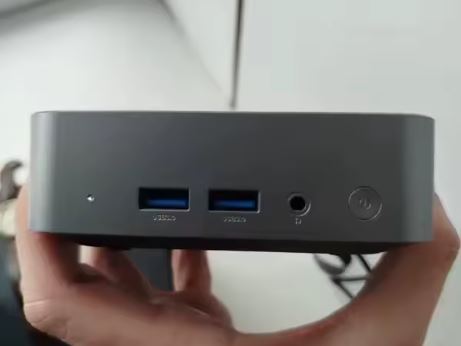
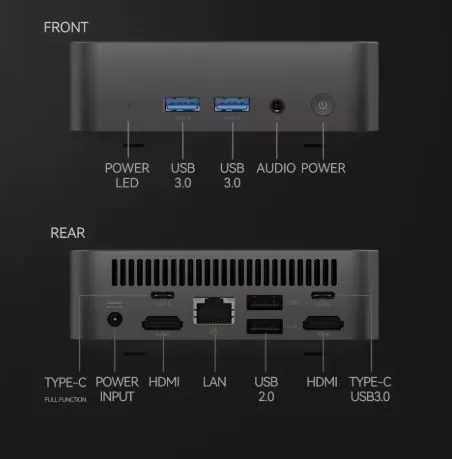
| Frontal Ports | 1× Power, 1× 3.5mm Jack, 2× USB 3.1 Type-A | 1× Power, 1× 3.5mm Jack, 2× USB 3.1 Type-A |
| Rear Ports | 2× USB Type-C, 2× HDMI, 1× LAN, 2× USB 2.0 | 2× USB Type-C, 2× HDMI, 1× LAN, 2× USB 2.0 |
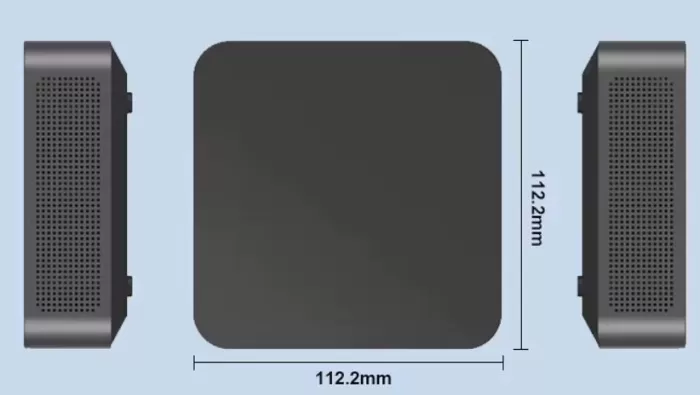
| Dimensions and Chassis | 112.2 × 112.2 × 39.7 mm | 112.2 × 112.2 × 39.7 mm |
| Operating System | Windows 11 Pro | Windows 11 Pro |
🎨 Design and Construction Quality
The Xiaman Mini PC opts for a distinctly square and compact design with a chassis made predominantly of rigid polycarbonate (plastic) with a matte anti-fingerprint finish.
-
Dimensions: Its dimensions of 112.2 × 112.2 × 39.7 mm allow it to take up less space than a paperback book, making it perfect for cluttered desks.
-
Feels in hand: While it doesn't feature the premium aluminum materials of higher-end brands, it feels solid and well-assembled. There are no creaks or looseness in the ports.
-
Aesthetics: Sober lines without garish RGB lighting, designed to blend discreetly into any office or living room environment.
📺 Screen and Multimedia
Although the device does not have its own screen, its behavior with external monitors is a fundamental pillar in this analysis:
-
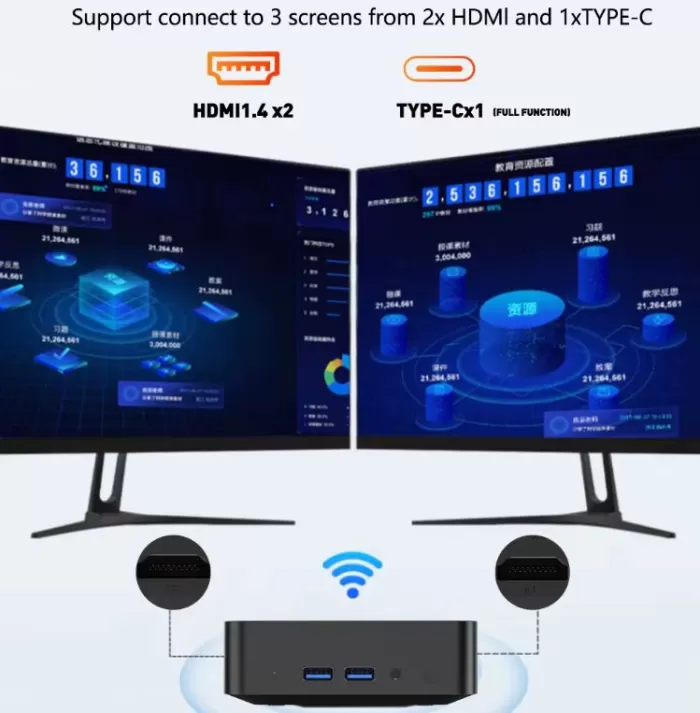
Triple Display Support: With its two HDMI outputs and secondary USB Type-C port with video support, it is capable of powering up to three monitors simultaneously.
-
Image Resolution and Brightness: For multimedia tasks at Full HD (1080p at 60 Hz), performance is excellent. While it supports 4K output via HDMI, we recommend limiting usage to 4K @ 30 Hz to avoid stuttering in the interface due to the limitations of the integrated graphics.
-
Audio: The front-facing 3.5 mm combo jack delivers clear sound for headphones or external speakers. No internal speaker included.
⚙️ Performance and Software
For everyday tasks like office work, web browsing with multiple tabs in Chrome, editing documents in Word, and streaming on Netflix or YouTube, the Xiaman Mini PC responds quickly thanks to its 16 GB of RAM and M.2 SSD.
-
Operating System and Bloatware: It comes with Windows 11 Pro pre-installed. The installation is clean, free of bloatware or adware.
-
Internal Speeds: The included M.2 NVMe SSD offers read speeds exceeding 1500 MB/s, guaranteeing system startup in less than 12 seconds.
-
Processors and real-world performance:
-
Intel Core i3-6100U: This is the most balanced and modern version. It manages DDR4 memory better and offers greater stability in multitasking.
-
Intel Core i7-4510U: Although the "i7" designation sounds appealing, it is a processor that is more than a decade old (4th Gen Haswell) that requires DDR3L memory and has lower thermal and graphics performance than the 6th generation i3.
-
⚡ Energy Consumption and Cables
One of the great strengths of this equipment is its energy efficiency:
-
Idle Power Consumption: It barely consumes between 6W and 9W, making it ideal to leave on 24 hours a day as a home automation server, lightweight NAS or download client.
-
Maximum Consumption (Load): Under maximum stress it does not exceed 25W to 30W.
-
Cable Management: The power supply cable is of standard length and the compact plug makes it easy to hide using the VESA mount.
🌡️ Temperature and Noise (Actual Thermal)
-
Noise: In normal tasks, the intelligent internal fan operates at very low revolutions, being almost imperceptible from more than half a meter away.
-
Temperature: At idle, it remains stable around 38°C to 42°C. During continuous stress tests, it reaches peaks of 72°C to 76°C, safe values for low-voltage processors (TDP 15W), without exhibiting critical thermal throttling.
🔌 Connectivity and Extras
-
Network and Wireless Ports: Despite using a classic hardware base, the manufacturer has adapted an M.2 module to add Wi-Fi 6 and Bluetooth 5.2, achieving stable and fast wireless connections on 5 GHz networks.
-
Advanced BIOS Functions:
-
Auto Power On: Allows the Mini PC to turn on automatically after a power outage.
-
Wake-on-LAN (WoL): Ability to turn on the computer remotely through the local network.
-
🛠️ Expansion and Upgrades
Accessing the inside of the Xiaman Mini PC is easy by removing the four screws located under the lower rubber feet.
-
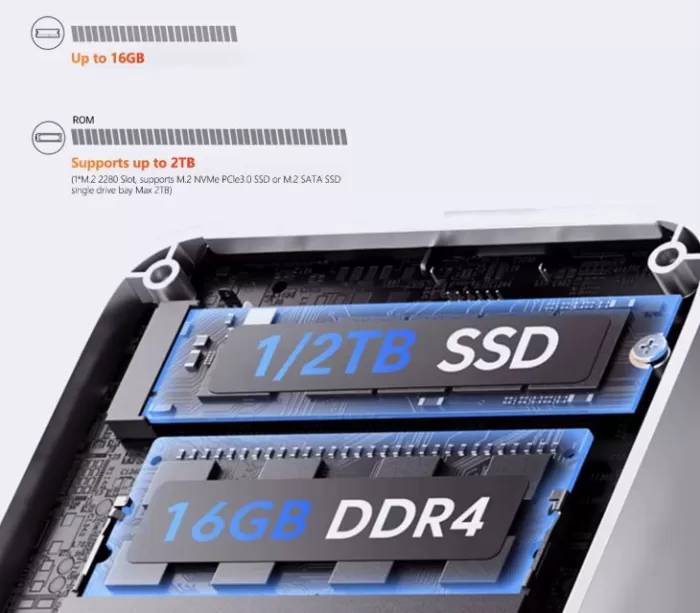
RAM Memory: It has a single SODIMM slot.
-
The i3 version comes configured with a 16GB DDR4 module (the maximum supported by the motherboard). It is not possible to install a second module to enable Dual Channel.
-
The i7 version comes configured with a 16 GB DDR3L module.
-
-
SSD Storage: Features a single hybrid M.2 2280 slot compatible with M.2 NVMe PCIe 3.0 or M.2 SATA SSDs up to 2TB. The stock drive can be easily replaced.
-
2.5" Drives": Does not support 2.5-inch SATA drives due to the reduced dimensions of the case.
🥊 Comparison with Direct Competitors
|
Model |
Processor |
Graphics |
Wi-Fi |
Overall Performance |
Purchase Link |
|---|---|---|---|---|---|
|
Xiaman Mini PC |
Intel i3-6100U / i7-4510U |
Intel HD 520 / 4400 |
Wi-Fi 6 |
⭐⭐⭐ (Basic) |
|
|
Beelink EQ14 |
Intel Twin Lake N150 |
Intel UHD (24 EU) |
Wi-Fi 6 |
⭐⭐⭐⭐ (Superior) |
|
|
PELADN HO5 |
Intel N100 |
Intel UHD Graphics |
Wi-Fi 5/6 |
⭐⭐⭐⭐ (Excellent efficiency) |
💬 Buyer and Community Reviews
The reviews of the Xiaman Mini PC on stores like AliExpress are mostly positive ( 4.8 to 5 stars with more than 11 verified reviews ), mainly highlighting:
-
Praised Points: The fast boot time with Windows 11, how quiet it is on work desktops, and the excellent size-price ratio for connecting to TVs or secondary monitors.
-
Criticisms: Some users point out the initial confusion in the seller's technical specifications regarding the processors and the inability to play demanding PC titles.
🧪 Technical Performance Tests
1. Cinebench R15 (3D Rendering Processor Performance)
This test measures the pure computing power of the processor when rendering a complex three-dimensional scene.
-
CPU Single Core: 95 cb
-
What it measures: The power of a single processor core.
-
Interpretation: This is a modest score. It indicates that the processor will respond adequately for simple, single-threaded tasks (opening documents, basic web browsing), but you will notice some slowness when loading very large web pages or running complex applications.
-
-
Multi-core CPU: 250 cb
-
What it measures: The combined power of all its cores and threads (2 cores and 4 threads via Hyper-Threading).
-
Interpretation: This reflects the physical limitation of having only two physical cores. It's suitable for light multitasking (listening to music while writing a document), but the processor will quickly become overloaded (reaching 100% usage) if you try to edit video, process large compressed files, or have dozens of tabs open simultaneously.
-
2. Geekbench 5 (General System Performance)
Geekbench simulates real-world tasks such as text processing, code compilation, light photo retouching, and face detection.
-
Single-Core: ~620
-
Interpretation: This score indicates the expected fluidity in daily use of the operating system. A score close to 600 points guarantees that the Windows 11 interface will perform relatively well for office tasks, although it falls short of the performance of modern processors (such as an Intel N100, which scores over 900-1000 points in this same test).
-
-
Multi-Core: ~1350
-
Interpretation: This reaffirms that the device is designed strictly for low-power/basic office use. In comparison, any current quad-core processor easily surpasses 2500-3000 points in this test.
-
3. CrystalDiskMark (512GB M.2 NVMe SSD Speed)
This test measures the speed at which the hard drive continuously reads and writes data (large files such as installers or movies).
-
Sequential Read: 1650 MB/s
-
What it means: It is the speed at which the computer reads data from the disk.
-
Interpretation: While it falls short of the theoretical limit of the most expensive NVMe PCIe 3.0 x4 drives (which reach ~3500 MB/s), it's about 3 times faster than a conventional SATA SSD (550 MB/s) and about 12 times faster than a traditional mechanical hard drive. This ensures that Windows 11 boots in under 15 seconds and applications open almost instantly.
-
-
Sequential Write: 1200 MB/s
-
What it means: The speed at which the disk saves massive files to memory.
-
Interpretation: It offers smooth performance for copying large files or downloading content from the internet at high speed without storage bottlenecking.
-
🎮 Gaming and Emulation
It is crucial to be realistic in this section: The seller is advertising unrealistic frame rates for AAA games.
-
Native PC Games:
-
League of Legends (LoL): ~45-60 FPS at 1080p resolutions with low settings.
-
Overwatch / PUBG: Unplayable. The integrated GPU (Intel HD 520) does not reach minimum frame rates (less than 15-20 unstable FPS).
-
-
Emulation:
-
RetroArch / PS1 / PSP / N64: Works perfectly and smoothly at 60 FPS.
-
PS2 / GameCube: Limited. Undemanding titles are playable at native resolution, but complex games will suffer performance drops.
-
❓ Frequently Asked Questions (FAQ)
Does the i7-4510U processor support DDR4 memory?
No. The Intel Core i7-4510U natively supports DDR3L memory. If you're looking for the DDR4-compatible variant, be sure to choose the option with the Intel Core i3-6100U processor .
Can I connect 3 monitors simultaneously?
Yes, by connecting two monitors to the HDMI ports and a third monitor to the USB Type-C port that supports DisplayPort.
Does it come with Windows activated?
Yes, most vendors ship the computer with Windows 11 Pro pre-installed and activated for immediate use.
🎯 Final Conclusion: Is it worth buying?
The Xiaman Mini PC is an interesting product if purchased in the right context. If you're looking for an affordable computer (between €170 and €280 depending on the storage configuration) for office work, point of sale (POS), home theater PC (HTPC), or a lightweight server with Auto Power On, it more than fulfills its purpose.
However, if your budget is around €200, modern processors like the Intel N100 (found in models like the PELADN HO5 or Beelink) offer lower power consumption, better integrated graphics, and greater video decoding support for a similar price.
-
Our recommendation: Choose the variant with an Intel i3-6100U processor over the i7 option due to its more modern architecture and better memory management.
🛒 Where to Buy
You can purchase the Xiaman Mini PC with international shipping and seller's warranty from AliExpress:
👉 See Prices for the Xiaman Mini PC with Intel i7-4510u
👉 See Prices for the Xiaman Mini PC with Intel i3-6100u
🛒 Recommended Alternatives: