If you're looking for a quiet, compact, and energy-efficient mini PC for office work, 4K multimedia playback, or a 24/7 home server, the Beelink Mini S12 Pro and Beelink Mini S13 are two of the best-selling models in Beelink's catalog.
After thoroughly auditing both our individual reviews and the current specifications and internal diagrams of all variants currently sold on Amazon, we have found that there are four real configurations (two with 16 GB of replaceable DDR4 RAM and two with 12 GB of soldered LPDDR5 RAM) that completely change the rear port layout and expansion options.
👉 Prices for the Beelink Mini S13 (N150) on Amazon
👉 Prices for the Beelink Mini S12 Pro (N100) on Amazon
General comparison table: all current versions head-to-head
| Feature | Mini S12 Pro (16 GB DDR4) | Mini S12 Pro (12 GB LPDDR5) | Mini S13 (16GB DDR4 / Dual LAN) | Mini S13 (12 GB LPDDR5) |
| Processor | Intel N100 (4C/4T, up to 3.4 GHz, 6 MB cache) | Intel N100 (4C/4T, up to 3.4 GHz, 6 MB cache) |
Intel Twin Lake N150 (4C/4T, up to 3.6 GHz, 6 MB cache) |
Intel Twin Lake N150 (4C/4T, up to 3.6 GHz, 6 MB cache) |
| Integrated graphics | Intel UHD (24 EUs, 750 MHz) | Intel UHD (24 EUs, 750 MHz) |
Intel Graphics (24 EUs, 1000 MHz) |
Intel Graphics (24 EUs, 1000 MHz) |
| RAM |
16 GB DDR4-3200 (replaceable SO-DIMM) |
12 GB LPDDR5-4800 (soldered, not expandable) |
16 GB DDR4-3200 (replaceable SO-DIMM) |
12 GB LPDDR5-4800 (soldered, not expandable) |
| Storage |
512 GB + 2× M.2 2280 (initial batches with 2.5" bay) |
512 GB + 2× M.2 2280 (up to 4 TB) |
500 GB + 2× M.2 2280 (up to 4 TB) |
512 GB + 2× M.2 2280 (up to 4 TB) |
| Wired network (LAN) |
1× RJ45 LAN 2.5 Gbps (1 GbE in old lots) |
1x RJ45 LAN 2.5 Gbps |
2× RJ45 LAN 2.5 Gbps (Dual Ethernet) |
1x RJ45 LAN 2.5 Gbps |
| Wireless network | Wi-Fi 6 (Intel AX101, 600 Mbps) + BT 5.2 |
Wi-Fi 6 (Intel AX101, 600 Mbps) + BT 5.2 |
Wi-Fi 6 (Intel AX101) + BT 5.2 |
Wi-Fi 6 (Intel AX101) + BT 5.2 |
| Video outputs |
2× HDMI 4K@60Hz |
2× HDMI 4K@60Hz |
1× HDMI 4K@60Hz |
2× HDMI 4K@60Hz |
| USB ports |
4× USB-A 3.2 Gen 2 (10 Gbps) |
4× USB-A 3.2 Gen 2 (10 Gbps) |
3× USB-A 3.2 Gen 2 (10 Gbps) + 1× USB 2.0 |
4× USB-A 3.2 Gen 2 (10 Gbps) |
| USB-C port |
❌ Not included |
❌ Not included |
❌ Not included |
❌ Not included |
| Current price analyzed | $396 (~€362.80) | $384.14 (~€351.95) | $417 (~€382.05) | $395.15 (~€362.05) |
Processor and performance: Intel N100 vs. Intel Twin Lake N150
The processor upgrade marks the first fundamental difference between the two families:
-
Beelink Mini S12 Pro (Intel N100):
Equipped with a quad-core, quad-thread processor with a Turbo frequency of up to 3.4 GHz, 6 MB of smart cache, and integrated Intel UHD graphics with 24 EUs at 750 MHz.
It's more than enough for office applications, multi-tab browsing, 4K playback, and light home use (as detailed in our Beelink Mini S12 Pro review ). -
Beelink Mini S13 (Intel Twin Lake N150):
It retains the 4 cores and 4 threads with 6 MB of cache, but increases the Turbo frequency to 3.6 GHz and accelerates the integrated graphics to 1000 MHz (+33% graphics frequency).
In real-world use, it delivers around 8–12% more sustained CPU performance and improved performance in video transcoding (Plex/Jellyfin) and retro emulation up to PS2 or GameCube (as we analyzed in our Beelink Mini S13 review ).
RAM Memory: 16 GB DDR4 replaceable vs. 12GB LPDDR5 soldered
Both the S12 Pro and the S13 currently have two very different memory architectures that should not be confused when choosing a variant on Amazon:
-
16GB DDR4-3200 (replaceable SO-DIMM) versions:
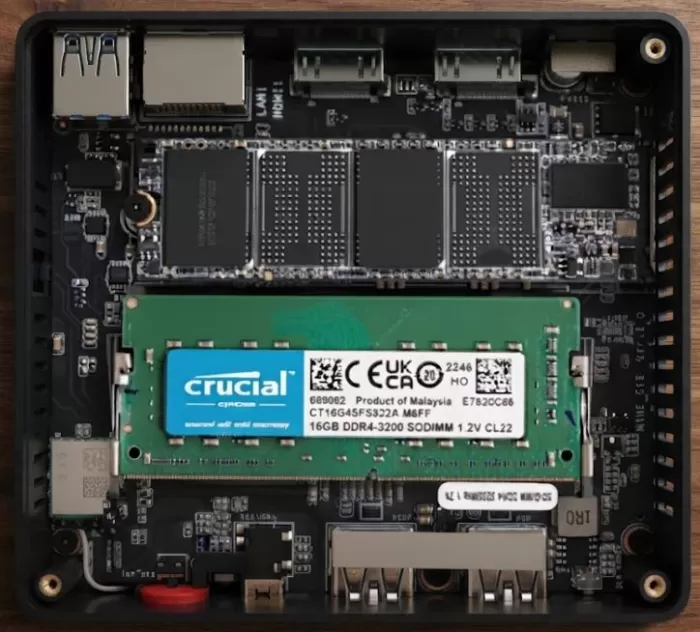
These use a standard SO-DIMM socket with a 16GB DDR4 module running at 3200MHz in a single channel (a limitation inherent to the N100/N150 chips).
Although it has lower bandwidth than LPDDR5 memory, it offers an additional 4GB of usable capacity and allows for future module replacement, making it the superior choice for virtualization (Proxmox VE, Docker containers), virtual machines, or intensive multitasking in Windows 11.
The only drawback of replaceable memory is its 16GB maximum capacity, meaning its only practical use is replacing a single module if it fails. Its 16GB official maximum capacity (though the S12 Pro unofficially supports 32GB modules).
-
12GB LPDDR5-4800 versions (soldered on board):
These integrate LPDDR5 chips at 4800 MT/s soldered directly onto the motherboard. They offer higher transfer speeds and slightly lower power consumption, but are not expandable and are limited to 12GB.
Rear ports: the big difference between DDR4 versions
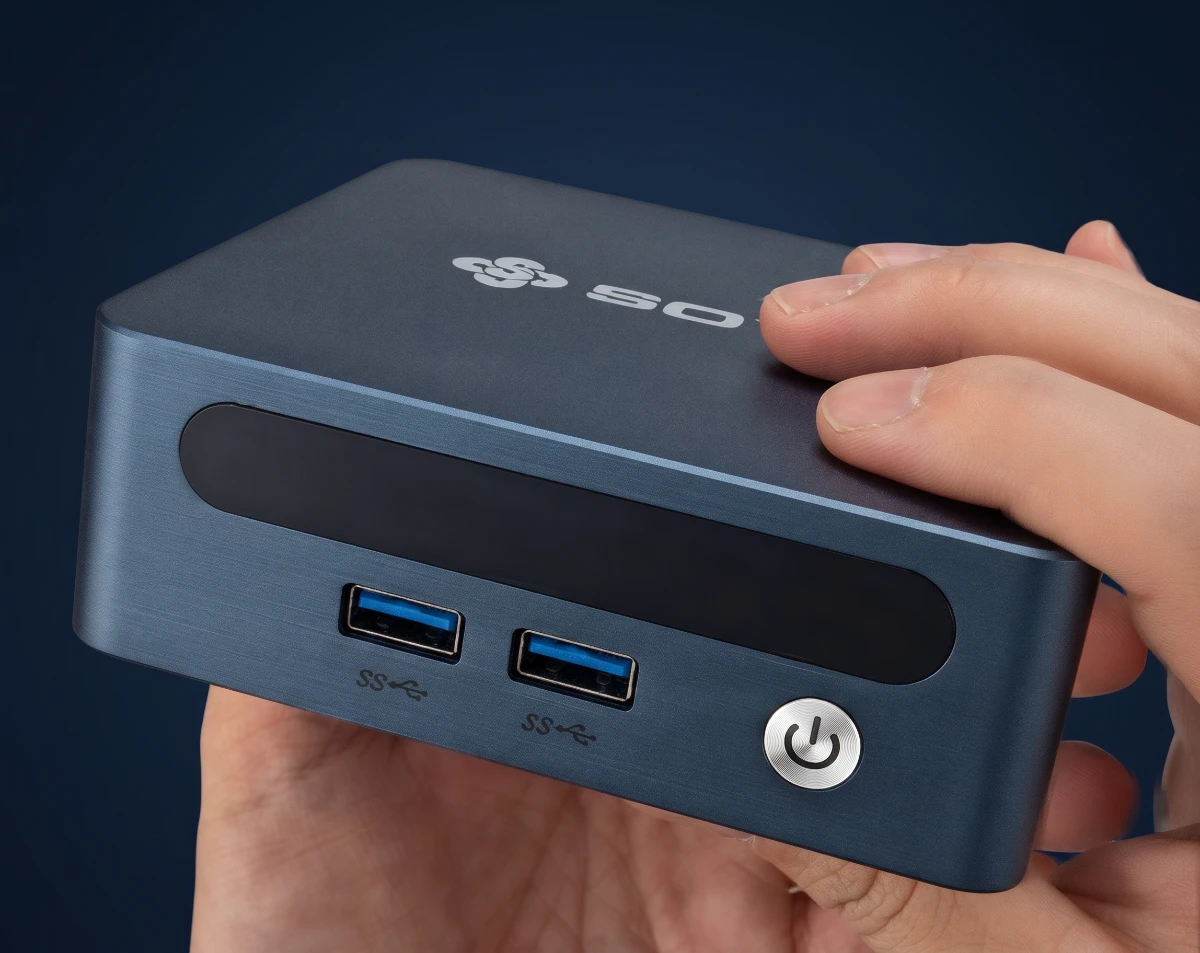
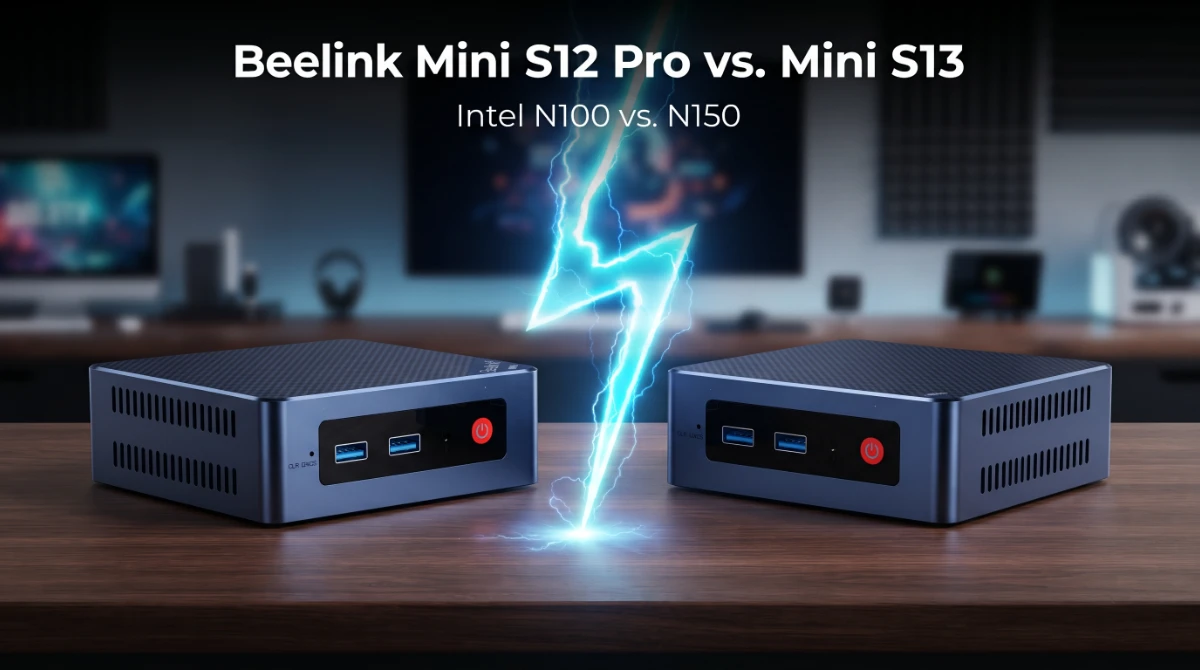
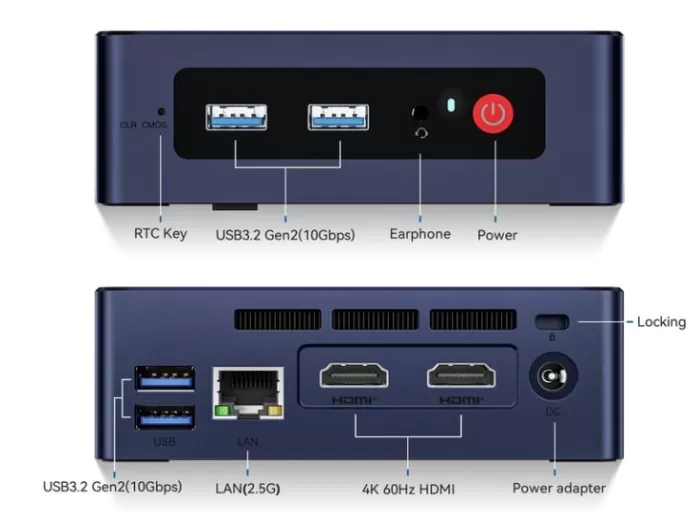
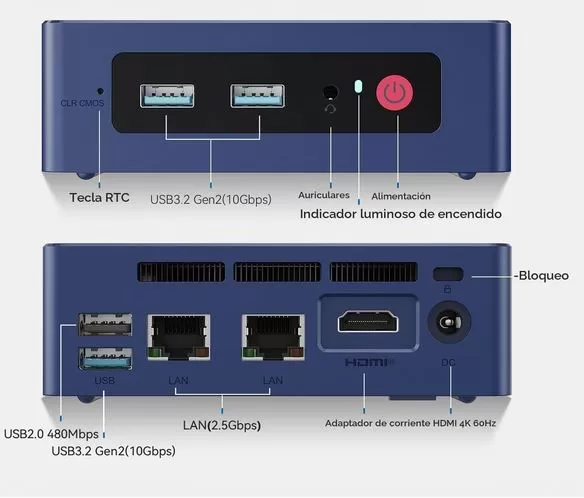
While the front panel is identical across all variants, featuring a red power button, 3.5mm combo jack, 2× USB 3.2 Gen 2 (10 Gbps) ports, and a CLR CMOS/RTC Key hole, the rear panel differs drastically between the S12 Pro DDR4 and the S13 DDR4:
-
Beelink Mini S12 Pro (16 GB DDR4) — Desktop and Dual Monitor Focus:
It features two 4K@60Hz HDMI outputs, four full-speed USB 3.2 Gen 2 10Gbps ports, and one 2.5Gbps RJ45 LAN port.
It's the best configuration if you plan to connect two monitors simultaneously and fast external peripherals.
-
Beelink Mini S13 (16 GB DDR4) — Networking, Server, and Firewall Focus:
To fit two 2.5 Gbps RJ45 Ethernet ports into the same compact 11.5 × 10.2 cm chassis, this revision sacrifices the second HDMI output (leaving it with 1× HDMI 4K@60Hz) and downgrades one of the rear USB ports to USB 2.0 (480 Mbps) (along with three 10 Gbps USB 3.2 Gen 2 ports).
It's a layout tailor-made for building a router/firewall (OPNsense/pfSense), a Proxmox node with separate networks, or a home NAS.
-
12GB LPDDR5 versions (both S12 Pro and S13):
Both retain the classic layout of 2× HDMI 4K@60Hz, 1× LAN 2.5 Gbps and 4× USB 3.2 Gen 2 (10 Gbps).
(Amazon error notice: Some sellers mistakenly include "USB Type-C" in the title or "Dual HDMI" in the listing for the Dual LAN variant of the S13. Neither the S12 Pro nor the S13 includes a USB-C port, and the S13 version with dual 2.5G LAN only has 1 HDMI port.)
Internal storage and cooling: Dual asymmetric M.2 2280
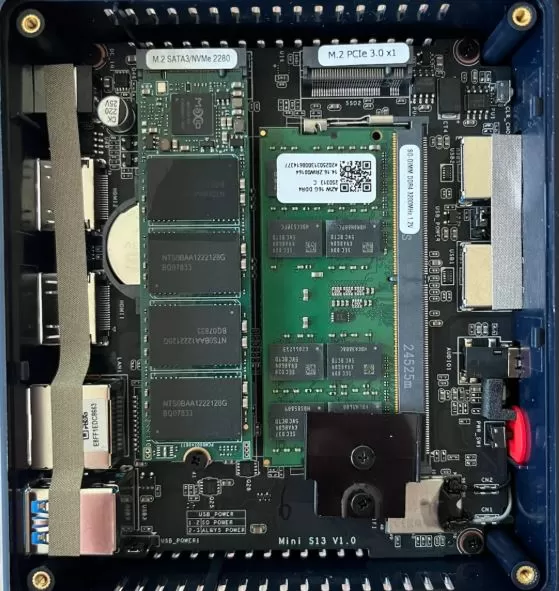
Current revisions of both models (both DDR4 and LPDDR5) incorporate a motherboard with two stacked M.2 2280 slots (up to 4 TB total capacity) cooled by a dedicated heatsink block on the bottom cover (SSD Cooling):
-
Top slot (PCIe 3.0 x1):
Exclusively for NVMe drives (actual maximum speed close to 850 MB/s) and incompatible with M.2 SATA3 SSDs. -
Bottom slot (PCIe 3.0 x4):
Offers full four-lane PCIe 3.0 bandwidth and is compatible with both NVMe and M.2 SATA3 SSDs (where the factory-installed 500/512 GB drive is usually located).
(Note: Only the earliest batches of the first-generation Mini S12 Pro had a single M.2 slot accompanied by an internal 2.5-inch SATA drive bay; all current revisions with 2.5G LAN use the dual M.2 2280 system.)
Price analysis and verdict: Which version to choose?
With the current prices analyzed on Amazon — $396 (~€362.80) for the Mini S12 Pro (16 GB DDR4) and $417 (~€382.05) for the Mini S13 (16 GB DDR4), compared to $384.14 (~€351.95) and $395.15 (~€362.05) for the 12 GB LPDDR5 variants, the difference between models is only $11 to $21 (~€10 to €19).
Recommendation based on your usage profile
-
Choose the Beelink Mini S13 (16 GB DDR4 / Dual LAN — $417 / ~€382) if:
You're going to use it as a 24/7 home server, Proxmox node, Docker container, or router/firewall with dual 2.5 Gbps networks; you need 16 GB of RAM; and you're only going to connect one monitor via HDMI. For $21 (~€19) more than the S12 Pro DDR4, you get the Intel N150 processor and a second 2.5G Ethernet port. -
Choose the Beelink Mini S12 Pro (16 GB DDR4 — $396 USD / ~€363) if:
You are going to use it as a desktop PC or for remote work with two 4K monitors via HDMI, you need 4 USB ports at 10 Gbps and 16 GB of replaceable RAM with a single 2.5G LAN port. -
Choose the Beelink Mini S13 (12 GB LPDDR5 — $395.15 / ~€362) if:
You don't need more than 12 GB of RAM, you want dual 4K HDMI output, 4 USB 3.2 Gen 2 ports, and the extra power of the Intel N150 for 4K multimedia or light emulation. -
Choose the Beelink Mini S12 Pro (12 GB LPDDR5 — $384.14 / ~€352) only if:
You find a temporary discount that places it significantly below the S13.
👉 Check the price of the Beelink Mini S13 (16 GB DDR4 / Dual LAN) on Amazon
👉 Check the price of the Beelink Mini S12 Pro (16 GB DDR4) on Amazon
👉 Check the price of the Beelink Mini S13 (LPDDR5) on Amazon
👉 Check the price of the Beelink Mini S12 Pro (LPDDR5) on Amazon