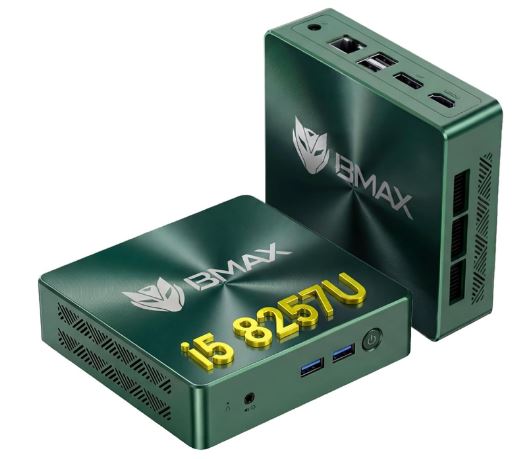
The BMAX B6 Turbo takes a different approach than other budget mini PCs: instead of an entry-level Celeron or Pentium, it uses an Intel Core i5-8257U, a 2019 chip that was once used in MacBook Pro and premium ultrabook laptops.
The result is a remarkable performance leap compared to the Celeron N4500/N5095 or J3355 engines we saw in other BMAX models.
Pros:
-
🚀 Quad-core/8-thread CPU with real mid-range laptop performance (PassMark 7427)
-
💾 16GB DDR4 expandable up to 32GB + dual M.2 slot (NVMe + SATA/NVMe) up to 4TB
-
🎨 Iris Plus 645 GPU far superior to a basic UHD Graphics card for light creative tasks
-
🌐 WiFi 6 and Bluetooth 5.2, next-generation connectivity despite the 2019 chip
-
🐧 Linux/Ubuntu 22.04 LTS compatibility confirmed
Cons:
-
⏳ The i5-8257U is a 2019 chip; in per-core energy efficiency it lags behind modern Alder Lake-N alternatives
-
🌡️ Being a chip with a higher TDP than the Celeron processors in this range, it generates slightly more heat and noise under sustained load.
-
⚠️ There are discrepancies between stores regarding the maximum supported RAM (32GB according to the official specifications, some stores indicate 64GB)
In short: the B6 Turbo offers a very attractive price-to-performance ratio for those who need more real power than a Celeron but don't want to pay the price of a Ryzen 7000 or Intel Core Ultra. According to the manufacturer, it outperforms mini PCs with the latest Core i5-1030NG7 in PCMark 10. It's a solid purchase for advanced office tasks, light editing, and demanding multitasking, though not for gaming or sustained professional workloads.
🛒 Where to buy it?
📦 Unboxing and Box Contents
The B6 Turbo box includes everything you need to start using it immediately:
-
The B6 Turbo mini PC
-
1.5m HDMI cable
-
Power adapter (12V/3A, 36W)
-
VESA mount with screws
-
Multilingual user manual
It does not include a keyboard or mouse, as is typical in this segment.
🛠️ Technical Specifications Table
| Component | Specification |
|---|---|
| CPU | Intel Core i5-8257U (4 cores/8 threads, Coffee Lake 14nm) |
| Frequency | Base 1.4GHz / Turbo up to 3.9GHz |
| Cache | 6MB Smart Cache, 4GT/s bus |
| TDP | 15W (official manufacturer's specification; some stores mistakenly indicate 28W) |
| GPU | Intel Iris Plus Graphics 645 (up to 1.05GHz, 48 execution units, 4K@60Hz) |
| RAM | 16GB DDR4 SO-DIMM 2400MHz (2 slots), expandable up to 32GB |
| Storage | 512GB SSD M.2 2280 NVMe (PCIe 3.0 x4) |
| Slot 2 available | M.2 2280 NVMe (PCIe 3.0 x2) or SATA, up to an additional 4TB |
| WiFi/BT | WiFi 6 (802.11ax) dual band + Bluetooth 5.2 |
| wired network | RJ45 Gigabit (1000Mbps) |
| Video | 1×HDMI 1.4b + 1×DisplayPort 1.2 (dual monitor 4K@60Hz) |
| USB | 2×USB 3.2, 2×USB 2.0 |
| SW | Windows 11 Pro (TPM 2.0), compatible with Ubuntu 22.04 LTS |
| Dimensions | 125×112×33mm |
| Weight | 300 grams |
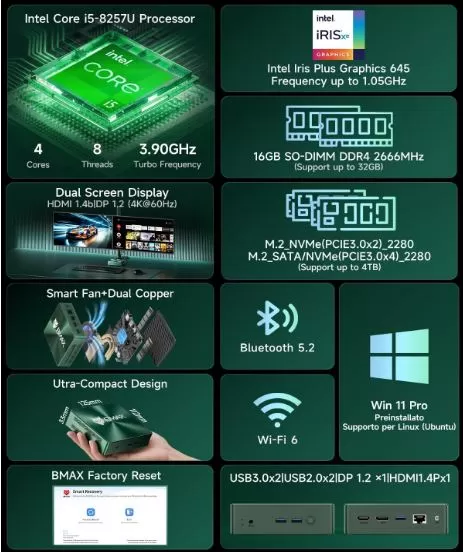
🎨 Design and Construction Quality
The chassis maintains BMAX's usual compact aesthetic, with a black/green finish and a size of just 125×112×33mm, making it lightweight despite housing a more powerful processor than other models from the brand. It incorporates a cooling system with dual copper heat pipes to better manage the heat of a chip that is more demanding than a basic Celeron.
The included VESA mount allows it to be mounted behind a monitor, and the Clear CMOS button visible on the chassis is a handy feature for technicians or advanced users who need to reset the BIOS.
🖥️ Screen and Multimedia
The B6 Turbo supports dual 4K@60Hz monitors by combining HDMI 1.4 and DisplayPort 1.2, a configuration designed for dual-screen workstations or editing with a secondary reference monitor. The integrated Iris Plus 645 GPU offers a significant performance leap compared to the basic UHD Graphics in Celeron processors: it handles video encoding/decoding more efficiently and supports photo retouching or light editing tasks without noticeable bottlenecks.
It does not include its own speakers, so you will need a monitor with integrated audio or an external sound system connected to the 3.5mm jack.
🎮 Performance and Software: Windows and Linux
This is where the B6 Turbo clearly differentiates itself from the rest of the BMAX range. According to the manufacturer's own data, the i5-8257U achieves a score of 7427 in PassMark, 104% higher than the previous generation of Core i5, and 3136 points in PCMark 10 Express, surpassing even systems with the latest Core i5-1030NG7 (3120 points).
In actual use this translates to:
-
Seamless multitasking with dozens of tabs open and multiple simultaneous office applications
-
Good performance in suites like Adobe Photoshop or Lightroom for light editing
-
Code compilation and lightweight virtual machines without frequent crashes
Windows 11 Pro comes pre-installed with TPM 2.0 support, meeting Microsoft's official requirements without the need for workarounds. The manufacturer confirms compatibility with Ubuntu 22.04 LTS, although it requires manual installation (it is not pre-installed).
Since the hardware is considerably more powerful than entry-level Celeron processors, the performance jump when switching to Linux is less dramatic than in those models, but it's still a viable option if you're looking to maximize the computer's energy efficiency or use it as a server.
🔌 Energy Consumption and Cables
The i5-8257U is officially rated at 15W according to the manufacturer's datasheet and several distributors, although one store mentions 28W, possibly confusing it with the chip's maximum configurable TDP in other scenarios.
The included adapter delivers 12V/3A (36W), with enough headroom for peak consumption under sustained load with both M.2 slots occupied and the USB ports in use.
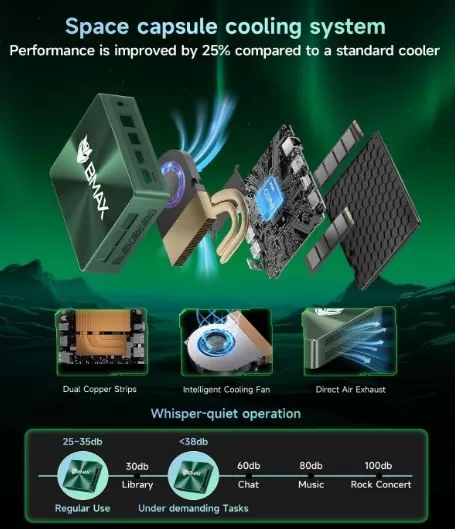
🌡️ Temperature and Noise (Actual Thermal)
Thanks to the dual copper heat pipe system, the B6 Turbo manages temperatures better than mini PCs with more basic cooling, despite running a chip with a higher TDP than the Celeron processors in the BMAX range.
The smart fan adjusts its speed according to the load: in light tasks it is virtually inaudible, and under sustained load (compilations, intense multitasking) it becomes somewhat more noticeable, although within reasonable levels for a device of this size.
🔗 Connectivity and Extras
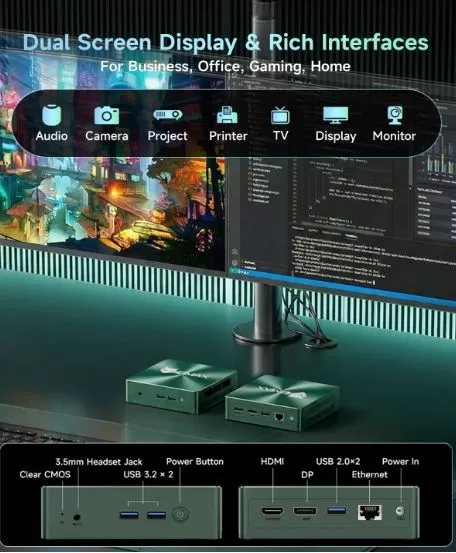
-
🔵 2× USB 3.2
-
⚪ 2× USB 2.0
-
🖥️ 1× HDMI 1.4b (4K@60Hz)
-
🖲️ 1× DisplayPort 1.2 (4K@60Hz)
-
🎧 1× Audio Jack 3.5mm combo
-
🌐 1× RJ45 Gigabit Ethernet
-
📡 WiFi 6 dual band + Bluetooth 5.2
-
📺 Integrated VESA mount
-
🔘 Clear CMOS button
-
🔋 BIOS backup battery (CR2032, 230mAh)
It does not include a fingerprint reader, NFC, or a 5G module, which is to be expected in a mini PC geared towards desktop productivity.
🧩 Expansion and Upgrades
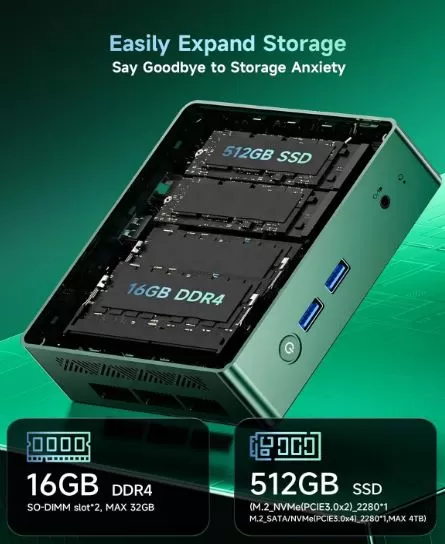
Of the BMAX models analyzed so far, the B6 Turbo offers the greatest real upgrade potential:
-
RAM: 16GB DDR4 SO-DIMM factory in 2 slots, expandable up to 32GB according to the official manufacturer's specifications (some stores mention 64GB, a figure not officially confirmed).
-
SSD Slot 1: M.2 2280 NVMe (PCIe 3.0 x4), occupied by the primary 512GB SSD.
-
SSD Slot 2: M.2 2280 NVMe (PCIe 3.0 x2) or SATA, factory unlocked, up to an additional 4TB.
-
Total combined storage: up to 4TB without replacing the main disk.
This configuration makes it ideal if you plan to use it as a workstation with large file libraries, or as a home NAS/server with disk redundancy.
🛒 Upgrade your BMAX B6 Turbo with these components on AliExpress:
⚔️ Comparison with Direct Competitors
| Model | CPU | RAM | Storage | Approximate price | Strength | Buy on AliExpress |
|---|---|---|---|---|---|---|
| BMAX B6 Turbo | Core i5-8257U | 16GB (up to 32GB) | 512GB + free slot up to 4TB | ~250-300€ | Real performance of a premium laptop | View offer |
| BMAX B3 Pro | N4500/N5095 | 8GB (fixed) | 256GB + free slot | ~125-160€ | Cheaper, much less performance | View offer |
| Beelink SER5 | Ryzen 5 5650U | Up to 64GB DDR4 | 256GB-1TB NVMe | ~350-450€ | Newer, more efficient CPUs are more expensive. | View offer |
| GMKtec NucBox G3 | Intel N100/N150 | 8-16GB DDR4 | 256GB-1TB NVMe | ~140-180€ | More efficient, but less raw power than the i5-8257U | View offer |
The B6 Turbo occupies an interesting middle ground: more powerful than any Intel N100/Celeron chip in its price range, and considerably cheaper than a mini PC with a Ryzen 5000/7000, although sacrificing some energy efficiency due to being an older generation chip.
⭐ Reviews on Well-Known Pages
In stores like PowerPlanetOnline, Darty and Fnac, the B6 Turbo is presented as a solid option for "sustained performance for productivity, multimedia and professional use".
The manufacturer itself highlights in its official communication that the chip outperforms systems with Core i5-1030NG7 (a more recent generation) in PCMark 10 tests, a fact that reinforces its positioning as a real performance alternative against Celeron/N100 range mini PCs.
We haven't found any significant negative reports specific to this model on forums like Reddit, unlike what happens with the entry-level Celeron variants of the BMAX, suggesting a more consistent user experience thanks to the power boost of the i5-8257U.
🔬 Technical Tests
-
PassMark: 7427 points, a 104% improvement over the previous generation of Core i5 according to the manufacturer.
-
PCMark 10 Express: 3136 points, surpassing systems equipped with Intel Core i5-1030NG7 (3120 points) in the same test.
-
The primary 512GB M.2 NVMe PCIe 3.0 x4 SSD offers significantly higher speeds than a SATA SSD, improving load times for heavy applications and system boot times.
-
The DDR4 memory at 2400MHz in dual-channel configuration (2×8GB) provides adequate bandwidth for multitasking with several simultaneous office and browser applications.
🕹️ Gaming and Emulation
Thanks to its Iris Plus 645, the B6 Turbo offers significantly better graphics performance than a basic UHD Graphics 600, although it remains a low-to-mid-range integrated GPU. It is capable of handling:
-
Light eSports (League of Legends, CS:GO/CS2 on low settings, Valorant) at moderate resolutions
-
It emulates retro systems up to PS1/N64 without problems, and GameCube/Wii with varying results depending on the title.
-
Lightweight 2D/3D indie games without difficulty
It's not a machine designed for modern AAA gaming, but its CPU+GPU combination is more versatile than that of the Celeron-based mini PCs from the same brand.
❓ Frequently Asked Questions (FAQ)
How does the i5-8257U actually perform compared to a modern Celeron?
Far superior. With 4 cores/8 threads and a PassMark score of 7427, it clearly outperforms any Celeron N4500/N5095/J3355 from the BMAX series, approaching the performance of a mid-range ultrabook.
What is the maximum amount of RAM I can install?
The manufacturer's official specifications indicate 32GB (2 x 16GB DDR4 SO-DIMM), al though some retailers mention 64GB without official confirmation. We recommend not exceeding 32GB unless directly confirmed by the seller.
Can I use both M.2 slots at the same time?
Yes. Slot 1 is already occupied by the 512GB SSD (NVMe PCIe 3.0 x4), and slot 2 is free, accepting NVMe PCIe 3.0 x2 or SATA drives, up to an additional 4TB.
Is it compatible with Linux?
Yes, the manufacturer confirms compatibility with Ubuntu 22.04 LTS, although it requires manual installation as it does not come pre-installed.
Is it suitable for gaming?
For light eSports and retro emulation, yes, thanks to the Iris Plus 645 GPU. For modern AAA gaming, it's not the right choice.
Is it worth it compared to a mini PC with a Ryzen or Intel N100?
It depends on your priorities: if you're looking for maximum CPU power at a good price, the B6 Turbo wins. If you prioritize modern energy efficiency, an N100 might be a better option; if you prioritize maximum performance regardless of price, a Ryzen 5000/7000 series outperforms it but costs considerably more.
🏁 Final Conclusion
The BMAX B6 Turbo is one of the brand's most compelling offerings for those who need real computing power—not just efficiency—in an affordable mini PC form factor. Its Core i5-8257U processor, although released in 2019, remains a capable chip that can handle demanding multitasking, light editing, and professional tasks with ease, supported by ample RAM and storage upgrade options.
It's the ideal purchase if your priority is processing power at a reasonable price, and you're willing to sacrifice some energy efficiency compared to more modern alternatives with Intel N100 processors. However, if you prioritize minimal power consumption and don't need that much raw power, the BMAX B3 Pro or a GMKtec with an N100 might be better options within the budget mini PC market.