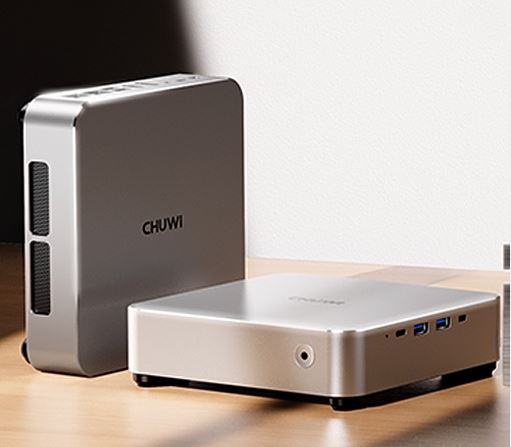
The CHUWI AuBox with Ryzen 7 8745HS is one of the most interesting mini PCs on the market in its price range.
It offers a very powerful AMD Zen 4 platform in a sleek aluminum chassis, with outstanding connectivity including USB4, OCuLink for external GPUs, dual 2.5G LAN and support for four simultaneous displays.
✅ Pros:
-
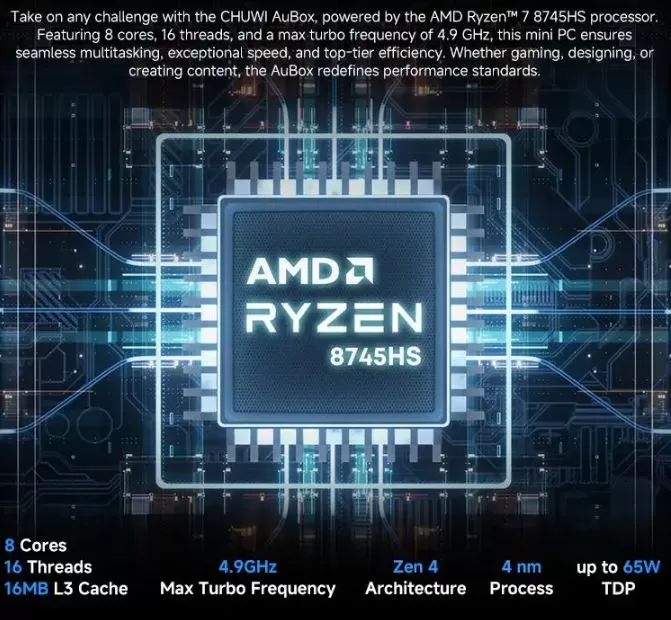
Extremely capable AMD Ryzen 7 8745HS processor (8 cores, 16 threads, up to 4.9 GHz)
-
High-quality aluminum housing with included VESA mount
-
USB4, OCuLink, dual 2.5G LAN, 4 simultaneous video outputs
-
Easy to open and expand: 2 M.2 slots and 2 SODIMM DDR5 slots
-
Very competitive price (~440 USD / ~390€)
❌ Cons:
-
It comes with a single 16GB DDR5 module, which severely penalizes the integrated graphics (up to 70% less graphics performance in single-channel).
-
The included SSD is PCIe 3.0, slower than expected at this price.
-
No dedicated NPU (no hardware AI acceleration)
-
BIOS with very limited customization options
🎯 Quick conclusion: A mini PC with excellent hardware that Chuwi has artificially limited with poor configuration choices. With a RAM upgrade for around €35, it becomes a direct competitor to systems costing €200 more.
👉 View Prices and Availability
📦 Unboxing and Box Contents
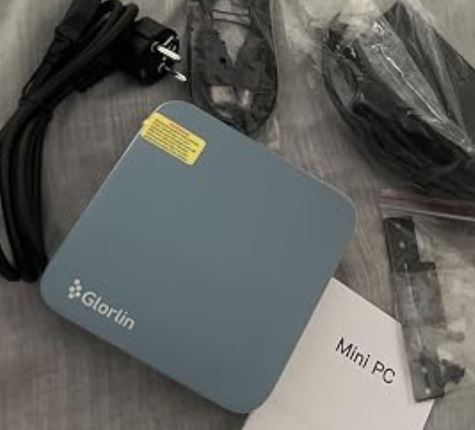
Upon opening the box —made primarily of cardboard with internal foam— we found:
-
🖥️ Mini PC CHUWI AuBox
-
🔌 19V / 6.32A (120W) power adapter — quite bulky
-
🔩 VESA mount with screws for rear monitor mounting
-
📄 Quick Start Guide (Multilingual)
-
⚠️ No extra thermal pad for the second M.2 slot
The packaging is adequate, without any flashy extras. The lack of an HDMI or network cable is a major drawback.
📊 Technical Specifications
| Component | Detail |
|---|---|
| Processor | AMD Ryzen 7 8745HS — 8 cores / 16 threads, up to 4.9 GHz (Zen 4) |
| Integrated graphics | AMD Radeon 780M — 12 CUs, up to 2.600 MHz (RDNA 3) |
| RAM Memory | 16 GB DDR5-5600 MHz (1 module; 2 SODIMM slots, expandable up to 64 GB) |
| Storage | 512 GB M.2 2280 PCIe Gen 3 (AirDisk) |
| Expansion | 1 additional free M.2 2280 slot for NVMe |
| Video outputs | HDMI 2.1 × 2, DisplayPort 1.4 × 1, USB4 (DP included) → up to 4K@144Hz |
| USB ports | USB4 ×1 (40 Gbps), USB 3.2 Gen2 Type-C ×1, USB 3.2 Gen2 Type-A ×2, USB 2.0 ×2 |
| Red | Wi-Fi 6 (802.11ax), Bluetooth 5.1, LAN 2.5 Gbps ×2 |
| OCuLink | ✅ Yes (it occupies an M.2 slot when activated) |
| Operating system | Windows 11 Pro pre-installed |
| Power supply | 120W (19V/6.32A) |
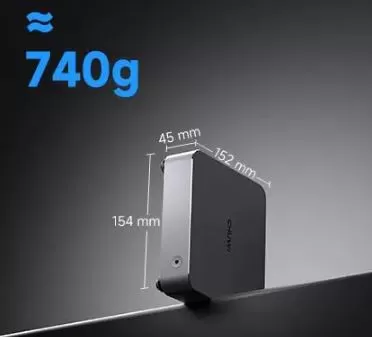
| Dimensions / Weight | 154 × 152 × 45 mm / ~740 g |
| TDP sustained | ~60 W (configurable in BIOS) |
👉 View Prices and Availability
🎨 Design and Construction Quality
CHUWI AuBox Mini PC
The AuBox is a pleasant surprise in this regard. The casing is made of milled aluminum, with only a few internal components in plastic. The result is solid, cool to the touch, and visually elegant: it's reminiscent of the Mac Mini design, albeit more compact.
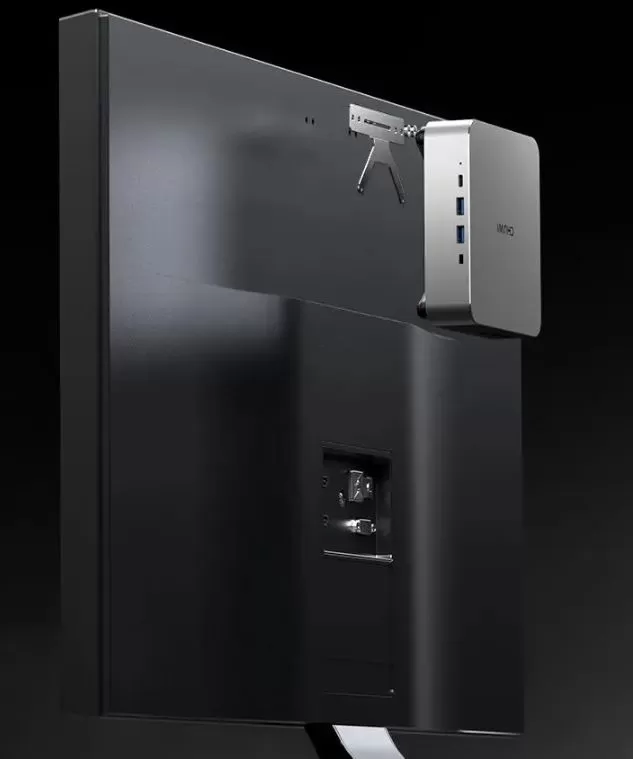
One unusual feature is that the front panel has no ports, only the power button. The USB ports have been moved to the right side, and the video/network ports to the back. This might seem odd at first, but it's very practical for VESA mounting: the device sits behind the monitor without cables visible in awkward places.
To open it, simply remove the four screws accessible through the holes in the rubber feet; no special tools or force are needed. Once open, you have immediate access to the RAM, the two M.2 slots, and the Wi-Fi module.
Construction: 9/10.
🖥️ Screen and Multimedia
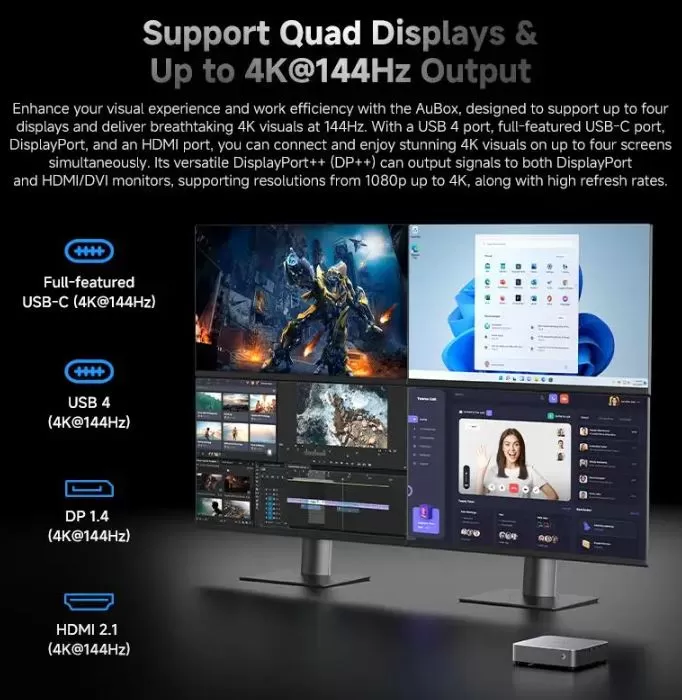
The AuBox doesn't include its own screen; it's a mini desktop PC. However, its video output capabilities are extraordinary: it supports up to four simultaneous monitors via HDMI 2.1 (×2), DisplayPort 1.4, and USB4—with a maximum resolution of 4K at 144Hz.
4K video streaming (YouTube, Netflix) works smoothly thanks to the AMD Radeon 780M's hardware decoding. Audio is handled via the 3.5 mm jack or HDMI/DP; there are no built-in speakers.
For multimedia content, light video editing (up to 4K in DaVinci Resolve or Premiere with certain limitations) and office work with multiple monitors, this computer is an extraordinarily versatile option in its price class.
⚙️ Performance and Software
CPU
The Ryzen 7 8745HS is almost identical to the 8845HS (4% difference in maximum turbo boost), making it one of the most powerful chips available in mini PCs in this range. In Cinebench R23 multi-core, it scores around 16,100 points, very close to the 8845HS (~16,350 points).
GPU (the big problem)
Here's where things get most controversial. With only one DDR5 module included, the Radeon 780M operates in 64-bit bus width mode instead of 128 bits. The impact is brutal:
-
3DMark Wildlife with 1 module (single-channel): 10,604 points
-
3DMark Wildlife with 2 modules (dual-channel): 16,986 points → +70% improvement
This isn't a chip issue, but a factory configuration problem. Adding a second DDR5 module (around €30-40) completely solves the problem.
👉 View Prices and Availability
Windows 11 Pro and Software
It comes with Windows 11 Pro pre-installed and activated, ready to use right out of the box. The system is reasonably clean, without excessive bloatware. The BIOS has very limited options for manual power or fan adjustment, which may frustrate advanced users.
🔌 Energy Consumption and Cables
The CHUWI AuBox has a sustained TDP of ~60W and can reach peaks of up to 70-75W under prolonged maximum load.
At idle, it consumes approximately 10-15W. The 120W power supply is generous and leaves room for USB peripherals.
The power cable is a standard circular DC connector, not USB-C, which limits the possibility of using power banks or universal chargers.
🌡️ Temperature and Noise (Actual Thermal)
The cooling system uses a fan that draws air in from the base and expels it through one of the top edges. The aluminum chassis also acts as a secondary passive heatsink for the RAM and SSD.
In prolonged stress tests (Cinebench R15 loop), the processor reaches peaks of ~90-92°C but maintains performance without visible throttling — a very positive fact that confirms that the cooling system is well sized.
In everyday desktop use, the computer is almost silent. You can only hear the fan under heavy GPU or CPU load.
🔗 Connectivity and Extras
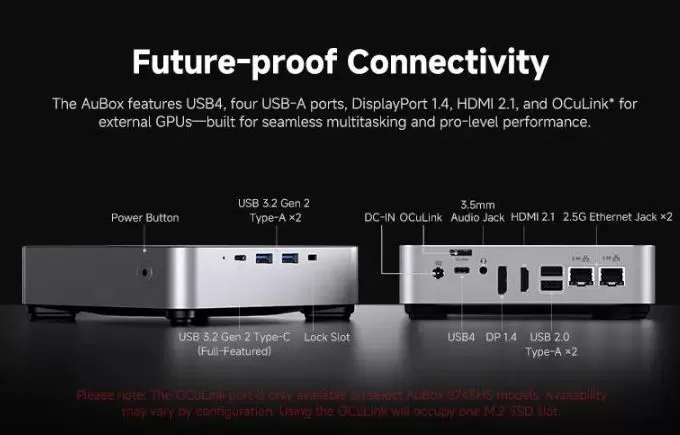
The AuBox is one of the best-connected mini PCs in its price range:
-
USB4 (40 Gbps): Allows connection of eGPUs, high-speed docks, or 10GbE adapters
-
OCuLink: for high-performance external GPUs (occupies one M.2 slot when used)
-
Dual 2.5G LAN: ideal for NAS, virtualization, or high-throughput network environments
-
Wi-Fi 6 (802.11ax) + BT 5.1: ~970 Mbps download speeds in real-world testing
-
AI-Link: Chuwi's proprietary feature for optimized connection with accessories
-
❌ No NFC, no fingerprint reader, no 5G cellular (it's a mini desktop PC)
-
❌ Neither Wi-Fi 7 nor Wi-Fi 6E
🔧 Expansion and Upgrades
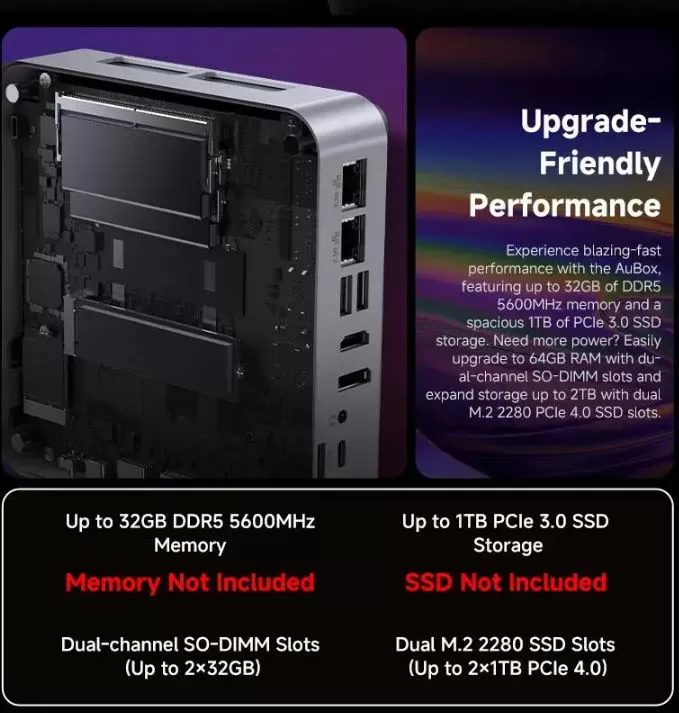
This is one of the strongest points of the AuBox. Opening it is trivial and inside you will find:
| Component | Stock | Maximum supported | Recommendation |
|---|---|---|---|
| RAM | 16 GB (1× SODIMM) | 64GB (2× 32GB) | Add 1× 16 GB DDR5 (~€30-35) |
| SSD principal | 512GB PCIe 3.0 | 2 TB (without integrated heatsink) | Upgrade to 1 TB PCIe 4.0 (~€50) |
| Second SSD M.2 | Empty | 2 TB | Add an M.2 2280 NVMe |
| OCuLink | Available | eGPU compatible | Activate it with the OCuLink eGPU box |
⚠️ Important: When using OCuLink, the second M.2 slot is occupied, so you cannot have a second SSD and an active eGPU at the same time. The platform theoretically supports up to 96 GB of RAM with 48 GB SODIMM DDR5 modules.
👉 View Prices and Availability
🆚 Comparison with Direct Competitors
| Feature | CHUWI AuBox 8745HS | GMKtec K8 Plus | Geekom A8 Max | Beelink SER8 |
|---|---|---|---|---|
| Processor | Ryzen 7 8745HS | Ryzen 7 8845HS | Ryzen 7 8845HS | Ryzen 7 8745HS |
| RAM | 16GB 1× SODIMM | 32GB 2× SODIMM | 32GB 2× SODIMM | 32GB 2× SODIMM |
| SSD | 512GB PCIe 3.0 | 1 TB PCIe 4.0 | 1 TB PCIe 4.0 | 1 TB PCIe 4.0 |
| OCuLink | ✅ Yes | ❌ No | ❌ No | ❌ No |
| AND | 2× 2.5G | 1× 2.5G | 1× 2.5G | 1× 2.5G |
| USB4 | ✅ Yes | ✅ Yes | ✅ Yes | ✅ Yes |
| Approx. price | ~460€ | ~520€ | ~550€ | ~500€ |
| Housing | Premium aluminum | Aluminum | Aluminum | Plastic+Metal |
The AuBox's unique advantages are its lower price, OCuLink, and dual 2.5G LAN. Its major disadvantage compared to rivals: it comes from the factory with single-channel RAM.
💬 Reviews on Specialized Websites
Technical media reviews are consistent: the hardware is excellent, the factory configuration is its Achilles' heel.
-
TechRadar gives it an overall score of 4/5, highlighting the sleek aluminum design and ease of upgrading, but harshly criticizing the decision to include only one RAM module: "an excellent mini PC that Chuwi has ruined with a couple of very poor choices. "
-
NotebookCheck concludes that "for under €400, there are few serious competitors in this performance range," particularly praising the cooling system and dual LAN. The limited RAM is the main drawback.
-
GizChina describes it as "a true powerhouse for any type of user," praising the Radeon 780M iGPU for light design tasks and the extensive connectivity.
-
Geektopia.es (Spanish review) highlights that the AuBox can sustain a 65W TDP stably, something unusual in mini PCs with this platform, and that this translates into better CPU and iGPU performance compared to other models that limit the TDP to 45W.
-
AndroidPCTV confirms the low fan noise level in everyday use and the good results in multimedia playback.
-
AliExpress: Review | 4.9 out of 154 ratings. Some reviews:
-
It works perfectly for game servers; it can run five servers without any issues. It's currently running servers for Enshroud, Palworld, DST, Valheim, and V Rising with four to eight players each, with absolutely no problems on the 32GB version. I also plan to set up a NAS on it, as I see there's still some extra performance available in this little beast.
-
The mini-PC I always dreamed of for retro emulation ❤️ 🎮 I waited for Black Friday and snagged it for €292 at the end of November. Windows 11 Pro activated, no bloatware (installation starts the first time you turn it on). Super quiet and cool (it's even made of aluminum) and very fast (boots up in just a few seconds). I wasn't expecting the OcuLink port because I wasn't going to use it, but it's there. The integrated Radeon 780M runs like a dream with Switch and PS3 at native resolution, and that's without installing another 16GB of RAM. It's a shame about the RAM and AI crisis we've been hit with, but in the future I'll add another module to emulate at 4K and have more memory to spare. Hats off to Chuwi, and I hope it lasts me a long time 🤞🏽 🍀
-
An absolute steal. I got it for under €280 on Black Friday and I love it. Excellent build quality, OcuLink port, and over 15,000 points in Cinebench. Temperature control is fine for me; the GPU temperature hovers around 60°C during Cinebench. I 3D printed extensions to keep the fan's suction point away from the desktop. The fan is audible under load, but it's not a deal-breaker. The only downsides are: - a clicking sound from the fan on startup - the price of DDR5 these days makes upgrades a bit of a stretch.
-
The perfect item, arrived in one day. The only downside I can find is that the fan is a bit noisy under heavy use, but updating the AMD drivers reduces this issue. It's not excessively loud, but it's a minor complaint. It would be a nice touch if the supplier offered the option to upgrade the memory to 32GB in two 16GB modules to take advantage of dual-channel. I had to do it myself. Windows comes pre-installed with no third-party applications, which is a nice bonus.
-
I added a 1TB M.2 hard drive and an extra 8GB of RAM to take advantage of both channels, and it's incredibly fast. There's no picture (it's mounted on the VESA screen) or sound. It's fantastic. Let's hope it lasts!
-
🔬 Technical Tests
🧠 CPU — Outstanding Performance
The Ryzen 7 8745HS (Zen 4, 4nm, 8 cores / 16 threads) operates with a sustained TDP of 60W (PL1) and peaks of 70W (PL2), which is unusual for a mini PC at this price point. In prolonged stress tests ( Cinebench R15 loop ), the system maintains a stable average of ~2,600 points without any performance drop—an exceptional result that confirms the cooling system is well-designed.
| Test CPU | CHUWI AuBox 8745HS | Geekom A8 Max 8845HS | Minisforum UM890 Pro 8945HS |
|---|---|---|---|
| Cinebench 2024 Multi | 868 pts | 943 pts (+9%) | 978 pts (+13%) |
| Cinebench R23 Multi | ~16.100 pts | 16.350 pts (+1%) | 17.131 pts (+6%) |
| Cinebench R20 Multi | ~6.300 pts | 6.428 pts (+1%) | 6.762 pts (+6%) |
| Blender BMW27 CPU | ~192 s | 194 s | 189 s |
| PCMark 10 Score | 6.391 pts | 6.993 pts (+9%) | 7.099 pts (+11%) |
| 7-Zip Multi | ~63.000 MIPS | 71.161 MIPS (+11%) | 73.742 MIPS (+15%) |
🗣️ Opinion: The CPU performance difference compared to the 8845HS is less than 2% in most tests. The 8745HS lacks an NPU for local AI acceleration, which in practice only matters if you use tools like Windows Studio Effects or Copilot+ PC features intensively. For 99% of users, this difference is irrelevant.
🎮 GPU — The Dramatic Effect of Dual-Channel
This is the most important point of the entire review. The Radeon 780M (RDNA 3, 12 CUs, up to 2,600 MHz) is the best iGPU of its generation, but it is critically dependent on memory bandwidth to operate at full performance.
| Test GPU | Single-Channel (stock) | Dual-Channel (upgrade ~35€) | Improvement |
|---|---|---|---|
| 3DMark Wildlife Score | 10.604 | 16.986 | +70% |
| 3DMark FireStrike Graphics | ~4.600 | ~7.600 | +65% |
| 3DMark TimeSpy Score | ~1.909 | ~3.100 | +62% |
| AIDA64 FP32 Ray-Trace | ~17.500 KRay/s | ~27.800 KRay/s | +59% |
| AIDA64 Memory Copy | ~35,000 MB/s | ~68,000 MB/s | +94% |
🗣️ Opinion: This drop in single-channel graphics performance is the most questionable engineering decision of the AuBox. With a 16GB module, the iGPU memory bus operates at 50% of its theoretical capacity (64 bits instead of 128 bits). The impact is so severe that an AuBox with upgraded RAM outperforms the Geekom A8 Max, which costs €100 more—and already comes with dual-channel memory. Chuwi saves around €20 at the factory, but it costs you 70% of your graphics performance. It's simply unacceptable.
💾 Storage — Adequate but Not Outstanding
The included SSD is an AirDisk AFF 512 GB with a PCIe Gen 3 interface (even though the platform supports PCIe 4.0):
| SSD | AuBox (PCIe 3.0) | Average Competence (PCIe 4.0) |
|---|---|---|
| Sequential Reading | ~3.265 MB/s | ~5,100 MB/s |
| Sequential Writing | ~2,810 MB/s | ~4,400 MB/s |
| System performance | Stable, no falls | — |
🗣️ Opinion: The SSD does the job, but it's another obvious cost-cutting measure. For everyday use (Office, browsing, video), you won't notice a difference. However, for tasks like video editing, code compilation, or moving large amounts of files, a PCIe 4.0 SSD can be 40-60% faster. If you plan to use it professionally, the first upgrade I'd make after the RAM is to replace this SSD with a good quality PCIe 4.0 one.
📡 Connectivity and Network — Remarkably High
Network tests confirm very solid performance:
| Proof | CHUWI AuBox | Mini PC mid-class | Valuation |
|---|---|---|---|
| Wi-Fi 6 Reception | 969 Mbps | 1.123 Mbps | ✅ Good |
| Wi-Fi 6 Streaming | 748 Mbps | 1.060 Mbps | ⚠️ Below average |
| USB4 (AS SSD Seq Read) | ~3.245 MB/s | 2.843 MB/s media | ✅ Above |
| LAN 2.5G | 2.350 Mbps | — | ✅ Dual port |
🗣️ Opinion: The Realtek RTL8852BE Wi-Fi 6 chip has slightly below-average transmission speeds compared to rivals using the MediaTek MT7922 (Wi-Fi 6E). This isn't a problem for home users, but it is a limitation for those who need fast Wi-Fi transfers. On the other hand, the dual 2.5G LAN is a unique advantage in its price range—perfect for NAS servers, virtualization, or environments with high network demands.
🌡️ Thermal and Consumption — The Most Positive Point
The sustained stress test is where the AuBox surprises the most:
| Scenery | CPU temperature | Consumption | Stability |
|---|---|---|---|
| Repose | ~35-40°C | 10-15W | — |
| Office automation | ~50-60°C | 17W | Perfect |
| Gaming | ~71°C | ~69W | Perfect |
| Maximum stress | ~90-92°C | ~75W | Sin throttling |
| Maximum noise | — | — | 34 dBA |
🗣️ Opinion: Reaching 90°C under maximum stress might sound alarming, but it's completely normal for high-performance processors integrated into compact cases. The important thing is that the system doesn't throttle (it doesn't lower the frequency to protect itself) and maintains over 2,600 points in Cinebench R15 indefinitely. The fan at its maximum of 34 dBA is almost inaudible in a normal room. During idle and desktop use, it's simply not audible. This cooling system is better designed than in many mini PCs that cost twice as much.
🎯 Multimedia — Perfect for HTPC
Video playback tests confirm full support for modern codecs:
| Codec | Result | Method |
|---|
| Codec | Result | Method |
|---|---|---|
| H.265 / HEVC | 4K@60Hz HDR ✅ | Hardware |
| AV1 | 4K@60Hz + 8K@60Hz ✅ | Hardware |
| VP9 | 4K@60Hz ✅ | Hardware |
| H.264 | 4K@30Hz ✅ | Hardware |
| Maximum bitrate | 350 Mbps ✅ | — |
Verified streaming services: YouTube 4K, Netflix 4K, Amazon Prime HD, Disney+ HD, Apple TV+ HD.
🗣️ Opinion: As an HTPC (home theater PC connected to a 4K TV or projector), the AuBox is practically perfect. Its hardware decoding of the AV1 codec—currently the most efficient and the one used by YouTube at maximum quality—works smoothly even at 8K, something older Intel processors can't do. If you're looking for a device for Kodi, Plex, Netflix, or 4K HDR streaming, this is one of the best mini PCs you can buy.
📊 Score by Sections
| Category | Use | Comment |
|---|---|---|
| 🧠 CPU Performance | 9/10 | Top in its price range, practically the same as the 8845HS |
| 🎮 GPU Performance (stock) | 5/10 | RAM single-channel penalizes severely. |
| 🎮 GPU performance (dual-ch.) | 9/10 | Excellent after a €35 upgrade |
| 💾 Storage | 7/10 | PCIe 3.0 SSD is decent but could be improved |
| 📡 Connectivity | 9.5/10 | Dual LAN 2.5G + USB4 + OCuLink unique at its price |
| 🌡️ Thermal | 9/10 | Stable without throttling, very quiet |
| 🎬 Multimedia | 10/10 | Perfect for HTPCs, full modern codecs |
| 💰 Value for money | 8.5/10 | Excellent with a RAM upgrade, good without it |
👉 View Prices and Availability
🎮 Gaming and Emulation
CHUWI Aubox R7 Mini PC
With the Radeon 780M in dual-channel (recommended configuration), the AuBox is one of the most capable mini PCs with iGPU on the market:
Games in 1080p (medium/low quality):
-
🎮 League of Legends / Dota 2: +120 FPS estables
-
🎮 Fortnite (Performance Mode): 60-80 FPS jugables
-
🎮 Tekken 7 / Mortal Kombat 11: 60+ FPS estables
-
🎮 CS2: 60-90 FPS on medium quality
-
🎮 Cyberpunk 2077 / Recent AAA Games: Only playable in 720p low quality (~30-45 FPS)
-
🎮 Undisputed Boxing (2024): ~40 FPS at medium quality 1080p
With eGPU via OCuLink or USB4: Things change dramatically. Reviewers tested the AuBox with an AMD RX 7800M via OCuLink, and the results were excellent for 1080p/1440p gaming. Even via USB4, very solid eGPU performance was achieved.
Emulation:
-
✅ PSP, PS2, GameCube, Wii, DS: Perfecto a 1080p
-
✅ PS3 (RPCS3): Most games at 720p-1080p with settings
-
⚠️ Nintendo Switch (Yuzu/Ryujinx): Demanding titles pushed to the limit
-
⚠️ PS4/Xbox One (emulation): Experimental, results may vary
❓ Frequently Asked Questions (FAQ)
❓ Does the CHUWI AuBox include a screen?
No. It's a mini desktop PC; you need to connect your own monitor via HDMI, DisplayPort, or USB-C.
❓ Can I connect an external GPU?
Yes, that's one of its biggest advantages. It has an OCuLink port (the fastest option) and USB4 (also compatible with eGPUs). When using OCuLink, the second M.2 slot is occupied.
❓ What is the maximum amount of RAM I can install?
Up to 64 GB with two 32 GB DDR5 SODIMM modules. With 48 GB modules, the platform can theoretically reach 96 GB.
❓ Does it work with Linux?
Yes. Several reviewers have tested it with Ubuntu and other distributions. AMD drivers are well supported on Linux.
❓ Is the fan very noisy?
It's almost inaudible during desktop use. You only notice it under heavy CPU/GPU loads. It's silent at idle.
❓ Is it worth it without upgrading the RAM?
For office use, yes, but for gaming or graphics-intensive tasks, adding the second module is essential. The impact is so significant that it's practically a must-have component from day one.
🏁 Final Conclusion
The CHUWI AuBox with Ryzen 7 8745HS is ideal for:
-
🏠 Home users who want a powerful, quiet, and small PC
-
💼 Professionals who need multi-monitor support (up to 4 screens)
-
🎮 Esports or emulation players looking for a compact and expandable option
-
🖥️ Content creators who work with video and want to connect an eGPU in the future
-
🌐 Technical users who value dual 2.5G LAN for NAS or network environments
It's not ideal if you need a powerful discrete graphics card without investing in an eGPU, or if you're looking for the best value for money without needing to upgrade.
Alternatives to consider:
-
💡 Geekom A8 Max — Same chip but already with 32 GB dual-channel from the factory (~€550)
-
💡 Beelink SER8 — Also 8845HS with 32 GB, sometimes cheaper (~€500)
-
💡 Minisforum UM890 Pro — Ryzen 9 8945HS if you need more raw power
In short, the AuBox is a diamond in the rough: brilliant in terms of hardware, with a few factory defects easily fixed with a minimal investment of around €35-40 in RAM. If you're willing to make that small upgrade, you get a mini PC that competes with systems costing €150-200 more.
🛒 Where to buy it?
| Store | Link | Approx. price |
|---|---|---|
| 🛒 AliExpress | 👉 Buy on AliExpress | ~390-470€ |