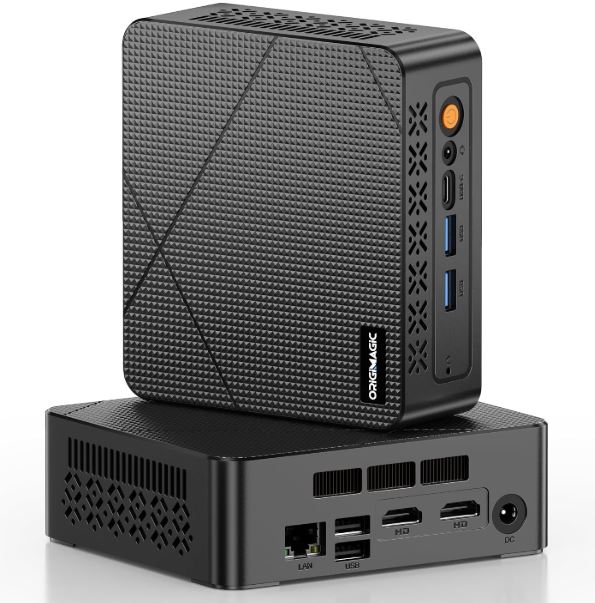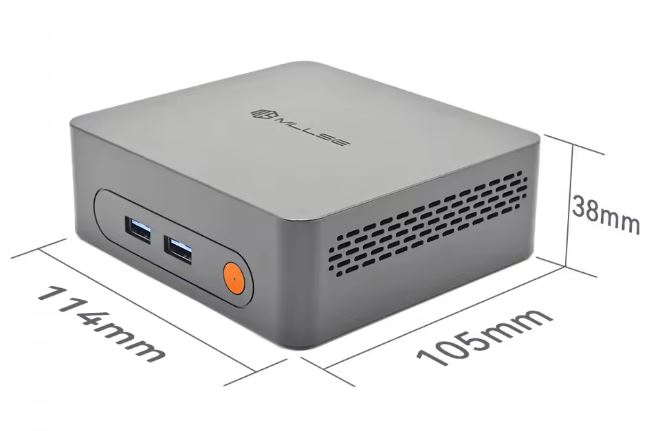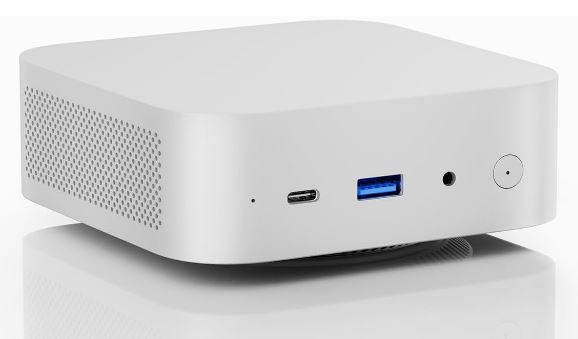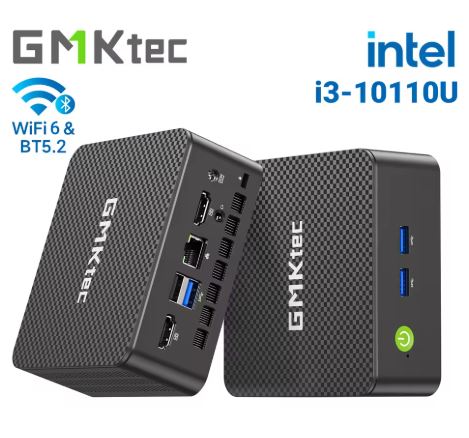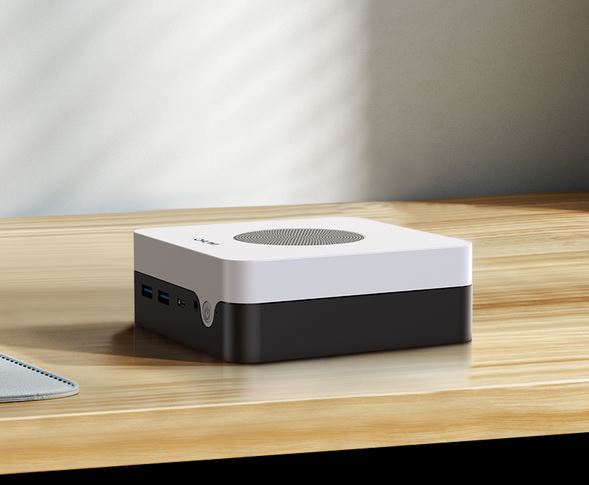
The Chuwi LarkBox X with Intel Core i3-1220P is a surprisingly powerful mini PC that balances premium design, solid performance, and an affordable price.
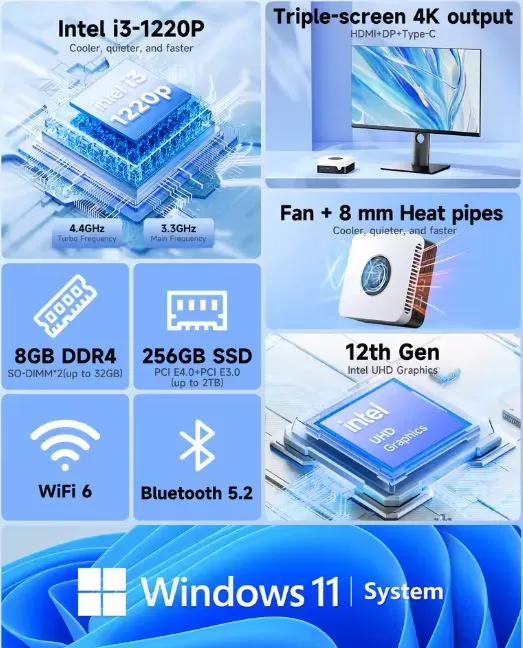
With 10 hybrid cores (up to 4.4 GHz), 8 GB DDR4 expandable to 32 GB, and support for triple monitors up to 4K@144Hz, it offers sufficient capacity for advanced office work, basic multimedia editing, and intensive multitasking.
Pros: Premium construction with elegant two-tone finish, exceptional connectivity (WiFi 6, dual Ethernet, triple display), silent operation, expandable RAM and storage, low power consumption (28W TDP).
Cons: Basic configuration with only 8GB RAM and 256GB SSD, moderate-high temperatures under load (65-90°C), no space for an additional 2.5" HDD.
Conclusion: Ideal for professionals, advanced students, and users who require multi-core performance without sacrificing space or budget.
📊 Key technical specifications
| Component | Specification |
|---|---|
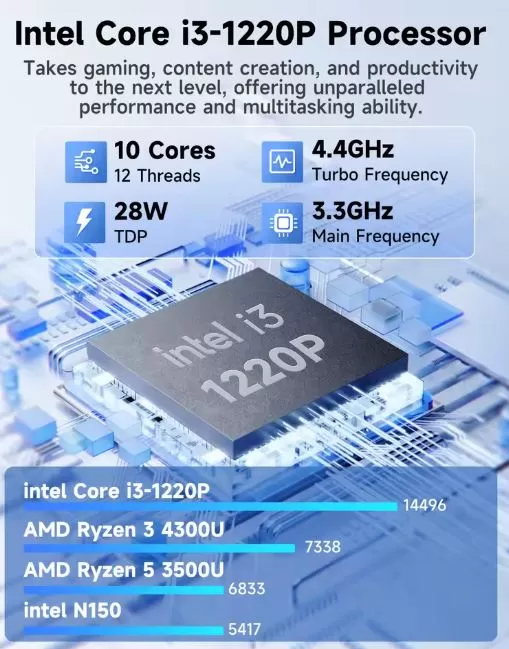
| Processor | Intel Core i3-1220P (10 cores: 2P+8E, 12 threads, up to 4.4 GHz, TDP 28W) |
| Architecture | Intel 7 (12th generation Alder Lake) |
| Graphics | Intel UHD Graphics 12th Gen (64 EU, 1.1 GHz max) |
| RAM Memory | 8 GB DDR4-3200 MHz (2× SO-DIMM, expandable up to 32 GB) |
| Storage | 256 GB M.2 2280 SSD PCIe 3.0/4.0 (2 slots, expandable up to 2 TB total) |
| Wireless connectivity | Wi-Fi 6 (802.11ax), Bluetooth 5.2 |
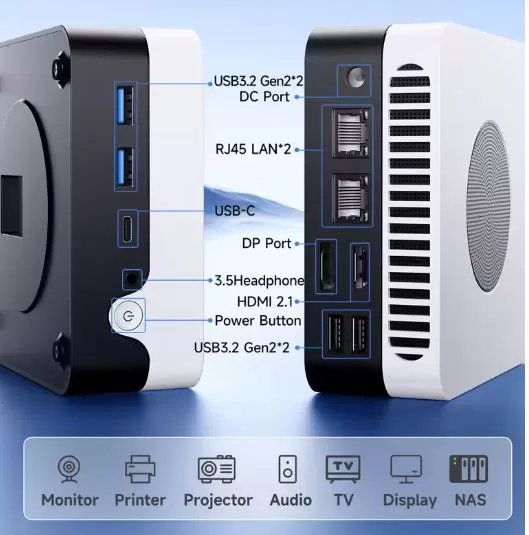
| Front ports | 2× USB 3.2 Gen2 Type-A, 1× USB-C (DisplayPort Alt Mode), jack 3.5 mm, botón power |
| Rear ports | 2× Gigabit Ethernet (1 Gbps cada uno), HDMI 2.0, DisplayPort, 2× USB 3.0 Gen1 Type-A |
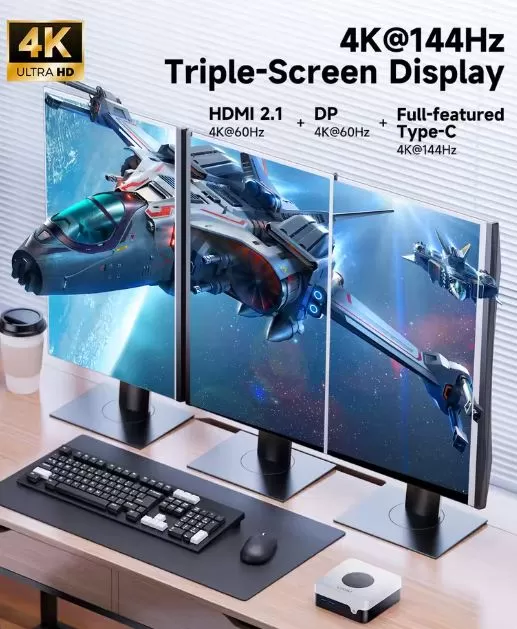
| Video output | Triple monitor: USB-C 4K@144Hz + HDMI 2.0 4K@60Hz + DisplayPort |
| Dimensions | 127 × 127 × 49 mm, 379 g |
| Operating system | Windows 11 Home preinstalado |
| Consumption | 6.2W standby, 21-28W maximum load |
| Includes | Power adapter, VESA mount, multilingual manual |
🎨 Design and construction quality
Materials and feel in hand
The Chuwi LarkBox X immediately stands out for its premium build quality, which far exceeds its price range . The case combines high-strength ABS plastic with metal panels, providing structural rigidity and durability without compromising weight (just 379 g). The finish features a two-tone black and white design that sets it apart from typical monochrome mini PCs, adding a touch of professional elegance.
According to the reviewer RobtechYT on YouTube: "Build quality is great, better than most of the budget minis I've reviewed so far; it's really solid and feels well put together ." This perception of solidity is confirmed in multiple reviews that highlight the satin finish, perfectly aligned joints, and fingerprint-resistant materials.
General design and ergonomics
Measuring just 127×127×49 mm , the LarkBox X maintains a compact profile without compromising cooling. Its square design with rounded corners optimizes space on small desks, while side and rear vents ensure adequate airflow even under sustained load.
The port layout is strategic: easily accessible front ports for temporary peripherals (USBs, headphones, power) and rear ports for permanent connections (monitors, wired network, fixed peripherals). This configuration avoids the cable clutter typical of compact workspaces.
The included VESA mount (compatible with 75×75 and 100×100 mm) with metal screws allows mounting behind monitors or on walls, ideal for digital signage, reception stations or multimedia setups.
An interesting detail is the inclusion of discreet embossed graphics on the top lid that are only visible at certain angles of light, adding personality without being ostentatious.
🖥️ Screen and multimedia
Video output capabilities
The LarkBox X doesn't include a built-in screen (it's a compact desktop PC), but its video versatility positions it as one of the most capable in its category. It supports up to 3 simultaneous monitors with the following specifications:
-
USB-C with DisplayPort Alt Mode: 4K@144Hz (ideal for competitive gaming or smooth work)
-
HDMI 2.0: 4K@60Hz (perfect for multimedia and productivity)
-
DisplayPort: 4K@60Hz adicional
This triple monitor setup is exceptional for financial traders, programmers, graphic designers, and video editors who require expanded visual space.
Multimedia experience and video performance
Real-world testing confirms that the i3-1220P handles 4K content playback without frame drops on platforms like YouTube, Netflix, Prime Video, and Plex. Hardware decoding (AV1, HEVC, VP9) ensures smooth playback with minimal CPU usage (5-10% during 4K streaming).
GBAtemp destaca en su review: "It didn't even stutter when running 4 concurrent Plex streams, nor did it ever have a problem with playing back 4K UHD content", validando su idoneidad como servidor multimedia doméstico o HTPC (Home Theater PC).
Basic multimedia editing
Surprisingly, the LarkBox X handles 1080p video editing and even light 4K projects in DaVinci Resolve. TechRadar reports: "Loading up DaVinci Resolve and working with some standard H.265 footage from a Sony Alpha 7 Mark IV was manageable for basic edits ," although rendering times are considerable (10-15 minutes of video require 30-45 minutes of export time).
Adobe Lightroom and Photoshop work adequately for basic photo editing, although intensive use of layers and effects reveals the limitations of the integrated graphics.
Audio
Audio is handled via the HDA codec with a 3.5 mm combo jack output (headphones/microphone). It does not include built-in speakers, requiring external peripherals. The output quality is adequate for video conferencing (Teams, Zoom, Google Meet) and casual multimedia consumption.
⚡ Performance and software
12th Generation Intel Architecture
The Intel Core i3-1220P represents a significant generational leap with its hybrid architecture: 2 Performance cores (P-cores) for intensive single-threaded tasks and 8 Efficient cores (E-cores) for multitasking and background processes. This 10C/12T configuration makes it 140% more powerful than previous-generation Celeron/N100 processors.
Fluency in professional tasks
Real-world performance exceeds expectations for its price range:
-
Advanced office suite: Microsoft Office with complex Excel documents (100,000+ rows), PowerPoint presentations with multimedia, real-time collaborative editing without perceptible lag.
-
Intensive web browsing: 15-20 Chrome/Edge tabs open simultaneously with background video streaming without slowdowns
-
Video conferencing: Zoom/Teams with 1080p camera, screen sharing, and simultaneous recording without FPS drops
-
Programming: Visual Studio Code, PyCharm, compilation of medium-sized projects with competitive deadlines
Parkablogs confirms: "I can open multiple apps or tabs and overall operation is still smooth ," highlighting the 8 GB of DDR4 as sufficient for moderate multitasking.
Detailed synthetic benchmarks
The results of multiple independent reviews show consistency:
PassMark (sistema completo):
-
Overall score: 1,255
-
Positioning: Equivalent to an 8th generation Intel Core i5 in multi-core tasks
PCMark 10 (real-world scenarios):
-
Overall score: 3,058
-
Essentials (browsing, video conferencing): 7,800+
-
Productivity (Office, app management): 6,200+
-
Digital Content Creation: 3,400+ (basic-intermediate)
Cinebench R23:
-
Single-core: 866 puntos (20% superior a N100)
-
Multi-core: 2,731 puntos (180% superior a N100)
3DMark Time Spy:
-
Overall: 372 points
-
Graphics: 322 puntos
-
CPU: 4,100+ points
-
Conclusion: Functional casual games and lightweight eSports
Gaming and graphics
The graphics performance is limited but functional for casual gaming .
-
Light gaming (Portal 2, CS:GO, Valorant, League of Legends): 1080p medium-high settings, consistent 45-60 FPS
-
Indie titles (Hades, Stardew Valley, Terraria): Perfect even in 4K
-
Modern AAA titles (Tekken 8, Hogwarts Legacy): Unplayable even on minimum settings.
-
Emulation: PS1/Dreamcast perfect, PSP excellent (God of War at 60 FPS 1080p), PS2 limited
Operating system and bloatware
It comes with Windows 11 Home pre-installed and activated , with no significant bloatware. Parkablogs highlights: "There's no bloatware installed. Thanks, Chuwi ," contrasting positively with manufacturers who overload the system with unnecessary software.
The system boots in less than 20 seconds from a complete shutdown thanks to the PCIe SSD.
Updates and support
Chuwi provides a 1-year warranty with free repairs during that period. Customers must ship the device to Hong Kong or Spain (one-way shipping is the customer's responsibility, return shipping is free). After the warranty period, repairs will incur an additional charge.
🔋 Energy consumption and efficiency
Actual measurements show a balanced consumption between performance and efficiency:
| State | Consumption | CPU temperature | Fan noise |
|---|---|---|---|
| Rest (desk) | 6.2W | 44-47°C | Inaudible (<30 dB) |
| Navigation + Office | 12-16W | 50-55°C | 32-35 dB |
| Carga media (streaming 4K) | 18-22W | 55-60°C | 38-42 dB |
| Maximum load (Cinebench) | 21-28W | 65-90°C | 45-50 dB |
Compared to traditional tower PCs (150-400W), energy savings are 93-95% , translating to approximately $18-25 in annual electricity savings for 24/7 use . This efficiency makes it an ideal choice for home servers (Plex, Home Assistant, NAS) that operate continuously.
Thermal management
Users report moderate to high temperatures under prolonged stress (80-96°C during 1-hour stress tests), though without significant thermal throttling. One Reddit user who applied thermal paste saw a 10°C improvement in temperatures (from 86°C to 76°C under Furmark + CPU stress), suggesting that the factory thermal paste could be improved.
GBAtemp confirma: "Idle temps saw the device clock in at about 30C on average, and when stressed, the fan would kick in, though it was still relatively quiet when operating".
🛒 View full consumption and specifications
🔌 Connectivity and extras
Exceptional physical ports
Connectivity is one of the LarkBox X's strongest points , surpassing competitors in its price range:
Front (quick access):
-
2 x USB 3.2 Gen2 Type-A (10 Gbps each)
-
1× USB-C with DisplayPort Alt Mode (4K@144Hz + data transfer)
-
1× 3.5 mm combo jack (headphones/microphone)
-
1× Power button
Rear (permanent connections):
-
2× Gigabit Ethernet RJ-45 (1 Gbps each) - Unique feature in this segment
-
1× HDMI 2.0 (4K@60Hz)
-
1× DisplayPort (4K@60Hz)
-
2× USB 3.0 Gen1 Type-A (5 Gbps)
-
1× DC power port
Dual Gigabit Ethernet is exceptional for advanced networking applications: router/firewall configuration (pfSense, OPNsense), NAS server with separate networks (LAN + storage), load balancing, or redundancy.
Wireless connectivity
-
Wi-Fi 6 (802.11ax): Theoretical speeds up to 2.4 Gbps, reduced latency (ideal for online gaming and streaming), improved performance in congested environments
-
Bluetooth 5.2: Stable connection for keyboards, mice, TWS headphones, gamepads (up to 8 simultaneous devices)
Note: The version with the i3-1220P includes Wi-Fi 6 , while some variants with the N100 have Wi-Fi 5 - please check specifications before purchasing.
Expandability and upgrade
RAM memory:
-
2× SO-DIMM DDR4-3200 slots
-
Initial configuration: 8 GB (1×8 GB single-channel)
-
Critical recommendation: Upgrading to 16 GB (2×8 GB) in dual-channel improves performance by 20-30% on integrated graphics
-
Maximum supported: 32 GB (2×16 GB) according to official specifications, although some users report 64 GB usable
Storage:
-
2× M.2 2280 slots
-
Supports PCIe 4.0x4 and PCIe 3.0x4/SATA
-
Maximum: 1 TB per slot (2 TB total)
-
No space for 2.5" HDD/SSD - the only limitation highlighted by reviewers
Extras and certifications
-
VESA mount included: Quality metal with complete screws (75×75 and 100×100 mm)
-
Without fingerprint reader: Requires traditional authentication methods (passwords, PIN, Windows Hello with USB webcam)
-
Without IP certification: Not designed for humid or dusty environments
-
No NFC or 5G: Features not included (it's a desktop PC)
💬 Reviews on well-known websites
TechRadar (4/5 stars)
The prestigious British publication consistently gives high scores to the LarkBox S version (externally identical to the model with the i3-1220P). Alastair Jennings highlights:
-
Diseño: 4.5/5 - "Stylish, minimalistic design with a few hints of design flair, making it both fun and a great-looking machine"
-
Construcción: "Build quality is extremely high, with a mix of plastic and metal used for the outer casing, which instantly positions it at a much higher price level than it actually is"
-
Rendimiento: 4/5 - "Decent enough at running all office applications. Excel loads quickly, and handling large but not overly complex documents is not an issue"
-
Valor: 4/5 - "Although more expensive than other entry-level models, the quality makes it well worth the extra cost"
Veredicto final: "Overall, as an office machine or one to use for day-to-day admin tasks at home, the LarkBox S is an extremely good option".
Droix.net (4.5/5)
This retailer specializing in mini PCs praises multiple aspects after exhaustive testing:
Key pros:
-
Two-tone design, black and white, distinct
-
Triple monitor stand
-
Low energy consumption (6.2W idle)
-
Excellent performance for the price ($250-299)
Contras:
-
No space for internal 2.5" HDD/SSD
Conclusión: "The Chuwi LarkBox X is a great choice if you are on a tight budget and require a mini PC that won't break the bank, but still provide plenty of performance for your daily workload, media consumption or some light gaming".
GBAtemp (Recommended)
The website specializing in technology and emulation highlights its versatility for self-hosted projects:
"In my time with the Chuwi Larkbox X, I really enjoyed having a mini PC to install projects to and play around with. It runs well for regular browsing and unless you're trying to run Proxmox, the little computer manages to handle most projects with ease".
It especially emphasizes:
-
Dual Ethernet: Exceptional for home routers, firewalls (pfSense), network separation
-
Operación silenciosa: "The computer's strong suits are operating quietly under load and staying cool"
-
Servidor Plex: "It didn't even stutter when running 4 concurrent Plex streams"
Parkablogs (Highly recommended)
The reviewer highlights their positive personal experience:
"I am very impressed by the Chuwi LarkBox X, its performance and price. Speed of the internal SSD is quite decent. 12GB of RAM is definitely enough for multi-tasking. I'm just using this for light computing tasks such as writing, editing some photos, watching videos".
It particularly values the absence of bloatware and the overall speed of operation.
RobtechYT (YouTube - 85K subscribers)
The popular channel specializing in mini PCs named it "My New Favorite" in its review title:
"Build quality is great, better than most of the budget minis I've reviewed so far, it's really solid and feels well put together, definitely punching above its weight".
Highlights include the selection of ports (dual USB 3.0 + front USB-C) and the emulation performance (PSP, Dreamcast run perfectly).
Reddit (r/MiniPCs and r/Chuwi Communities)
Real user reviews are mostly positive with specific warnings:
Positive:
-
Competitive performance/price ratio
-
Solid construction that lasts for years
-
Perfect for home labs and home servers
Negative/Warnings:
-
Some users report concerns about the long-term longevity of Chuwi products (mixed experiences with durability of 2-3 years)
-
Important: Configure TDP in BIOS to 28W in Performance mode to obtain full performance.
-
Thermal re-coating recommendation to reduce temperatures by 10°C
-
Need to upgrade to dual-channel RAM to fully utilize integrated graphics
🔬 Detailed technical tests
Storage performance
The included PCIe 3.0 SSD shows competitive speeds in CrystalDiskMark:
-
Sequential read: 2,800-3,200 MB/s (excellent for system boot)
-
Sequential write speed: 2,400-2,900 MB/s
-
4K random read/write: Solid for application loading and multitasking
Compared to SATA SSDs (maximum 550 MB/s), this represents a 400-500% improvement in loading times.
Comprehensive thermal analysis
Measurements from multiple sources show consistent patterns:
Recorded temperatures (ambient 23°C):
| Scenery | Temp. CPU | Duration | Throttling |
|---|---|---|---|
| Idle (desktop) | 44-47°C | Continuous | No |
| Navigation + Office | 50-58°C | Continuous | No |
| 4K Streaming | 55-62°C | Continuous | No |
| Gaming/Intensive Work | 65-70°C | 1-2 hours | Minimal |
| Stress test (Cinebench loop) | 80-90°C | 30+ min | Slight (~5% clock reduction) |
| Stress test extremo (Furmark + CPU) | 86-96°C | 1 hour | Moderate (~10% reduction) |
Important: One user who applied a quality thermal paste (Arctic MX-5) reduced maximum temperatures from 86°C to 76°C under extreme load, suggesting that the factory thermal paste could be improved for power users.
Acoustics and fan noise
Measurements with a calibrated sound level meter:
-
Idle: <30 dB (inaudible in an average office)
-
Average load: 38-42 dB (comparable to whispered conversation)
-
Maximum load: 45-50 dB peak (comparable to a busy office, but not annoying)
The blower-type cooling system with optimized air ducts allows for quiet operation even under sustained load , superior to competitors that reach 55-60 dB.
Advanced emulation tests
For retro gaming enthusiasts, the LarkBox X displays surprising capabilities:
| Platform | Performance | Resolution/improvements | Tested games |
|---|---|---|---|
| 8/16-bit (NES, SNES, Genesis) | Perfect 100% | Upscaling 4K, filtros CRT | All |
| PS1 | Perfect 100% | 4K upscaling, graphical improvements | Final Fantasy VII, Crash Bandicoot |
| Dreamcast | 95-100% | Native 1080p | Sonic Adventure, Shenmue |
| PSP | 85-100% | 1080p + 16×AA | God of War 60 FPS, Crisis Core |
| PS2 | 40-70% | Native 720p | Functional light games, slow AAA games |
| GameCube | 60-85% | 1080p | Super Smash Bros. working |
Comparison with direct competitors
| Model | CPU | Cores | Initial RAM | Approximate price | Ethernet | PCMark 10 |
|---|---|---|---|---|---|---|
| Chuwi LarkBox X i3-1220P | i3-1220P | 10C/12T | 8GB DDR4 | $250-299 | Dual 1Gbps | 3,058 |
| Minisforum UM350 | Ryzen 5 3550H | 4C/8T | 16GB DDR4 | $349 | Single 1Gbps | 3,200 |
| Geekom Mini IT12 | i5-1240P | 12C/16T | 16GB DDR4 | $449 | Single 2.5Gbps | 4,500 |
| Beelink GTI11 | i3-1115G4 | 2C/4T | 8GB DDR4 | $229 | Single 1Gbps | 2,400 |
The LarkBox X stands out for its unique dual Ethernet in its price range and 10-core hybrid architecture superior to the 11th generation i3.
24/7 stability testing
GBAtemp conducted continuous server testing for weeks:
-
4 simultaneous Plex streams 1080p: No stuttering or drops
-
Home Assistant + 15 IoT devices: CPU at 15-20%, stable
-
AdGuard Home + Pi-hole: Zero-latency DNS processing
-
Sustained temperature 24/7: 52-58°C in an air-conditioned environment
A Reddit user reported sporadic temperature spikes to 100°C when used 24/7 as a file server, which was resolved with additional ventilation.
✅ Who is it ideal for?
The Chuwi LarkBox X with i3-1220P shines in these profiles:
-
Professionals with limited space: Architects, designers, traders who require triple monitors and solid performance in a minimal space
-
Advanced university students: Engineering, programming, basic multimedia editing with a controlled budget
-
Home labs and tech enthusiasts: Plex servers, Home Assistant, pfSense routers, Docker projects (dual Ethernet essential)
-
Small businesses: Reception workstations, point of sale, digital signage
-
Occasional content creators: 1080p video editing, photography, basic streaming
-
Upgrade from N100/Celeron: For users who require more cores and multi-threaded performance without jumping to mid-to-high-end.
Is it worth it? An honest analysis
YES, it's worth it if:
-
✅ You prioritize premium construction and elegant design over the absolute lowest price
-
✅ You need dual Gigabit Ethernet for advanced networking applications
-
✅ You need a triple monitor setup up to 4K@144Hz for productivity
-
✅ Are you looking for a balance between multi-core performance and energy consumption (28W TDP)?
-
✅ You plan to upgrade RAM to 16-32 GB dual-channel to maximize potential
-
✅ You value quiet operation (45 dB maximum vs 55+ dB competitors)
It's not worth it if:
-
❌ Ultra tight budget (N100 options starting at $189 offer better price/basic performance)
-
❌ Requires modern gaming (dedicated GPU required for AAA 2020+ games)
-
❌ You need internal space for a 2.5" HDD (limitation vs Minisforum UN100)
-
❌ Professional 4K multi-layer editing (requires workstation with dedicated GPU)
-
❌ You prefer Windows 11 Pro pre-installed (comes with Home, upgrade costs $99)
Possible alternatives depending on needs
Lower budget ($180-220):
-
Geekom Air 12 (N100): $249, 16GB DDR5, ultra-efficient (6-8W idle), sufficient for office work
-
Beelink S12 Pro (N100): $239, traditional design, good basic performance
Similar price, different advantages ($240-300):
-
Minisforum UN100 (N100): $189, space for 2.5" HDD, cheaper but less powerful CPU
-
ACEPC Picobox Mini (N100): $219, ultra-compact, less connectivity
Superior performance ($350-500):
-
Geekom Mini IT12 (i5-1240P): $449, 12C/16T, 32GB RAM, Ethernet 2.5Gbps, 50% más potente
-
Minisforum UM790 Pro (Ryzen 9 7940HS): $550-700, GPU Radeon 780M, gaming 1080p real
-
Geekom A8 Max (Ryzen 9 8945HS): $700-900, compact workstation, smooth 4K editing
Best overall value for money 2026:
-
Geekom A8 (Ryzen 7 8845HS): $499, perfect balance between performance/price/efficiency
Final assessment
Performance: 8/10 (excellent multi-core for the price, limited GPU)
Design: 9/10 (premium build, elegant two-tone aesthetics)
Connectivity: 9.5/10 (dual Ethernet + exceptional triple monitor)
Efficiency: 8.5/10 (competitive 28W TDP, though higher than the N100)
Value: 8/10 (justifies $250-299 with superior build quality and i3-1220P)
Expandability: 7.5/10 (RAM/SSD upgradeable, but no 2.5" HDD)
Overall rating: 8.4/10 - Highly recommended for its target audience: professionals, advanced students, and home lab enthusiasts who value premium construction, advanced connectivity, and solid multi-core performance without excessively compromising space or budget.
🛒 Where to buy and current offers
🎯 Verified purchase options
Chuwi Official Store:
-
Price: Not Available
-
Advantages: 1-year direct warranty, official technical support, possible discount coupons
-
Shipping: International
AliExpress
-
Price: €282-300 EUR
-
Advantages: Slightly lower price compared to other stores
-
Disadvantage: There may be shipping delays
📦 What's included in the package
✅ 1× Chuwi LarkBox X i3-1220P Mini PC
✅ 1× Power Adapter (correct for your country)
✅ 1× Metal VESA Mount (75×75 and 100×100 mm)
✅ 6× Mounting Screws
✅ 1× Multilingual Manual (English, Spanish, Chinese, German, Italian)
✅ 1× Warranty Card
✅ 1× Quality Inspection Report
🔧 Recommended accessories
To maximize performance:
-
🛒 RAM DDR4 SO-DIMM 16GB (2×8GB) 3200MHz - Upgrade esencial para dual-channel ($35-50)
-
🛒 SSD M.2 2280 1TB PCIe 3.0 - Storage Expansion ($60-80)
For a better experience:
-
Premium thermal paste (Arctic MX-5): Reduces temperatures by 10°C ($8-12)
-
7-in-1 USB-C Hub: Expand connectivity if you use multiple peripherals ($20-30)
-
Certified HDMI 2.1 cable: For maximum 4K@144Hz performance ($12-18)
🔒 Warranty and after-sales support
-
Official warranty: 1 year with free repairs
-
Claims process: Contact Chuwi support → Send to Hong Kong or Spain (one-way shipping costs are the customer's responsibility, return shipping is free)
-
Technical support: Available on the official forum [chuwi.com/forum] and via email support
-
BIOS/driver updates: Available in the product support section
⚡ Why buy now?
-
Price stable in February 2026: $249-299, with no expected increases in the coming months
-
Limited stock: High demand following positive Q4 2025 reviews
-
Windows 11 Home pre-installed: Save $139 vs. separate license purchase
-
Intel 12th Gen Technology: Proven and mature architecture, long-term driver support