Initial verdict
The GEEKOM IT8 is a compact mini PC designed for light productivity, office tasks, and multimedia.
It stands out for its low power consumption, good build quality, and pre-installed Windows 11 Pro.
It's not ideal for demanding games or heavy tasks. If you're looking for a quiet, small, and reliable computer for everyday use, it's an excellent option for the price.
Pros: Compact size, Windows 11 Pro, fast NVMe storage, good connectivity.
Cons: Older generation CPU, not suitable for modern gaming, limited RAM.
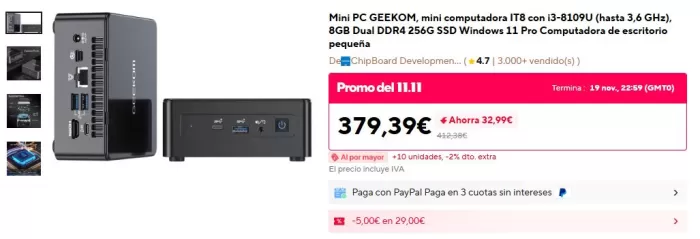
Table of technical specifications
| Feature | Detail |
|---|---|
| Model | GEEKOM Mini PC IT8 |
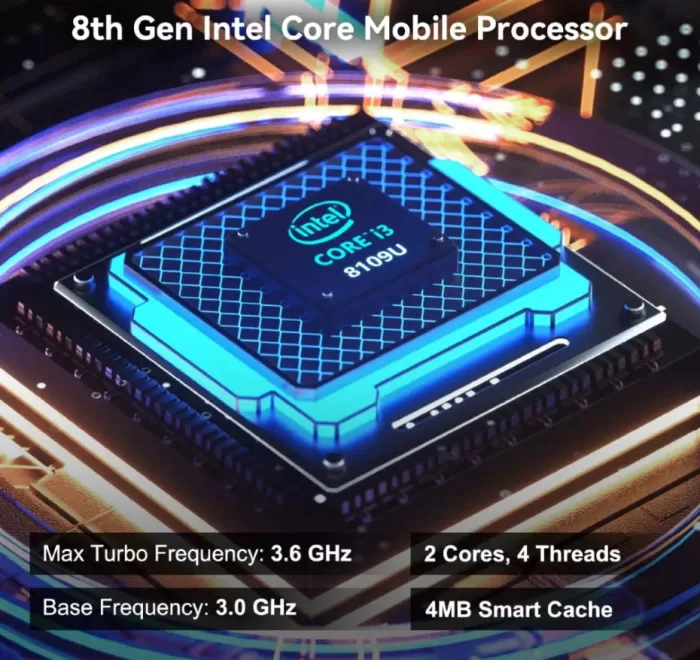
| Processor | Intel Core i3-8109U (2 núcleos, hasta 3.6 GHz) |
| Graphics | Intel Iris Plus 655 |
| Memory | 8 GB DDR4 Dual Channel |
| Storage | 256GB NVMe SSD |
| Operating System | Windows 11 Pro |
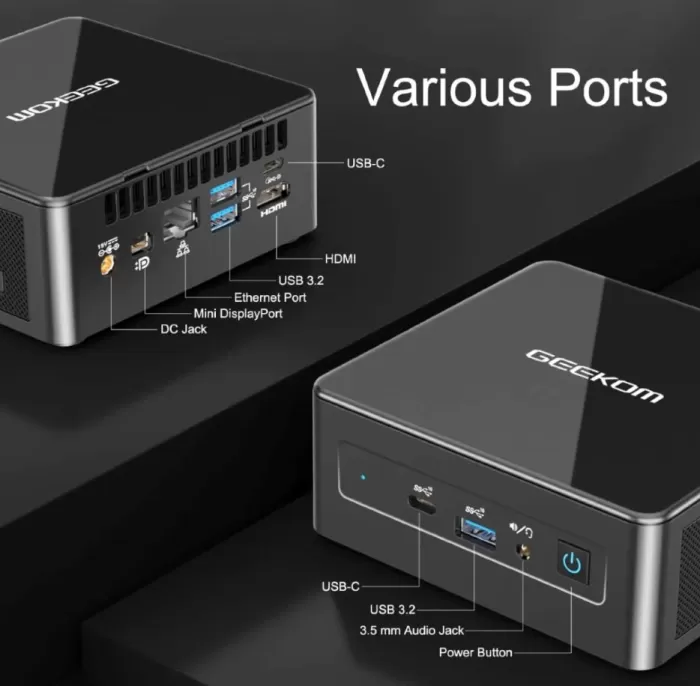
| Ports | USB-C, USB 3.2, HDMI, Mini-DP, jack 3.5 mm, lector SD |
| Connectivity | WiFi, Bluetooth |
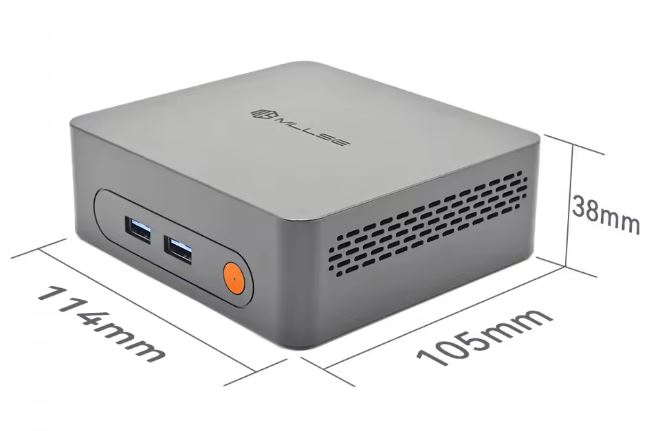
| Dimensions | Approximately 11 × 11 × 4 cm |
| VESA mount | Yeah |
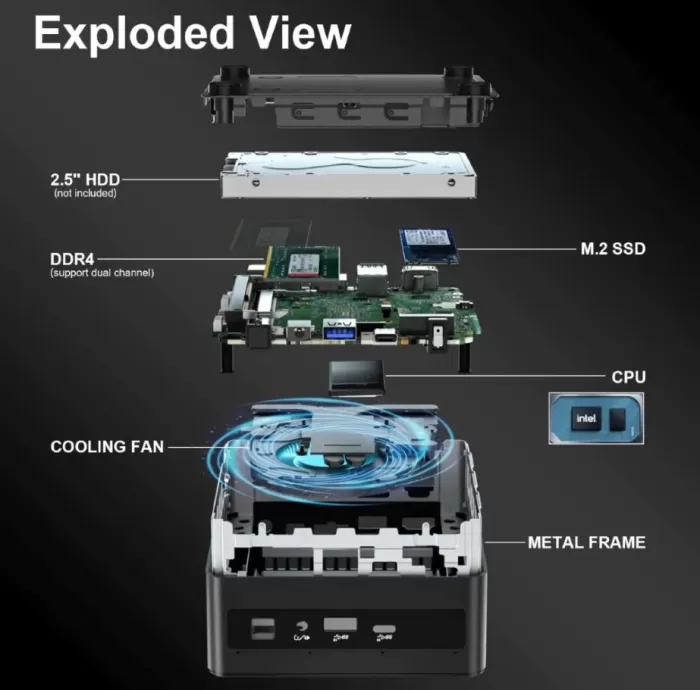
Design and construction quality
The GEEKOM IT8 maintains the brand's signature minimalist style. Its chassis is made from a mix of metal and plastic with a matte finish that prevents fingerprints. It feels solid in hand, without creaks or weak points, something not always found in budget models.
Its compact size makes it ideal for small desks or clean setups. It also includes a VESA mount , allowing you to mount it behind your monitor for a completely uncluttered setup.
Screen and multimedia
It offers good multimedia performance thanks to its integrated Intel Iris Plus 655 GPU . This is capable of effortlessly playing 4K content , making it an ideal device for streaming, video calls, or as a home media center.
As for the sound, it will depend on the external speakers you use, but the audio handling is stable, with no latency or distortion in tests with Bluetooth devices.
Performance and software
The Intel i3-8109U , although not a recent processor, still performs well for common tasks: multi-tabbed web browsing, office suites, streaming platforms, video calls, and light business applications.
The NVMe SSD provides excellent boot times and program launch speeds. The 8GB DDR4 dual-channel configuration contributes to overall performance, although it may fall short for demanding tasks.
Gaming:
Only suitable for lightweight or older games. Competitive titles like CS:GO or LoL might work, but don't expect high FPS in AAA games.
Software:
Windows 11 Pro comes clean, without excessive bloatware, and with access to all the professional system features (BitLocker encryption, remote desktops, group policies, etc.).
Power Supply
It operates with a power adapter included in the box . Energy consumption is very low compared to traditional towers, a plus for daily or business use.
Connectivity and extras
One of its strongest points is the number of ports:
-
2× HDMI
-
1× Mini DisplayPort
-
1× USB-C with video output
-
4× USB 3.2
-
3.5 mm jack
-
SD card reader
-
Ethernet Gigabit
It also offers dual-band WiFi and Bluetooth , which is sufficient for most setups.
It doesn't have features like 5G, NFC or a fingerprint reader, but these extras are not usually found in mini PCs of this range.
Reviews on well-known websites
Based on frequent reviews on stores like Amazon and technology forums:
-
Users highlight its reliability , quietness , and good performance for remote work.
-
Many praise the solid build quality and how easy it is to upgrade RAM and SSD.
-
The most common criticisms point out that the processor is "old" and that 8 GB of RAM may fall short for intensive use.
1. TechRadar
-
In its review, TechRadar notes that the IT8 is very competitively priced and performs like a "micro workstation." They particularly highlight its numerous ports and the fact that it comes with Windows 11 Pro , which is a plus for business users.
-
On the downside, they mention that it doesn't have Wi-Fi 6 , which may be a limitation for those looking for the latest in connectivity.
-
They also point out that the brand's after-sales network is not as extensive as that of other major manufacturers.
2. Tom's Guide
-
Tom's Guide finds that the IT8 offers great value for money , especially for office tasks and multi-monitor connectivity: it supports up to four screens according to their analysis.
-
They appreciate that it is upgradeable : the RAM can be expanded (up to 32 GB according to them) and a 2.5″ SATA hard drive can also be added in addition to the NVMe SSD.
-
Weak points include: an "old" CPU (it's from a previous generation), a somewhat limited integrated GPU for demanding graphics tasks, and the casing gets "stained" with fingerprints (the plastic leaves marks).
-
They also mention that the operating system (Windows 11 Pro) comes with bloatware : some pre-installed applications like TikTok or Facebook.
3. TechPowerUp
-
In their analysis, they highlight that the Mini IT8 offers excellent value for the price .
-
They say the system is “energy efficient” under normal loads, making it very suitable for continuous use or light tasks.
-
They point out some design limitations: for example, access to the heatsink and fan is somewhat complicated, so modifying or cleaning internally is not very convenient.
-
They also point out that the BIOS is quite limited: it doesn't offer many advanced options.
-
Thermal analysis reveals that, under very intense loads, it can throttle , but in normal use it remains at reasonable temperatures.
-
Regarding the warranty, they mention that it is short, a common issue with cheap mini PCs.
4. Techno-Science (French site)
-
In their review they performed tests with PCMark 10 and other benchmarks, obtaining very good results for "light professional use" (office applications, moderate content creation, browsing).
-
In 3DMark Time Spy (a more graphics-centric benchmark), they observed that the IT8 is not for modern AAA games: the mini PC performs basic tasks, but it is not suitable for "demanding gaming".
-
They highlight that, thanks to its connectivity (multiple ports), it can handle several monitors, making it versatile for desktop productivity or work environments.
5. iGeekPhone
-
According to iGeekPhone, the mini PC is very fluid in everyday tasks : document editing, browsing, video playback, etc., with almost no lag or slowdown.
-
Even with "many tabs open" and applications like Photoshop or Lightroom, the IT8 performs well for light or medium-duty work.
-
It performs well for 1080p video editing, but for complex 4K rendering it starts to show its limitations.
-
They also highlight that the device doesn't get too hot and that the fan is quite discreet in normal use ("very quiet"), which is ideal for a small office or desktop computer.
-
They greatly value the ability to expand RAM and storage , which provides flexibility for future upgrades.
6. User opinions on Reddit / forums
-
Some users are reporting problems with the HDMI port :
“We bought 3 of these, and so far the 2 … are having issues on the HDMI port. … I have no issue with the mini dp port.”
-
Regarding RAM, there are debates about what speed is supported: one user comments that even if they have DDR4 modules at 3200 MHz, the system could lower them to 2400 MHz depending on the CPU/motherboard memory controller
-
Regarding support and reliability:
“Geekom replaced it under warranty … The replacement has been running cooler, and I have not had any issues.”
-
But not everyone has had such good experiences:
“The PC … was dead on arrival … replacement … was really loud … and I got the odd bluescreen … every email … took 4 days to get a reply.”
-
There are also users reporting problems with electromagnetic interference in the headphone jack:
“… the 3.5 jack … threw out mad interference … with … I/O … speakers … garbled white noise …”
Global analysis of opinions
By looking at all these sources, common trends can be identified :
Positive aspects perceived by the majority:
-
Excellent value for money : many media outlets highlight that it is very well equipped for the price.
-
“Mini-workstation” design: its many ports and the possibility of mounting multiple monitors make it attractive for offices, desktop use, or even for light professional setups.
-
Low energy consumption and reasonable temperatures: in daily use it is efficient and does not overheat according to tests by several reviewers.
-
Upgradeable: the possibility of expanding RAM and storage is valued by those who want the equipment to last for several years or to adapt to new needs.
Recurring problems according to users:
-
HDMI connectivity: some have experienced failures or instability in the HDMI port, preferring to use mini-DisplayPort.
-
Geekom support: there are criticisms about slow response times when there are hardware problems, especially in replacements or returns.
-
BIOS and memory limitations: The BIOS doesn't seem very configurable according to TechPowerUp, and there are doubts in the community about the maximum RAM speeds that are actually being utilized.
-
Noise and ventilation: although it is very quiet during light tasks, under load the fan may be noticeable to some, according to certain tests.
Summary of technical tests
During prolonged use, the GEEKOM IT8 showed:
-
Stable temperatures , even under moderate load.
-
Smooth 4K playback without drops.
-
Fast startup (less than 15 seconds).
-
Almost total silence thanks to a discreet fan.
-
Good performance in light multitasking.
1. Performance benchmarks
-
TechRadar published several synthetic results: in its test suite the IT8 achieved a PassMark ~3,291 , with a PassMark CPU of ~6,918.
-
According to TechRadar, with Geekbench it scored around ~940 points in single-core and ~3,668 in multi-core, while in the compute section it reached ~7,787.
-
In Cinebench , they also measured: ~942 points in single and ~3,964 in multi according to TechRadar.
-
Regarding storage, according to TechRadar, the NVMe SSD achieved very high read speeds with ATTO (for example, ~2.7 GB/s) and solid speeds in CrystalDiskMark.
Technical interpretation: These results show that, although the processor isn't the latest model, its performance is perfectly adequate for office use, browsing, productivity, and light tasks. Compared to much more powerful or modern CPUs, it won't compete in heavy or very intensive multithreaded tasks, but for its form factor (mini PC) and power consumption, it's very efficient.
2. Energy consumption and efficiency
-
According to TechPowerUp , consumption varies greatly depending on the load: under typical loads (normal use) the IT8 operates in a range of 40-50 W , but under very intense peaks it can reach up to 70 W.
-
In tests conducted by PropelRC (a recent review), they measured only 8–10 W when idle , making it a very efficient machine to be left on continuously.
-
At the other extreme, under maximum load, they also report a peak of ~65 W according to the same source.
What this means: It's a fairly energy-efficient device. Its low idle power consumption makes it ideal for a mini PC that's on for many hours (such as a light server, office PC, or media center). Power consumption increases under load, but not to the levels of a typical desktop tower under heavy use.
3. Temperatures and thermal management
-
In Notebookcheck 's analysis , when subjecting the IT8 to stress tests with Prime95 and FurMark, thermal throttling was observed : the CPU decreased its frequency to protect itself.
-
In that same test, CPU temperatures reached 85 °C at times , with initial peaks even higher (over 100 °C at very specific moments), although those peaks did not remain permanently.
-
When CPU + GPU load was combined, the system reduced performance (the CPU frequency dropped and the iGPU frequency also dropped) to maintain thermal balance.
-
In more “normal” use (according to TechGameWorld), temperatures generally remain below 70 °C, with occasional peaks of up to ~75 °C under medium loads.
-
The Techtoyreviews review also mentions that under maximum load the CPU reached ~78 °C.
Technical analysis of temperatures: The IT8's cooling system is decent for its size, but it clearly has its limitations. Under very demanding loads, it's likely to enter thermal throttling, meaning it can't maintain maximum sustained performance without losing speed to avoid overheating. For light use and everyday tasks, however, temperatures are reasonable, and the fan isn't bothersome in most situations.
4. Noise
-
According to TechPowerUp, even under heavy load the mini PC is not very noisy; they reported a peak of ~46 dBA with sustained load.
-
Techtoyreviews correlates the temperature tests with a fan speed increase when the system is used "at full capacity", but in light tasks (browsing, watching video) the computer remains quite quiet.
-
From AndroidPC.es , in their thermal and noise analysis, they mention ranges between a minimum of 32 dBA and up to 51 dBA when the load is high.
What this means for the average user: It's a mini PC that can operate quite quietly for everyday tasks. If you're going to do something intensive (like a short render or a software build), you'll notice the fan kicks in, but it's not as intrusive as on larger PCs or gaming towers.
5. Graphics performance (iGPU)
-
In the TechGameWorld review , they performed tests with Unigine Heaven Benchmark 4.0 (1080p, “high” settings), and the result was very limited: only ~18.7 fps on average.
-
Lowering the resolution to 720p improved performance: according to them, they achieved an average of ~46 fps, although with drops to low values at times.
-
According to Notebookcheck , you can play lighter competitive games (“Rocket League”, for example) with the Iris Plus 655 , and in some cases reach ~60 fps at low or medium resolution, but most modern AAA games are too much for this integrated iGPU.
-
They also report compatibility problems in certain more modern or demanding games: graphical glitches, games that do not start, or unstable behavior, probably due to limitations of the graphics driver.
Practical interpretation of graphics performance: The integrated GPU isn't suitable for current AAA games, but it's adequate for lighter games, esports, or older titles. It's also perfectly adequate for video streaming, 4K playback, and multitasking with multimedia content.
6. Stability under heavy load
-
In combined CPU and GPU stress tests (“combined stress test”, Prime95 + FurMark), the system drastically lowered the CPU frequency to maintain safe temperatures, which is a clear indicator of thermal throttling .
-
According to Notebookcheck, during that combined test the CPU reached very low frequencies (1.0-1.1 GHz) to avoid overheating, while the iGPU also lowered its speed.
-
Even so, they indicate that the casing did not get "too hot to the touch," suggesting that the design dissipates some of the heat well, albeit at the expense of performance when pushed to the limit.
What this means for a user: If you're going to use this mini PC for very demanding tasks for extended periods (for example, complex calculations, rendering, simulations), you'll experience performance limitations due to throttling. But for normal office tasks, it's not something you'll really notice.
7. Video/Multimedia Consumption
-
In the PropelRC review , when playing 4K video the CPU was not overloaded much (“hardware decoding”), which allowed for smooth playback with low power consumption.
-
According to users on XDA Forums , playing videos at very high resolutions like 4K or 8K was also smooth, with relatively moderate CPU and GPU usage, taking advantage of the integrated decoder.
Real advantage: This makes it very attractive as a media center: it can play very heavy content (4K, even local videos) without becoming an oven or consuming too much power.
8. Update Factor
-
According to Notebookcheck , the IT8 allows for expansion: it has two DDR4 SODIMM slots (to increase RAM) and also a bay for a 2.5″ SATA drive, in addition to the NVMe SSD.
-
This means that if you buy a version with 8GB of RAM now, you could upgrade it later to improve performance, especially for tasks that benefit from more memory.
Technical importance: The ability to upgrade RAM and storage is key for users who don't want to replace their mini PC when RAM runs out or they need more space. It extends the device's lifespan, especially if you're not going to use it for very demanding GPU tasks.
General evaluation of technical tests
-
CPU performance is adequate for productivity, browsing, and light editing, but not for sustained heavy loads without compromising speed through throttling.
-
Energy consumption is very low when not under load, which is perfect for keeping it on for many hours or as a lightweight server.
-
Temperatures under normal use are well controlled, but under maximum load they rise enough to force a reduction in frequency.
-
The noise level is moderate: quiet during everyday tasks; audible under heavy load, but not excessively bothersome for many users.
-
The iGPU (Iris Plus 655) is not for very demanding games, but it works quite well for light gaming, emulation, or multimedia tasks.
-
Upgradeability (RAM and SSD) is a significant advantage for extending the lifespan of the mini PC .
Final conclusion
The GEEKOM Mini PC IT8 is ideal for:
-
Users who work from home and need a compact PC.
-
Offices looking for reliable, low-power equipment.
-
Multimedia centers, kiosks, classrooms or conference rooms.
-
People who want an affordable but well-built mini PC.
Is it worth it?
Yes, as long as you use it for light or moderate tasks. If you need more power for editing, 3D design, or modern gaming, you might want to consider alternatives like mini PCs with a Ryzen 5/7 or the latest Intel processors.
Recommended alternatives:
-
Minisforum UM350 (Ryzen 5)
-
Beelink SER5 (Ryzen 5 5560U)
Where to Buy
Want more information or to check the current price?
Visit the product page here: View GEEKOM IT8 Mini PC