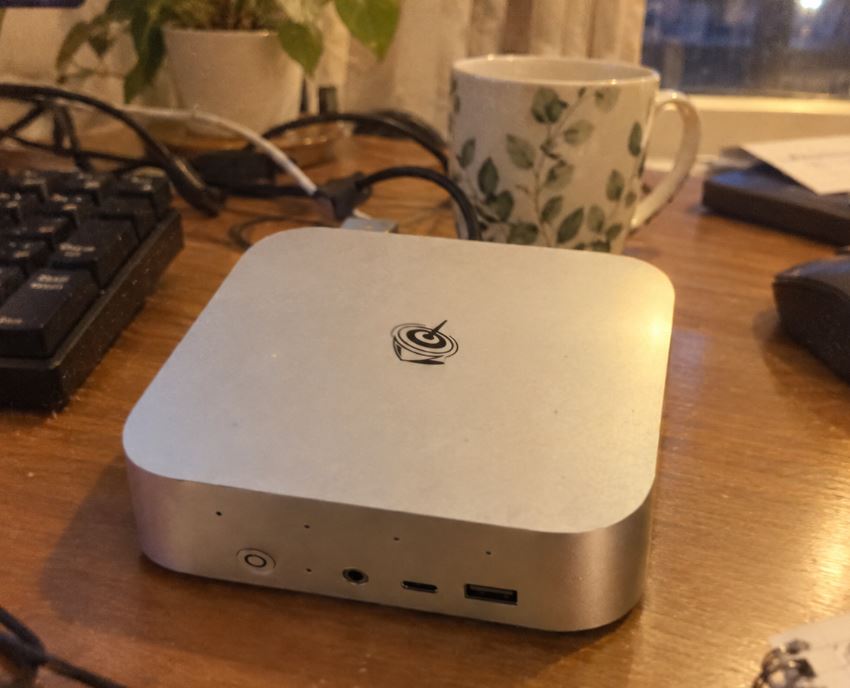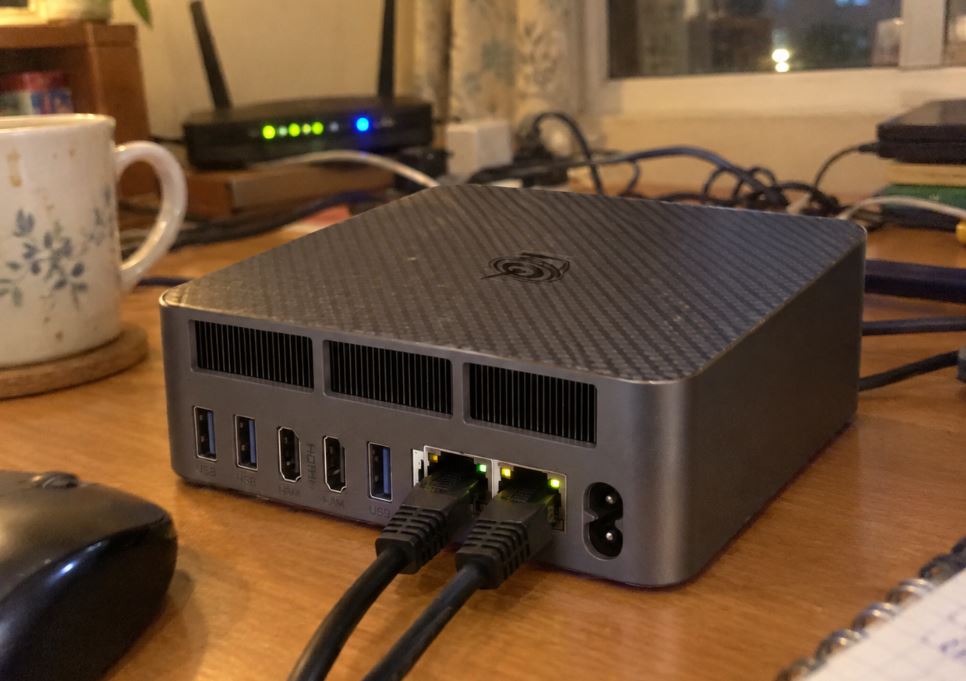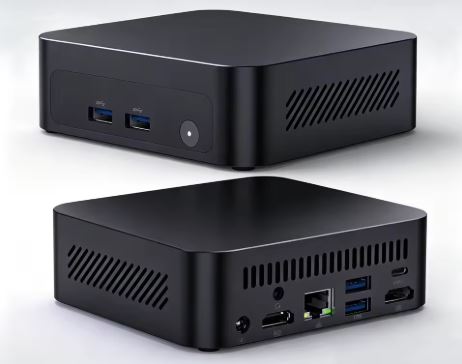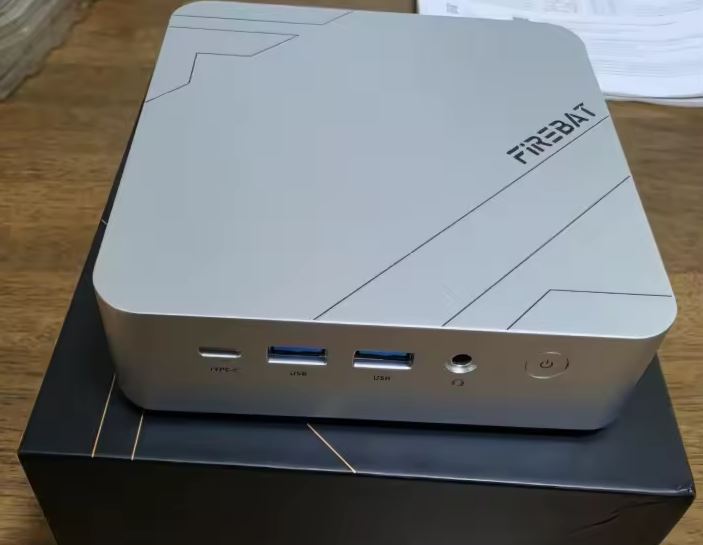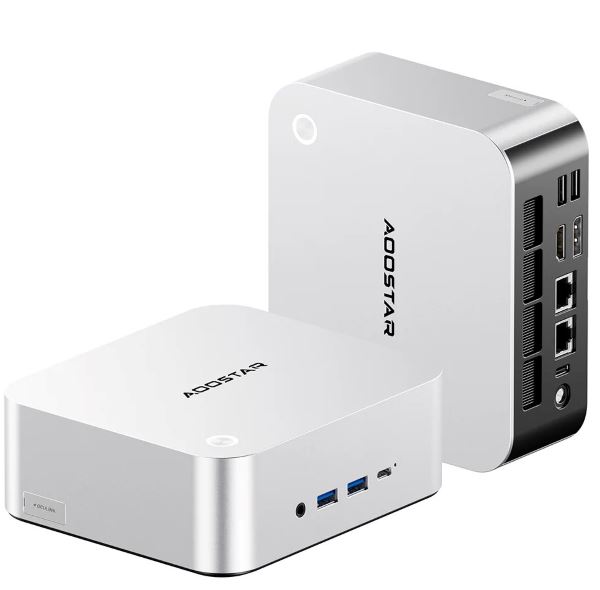
The AOOSTAR MACO Ryzen 7 PRO 8845HS mini PC stands out for its unusual connectivity: two USB4 ports, dedicated OCuLink, dual 2.5G Ethernet ports, and two M.2 PCIe 4.0 slots.
It's an excellent base for professional work, homelab, compact NAS, development, and an expandable gaming rig with eGPU.
Pros: High expandability, dual 2.5G Intel LAN, up to 128GB of DDR5 RAM, and a dedicated OCuLink.
Cons: The barebone version doesn't include an operating system or SSD, the OCuLink port doesn't support hot-swapping, and the integrated graphics are a Radeon 780M, not a Radeon 890M.
Conclusion: It's especially worthwhile if you value connectivity and future upgrades more than buying the cheapest mini PC possible.
📦 Purchase and price:
👉 AOOSTAR MACO on Amazon
👉 View AOOSTAR MACO on AliExpress
Unboxing and box
Package Included:
- Mini PC.
- 120W power supply.
- HDMI cable.
- VESA mount and screws.
- A thermal pad for SSDs.
- User manual and quick start guide.
For the barebone version , the price also includes DDR5 RAM, one or two M.2 SSDs, and an operating system or Windows license. The official store specifies Windows 11 Pro for configurations with an operating system, while the barebone version does not include a Windows key.
Key specifications
| Feature | AOOSTAR MACO Ryzen 7 PRO 8845HS |
|---|---|
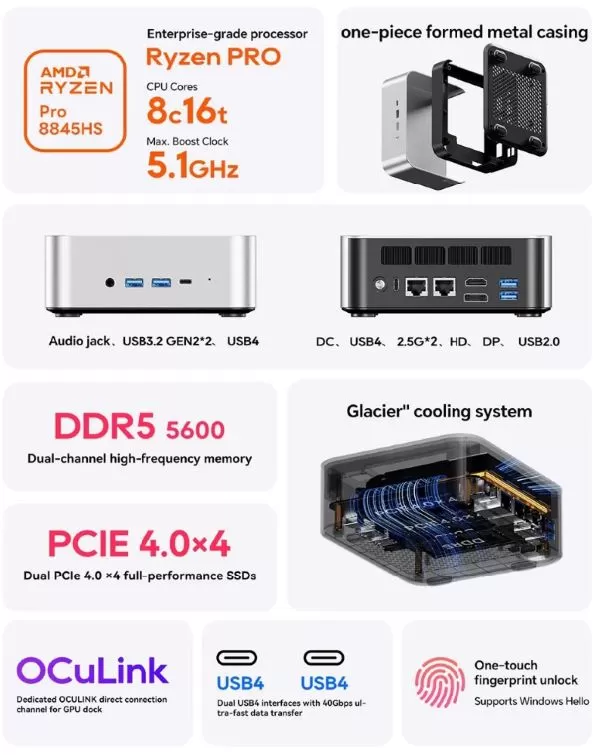
| Processor | AMD Ryzen 7 PRO 8845HS, Zen 4, 8 cores / 16 threads, 3.8 to 5.1 GHz |
| Integrated graphics | AMD Radeon 780M; It's not Radeon 890M |
| Configured power | TDP of 35 to 54 W, with a maximum indicated of 65 W |
| RAM | 2 SO-DIMM DDR5-5600 slots, up to 128 GB |
| Storage | 2 x M.2 2280 NVMe PCIe 4.0 x4, up to 16 TB total |
| Video, Audio | HDMI 2.1, DisplayPort 1.4 and 2 x USB4; up to four displays, 1 RJ45 Audio Jack |
| USB | 2 x USB 4, 2 x USB 3.2 Gen 2, 1 x USB 2.0 |
| Grid | 2 x 2.5 GbE Intel I226-V, Wi-Fi 6 and Bluetooth 5.2 |
| eGPU | Dedicated OCuLink; does not support hot swap |
| Security | Fingerprint reader compatible with Windows Hello |
| Feeding | External 120W power supply, 19V/6.32A input |
| Operating system | Windows 11 Pro in configured versions; unlicensed barebone |
| Dimensions | 130 x 150 x 55 mm |
Design and construction
🧱 The AOOSTAR MACO uses an aluminum alloy chassis with a plastic bottom cover. On paper, it's a more solid and well-made build than many budget mini PCs made entirely of plastic.
Its compact size, approximately 13 x 15 x 5.5 cm, allows it to be placed next to a monitor or behind a screen using the included VESA mount. The design is reminiscent of a small professional desktop computer: understated, metallic, and focused on providing ports rather than RGB lighting.
Screen and multimedia
It excels in video output capabilities: HDMI 2.1, DisplayPort 1.4, and two USB4 ports for connecting up to four displays simultaneously. It's a particularly attractive option for editing, programming, data analysis, trading platforms, or multi-monitor setups.
For video playback, the Radeon 780M features modern hardware acceleration and should easily handle 4K streaming, high-bitrate video, and home theater use. However, for 8K playback, it's advisable to check the specific compatibility of your TV, cable, application, and codec.
Performance and software
⚡ The Ryzen 7 PRO 8845HS offers 8 cores and 16 threads based on Zen 4, with a maximum frequency of 5.1 GHz. It's a high-end processor for mini PCs and is ready for intensive multitasking: multi-tab browsing, programming, moderate virtual machines, photo editing, advanced office applications, and video exports.
The PRO series adds a business focus, although its real advantages depend on a company implementing its management and security tools. For a home user, the most noticeable difference is that it's a very capable and efficient APU, not necessarily a game-changer compared to a standard Ryzen 7 8845HS.
The barebone version requires you to install the operating system and drivers. This can be an advantage if you want a clean installation of Windows 11 or Linux, avoiding promotional programs and unnecessary factory settings.
About the Radeon 890M
⚠️ There is an important correction to avoid misinformation on a product page: the Ryzen 7 PRO 8845HS integrates a Radeon 780M, not a Radeon 890M. The Radeon 890M belongs to a later generation of AMD graphics; the Mac with the 8845HS is sold with the Radeon 780M iGPU.
Power consumption and cables
🔌 The system uses an external 120W power supply, with an input of 19V and 6.32A. Its actual power consumption will vary greatly depending on the power profile, installed RAM, SSD drives, processor load, and whether an external eGPU is used.
For desktop use, multimedia playback, and office applications, it should be noticeably more efficient than a conventional tower. Under rendering, compilation, or gaming, performance can clearly improve, allowing a TDP of up to 54W and an advertised maximum of 65W.
To avoid signal problems with high-resolution or high-frequency monitors, I recommend using certified HDMI 2.1, DisplayPort, and full USB 4 cables when connecting displays or fast storage.
👉 See 40 Gbps USB 4 cables
Temperature and noise
1. Temperature Behavior
-
Idle / Basic tasks (Browsing, Word, Video):
-
Temperature: Around 40 °C and 45 °C.
-
The heat is distributed evenly throughout the metal casing, so the body of the device feels warm to the touch without burning.
-
-
Under heavy load / Stress tests / AAA games (TDP ~50W-54W):
-
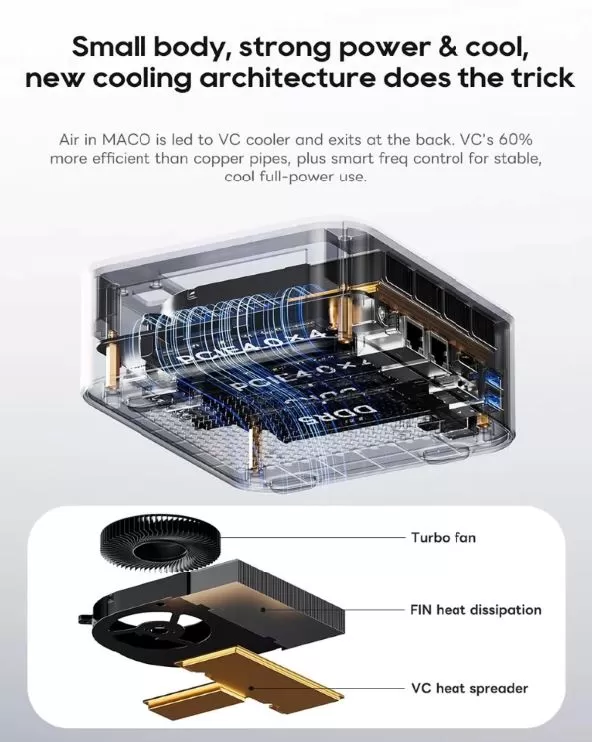
CPU/GPU temperature: Stabilizes around 72°C - 78°C (with peak temperatures rarely exceeding 82°C).
-
Performance: These are very good figures for such a compact space. The processor does not thermal throttling (throttling due to overheating) under normal use.
-
2. Noise Level and Fan
-
Daily Use / Office:
-
Virtually silent or inaudible. In a normal room environment, you'll barely notice it's on.
-
-
Playing or Rendering (100% Load):
-
The noise level is between 40 dB and 44 dB measured at half a meter. A constant hissing and moving air can be heard, but because it is a low, continuous sound, it is not high-pitched or shrill like some other small fans.
-
Connectivity and extras
1. Physical Connectivity (Ports and Expansion)
-
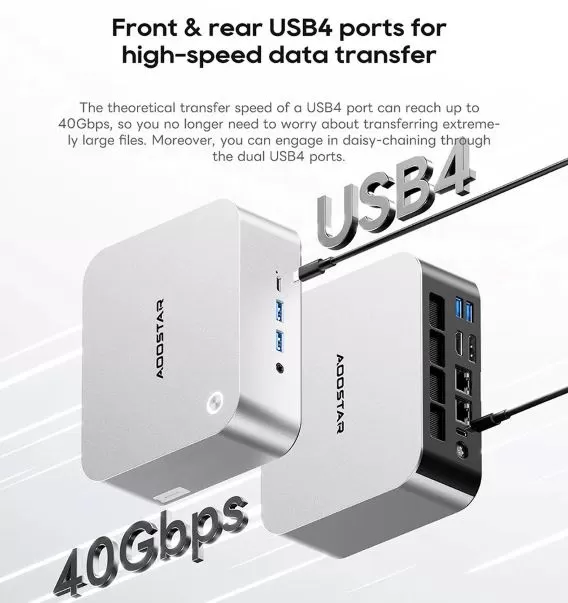
Native OCuLink port (SFF-8611): Allows you to connect an eGPU (external graphics card dock) via a direct PCIe 4.0 x4 lane (~64 Gbps). It offers twice the effective bandwidth and much lower latency than Thunderbolt 4 / USB4.
-
Dual USB4 40Gbps: Supports DisplayPort 1.4 video output, ultra-fast data transfer and round-trip Power Delivery (PD) charging.
-
Video Outputs (Up to 4 4K displays simultaneously):
-
1x HDMI 2.1
-
1x DisplayPort 1.4
-
2x USB4 (via USB-C)
-
-
Dual 2.5G Ethernet (RJ45) Network Ports: Features two high-speed network cards (Intel/Realtek 2.5GbE). This allows you to use the device as an advanced router (pfSense/OPNsense), NAS server, or virtualization environment (Proxmox) by connecting a WAN and a LAN independently.
-
Traditional USB ports: Includes USB 3.2 Gen2 (10Gbps) ports for standard peripherals and external storage.
2. Wireless Connectivity
-
Wi-Fi 6 (802.11ax): Integrated M.2 Wi-Fi card that offers theoretical speeds of up to 2.4 Gbps and improved management of congested networks.
-
Bluetooth 5.2: Excellent stability and low latency for console controllers, headphones, and wireless keyboards.
3. BIOS Extras and Functions
-
VESA mount included: Comes with the metal plate and screws to mount it behind the monitor and completely clear the desk.
-
Scheduled ignition and auto-boot:
-
Wake-on-LAN (WoL): You can turn on the Mini PC remotely via the local network.
-
Auto Power On: Configurable from the BIOS so that the computer turns on automatically as soon as it receives electrical power (ideal for servers).
-
-
Configurable TDP control: The unlocked BIOS allows you to adjust the processor's power consumption between 35W (Silent Mode), 45W (Balanced Mode) and 54W (High Performance Mode).
👉 AOOSTAR MACO on Amazon
👉 View AOOSTAR MACO on AliExpress
Expansion and upgrades
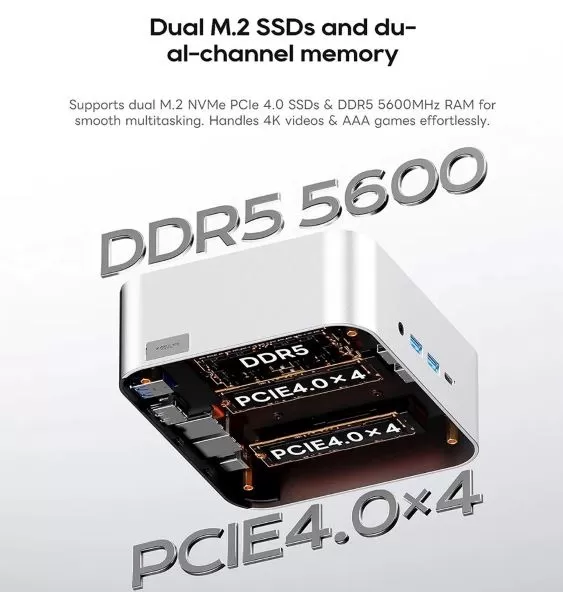
🔧 The AOOSTAR MACO is a very interesting option for users who want to expand their equipment over time.
| Element | Expansion options |
|---|---|
| RAM | Two DDR5 SO-DIMM slots at 5600 MT/s, up to 128 GB total |
| primary SSD | M.2 2280 NVMe PCIe 4.0 x4 |
| Second SSD | Second slot M.2 2280 NVMe PCIe 4.0 x4 |
| Total capacity | Up to 16 TB internal storage according to AOOSTAR |
| 2.5" SATA hard drive | No 2.5-inch SATA bay is advertised |
| External GPU | Yes, via OCuLink; it also supports USB4 solutions. |
The key difference is that OCuLink doesn't occupy one of the internal NVMe slots, according to the official FAQ. This allows you to keep both PCIe 4.0 SSDs installed and simultaneously connect a dedicated eGPU.
Remember that the OCuLink port does not support hot-swap: you must turn off the computer before connecting or disconnecting the graphics card.
👉 See DDR5 SO-DIMM 5600 memory
👉 See SSD M.2 2280 PCIe 4.0
Direct competitors
| Model | Processor and graphics | Expansion | Differential connectivity | Best for |
|---|---|---|---|---|
| AOOSTAR MACO | Ryzen 7 PRO 8845HS + Radeon 780M | 2 x M.2 PCIe 4.0, up to 128GB DDR5, OCuLink | 2 x USB4, OCuLink and 2 x 2.5G LAN | Homelab, NAS, eGPU and advanced users |
| AOOSTAR GEM12+ | Ryzen 7 PRO 8845HS + Radeon 780M | Configuration varies depending on the version | USB4 and advanced networking options | Anyone who prefers another AOOSTAR design |
| Beelink SER8 | Ryzen 7 8845HS + Radeon 780M | Expandable RAM and SSD | USB4, full connectivity | Work and overall performance |
| Minisforum UM890 Pro | Ryzen 9 8945HS + Radeon 780M | Expandable RAM/SSD; eGPU options depending on version | High-end connectivity | More CPU performance if the price is right. |
| GMKtec K8 Plus | Ryzen 7 8845HS + Radeon 780M | Expandable RAM/SSD | Dual LAN and USB4 in some versions | Good value for money and fast network |
The MACO's objective advantage over many rivals is that it packs a dedicated OCuLink, dual USB 4.0 ports, dual 2.5G LAN ports, and two M.2 PCIe 4.0 drives into a compact chassis. Before buying, compare the final price with RAM, SSD, and Windows included: a seemingly cheap barebone system can end up costing more than a pre-configured alternative.
Reviews and reputation
| Platform / Source | Overall Assessment / Verdict | Key Comment |
Reddit ( r/MiniPCs) |
Very High / Recommended | Considered one of the best all-around Mini PCs in terms of value for money, especially for budgets of $500–$600. |
| YouTube Reviews (Technology / Hardware) | Almost Perfect ("Round Product") | Highlights include its raw power in minimal space and the possibility of turning it into a "Desktop Gaming PC" via the OCuLink port. |
| Shoppers in Stores (Amazon / AliExpress) | 4.2 to 4.5 out of 5 Stars | Great satisfaction with boot speed, usability without bloatware , and performance in heavy multitasking. |
Technical Tests
1. Processor Performance (CPU Benchmarks)
The Ryzen 7 Pro 8845HS delivers performance equivalent to that of a mid-to-high-end desktop processor from a couple of generations ago, but consuming only a fraction of its power.
| Technical Test | Result (45W Mode) | Result (54W/Performance Mode) |
| Cinebench R23 (Single-Core) | ~1,780 pts | ~1,820 pts |
| Cinebench R23 (Multi-Core) | ~15,200 pts | ~16,400 pts |
| Cinebench 2024 (Single-Core) | ~105 pts | ~108 pts |
| Cinebench 2024 (Multi-Core) | ~906 pts | ~930 pts |
| Geekbench 6 (Single-Core) | ~2,585 pts | ~2,620 pts |
| Geekbench 6 (Multi-Core) | ~12,800 pts | ~13,100 pts |
Quick read: Multi-core performance is excellent for heavy-duty tasks such as code compilation, 4K video editing in Premiere/DaVinci, or simultaneous virtual machines.
2. Synthetic Graphics Tests (GPU iGPU Radeon 780M)
In 3DMark synthetic tests, the Radeon 780M easily outperforms older dedicated cards like the GTX 1050 Ti and comes close to a laptop GTX 1650.
-
3DMark Time Spy (DirectX 12): ~3,300 - 3,350 points (3,000 pts on the integrated GPU and 10,000+ on the CPU).
-
3DMark Fire Strike (DirectX 11): ~7,800 - 8,100 points.
3. Real Game Tests (FPS at 1080p)
At 1080p (Full HD) resolution, using the integrated Radeon 780M GPU and 5600 MHz DDR5 RAM:
eSports and Competitive Titles (Medium/High Quality):
-
Valorant / CS2: 120 – 160 FPS (Super smooth flow).
-
Rocket League: 100+ FPS on High quality.
-
Overwatch 2: 80 – 95 FPS on Medium quality.
Demanding AAA Games (Low/Medium Quality):
-
Cyberpunk 2077 (1080p Medium + FSR Quality): 48 – 55 stable FPS.
-
God of War (1080p Low + FSR Performance): ~65 FPS average.
-
Call of Duty Modern Warfare II (1080p Low): 80 – 90 FPS.
-
Red Dead Redemption 2 (1080p Low/Medium): 50 – 58 FPS.
4. OCuLink Port Performance (External eGPU)
Tests connecting a desktop graphics card (e.g., an RTX 4070 ) via the OCuLink port show unsurpassed efficiency:
-
USB4 / Thunderbolt 4 connection: Loss of 20% to 35% of graphics performance due to latency and the ~32 Gbps real limit.
-
OCuLink connection (PCIe 4.0 x4): Loss of only 3% to 7% compared to installing the graphics card inside a traditional desktop PC.
5. Electrical Consumption, Stress and Thermal
Thermal imaging and stress software tests (AIDA64 + FurMark simulating 100% load) recorded:
-
Idle Power Consumption: ~8W – 12W at the plug.
-
Power Consumption at Maximum Load (TDP 54W): ~85W – 95W total consumed from the wall.
-
CPU/GPU Temperature Under Prolonged Load: 72°C to 82°C (AMD's safe thermal limit for this chip is 100°C, so it is far from the danger of overheating).
-
NVMe M.2 Drive Speed: Supports PCIe 4.0 read/write speeds of up to 7,000 MB/s when using the factory thermal pad.
Gaming and emulation
| System | Expected experience |
|---|---|
| NES, SNES, Mega Drive, PS1 and arcade | Excellent |
| Dreamcast, PSP, GameCube and Wii | Excellent in most titles |
| PlayStation 2 | Very good in most games; it depends on the emulator and settings. |
| Wii U | Generally good, with appropriate settings |
| Nintendo Switch | Variable; depends on the game, emulator, and compatibility |
| PlayStation 3 | Selective; some games will run well, others will demand more CPU/GPU or settings. |
| Modern AAA Games | 1080p low/medium and FSR when needed; much better with eGPU |
For a serious emulation setup, a combination of 32GB of dual-channel DDR5 RAM and a 1TB or larger NVMe SSD is a good balance. If the goal is to play AAA titles without compromise, it makes more sense to budget for an OCULink eGPU or consider a system with a dedicated graphics card.
Frequently Asked Questions
Does the AOOSTAR MACO have a Radeon 890M?
No. The model with Ryzen 7 PRO 8845HS integrates AMD Radeon 780M ; the mention of Radeon 890M in some listings appears to be a spec sheet error.
Does it include Windows 11?
It depends on the configuration. AOOSTAR specifies Windows 11 Pro for versions with an operating system, while the barebone is sold without a Windows key.
Can the RAM be upgraded?
Yes. It includes two DDR5 SO-DIMM slots and supports up to 128GB of dual-channel DDR5-5600 memory.
Can I install two SSDs?
Yes. It has two M.2 2280 NVMe PCIe 4.0 x4 slots and supports up to 16 TB of internal storage, according to the manufacturer.
Does it have space for a 2.5-inch SATA drive?
There is no advertised 2.5-inch SATA drive bay. Internal expansion is provided via the two M.2 2280 slots.
What is OCuLink used for?
OCuLink allows you to connect an external GPU with a dedicated PCIe connection. It's especially useful for transforming your mini PC into a graphics or gaming workstation when connected to a compatible eGPU.
Can OCuLink be disconnected with the PC turned on?
No. AOOSTAR specifies that the OCuLink port does not support hot-swap, so you must turn off the device before connecting or disconnecting it.
Final conclusion
🏁 The AOOSTAR MACO Ryzen 7 PRO 8845HS isn't just trying to compete on price: it aims to be a compact mini PC for users who want real upgrade potential. Two M.2 PCIe 4.0 slots, up to 128GB of DDR5 RAM, dual 2.5G LAN ports, front and rear USB 4.0 ports, a fingerprint reader, and OCU Link make it a particularly versatile platform.
It's ideal for developers, creators working with multiple displays, home labs, high-performance NAS devices, users of lightweight virtualization, and those who want to start with integrated graphics but retain the option of an eGPU. For basic office work or streaming, a mini PC with a Ryzen 5 or Intel N100 will be more affordable and sufficient.
The decision hinges on the final price. If the barebone version is inexpensive and you already have DDR5 RAM and an SSD, it could be an excellent purchase; if you have to buy all the components separately, compare it to a pre-configured Beelink, GMKtec, or Minisforum system. The important thing is to buy it knowing that its correct graphics card is a Radeon 780M and that its main appeal lies in its connectivity, not in promises of "AAA gaming" without any tweaking.
Buy AOOSTAR MACO
🛒 Check price, RAM/SSD included, warranty and plug type before paying: