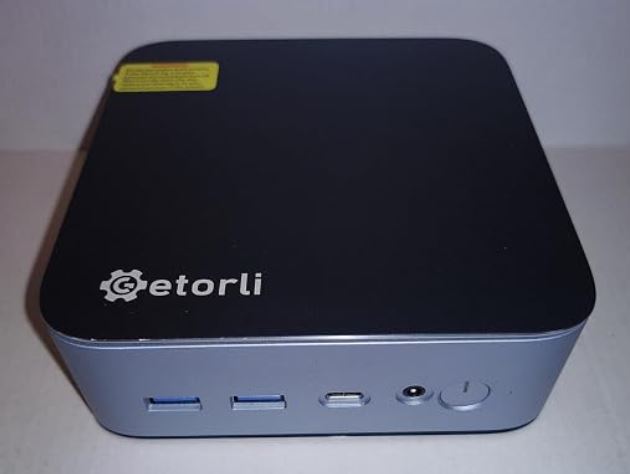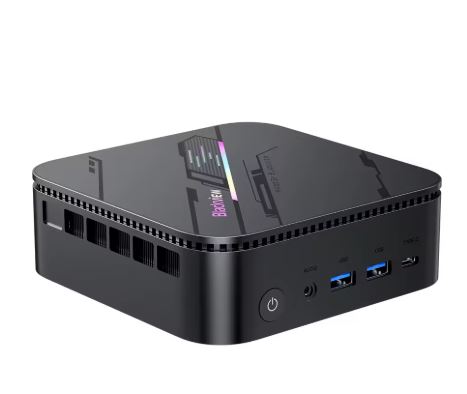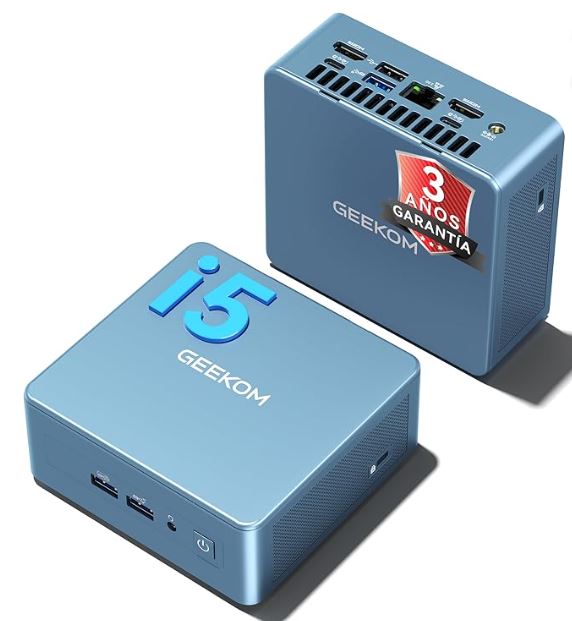
The GEEKOM IT13 with an Intel Core i5-13600H is one of the most well-rounded mini PCs on the market: powerful for advanced office work, capable for casual gaming, and well-built for continuous use. Its key advantages over the competition are its expandable RAM (without soldered LPDDR), a 3-year warranty, and top-notch connectivity with USB 4.0.
| ✅ Pros | Expandable RAM up to 96GB, 3-year warranty, 4 x 2 USB ports, support for 4 displays, Windows 11 Pro included, silent IceBlast 2.0 cooling, SD card slot, 2.5" SATA bay |
| ❌ Cons | Integrated GPU limited for modern AAA gaming, DDR4 instead of DDR5 |
| 🏆 Conclusion | Ideal for professionals, intensive multitasking, and users who want to invest long-term in an expandable and reliable machine. |
📦 Unboxing and Box Contents
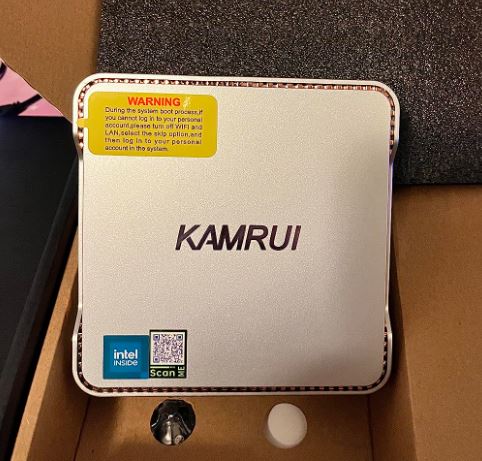
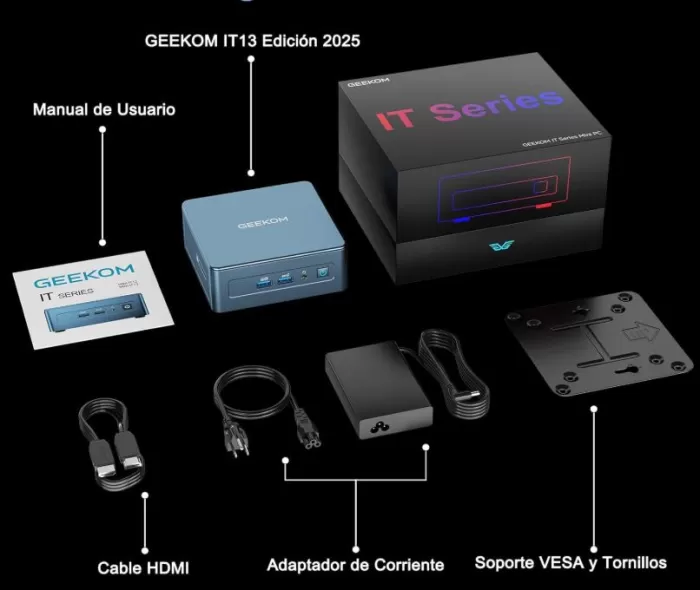
Upon opening the GEEKOM IT13 box, the first impression is one of seriousness. The mini PC arrives protected with molded foam and accompanied by:
-
🔌 Power adapter (120 W)
-
🖥️ HDMI cable
-
🔩 VESA mount for attaching it behind the monitor
-
📖 Quick Start Guide
-
🔧 Screwdriver for opening the chassis
The packaging is compact and reusable, with no unnecessary plastic. Everything is well organized, and the device arrives ready to plug in within minutes, with Windows 11 Pro already activated.
🗂️ Technical Specifications
| Component | Specification |
|---|---|
| Processor | Intel Core i5-13600H — 12 cores (4P+8E), 16 threads, up to 4.8 GHz |
| Integrated GPU | Intel UHD Graphics (Iris Xe, 80 EUs) |
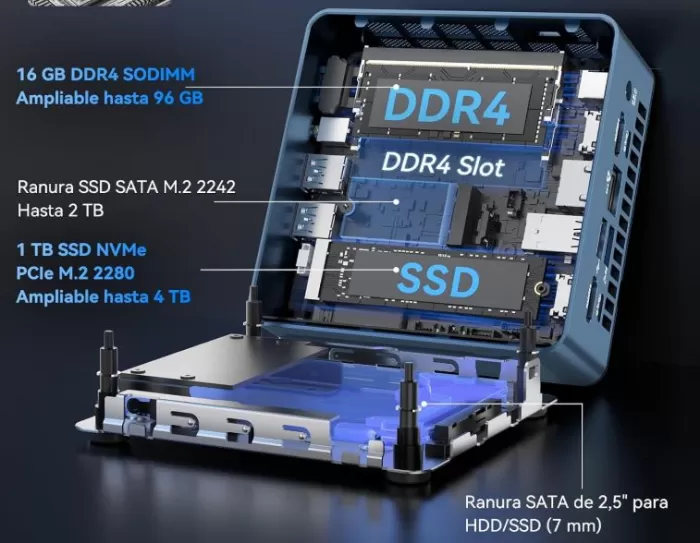
| RAM | 16 GB DDR4 3200 MHz (SO-DIMM, expandable up to 96 GB) It has 2 memory slots: 1×16GB factory installed and 1 free slot for future expansion |
| Storage | 1 TB SSD NVMe PCIe Gen 4 (M.2 2280) expandable up to 4 TB |
| Extra slots | 1× M.2 2242 SATA (expandable up to 2 TB) + 1× 2.5" SATA bay (expandable up to 2 TB) |
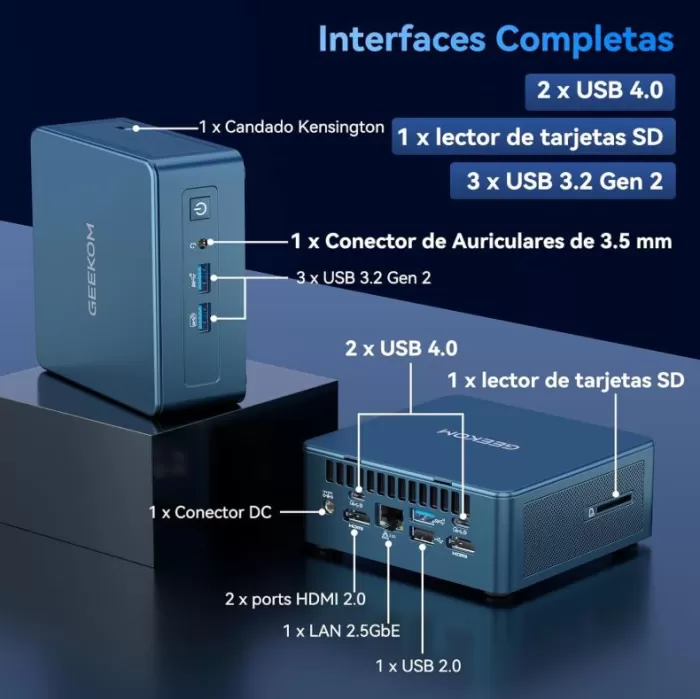
| Video ports | 2× HDMI 2.0 + 2× USB 4.0 (up to 8K @ 60 Hz via USB4) |
| USB | 2× USB 4.0 (40 Gbps) + 2× USB 3.2 Gen2 + 2× USB 2.0 |
| Grid | Wi-Fi 6E, Bluetooth 5.2, Ethernet 2.5 Gbps |
| SD slot | ✅ Yes, SD card reader |
| Audio | 3.5 mm combo jack (headphones + microphone) |
| Dimensions | 117 × 112 × 49 mm - 0.64 liters volume - 653.17 grams |
| Consumption | ~15-20 W at rest, ~50-67 W under load |
| Operating system | Windows 11 Pro (pre-installed and activated) |
| Warranty | 3-year manufacturer's warranty + lifetime technical support |
🎨 Design and Construction Quality
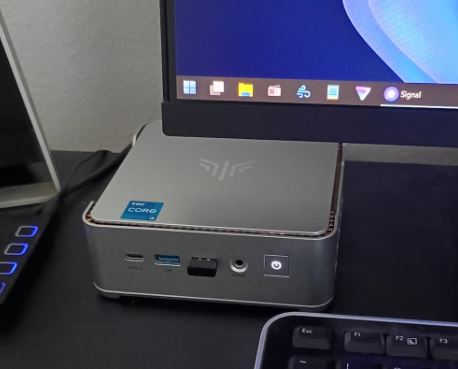
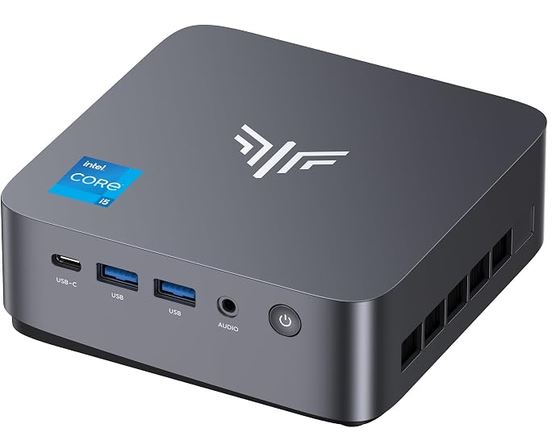
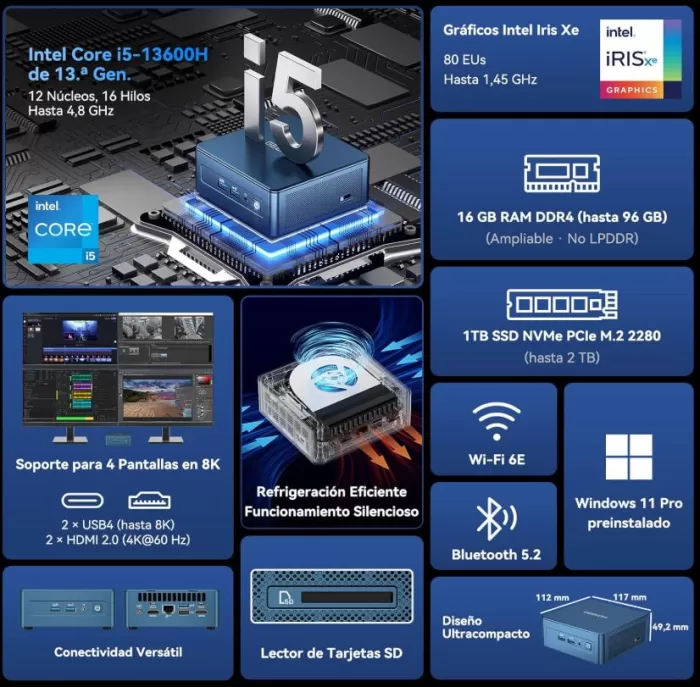
The GEEKOM IT13 measures just 11.7 × 11.2 × 4.9 cm, allowing it to fit behind a monitor with the included VESA mount or on any desk without taking up much space. The casing combines high-quality metal and plastic, with a discreet and professional dark gray finish that blends seamlessly into any office or gaming setup. The chassis feels solid to the touch; there are no creaks or wobbly flexes.
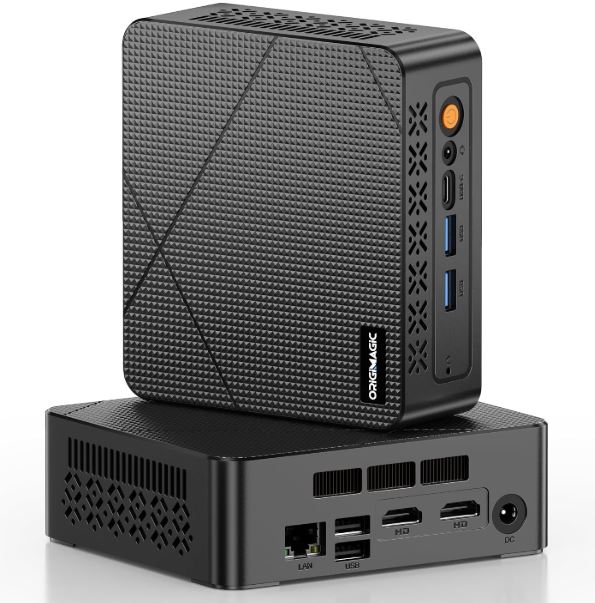
Heat dissipation is managed by GEEKOM's IceBlast 2.0 system : a solid copper block combined with a larger diameter fan than is typical for devices of this size. The port placement is smart: the most commonly used USB ports (USB 4.0) are on the front for easy access, while the HDMI and Ethernet ports are on the back.
🖥️ Screen and Multimedia
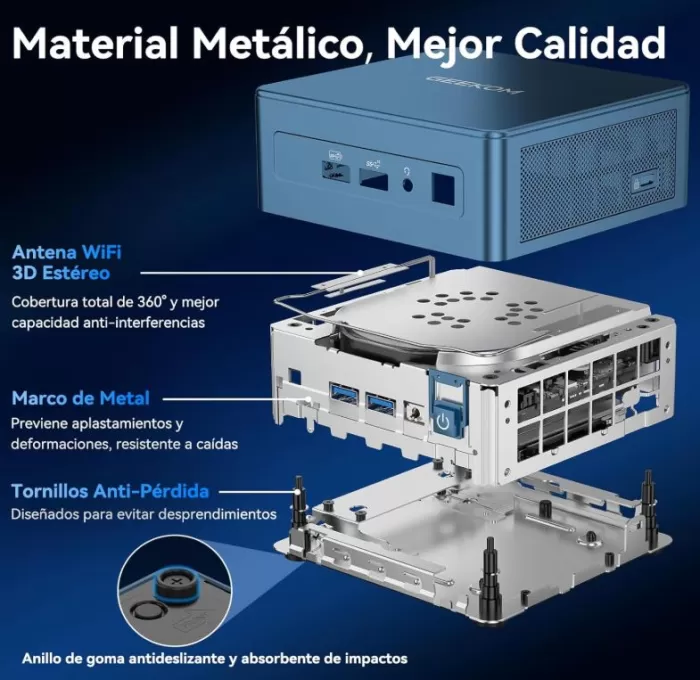
This mini PC doesn't include its own screen, but its potential in that regard is remarkable. Thanks to its 2x HDMI 2.0 and 2x USB 4.0 ports, it allows you to simultaneously connect up to four 4K monitors at 120Hz or two 8K displays at 60Hz —a configuration that few mini PCs in this price range can match.
The audio output is good via the 3.5 mm jack and is compatible with external speaker systems. For streamers or content creators who need a compact multi-monitor workstation, the IT13 is a hard-to-beat option in terms of price.
🚀 Performance and Software
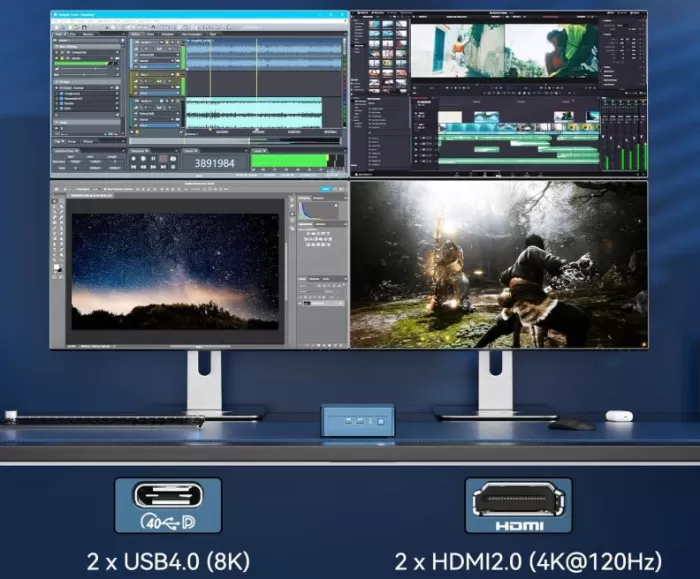
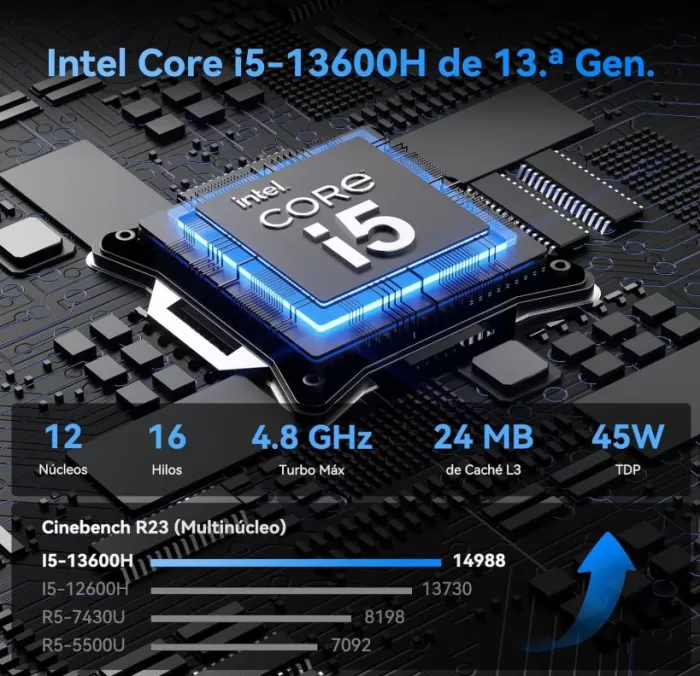
The Intel Core i5-13600H is a 13th-generation Raptor Lake processor with 12 hybrid cores (4 P-cores + 8 E-cores) and speeds up to 4.8 GHz. It achieves outstanding scores in real-world benchmarks:
| Benchmark | GEEKOM IT13 Result |
|---|---|
| Cinebench R23 Single-core | ~1,727 pts |
| Cinebench R23 Multi-core | ~12,000–14,000 pts |
| GeekBench 6 Single | ~2,694 pts |
| GeekBench 6 Multi | ~10,286 pts |
| PCMark 10 | ~6,000–6,500 pts |
| CrystalDiskMark Read | ~4.857 MB/s |
| 3DMark Time Spy (GPU) | ~1,880 pts |
Windows 11 Pro comes clean, with virtually no bloatware —just the standard Microsoft applications. Windows updates work normally, and GEEKOM provides updated drivers on its official website. The computer boots in less than 15 seconds from a complete shutdown.
🔋 Energy Consumption and Cables
The GEEKOM IT13 is surprisingly efficient for its power level:
-
🟢 Standby / Light load: ~15-20 W
-
🟡 Average load (office applications, streaming): ~30-45 W
-
🔴 Maximum sustained load: ~50-67 W
The included adapter is 120W, sufficient for peak performance. It does not support USB-C PD (Power Delivery) charging, so the proprietary adapter is always required. The power cable is standard and easily replaceable.
🌡️ Temperature and Noise (Actual Thermal)
The IceBlast 2.0 cooling system performs excellently. In real-world tests under full load with Cinebench, the temperature at the air outlet grille hovers around 59°C, which is remarkable for such a compact chassis. The CPU can reach ~80°C internally at peak temperatures, but this doesn't cause any significant throttling and always remains within a safe range.
Regarding the noise:
-
🔇 At rest: virtually inaudible (~30 dB)
-
🔉 Moderate load: barely perceptible in a normal office environment (~35 dB)
-
🔊 Maximum sustained load: ~40-49 dB in performance mode
Unlike centrifugal laptop fans, the IT13's noise is more similar to that of a 12cm tower fan — much less annoying on a daily basis.
🔌 Connectivity and Extras
The GEEKOM IT13 boasts exceptional connectivity for its size:
-
USB 4.0 × 2 (40 Gbps, compatible with Thunderbolt 3/4 depending on the monitor, eGPU)
-
USB 3.2 Gen 2 × 2 (10 Gbps)
-
USB 2.0 × 2
-
HDMI 2.0 × 2
-
Ethernet 2.5 Gbps × 1
-
Wi-Fi 6E (up to 2.4 Gbps theoretical)
-
Bluetooth 5.2
-
SD card reader
-
3.5 mm combo audio jack
-
No 5G, no NFC, no integrated fingerprint reader
-
No IP rating (not waterproof)
The presence of USB 4.0 is a major differentiator: it allows you to connect external eGPUs to multiply graphics performance, with FPS jumps of up to double in games at 1080p resolution.
🔧 Expansion and Upgrades
The GEEKOM IT13 is one of the most expandable mini PCs on the market. Here's what you can do:
-
🧠 RAM: It comes with 1 x 16 GB in a DDR4 SO-DIMM slot. The second slot is empty. You can expand it up to a total of 96 GB (2 x 48 GB). The RAM is not soldered, which is a big advantage over competitors.
-
💾 Main SSD: M.2 2280 PCIe Gen 4, expandable up to 4 TB.
-
➕ Second M.2 drive: M.2 2242 SATA slot included (up to 2 TB).
-
💿 Third drive: 2.5" SATA bay for conventional HDD or SSD drives (up to 2 TB).
-
🔁 Total potential storage: up to 8 TB across the three slots.
To open the device, you only need the included screwdriver. Detailed disassembly guides are available in communities like Reddit (/r/MiniPCs).
🆚 Comparison with Direct Competitors
| GEEKOM IT13 i5-13600H | Beelink SER7 | Minisforum UM790 Pro | Intel NUC 13 Pro | |
|---|---|---|---|---|
| CPU | Intel Core i5-13600H | AMD Ryzen 7 7840HS | AMD Ryzen 9 7940HS | Intel Core i7-1360P |
| Integrated GPU | Iris Xe 80 EUs | Radeon 780M | Radeon 780M | Iris Xe 96 EUs |
| RAM | 16 GB DDR4 (expandable to 96 GB) | 32 GB DDR5 | 32 GB DDR5 | 16 GB DDR4 |
| SSD | 1 TB PCIe Gen 4 | 1 TB | 1 TB | 512 GB |
| Total slots | 3 (M.2 + M.2 SATA + 2.5") | 2 × M.2 | 2 × M.2 | 1 × M.2 |
| USB 4.0 | ✅ × 2 | ❌ | ❌ | ✅ × 2 |
| Wi-Fi | Wi-Fi 6E | Wi-Fi 6 | Wi-Fi 6E | Wi-Fi 6E |
| Warranty | 3 years | 1 year | 1 year | 1 year |
| Gaming GPU | ⭐⭐⭐ | ⭐⭐⭐⭐ | ⭐⭐⭐⭐ | ⭐⭐⭐ |
| Expandability | ⭐⭐⭐⭐⭐ | ⭐⭐⭐ | ⭐⭐⭐ | ⭐⭐ |
| Availability | View Prices | View Prices | View Prices | View Prices |
💡 Note: If gaming is your priority, the Radeon 780M GPU in the Beelink SER7 or Minisforum UM790 Pro clearly performs better in modern 3D games. But if you prioritize expandable RAM, more storage slots, an extended warranty, and USB 4.0, the IT13 wins.
💬 Reviews on Well-Known Pages
The reviews published by specialized media outlets are very positive. Here's a summary of the most relevant points:
🌐 TechRadar — Rated the GEEKOM IT13 as a "Top-tier CPU in a NUC case," highlighting its scores in Cinebench and PCMark (6,501 in the Office Test). It noted that the compact chassis does not compromise performance.
🌐 Tweaktown — Described it as "The fastest Mini PC we've ever tested" at the time of the review, with first place in Cinebench single-core and 3DMark Storage. They highlighted the SSD's speed (4,857 MB/s read).
🌐 Windows Central — After reviewing it, they considered it "one of the best mini-PCs we've ever used." They especially recommended it for users looking for a reliable, no-compromise machine. In their 2025 review, they highlighted the good scores on Geekbench 6 (2,694 SC / 10,286 MC) and 3DMark Night Raid (17,901 pts).
🌐 ITPro — In its 2025 analysis, it acknowledged that it is "a mild update that has made a good mini PC just that little bit better", competing directly with the Lenovo ThinkCentre M70q in PCMark 10 (6,002 vs 6,066).
🌐 Droix.net — Confirmed inaudible noise under normal use and only 52 dB under maximum load with Cinebench, with an exhaust temperature of ~59°C. Very positive rating for office environments.
🌐 Gizmochina — It highlighted the surface temperature of just 40°C during intensive use and compared the fan noise to that of a PC tower fan, much more pleasant than laptop fans.
🌐 Amazon — Real customer reviews: 4.8 out of 5 stars. 59 global ratings
- I bought it a few months ago to be my main PC for my consulting business, and I couldn't be happier. Setup was very straightforward (except for the usual Windows 11 issues). The fan only kicks on occasionally and isn't really that noisy. I've since added a 1GB SATA 2242 SSD and a 2.5GB hard drive. Geekom has some very helpful videos on YouTube that guide you through the process.
- Perfect. It's fast and takes up little space. Ideal.
- We're more than satisfied with it. It takes up hardly any space, it's super quiet, and it's fast. After looking at many options, it was definitely the right purchase.
-
So far I like everything: fast, stable, quiet. But it wouldn't have cost them anything to put a switch on the power supply.
-
A marvel. A powerful device in a compact size. It has everything. And at an extraordinary price. We also had an issue with the charger cable, which was resolved exceptionally well by the manufacturer's staff.
📊 Technical Tests
Here are the most relevant results recorded by independent reviewers on similar hardware (i5-13600H / i7-13700H / i9-13900H within the same family):
🧠 CPU Performance
| Test | Result | 💬 Opinion |
|---|---|---|
| Cinebench R23 Single-core | ~1,700–1,750 pts | Excellent for a mini PC. It outperforms many mid-range gaming laptops and is more than enough for any office or development task. |
| Cinebench R23 Multi-core | ~12,000–15,000 pts | This is where the i5-13600H truly shines: its 12 hybrid cores perform like an older generation i7. Ideal for compiling code, exporting video, or having 20 tabs open. |
| GeekBench 6 Single | ~2,694 pts | This number reflects the speed of everyday tasks (opening apps, browsing, typing). It's noticeable in daily use: the device is agile and responsive. |
| GeekBench 6 Multi | ~10,286 pts | Solid performance under parallel workloads. It doesn't quite reach the level of an Apple M.2, but for Windows at this price, it's a very competitive score. |
| PCMark 10 (Office/Productivity) | ~6,000–6,500 pts | The test is designed to simulate real-world work: spreadsheets, video conferencing, document editing. A score of over 6,000 points puts it on par with compact Lenovo or Dell workstations in the same price range. |
| Passmark CPU | ~4,742 pts | Correct result. Indicates that there will be no bottlenecks in standard professional use. |
🎨 GPU Performance (Intel Iris Xe)
| Test | Result | 💬 Opinion |
|---|---|---|
| 3DMark Time Spy | ~1,880 pts | The integrated GPU shows its limitations here. It's sufficient for casual gaming and 4K playback on media players, but not for modern AAA titles at high resolution. |
| 3DMark Night Raid | ~17,901 pts | This test is specifically designed for integrated GPUs, and the results are remarkable. For games from 3-5 years ago or indie titles, the graphics performance is perfectly playable. |
| GeekBench 6 OpenCL | ~15,370 pts | It demonstrates capabilities for parallel computing tasks: light rendering, image/video filters in software like DaVinci Resolve or Adobe Premiere at 1080p resolution. Nothing spectacular, but functional. |
💡 My assessment: The Intel Iris Xe isn't a GPU that can compete with AMD's Radeon 780M. However, for those who don't play the latest games, it's more than adequate. And if you need more graphics power, USB 4.0 allows you to connect an external eGPU and completely transform your gaming experience.
💾 Storage Speed
| Test | Result | 💬 Opinion |
|---|---|---|
| CrystalDiskMark Sequential Read | ~4.857 MB/s | Exceptional read speeds. Opening demanding applications, loading large projects, or copying large files happens in seconds. Clearly PCIe Gen 4 at full performance. |
| CrystalDiskMark Sequential Write | ~4.484 MB/s | Write speeds are virtually on par with read speeds, meaning that exporting projects or making local backups is just as fast. An SSD of this caliber in a mini PC of this range is a real game-changer. |
💡 My rating: This is one of the most surprising aspects of the GEEKOM IT13. Many similarly priced mini PCs use PCIe Gen 3 or even SATA SSDs. Here you have pure Gen 4, with speeds that many high-end laptops would envy.
🌡️ Temperature and Energy Efficiency
| Scenery | Result | 💬 Opinion |
|---|---|---|
| Outlet air temperature (max. load) | ~59°C | Impressive for a chassis of just 0.64 liters. The IceBlast 2.0 system does exactly what it promises: evacuate heat without compromising performance or overheating the equipment. |
| Outdoor surface temperature | ~40°C under load | The device's body gets slightly warm to the touch, but never uncomfortably so. You can keep it in an enclosed space without any problem. |
| Standby power consumption | ~15-20 W | Perfect for a system that's on 24/7, such as a home server or media center. In a continuous standby state, it only costs around €15-20 per year in electricity. |
| Power consumption under maximum load | ~50-67 W | Reasonable for the power it offers. An equivalent gaming laptop would consume twice as much. Energy efficiency is another strong point of the i5-13600H. |
💡 My assessment: Thermal efficiency and energy consumption are two of the key areas GEEKOM has focused on in this model. The result is a device that can run all day without you noticing its presence, either in terms of noise or your electricity bill.
🎮 Gaming and Emulation
The Intel Iris Xe GPU isn't a gaming powerhouse, but it's not useless either. Here's what you can expect:
✅ Games that run well:
-
League of Legends, Valorant, CS2 (medium settings, 60+ FPS in 1080p)
-
GTA V (medium settings, 60 FPS)
-
Fortnite (low-medium settings, 45-60 FPS)
-
Genshin Impact (1080p, 45-60 FPS adjusting graphics)
-
Minecraft, Stardew Valley, Hades — no problem
⚠️ Demanding games (low settings required):
-
Cyberpunk 2077 — playable in 720p/low
-
The Witcher 3 — 1080p/medium possible
🕹️ Emulation — This is where it shines:
-
✅ NES, SNES, Genesis, GBA — no problem at all
-
✅ PSP, N64, PS1 — 100% smooth
-
✅ PlayStation 2 — perfectly playable
-
✅ GameCube / Wii — no problems (Dolphin)
-
⚠️ PS3 (RPCS3) — some titles playable, others with drops
-
⚠️ Nintendo Switch (Yuzu/Ryujinx) — depends heavily on the game
💡 Tip: By connecting an eGPU via USB 4.0, FPS in modern games can be doubled or tripled — from 54 FPS to 115 FPS in Forza Horizon 5 at 1080p in real-world testing.
❓ Frequently Asked Questions (FAQ)
Can the RAM on the GEEKOM IT13 be upgraded?
Yes. The RAM is standard SO-DIMM DDR4, not soldered. It comes with one 16GB module and has one free slot for up to 96GB total.
Does it support Linux?
Yes. GEEKOM confirms official compatibility with Linux distributions such as Ubuntu.
Does it have an M.2 slot for a second SSD?
Yes, it has an additional M.2 2242 SATA slot besides the main NVMe SSD, plus a 2.5" SATA bay. In total, three storage options.
Does it work as a home server or lightweight NAS?
Absolutely. Its low standby power consumption (~15-20 W) makes it ideal for 24/7 operation.
Can I connect 4 monitors?
Yes: 2× HDMI + 2× USB4 allow up to four simultaneous displays.
Is USB 4.0 compatible with Thunderbolt?
It is USB 4.0 (40 Gbps), which shares the specification with Thunderbolt 3/4, although full compatibility depends on the accessory.
Does it come with Windows in Spanish?
Windows 11 Pro comes in English by default, but you can change the language from Settings > Time & Language > Language. Activation is valid for Spanish.
🏆 Final Conclusion
The GEEKOM IT13 with an i5-13600H is a solid and future-proof purchase for anyone looking for an expandable, quiet, and well-built mini PC for intensive work, home use, or education. It's not the option for a AAA gamer demanding top-of-the-line GPU performance, but for 90% of users who need advanced office applications, multitasking, retro emulation, streaming, and a multi-screen environment, it's hard to find a more complete option at this price.
Who is it ideal for?
-
👨💼 Professionals and freelancers who need multiple screens
-
🎓 Students or educational institutions looking for durability and a guarantee
-
🏠 Home users who want to replace a tower PC
-
🕹️ Retro emulation enthusiasts
-
🖥️ Lightweight home servers or NAS
Alternatives to consider:
-
💜 Beelink SER7 if you prioritize gaming with AMD Radeon 780M
-
🟣 Minisforum UM790 Pro if you want maximum AMD performance
-
🔵 GEEKOM IT13 i9-13900HK version if you need more CPU/GPU power
🛒 Where to Buy?
You can purchase the GEEKOM IT13 at the following stores with guaranteed secure purchases:
| Store | Link | Approximate price |
|---|---|---|
| 🛒 Amazon | 🛒 Buy GEEKOM IT13 | ~€699 |
| 🛒 AliExpress | Search for GEEKOM IT13 on AliExpress | Not Available |