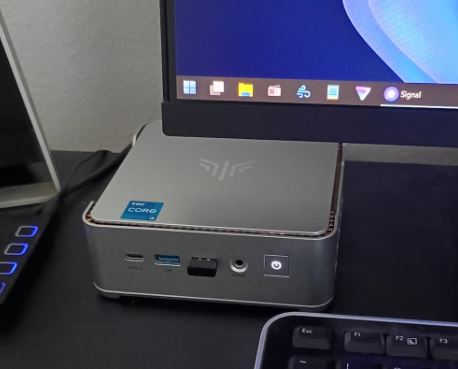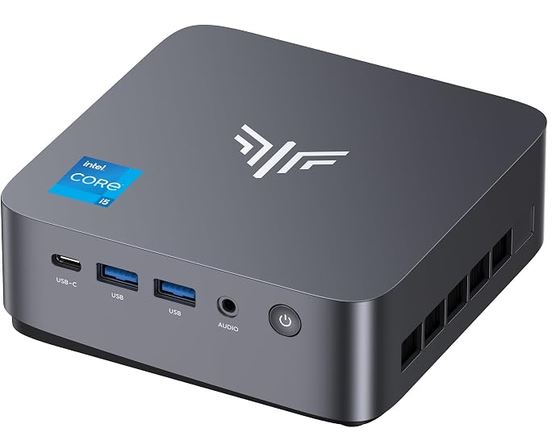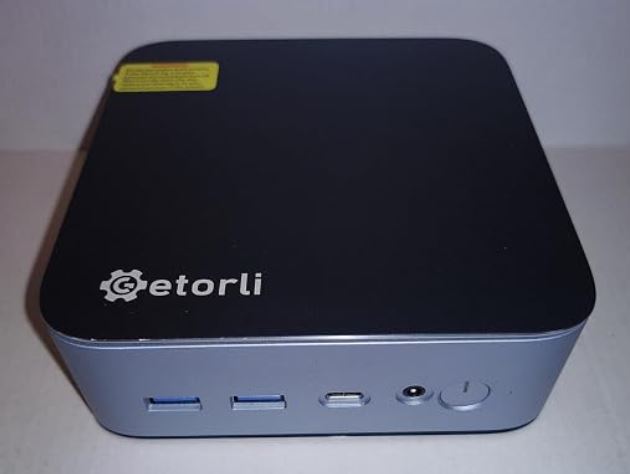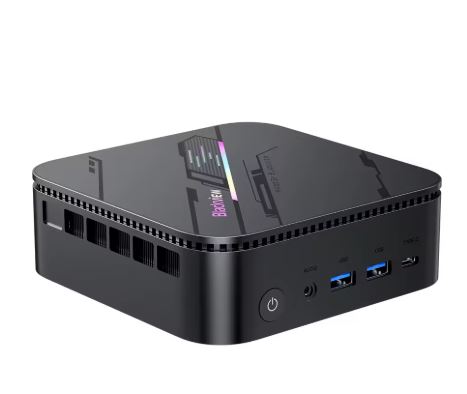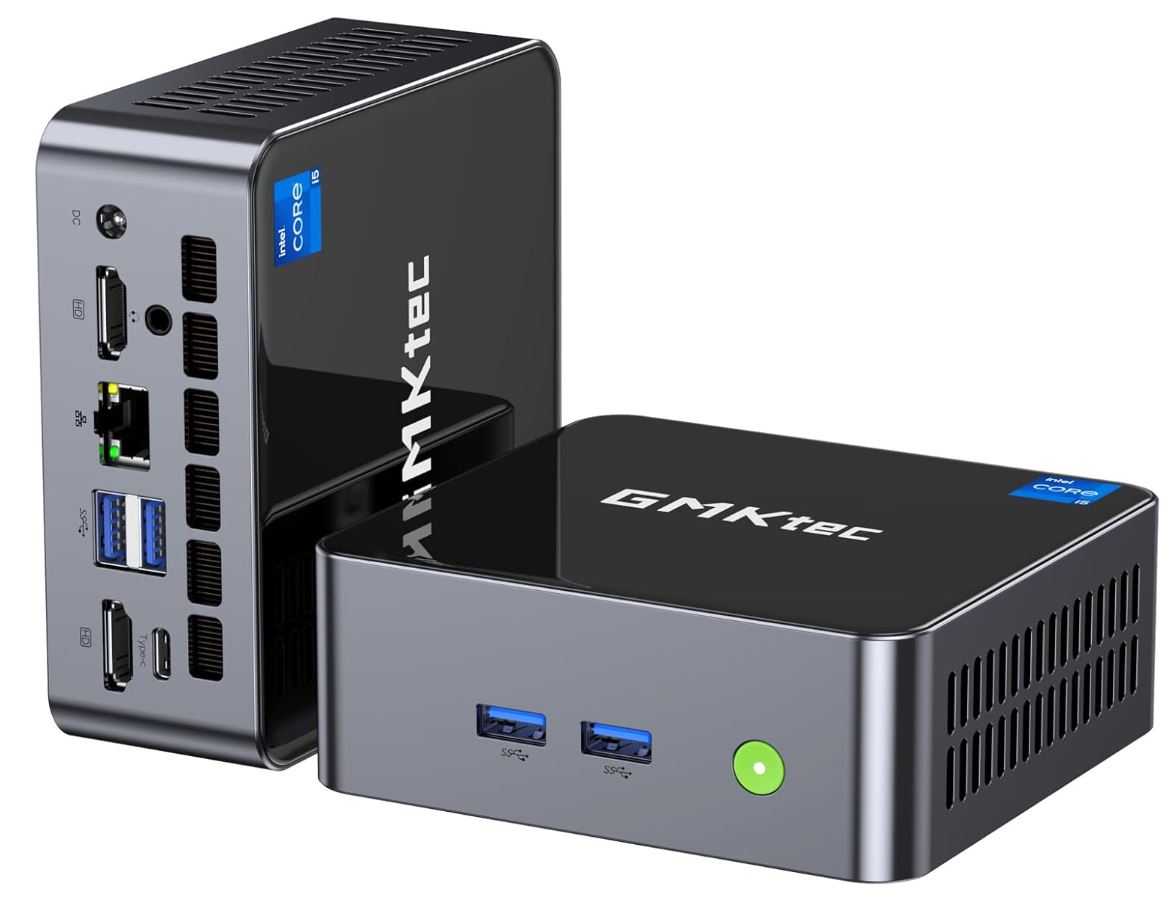
The GMKtec NucBox M3 is a solid choice for those looking for a powerful, compact, and affordable mini PC for office work, multitasking, and multimedia use.
Its 12th generation Intel Core i5-12450H processor delivers above-average performance in its class, and its upgradeable design makes it a lasting investment.
✅ Pros:
-
Excellent value for money
-
Powerful CPU with 8 cores and 12 threads
-
Triple 4K Screen Support
-
Compact and upgradeable design
-
WiFi 6 + 2.5G Ethernet + BT 5.2
-
Windows 11 Pro pre-installed and activated
❌ Cons:
-
Limited integrated graphics for AAA gaming
-
Without Wi-Fi 6E or Thunderbolt
🏁 Quick conclusion: For office work, home theater, web development, virtualization, and casual gaming, this mini PC is hard to beat at its price. If your main goal is to play AAA titles or work with intensive 3D rendering, you should aim higher.
🛒 View Prices and Availability GMKtec NucBox M3
📦 Unboxing and Box Contents
GMKTec NucBox M3
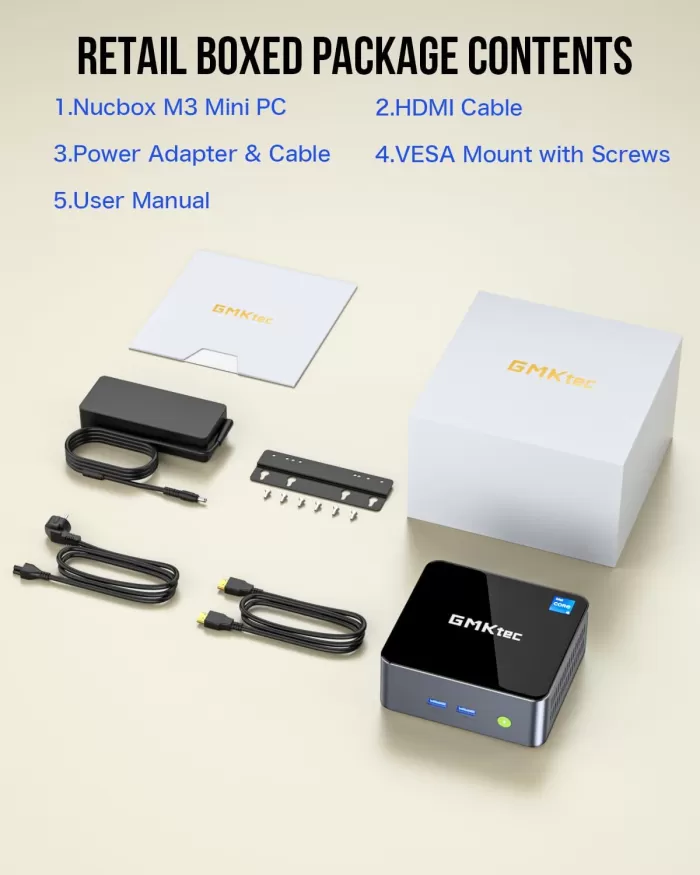
Upon opening the GMKtec NucBox M3 box, you'll find neat and well-protected packaging. The contents include:
-
🖥️ The mini PC itself
-
🔌 AC power adapter (includes power cord)
-
🖇️ HDMI cable
-
🔧 VESA mounting bracket with screws
-
📄 User manual and documentation
The VESA mount is a welcome feature if you want to mount the device behind your monitor or on a wall, freeing up desk space. However, as is typical for this price range, it doesn't include a keyboard, mouse, or monitor.
📋 Technical Specifications
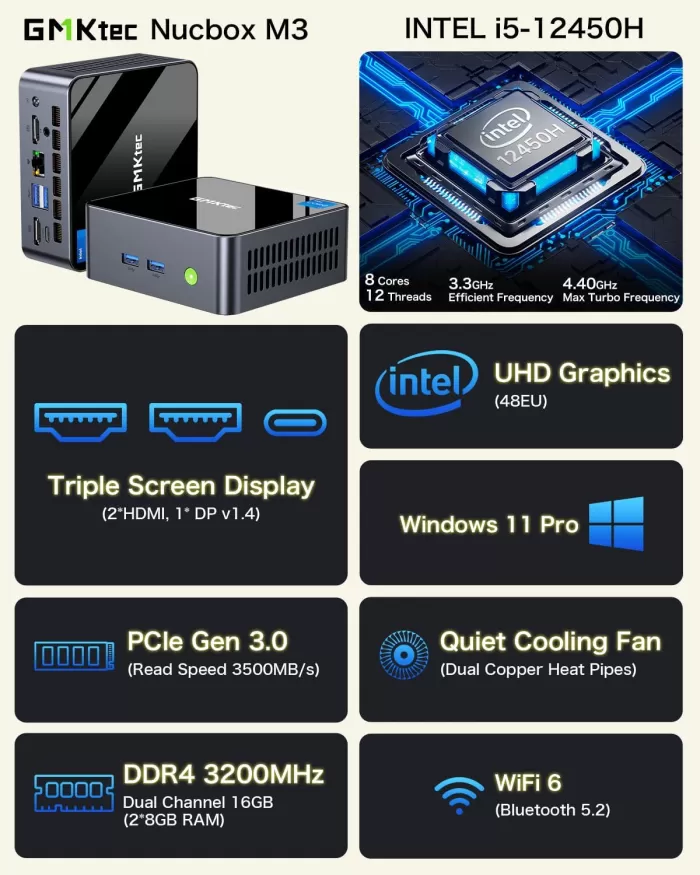
| Component | Detail |
|---|---|
| CPU | Intel Core i5-12450H, 8C/12T, up to 4.4 GHz Turbo, TDP 45W |
| GPU | Intel UHD Graphics Xe G4, 48 EUs, up to 1.20 GHz |
| RAM | 16 GB DDR4 3200 MHz Dual Channel (2x SO-DIMM) |
| Storage | 1TB M.2 2280 PCIe 3.0 NVMe SSD |
| Operating System | Windows 11 Pro (64-bit, pre-activated) |
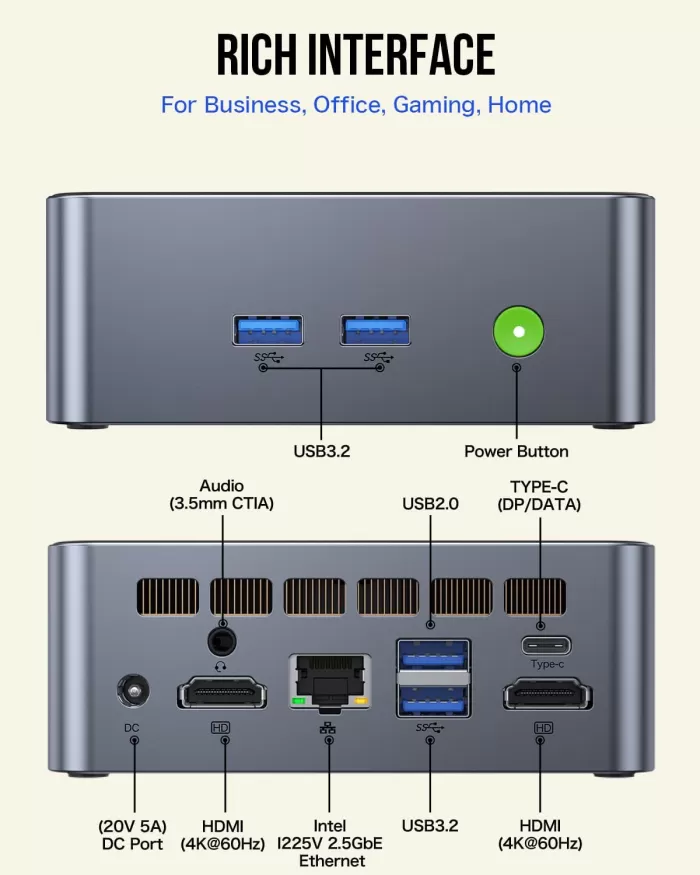
| Video outputs | 2x HDMI 2.0 (4K@60Hz) + 1x USB-C (DP/data) |
| USB | 3x USB 3.2, 1x USB 2.0, 1x USB-C |
| Grid | Intel I225-V 2.5G Ethernet (RJ45) |
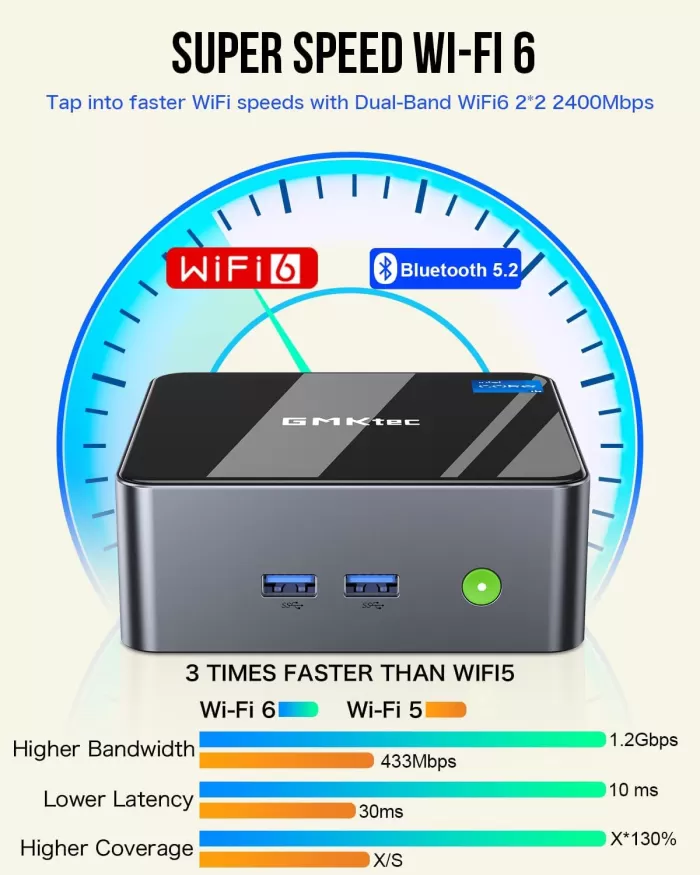
| WiFi | Wi-Fi 6 (up to 1,201 Mbps, Realtek RTL8852BE) |
| Bluetooth | 5.2 |
| Audio | 3.5 mm combo jack + HDMI output |
| Dimensions | 114 x 106 x 42.5 mm (≈ 4.48 x 4.17 x 1.67 inches) |
| Weight | 361–440 g |
| Warranty | 1 year limited GMKtec |
🏗️ Design and Construction Quality
GMKTec NucBox M3 mini PC
The NucBox M3 has a compact and functional design that doesn't aim to attract attention but rather to occupy the least amount of space possible. Its dimensions of just 114 x 106 x 42.5 mm make it smaller than a paperback book.
The chassis combines metal (aluminum) side panels with a plastic top and bottom cover. The metal side panels lend a degree of sturdiness to the unit, although the plastic cover diminishes the perceived premium quality compared to devices like the Intel NUC. Ventilation slots are located on the sides to facilitate airflow, a necessity given the processor's 45W TDP. The power button and quick-access ports are located on the front, while the main ports are concentrated at the rear.
The included VESA mount is an interesting bonus: it allows you to mount the device directly on the back of the monitor, transforming any screen into a makeshift all-in-one.
🖥️ Screen and Multimedia
GMKTec NucBox M3 mini PC
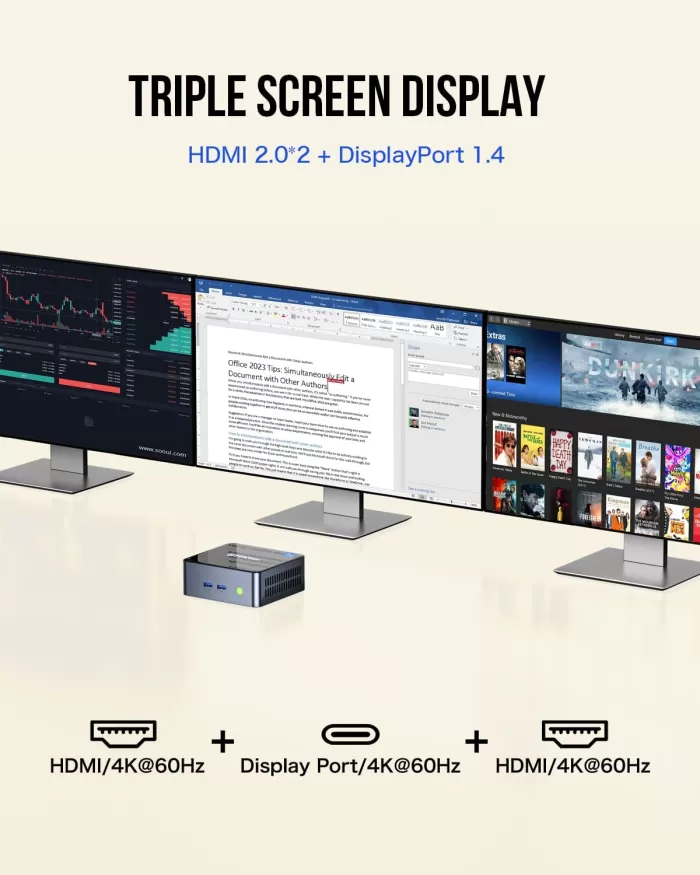
Its video output capability is remarkable for its category. It supports up to three simultaneous displays thanks to its two HDMI 2.0 ports (4K@60Hz) and the USB-C port with DisplayPort.
4K video playback at 60 FPS via HDMI runs smoothly, without frame drops, according to our tests. The Intel UHD Graphics Xe G4 chip is sufficient for light video editing and streaming high-resolution content. For audio, it has an HDMI output and a 3.5 mm jack that serves as both a headphone and microphone jack, although the integrated audio quality is basic. If you require high-quality sound, an external DAC or active speakers with an HDMI connection are recommended.
⚙️ Performance and Software
The Intel Core i5-12450H is the heart of this machine, and it performs very well in everyday and productivity tasks. Real-world benchmarks place the M3 at this performance level:
| Benchmark | Punctuation |
|---|---|
| Geekbench 6 Single-Core | ~2,108 pts |
| Geekbench 6 Multi-Core | ~7,684 pts |
| CineBench R23 Multi | ~9,113 pts (average i5-12450H) |
| PCMark 10 | 5,310 pts |
| CrystalDisk Read (SSD) | 3.494–3.501 MB/s |
| CrystalDisk Write (SSD) | 2.430–3.195 MB/s |
| 3DMark Fire Strike | 2,902 pts |
| 3DMark Time Spy | 986 pts |
From a software perspective, the computer comes with Windows 11 Pro pre-installed and fully activated by Microsoft, requiring no additional steps. It doesn't include excessive bloatware and accepts Windows updates normally. It's also compatible with Linux (Ubuntu) and virtualization platforms like VMware ESXi and Proxmox, making it popular as a home server.
🔌 Energy Consumption and Cables
The included power adapter provides sufficient power for the i5-12450H's 45W TDP. At idle or under light load (browsing, office applications), actual power consumption hovers around 10-15W. Under sustained load (benchmarks, rendering), it can reach 45-65W, which is to be expected with a 12th-generation H-Series processor. This power consumption under load is one of the most criticized aspects: the i5-12450H consumes significantly more power than comparable U-series alternatives.
The included power cable is standard, and the connector is a DC barrel (not USB-C PD), which means you can't power it with a universal laptop-type charger.
🌡️ Temperature and Noise (Actual Thermal)
Here's one of the most controversial aspects of the NucBox M3. The i5-12450H processor has a TDP of 45W, which poses a thermal challenge for such a compact chassis.
-
At rest: Temperature is contained, the fan is practically silent.
-
Under medium load (browsing, Office, streaming): The system remains cool and quiet.
-
Under sustained load (rendering, benchmarking, gaming): Temperatures may exceed 80-85°C, and the fan becomes audible.
Some Reddit users and tech forum members note that the device "gets quite hot, which also makes it noisy and irritating" under prolonged load. However, GMKtec incorporates two copper heat pipes to improve heat dissipation. If the noise bothers you, you can limit the TDP in the BIOS or install higher-quality thermal paste (the community recommends PTM7950), which can reduce temperatures by several degrees.
Thermal summary:
| Scenery | Approximate temperature | Fan noise |
|---|---|---|
| Repose | ~35-40°C | Inaudible |
| Medium load | ~60-70°C | Mild |
| Maximum stress | ~80-90°C | Moderate-High |
🔗 Connectivity and Extras
Connectivity is one of the NucBox M3's strong points.
Available ports:
-
🖥️ 2x HDMI 2.0 (4K@60Hz) — on the back
-
⚡ 3x USB 3.2 Gen 1 (5 Gbps)
-
🔌 1x USB 2.0
-
🔄 1x USB-C (data/DisplayPort) — on the front
-
🌐 1x RJ45 Intel I225-V (2.5G Ethernet)
-
🎧 1x 3.5 mm combo jack (headphones + microphone)
-
📡 WiFi 6 (up to 1,201 Mbps, dual band 2.4/5 GHz)
-
🔵 Bluetooth 5.2
What it DOESN'T have:
-
❌ WiFi 6E or WiFi 7
-
❌ Thunderbolt 4 or USB4
-
❌ Fingerprint reader
-
❌ NFC
-
❌ IP Certification (dust/water resistance)
-
❌ SD / microSD slot
Important note: There have been reports of the USB-C port not working properly for video output with certain monitors. For reliable triple-display setups, use both HDMI ports plus a monitor with a native USB-C input.
🔧 Expansion and Upgrades
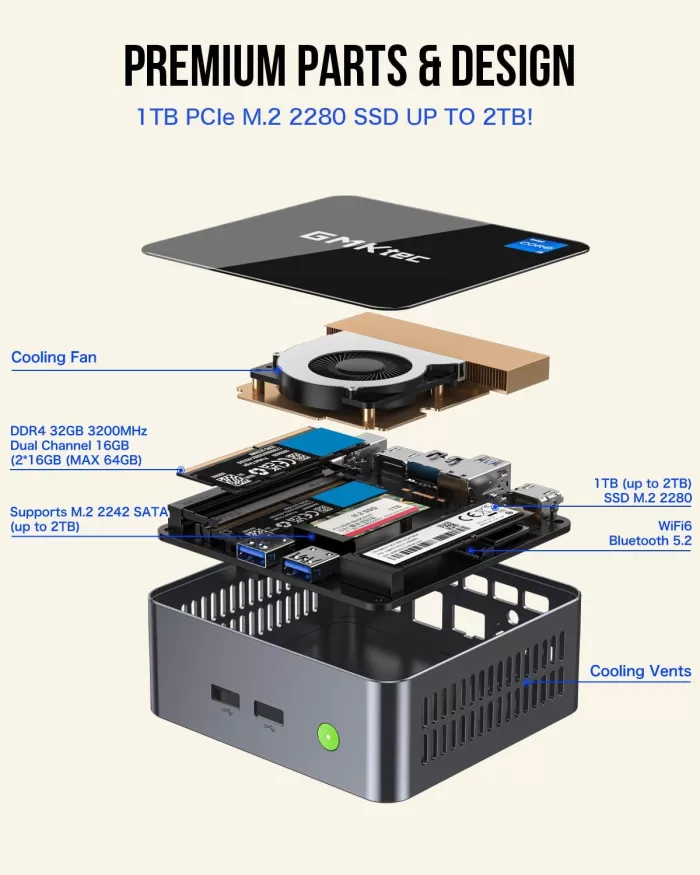
One of the great advantages of the NucBox M3 is its ease of maintenance and upgrades. Simply removing four Phillips screws from the base provides access to the internal components.
| Component | Current Configuration | Maximum Supported | Grades |
|---|---|---|---|
| RAM | 16 GB DDR4 3200 (2x8GB) | 64 GB (2x SO-DIMM) | Easily replaceable |
| primary SSD | 1 TB M.2 2280 PCIe 3.0 | 2 TB PCIe 3.0/4.0 | M.2 2280 slot |
| Second SSD | Not included | 2 TB M.2 2242 SATA | Only 42mm length (M.2 2242) |
Upgrade recommendations:
-
🔼 32GB RAM (2x16GB DDR4 3200): Notable improvement for intensive multitasking, virtualization and video editing.
-
🔼 2TB SSD: If you work with large files (video, VMs, games).
-
🔼 Add a second M.2 2242 SATA SSD: Ideal for increasing storage without replacing the main one.
🆚 Comparison with Direct Competitors
| Feature | GMKtec NucBox M3 | Beelink SER5 | Geekom A5 | GMKtec NucBox K3 Pro |
|---|---|---|---|---|
| CPU | Intel i5-12450H (8C/12T) | AMD Ryzen 5 5560U | AMD Ryzen 7 5800H | Intel i7-12650H (10C/16T) |
| GPU | Intel UHD Xe 48EUs | AMD Radeon Vega 6 | AMD Radeon Vega 8 | Intel UHD 64EUs |
| RAM base | 16 GB DDR4 | 16 GB DDR4 | 16 GB DDR4 | 16/32 GB DDR4 |
| SSD base | 1 TB PCIe 3.0 | 500 GB | 512 GB | 1 TB |
| Ethernet | 2.5G Intel I225-V | 1G | 2.5G | 2.5G |
| WiFi | WiFi 6 | WiFi 6 | WiFi 6 | WiFi 6 |
| Gaming iGPU | ⭐⭐ | ⭐⭐⭐ | ⭐⭐⭐⭐ | ⭐⭐⭐ |
| CPU performance | ⭐⭐⭐ | ⭐⭐ | ⭐⭐⭐ | ⭐⭐⭐⭐ |
| Approx. price | ~€440 | ~€490 | ~€439 | ~$250–300 |
| NotebookCheck Score | 78.7% | 82.1% | 81.2% | 82.8% |
| 🛒 View Prices | Buy AliExpress | 🛒 View Prices | Buy AliExpress |
💡 Comparative conclusion: If gaming is your priority, the Geekom A5 with its Vega 8 is the better option. If you want more pure CPU power, the K3 Pro with its i7-12650H is the clear winner. But for overall price/performance in 2024-2025, the NucBox M3 is hard to beat in its price range.
💬 Reviews on Well-Known Pages
Reviews from specialized media and users paint a fairly consistent picture:
🔬 NotebookCheck gives it a 78.7% and is more critical: it points out that the i5-12450H consumes more power than it should for the performance it offers, and that alternatives with U-series chips offer similar performance with lower power consumption. However, it acknowledges that single-threaded performance is on par with the i7-13700H.
💻 Virtualization HowTo specifically analyzes it as a home server and concludes that it works well with VMware ESXi and Proxmox, with good performance for lightweight VMs.
👥 Reddit r/MiniPCs: Users rate the GMKtec brand positively as reliable, but warn that "it gets quite hot" under sustained load, generating some noise.
💻 Amazon (average rating): 4.3/5 ⭐ based on hundreds of reviews. Buyers highlight its performance for the price and the inclusion of Windows 11 Pro pre-installed as the most frequently mentioned positive points. The most common criticisms point to overheating under load and the lack of Thunderbolt.
💻 YouTube (Team Pandory, +10,000 views): The reviewer highlights that Batocera Linux runs perfectly, with Wii U and GameCube emulation without any issues, and that Windows 11 Pro activates legitimately upon connecting online. They consider the system "incredible for its price."
💻 TechRadar (rating 4/5 ⭐):
"The GMKtec M3 balances everyday efficiency with creative agility, all wrapped in a sleek and easily upgradable package. For most home and office users, it's hard to ask for more at this price."
💻 Droix.net:
"Its combination of a 12th generation i5-12450H processor, triple 4K display support, WiFi 6 and 2.5G Ethernet makes it one of the most complete mini PCs in its price segment."
🔩 Technical Tests
🖥️ CPU Performance — Real Benchmarks
The Intel Core i5-12450H is a hybrid architecture processor (4 cores + 4 threads) with 12 threads and up to 4.4 GHz turbo speed. In the NucBox M3, it operates with a TDP of 45W, allowing it to unleash its full potential.
| Benchmark | GMKtec NucBox M3 (i5-12450H) | Beelink SER5 (Ryzen 5 5560U) | Intel NUC 13 (i5-1340P) |
|---|---|---|---|
| CineBench R23 Multi | ~9,113 pts | ~7,667 pts | ~9,800 pts |
| CineBench R23 Single | ~1,655 pts | ~1,465 pts | ~1,720 pts |
| Geekbench 5 Multi | ~7,342 pts | ~6,800 pts | ~7,900 pts |
| Geekbench 5 Single | ~1,614 pts | ~1,410 pts | ~1,650 pts |
| PCMark 10 Overall | 5,310 pts | 5,453 pts | 5,820 pts |
📌 What this means in practice: The M3 easily outperforms the Ryzen 5 5560U in multi-threaded tasks, such as code compilation, light video export, or managing multiple virtual machines simultaneously. Single-core performance is comparable to an 11th-generation i7-1165G7, resulting in noticeably smooth performance in all everyday applications.
💾 SSD Performance
The included SSD (M.2 2280 PCIe 3.0 NVMe, in some models Lexar NM610 Pro) offers very competent speeds:
| Proof | Result |
|---|---|
| Sequential reading | 3.494 – 3.501 MB/s |
| Sequential writing | 2.430 – 3.195 MB/s |
| 4K Random Read | ~430 MB/s |
| 4K Random Write | ~500 MB/s |
Windows 11 Pro boots from a complete shutdown in less than 15 seconds, and heavy applications like Chrome with 20 tabs open, VS Code and Spotify simultaneously do not generate any perceptible lag.
🎨 Graphics Performance — Intel UHD Xe G4 (48 EUs)
The integrated GPU is the weakest link in the system, as is the case with all mini PCs without a discrete graphics card:
| Benchmark | Punctuation |
|---|---|
| 3DMark Fire Strike Overall | 2,902 pts |
| 3DMark Time Spy Overall | 986 pts |
| 3DMark Wildlife | 7,172 pts |
| 3DMark Night Raid | 15,487 pts |
These values place it well below the AMD Radeon 680M (found in the Geekom A5 with Ryzen 7 5800H), which doubles the M3's performance in Fire Strike. However, for tasks such as photo editing in Lightroom, 4K HDR playback, graphic design in Figma, or 1080p YouTube channels, the GPU is perfectly adequate.
🌐 Network Connectivity — Real-World Tests
The Intel I225-V 2.5 Gbps chip is one of the M3's strengths. In local network transfer tests:
-
📶 2.5G Ethernet: Real transfer speeds close to 2.35 Gbps, ideal for NAS, network backups and home servers.
-
📡 WiFi 6 (Realtek RTL8852BE): Real-world speeds of 600–900 Mbps on the 5 GHz band, with good stability and low latency.
One point to note is that the WiFi chip implementation is from Realtek and not Intel, which according to some users may translate into less long-term stability compared to devices with Intel AX210.
🌡️ Temperature and Consumption Tests Verified
NotebookCheck, one of the most rigorous media outlets in technical analysis, measured power consumption and thermal performance in different scenarios:
| Scenery | Power consumption (watts) | CPU Temp. | Fan noise |
|---|---|---|---|
| Idle | 8–11 W | 35–42°C | ~25 dB (almost inaudible) |
| Office automation workload | 18–25 W | 55–68°C | ~32 dB (slight) |
| Cinebench R23 Multi (sustained) | 55–65 W | 82–89°C | ~38–42 dB (clearly audible) |
| Combined CPU+GPU stress | 60–70 W | 85–92°C | ~42–45 dB (annoying on a desktop) |
NotebookCheck concludes that the i5-12450H is too power-hungry for such a compact chassis, and criticizes the fact that rivals with U-series chips (TDP 15-28W) offer similar performance with significantly less heat and noise. However, it acknowledges that in real-world, everyday use (not in sustained stress benchmarks), the device operates at completely normal temperatures.
🎮 Gaming and Emulation
The NucBox M3 isn't a gaming PC, but it offers more than it seems:
Games with integrated graphics (Intel UHD Xe G4 48EUs):
| Game | Configuration | Approximate FPS |
|---|---|---|
| Rocket League | Media, 1080p | ~45-60 FPS ✅ |
| CS2 / Counter-Strike 2 | Low, 1080p | ~40-60 FPS ✅ |
| DOTA 2 | Media, 1080p | ~40-55 FPS ✅ |
| Fortnite | Low, 720p | ~30-40 FPS ⚠️ |
| Red Dead Redemption 2 | Minimum | <20 FPS ❌ |
| Cyberpunk 2077 | Minimum | <15 FPS ❌ |
🕹️ Retro emulation (with Batocera Linux or other frontends):
This is where the M3 truly shines. Its powerful CPU compensates for the modest GPU for emulation:
-
✅ NES, SNES, Mega Drive, N64 → 100% Perfect
-
✅ GameCube / Wii → Excellent performance
-
✅ PS2 → Very good with Dolphin/PCSX2
-
✅ Wii U (CEMU) → Works well on most titles
-
⚠️ Xbox 360 (Xenia) → Varies depending on the game
-
❌ PS3 (RPCS3) → Limited, some games playable
The retro gaming community considers it one of the best mini PCs in its price range for emulation, thanks to the power of the i5-12450H.
❓ Frequently Asked Questions (FAQ)
🔷 Does it come with Windows activated?
Yes. Windows 11 Pro comes pre-installed and is automatically activated when you connect to the internet with a genuine digital license.
🔷 Can I connect three monitors simultaneously?
Yes, using the 2x HDMI ports + the USB-C port (with an active USB-C to DisplayPort cable). The USB-C port may have issues with some monitors, so it's recommended to check compatibility.
🔷 Is it compatible with Linux?
Yes. It works with Ubuntu and derivative distributions. It also supports VMware ESXi and Proxmox for virtualization.
🔷 Can the RAM be expanded to more than 16 GB?
Yes, it supports up to 64 GB with two SO-DIMM DDR4 modules of up to 32 GB each.
🔷 Does it have a slot for a second drive?
Yes, but the second slot is M.2 2242 SATA (not PCIe), and it only accepts drives up to 42 mm in length, which limits the available options.
🔷 Does it have Thunderbolt 4 or USB4?
No. The USB-C port is for data and DisplayPort only, without Thunderbolt.
🔷 Can I use it as a 24/7 server?
Yes, but be aware of the heat generated under sustained load. For use as a lightweight server (Proxmox, Plex, Home Assistant), it works well with moderate load.
🏁 Final Conclusion
The GMKtec NucBox M3 with Intel i5-12450H is a mini PC that more than meets expectations for its price and segment. It's ideal for:
-
💼 Professionals who need a compact work team for office automation, web development, browsing and video conferencing.
-
🎬 Home Theater with real 4K support at 60Hz and smooth content playback.
-
🖧 IT administrators who want a small home server for Proxmox, VMs or Plex.
-
🕹️ Retrogaming enthusiasts looking to emulate consoles up to PS2/GameCube/Wii U.
-
📺 Users with multiple monitors who take advantage of triple screen support.
It's not the best option if:
-
You need to play modern AAA titles at high resolution.
-
The noise of the fan under load is annoying to you.
-
You need Thunderbolt 4 or Wi-Fi 6E connectivity.
Alternatives to consider:
-
🆚 Geekom A5 (Ryzen 7 5800H): Best integrated GPU for gaming.
-
🆚 Beelink SER5 Max (Ryzen 5 5560U): More energy efficient.
-
🆚 GMKtec NucBox K3 Pro (i7-12650H): More CPU for a slightly higher price.
🛒 Where to buy it?
You can find the GMKtec NucBox M3 on the main platforms:
-
🛒 GMKtec NucBox M3 16GB+1TB — Fast shipping, seller warranty and easy returns.
-
🔴 AliExpress — GMKtec NucBox M3 Official — Generally lower price, direct from the manufacturer.
-
💡 Tip: Check Amazon for seasonal discounts (Prime Day, Black Friday). The NucBox M3 often has discounts of up to 20-30%.