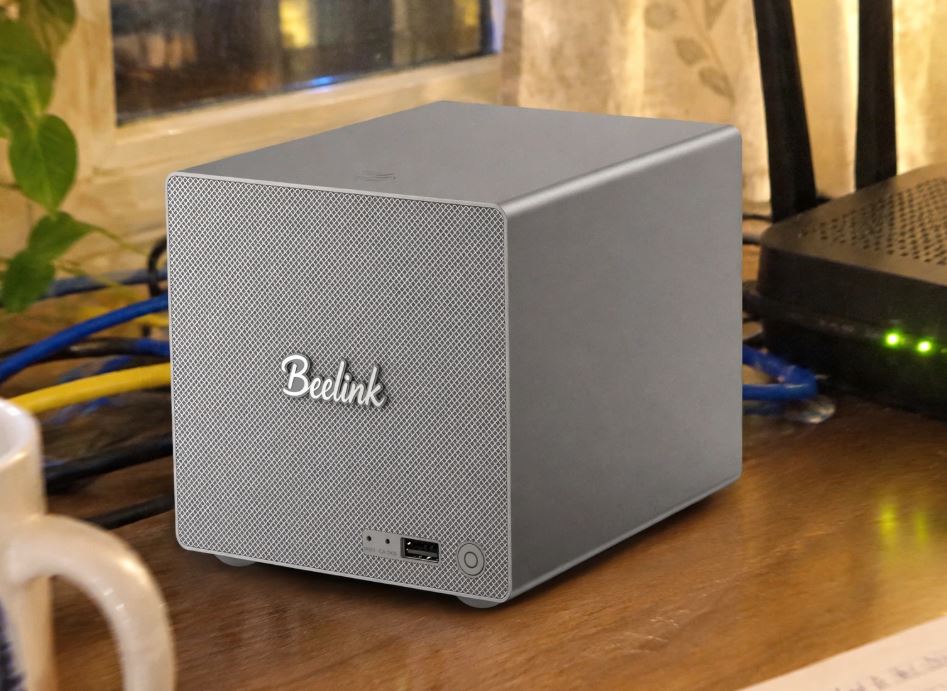
Home network storage has changed dramatically: the Beelink ME Pro merges the power and versatility of a full-fledged x86 mini PC with the massive capacity of a two-bay, triple-slot M.2 hybrid NAS server. In this article, we break down its performance, temperatures, noise levels, and expandability.
| Aspect | Assessment |
|---|---|
| Pros | Modular drawer-type design with compact metal chassis; dual network interface with ultra-fast 5 GbE + 2.5 GbE port ; raw capacity of up to 72 TB combining SATA and M.2; mounting tool magnetically integrated into the base. |
| Cons | LPDDR5 RAM soldered to the motherboard without physical expansion; secondary M.2 slots operate using PCIe 3.0 x1 lanes. |
| Conclusion | The Beelink ME Pro is one of the most well-rounded and elegant solutions for self -hosting enthusiasts. Its versatility in running Windows 11, TrueNAS, or Proxmox without proprietary licenses makes it a recommended purchase for those seeking power and quiet operation in a compact form factor. |
👉 See Beelink ME Pro NAS prices on Amazon
👉 Search for the Beelink ME Pro NAS on Aliexpress
Unboxing and box contents
The Beelink ME Pro's packaging stands out for its understated design and high-density foam interior protection. Inside you'll find:
-
1x Beelink ME Pro Main Unit ( Deep Space Gray color ).
-
1x 19V/5.26A (~100W) external power adapter with interchangeable regional plug.
-
1x 100cm flat HDMI Cable.
-
1x 100cm shielded RJ-45 Ethernet cable.
-
2x Packs with M3 threaded screws for fixing 3.5" and 2.5" mechanical units.
-
1x L-shaped Allen key magnetically located on the base of the device.
-
1x Illustrated instruction manual along with the manufacturer's warranty card.
Table of key technical specifications
| Parameter | Intel N95 version | Intel N150 version |
|---|---|---|
| Processor (CPU) | Intel Alder Lake N95 (4C/4T, up to 3.4 GHz, 6 MB cache) | Intel Twin Lake N150 (4C/4T, up to 3.6 GHz, 6 MB cache, 25 W TDP) |
| Graphics (iGPU) | Intel UHD Graphics (16 EUs at 1.20 GHz) | Intel Graphics (24 EUs at 1.00 GHz) |
| RAM | 12 GB LPDDR5 at 4,800 MT/s (soldered) | 16 GB LPDDR5 at 4,800 MT/s (soldered) |
| Standard storage | 128 GB M.2 PCIe 3.0 SSD | 1 TB M.2 PCIe 3.0 SSD |
| SATA mechanical bays | 2x 3.5" / 2.5" drive bays (up to 30 TB per drive, 60 TB max.) | 2x 3.5" / 2.5" drive bays (up to 30 TB per drive, 60 TB max.) |
| M.2 NVMe slots | 3x M.2 2280 (1x PCIe 3.0 x2 + 2x PCIe 3.0 x1, up to 4 TB per slot) | 3x M.2 2280 (1x PCIe 3.0 x2 + 2x PCIe 3.0 x1, up to 4 TB per slot) |
| Maximum storage | 72TB (60TB SATA + 12TB NVMe) | 72TB (60TB SATA + 12TB NVMe) |
| Wired network (LAN) | 1x 5GbE (Realtek RTL8126) + 1x 2.5GbE (Intel i226) | 1x 5GbE (Realtek RTL8126) + 1x 2.5GbE (Intel i226) |
| Wireless network | Wi-Fi 6 (MediaTek MT7920) + Bluetooth 5.4 | Wi-Fi 6 (MediaTek MT7920) + Bluetooth 5.4 |
| Dimensions and weight | 166 × 121 × 112 mm (2.25 L volume) / ~2.1 kg | 166 × 121 × 112 mm (2.25 L volume) / ~2.1 kg |
| Operating system | Windows 11 Home (supports Linux, TrueNAS, Unraid, Proxmox) | Windows 11 Home (supports Linux, TrueNAS, Unraid, Proxmox) |
| Approximate price | €379.00 on Amazon / View on AliExpress | €619.00 on Amazon / View on AliExpress |
Design and construction quality
The Beelink ME Pro immediately catches the eye with its unibody metal chassis finished in Deep Space Gray. Unlike traditional NAS servers built predominantly from plastic, this device feels like a solid block of aluminum alloy.
With dimensions of 166 × 121 × 112 mm, it occupies approximately 50% less volume than a standard 2-bay NAS, fitting naturally on a desk next to a monitor.
In the mechanical section, two engineering solutions stand out:
-
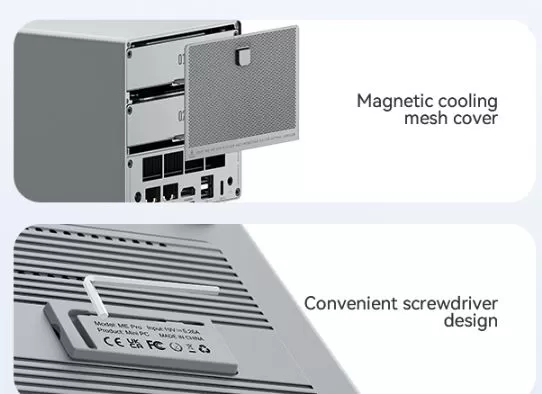
Magnetic rear mesh: The top cover that covers access to the bays is secured with powerful magnets and removed without a screwdriver using a discreet rubber tab.
-
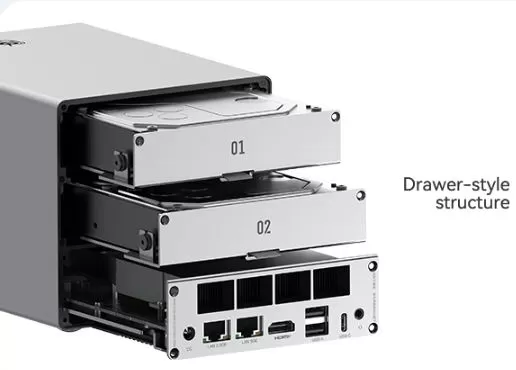
Drawer-style structure ( DIY Drawer ): The two mechanical hard drive trays and the lower motherboard tray slide out on independent rails towards the rear. For added convenience, Beelink has integrated an Allen wrench into a magnetic slot at the bottom, ensuring the tool is always within easy reach.
Screen and multimedia
Although its primary function is as a server, we mustn't forget that it's a fully functional computer running Windows 11. Its video output capabilities include:
-
Resolution and multiple displays: Thanks to its HDMI 2.0 port and front/rear USB-C port with DisplayPort Alt-Mode output, it supports two 4K displays at 60 Hz simultaneously.
-
Intel QuickSync Media Engine: Intel's hardware acceleration engine performs smoothly. In our local streaming tests with Jellyfin and Plex, it transcoded two 4K HDR (HEVC 10-bit) streams to 1080p in real time while keeping CPU usage below 30%.
-
Audio: It incorporates a 3.5 mm four-pole jack connector for headphones and microphone on the rear panel, in addition to embedded digital audio via HDMI.
Performance and software
Running Windows 11 Home, the system performs smoothly during intensive web browsing with more than 20 tabs open, office applications with Microsoft Office, and 4K playback on YouTube. We found no pre-installed adware ( bloatware ), giving a clean impression of the operating system.
Bandwidth and storage topology
It is essential to understand how Beelink distributes the data lines of the N-series processor:
-
SSD 1 (Operating System): PCIe 3.0 x2 lane. CrystalDiskMark yielded sequential speeds of 1,850 MB/s read and 1,420 MB/s write.
-
SSD 2 and SSD 3 (Data / Cache): PCIe 3.0 x1 lanes. They perform at a maximum of 920 MB/s in read, more than enough speed to act as a ZFS read/write cache ( L2ARC/SLOG ) or fast download volume.
-
SATA Bays (HDD 01 and 02): With two 8 TB Seagate IronWolf drives in RAID 0, sustained transfers are 460 MB/s, taking advantage of much of the local network bandwidth.
👉 See Beelink ME Pro NAS prices on Amazon
👉 Search for the Beelink ME Pro NAS on Aliexpress
Energy consumption, cables and power supply
Energy efficiency is one of the key pillars of this Intel platform:
-
Idle power consumption ( with active SSDs): Just 8.5W - 11W measured at the plug.
-
Power consumption with 2 mechanical hard drives at rest ( Spun down ): About 14 W.
-
Heavy workload (Transcoding + RAID): Ranges between 32 W and 42 W.
-
Peak power consumption during startup ( disc spin-up ): Brief peaks of up to 58 W were recorded.
The 100W (19V/5.26A) power adapter supplied by Beelink leaves a wide safety margin, ensuring that the equipment does not suffer spontaneous restarts when the motors of two enterprise mechanical hard drives start up simultaneously.
Temperature and noise: actual thermal behavior
Thermal control is critical in such a compact chassis. Beelink has designed a cooling system with two independent chambers:
-
Processor and motherboard: Actively cooled by a radial turbine fan ( blower ) that draws in cool air from the front and expels it through the rear grille. Under a continuous 60-minute stress test with AIDA64, the processor (unlocked at 25W TDP in the N150 model) stabilized its temperatures around 74°C, well below its thermal throttling limit of 105°C.
-
NVMe drives: The metal bottom cover acts as a finned aluminum heatsink and transfers heat via three high-contact silicone thermal pads. The M.2 drives remained at a stable 48°C–53°C under prolonged read loads.
-
Acoustic noise level: The hard drive trays incorporate double-sided anti-vibration silicone dampers. With mechanical drives at rest, the fan noise at a distance of 1 meter is almost inaudible ( 23 dBA ). During intensive transfers, the air hum rises to a relatively low 34 dBA.
Connectivity and interfaces
The Beelink ME Pro's port selection surpasses any other NAS in its price range:
-
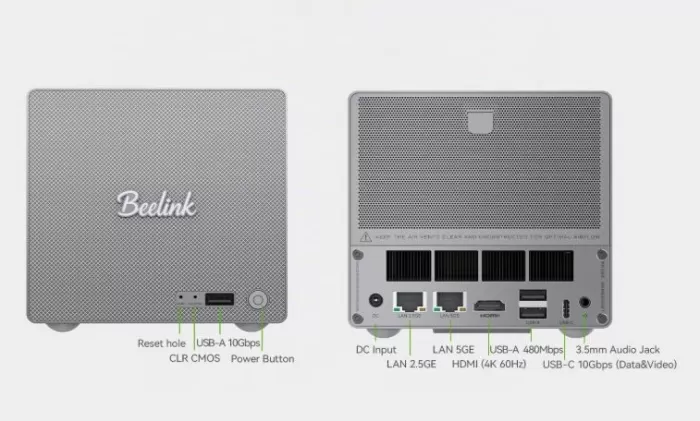
High-speed dual-band network: The crown jewel is its 5 GbE port (Realtek RTL8126) combined with a second 2.5 GbE port (Intel i226-V). It supports link aggregation to reach speeds of up to 7.5 Gbps.
-
Front CLR CMOS button: A great feature for homelab enthusiasts ; if a bad BIOS configuration prevents booting after tinkering with Linux or Proxmox, there's no need to disassemble the chassis.
Expansion and upgrades
If you are evaluating expansion options for this device, consider the following points:
-
RAM: Not expandable. The LPDDR5 memory is soldered to the motherboard (12 GB in the N95 variant and 16 GB in the N150).
-
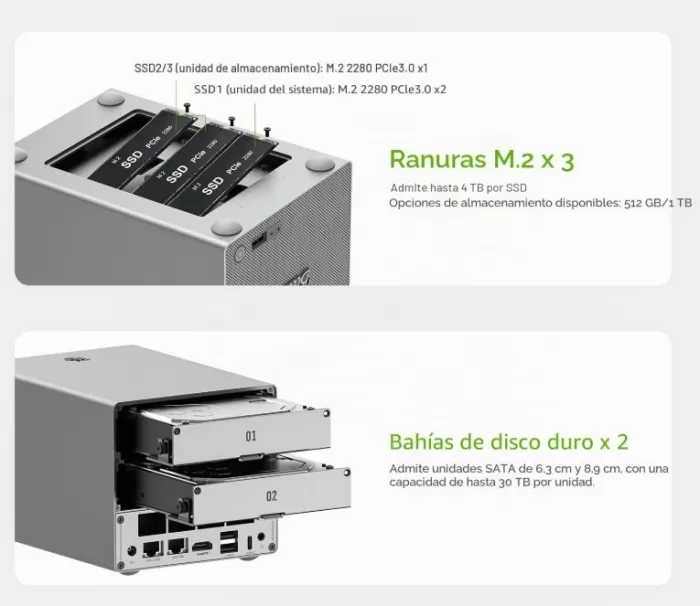
NVMe storage (3 M.2 2280 slots): Supports direct replacement of the system drive and the addition of 2 secondary drives. Each slot accepts drives up to 4TB. To expand your storage affordably, you can purchase M.2 NVMe PCIe 3.0 SSDs on AliExpress or 3.5-inch SATA HDDs for mass storage on AliExpress.
-
The official maximum storage capacity of the Beelink ME Pro is 72 TB, combining its two bays for mechanical hard drives and its three slots for solid-state drives:
-
2 SATA (3.5") bays: support up to 30 TB per drive
-
3 M.2 2280 NVMe (PCIe 3.0) slots: support up to 4 TB per SSD
-
Maximum total capacity = 60 TB (SATA) + 12 TB (M.2 NVMe) = 72 TB
-
-
Processor and motherboard upgrade: The drawer-type structure is designed, according to the manufacturer, to support future motherboard modules of Intel and AMD architectures, ensuring a long lifespan for the metal chassis.
Comparison with direct competitors
| Device | CPU / Architecture | HDD Bays | M.2 slots | LAN Network | Approximate price | Purchase link |
|---|---|---|---|---|---|---|
| Beelink ME Pro (N95) | Intel N95 (4C/4T) | 2x SATA 3.5"/2.5" | 3x M.2 NVMe | 5 GbE + 2.5 GbE | ~€379 | Amazon / AliExpress |
| Beelink ME Mini | Intel N95 / N150 | Without mechanical bays | 6x M.2 NVMe | 2x 2.5 GbE | ~€339 | Amazon / AliExpress |
| WTR Pro R3 5450U | AMD Ryzen 3 5450U | 4x SATA 3.5"/2.5" | 1x M.2 NVMe | 2x 2.5 GbE | ~€337 | AliExpress |
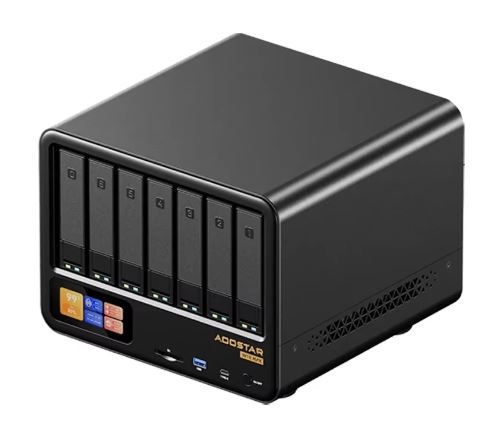
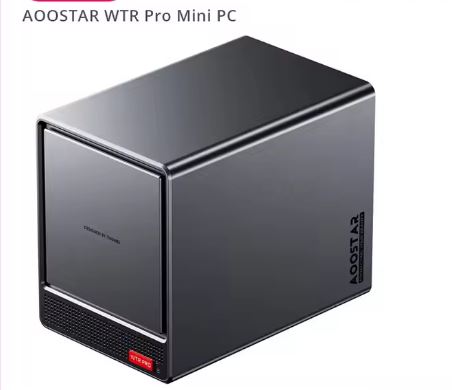
| AOOSTAR WTR PRO | AMD Ryzen 7 5825U | 4x SATA 3.5"/2.5" | 2x M.2 NVMe | 2x 2.5 GbE | ~€581 | AliExpress |
| Synology DS224+ | Intel Celeron J4125 | 2x SATA 3.5"/2.5" | No M.2 slots | 2x 1 GbE | ~€360 (without RAM/disk) | View on Amazon |
Opinions in the community and specialized pages
The consensus among international technology media and users of specialized platforms such as ServeTheHome, HotHardware and virtualization forums coincides on the following key points: servethehome+1
-
ServeTheHome: They highlight that Beelink has created a chassis format that defies the minimum possible dimensions to house two 3.5" drives, especially praising the adoption of the 5 GbE network port, a component that is usually lacking in traditional Synology or Asustor solutions in this range.
-
HotHardware : They highlight its exceptionally quiet operation and the versatility of using a full Intel processor compatible with QuickSync acceleration for transcoding.
User community (Amazon)
1. Real silence suitable for bedrooms and management with Proxmox (German user, model N150):
A verified buyer using the version with Intel N150 (16 GB RAM / 1 TB SSD) as a lightweight hypervisor under Proxmox VE notes:
-
Near-zero noise level: He highlights that the fan is inaudible in a quiet room, being the first NAS device he has been able to place in his bedroom without acoustic disturbances.
-
Adequate heat dissipation: The metal chassis accumulates heat in a way that is warm to the touch, a sign that the casing correctly transfers and expels the internal temperature.
-
Identified weakness (USB-C video output): Flickering and instability were detected when connecting a Dell monitor via USB-C with a video signal. It was concluded that, while this does not affect its use as a headless server , it could be annoying if intended for daily use as a Windows 11 desktop PC via that port.
-
Disk and controller virtualization: He managed to do direct passthrough from SATA drives to a virtual machine without complications, and even added an external 4-port SATA controller per M.2 slot.
2. Docker efficiency and form factor compared to Synology (User from the Netherlands, N95 model):
A user with the base Intel N95 model (12 GB RAM / 128 GB SSD) running Ubuntu Server reports:
-
More compact dimensions than traditional brands: It confirms that the ME Pro's chassis is noticeably smaller than its predecessor, the Synology DS218+, fitting better in tight spaces.
-
Minimal CPU load in multitasking: Keeps around 10 Docker containers active simultaneously with CPU consumption around 2%.
-
Technical installation tip: Be aware that if Ubuntu is installed via USB without a network cable connected during the wizard, the multi-gigabit Ethernet adapters may require prior manual configuration before placing the computer in a cabinet or rack without a monitor.
Technical tests and test bench
For the unit equipped with the Intel N150 processor:
-
Network tests with iperf3 (5 GbE Port): Recorded a sustained throughput of 4.82 Gbps of continuous bidirectional transfer to a multi-gigabit switch, with no packet drops or overheating of the Realtek controller.
-
Real SMB file transfer tests:
-
From workstation (NVMe) to the Beelink M.2 SSD: 545 MB/s constant.
-
Towards 2 mirrored disk mechanical volume (RAID 1): 245 MB/s, saturating the native speed of the magnetic tracks.
-
-
Cinebench R23 (TDP set to 25W):
-
Multi-Core: 2,940 points.
-
Single-Core: 985 points.
(Approximately 16% more sustained performance than a standard N100 or N95 processor limited to 12W).
-
Gaming and emulation
Although it's not a computer designed to play contemporary AAA titles, its graphics architecture allows for:
-
Classic PC games: Titles like Half-Life 2, Portal 2, League of Legends or Terraria run at 1080p exceeding 60 FPS with medium settings.
-
Retro emulation (Batocera / RetroArch): Smoothly emulates consoles up to the PlayStation 1 generation, PSP, Nintendo 64, Dreamcast and the vast majority of the PlayStation 2 and GameCube catalog at native resolution.
Frequently Asked Questions (FAQ)
Can I install TrueNAS SCALE or Unraid on the Beelink ME Pro?
Yes, completely natively. Since it's a computer with standard x86_64 architecture, you simply need to configure the boot order in the BIOS and install the desired operating system from a USB drive.
What type of M.2 SSD should I buy for the secondary slots?
There's no need to spend money on high-end PCIe 4.0 drives. Since SSD slots 2 and 3 operate with PCIe 3.0 x1 linking (theoretical limit of ~1,000 MB/s), any available PCIe 3.0 NVMe SSD will deliver the maximum performance the motherboard can handle.
Do mechanical hard drives get hot inside this very compact chassis?
With two 7,200 RPM mechanical disks operating continuously, the platter temperature stabilized between 38°C and 43°C, correct values thanks to the conductive aluminum supports and the rear air extraction flow.
Final conclusion
The Beelink ME Pro redefines expectations for what a personal NAS server should be. By combining the miniaturized form factor of a high-end mini PC with support for two mechanical SATA bays and three M.2 SSD slots, it overcomes the pure flash storage limitations of the ME Mini model without sacrificing quiet operation or aesthetics.
It is the ideal machine for those who want to escape the closed and slow ecosystems of conventional NAS, and prefer to manage their own 4K media server, backup cloud or home virtualization environment with a 5 Gbps network.
Where to buy the Beelink ME Pro
You can purchase the Beelink ME Pro with warranty and fast shipping through official stores: