The Geekom A9 Max is, without a doubt, the most powerful mini PC that Geekom has released to date.
With the AMD Ryzen AI 9 HX 370 processor inside a chassis of just 0.8 liters, it offers performance that rivals conventionally sized desktop computers.
The connectivity is exceptional: dual USB4, dual 2.5GbE, Wi-Fi 7, and the build quality is truly premium.
✅ Strengths:
-
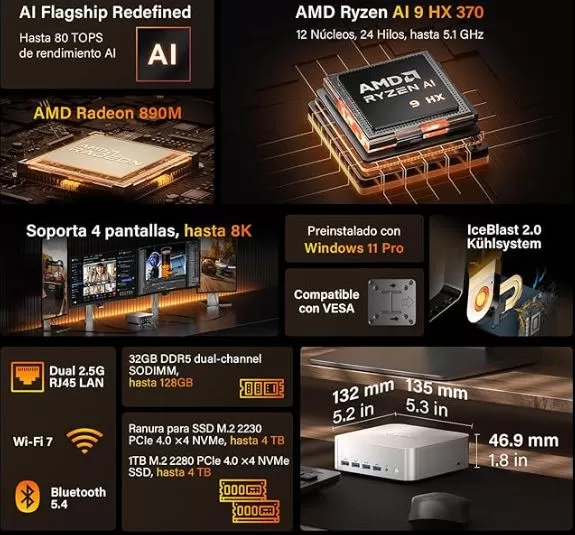
AMD Ryzen AI 9 HX 370 processor with 12 cores / 24 threads at 5.1 GHz
-
Compact and elegant metal chassis (0.8L)
-
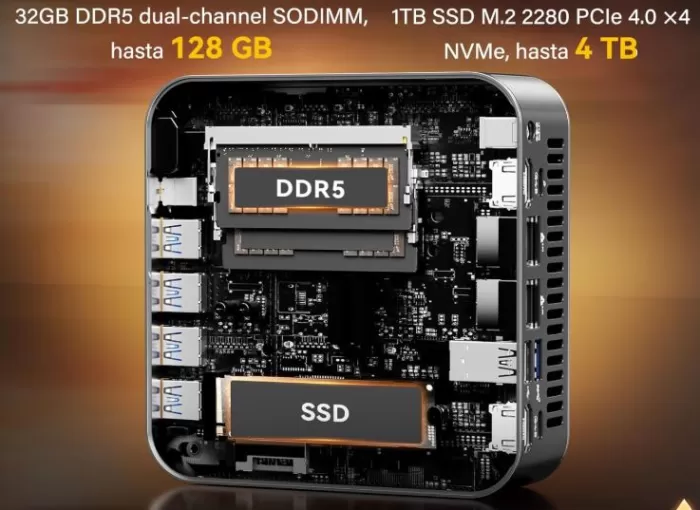
Up to 128GB of upgradeable RAM, dual M.2 up to 8TB
-
Spectacular connectivity: dual USB4, dual HDMI 2.1, dual 2.5GbE, Wi-Fi 7
-
36-month warranty
❌ Weak points:
-
Without OCuLink or USB4 v2 (limitation vs. competitors)
-
Sin USB-C frontal
🏁 Quick conclusion: If you're looking for the best possible performance in a mini PC form factor with professional connectivity, the A9 Max is a solid buy. If you're on a budget, there are cheaper alternatives that offer 80% of the performance.
Buy on Amazon: 🛒 Geekom A9 Max
🛒 View Geekom mini PCs on Aliexpress
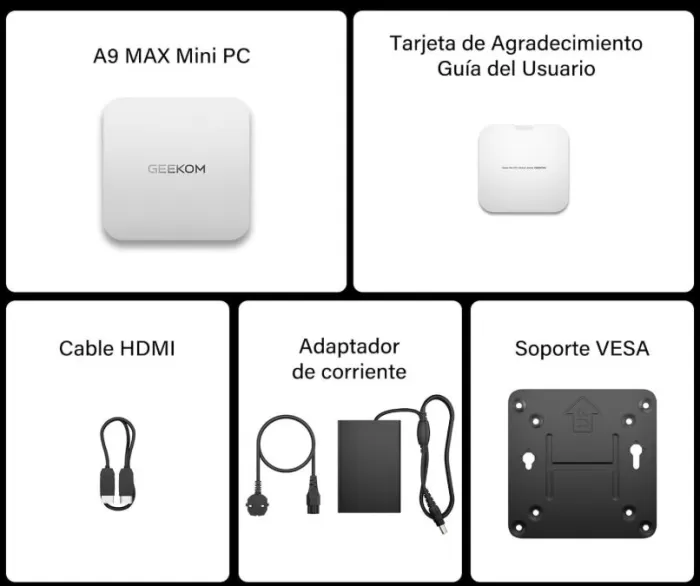
📦 Unboxing and Box Contents
Upon opening the Geekom A9 Max box, the presentation immediately conveys a premium product. The packaging is compact and well-organized, with each accessory in its place.
Included content:
-
🖥️ Mini PC Geekom A9 Max
-
🔌 120W (19V) power supply
-
📺 Cable HDMI
-
🔩 VESA mount (for mounting behind the monitor)
-
📖 User manual and information on ports and upgrades
-
🪙 Replacement RTC Battery
📋 Technical Specifications
| Component | Detail |
|---|---|
| Processor | AMD Ryzen AI 9 HX 370 — 12 cores (4×Zen 5 + 8×Zen 5c), 24 threads, up to 5.1 GHz |
| TDP | 54W (Sustained) / 65W (Burst) |
| Integrated GPU | AMD Radeon 890M (16 CU, RDNA 3.5, up to 24 GB VRAM from BIOS) |
| NPU (IA) | 50 dedicated TOPS + 80 total TOPS (CPU+GPU+NPU) |
| RAM | 32 GB DDR5-5600 (2× SO-DIMM), expandable up to 128 GB |
| Storage | 1× M.2 2280 NVMe PCIe 4.0 (2 TB included) + 1× M.2 2230 NVMe PCIe 4.0 (free slot) |
| Operating system | Windows 11 Pro 64-bit (24H2) |
| Wi-Fi | Wi-Fi 7 (MediaTek MT7925), Bluetooth 5.4 |
| Ethernet | 2× RJ45 2.5GbE (Realtek RTL8125) |
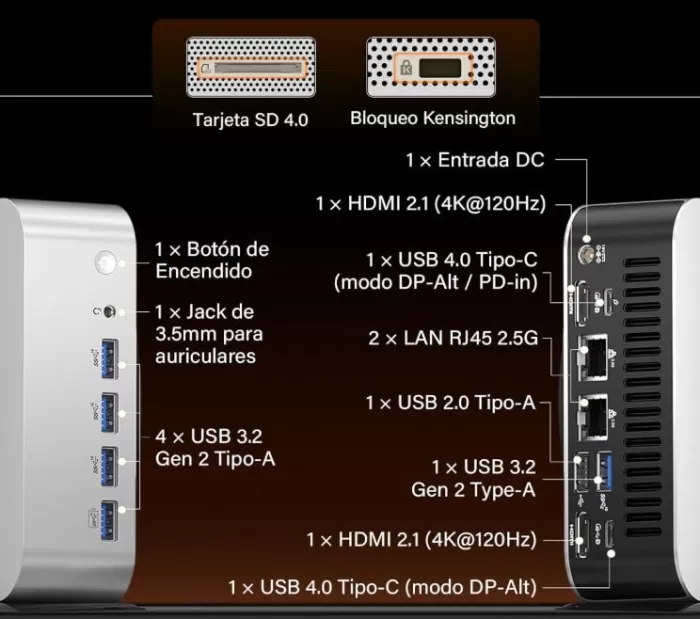
| USB | 2× USB4 40 Gbps (Type-C), 4× USB 3.2 Gen2 (Type-A), 1× USB 2.0 (Type-A) |
| Video | 2× HDMI 2.1, 2× DisplayPort (via USB4), supports 4 simultaneous 4K or 8K monitors |
| Card reader | SD 4.0 (UHS-II) |
| Audio | Jack 3.5mm combo (front) |
| Security | TPM 2.0, Kensington Lock |
| Dimensions | 135 × 132 × 46.9 mm — less than 1 liter in volume |
| Weight | 709 g |
| Adapter | 120W, 19V |
| Warranty | 36 months |
🛒 Buy on Amazon: 🛒 Geekom A9 Max
🔩 Design and Construction Quality
GEEKOM A9 Max Mini PC
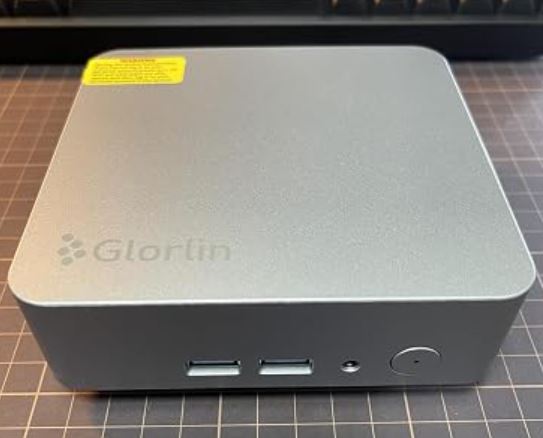
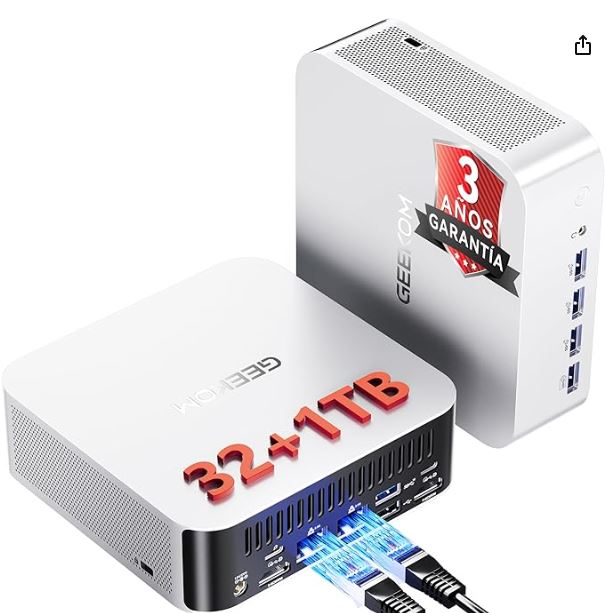
The Geekom A9 Max boasts a full metal chassis in a silver/dark gray color scheme with a sleek and professional finish. It feels solid and premium in hand: there are no squeaks, the metal doesn't bend, and the buttons have a satisfying tactile feedback. Physically, it fits comfortably in the palm of your hand, which is surprising given what it houses inside.
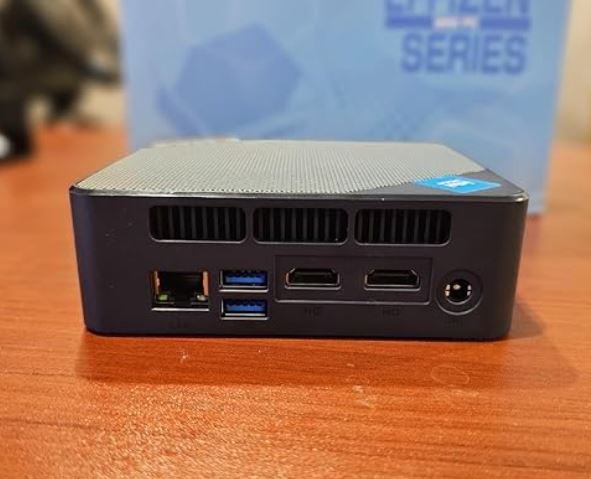
The port layout is clever: frequently used ports (USB-A, audio jack, SD card reader) are on the front, while those for permanent connections (HDMI, Ethernet, USB4, power) are on the back. The only aesthetic and functional drawback is the lack of a front USB-C port, something many users request for connecting modern peripherals without long cables. The design, however, is virtually identical to that of the Geekom A8 Max—there's no chassis update—but it doesn't need to be, because it's already very good.
🖥️ Screen and Multimedia
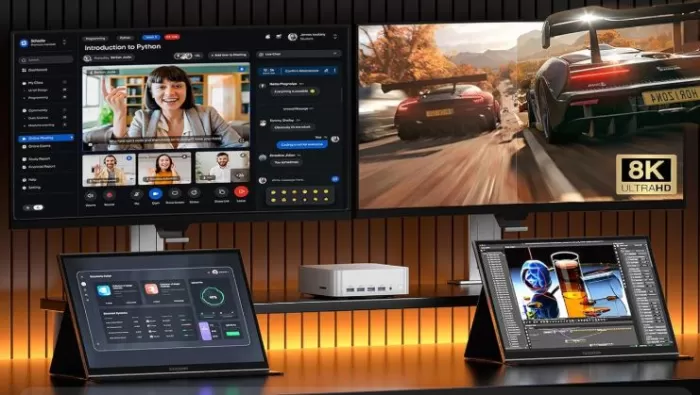
The A9 Max mini PC offers top-notch video output options.
-
It supports up to 4 4K monitors simultaneously via 2 HDMI 2.1 and 2 DisplayPort ports via USB4
-
Compatible with 8K resolution on a single screen
-
The Radeon 890M supports H.264, H.265, and AV1 hardware decoding , ideal for smooth 4K streaming.
-
The front-facing 3.5mm audio jack offers adequate quality for basic headphones and speakers; for professional audio, an external DAC is recommended.
For creative users, video editors, or simply anyone who works with multiple windows, multi-monitor capability is one of this computer's strongest points.
⚙️ Performance and Software
🧠 CPU: Real power in miniature
The AMD Ryzen AI 9 HX 370 powers the A9 Max, and the numbers don't lie. With 12 cores based on Zen 5 architecture, it achieves scores that clearly surpass the previous generation of Geekom benchmarks.
Cinebench 2024 results (Normal mode, 54W):
-
Single-Core: 119 points
-
Multi-Core: 1,209 points
In comparison, the Geekom A8 Max with a Ryzen 7 8845HS only achieved 943 multicore points— 28% faster in this test. For everyday tasks like browsing, office applications, photo editing, or video encoding, the A9 Max is incredibly smooth. You won't notice any limitations.
🤖 IA and NPU
With a total of 80 TOPS (50 from the dedicated NPU plus those from the CPU and GPU), the A9 Max qualifies as PC Copilot+, making it compatible with all Windows 11 AI features such as Recall, real-time Live Captions, and more. Geekbench AI results show scores of ~7,800 points (Quantized), very competitive in its category.
💻 Operating System and Software
It comes with Windows 11 Pro 24H2 pre-installed, ready to use right out of the box. The bloatware level is minimal—a welcome feature in mini PCs from Chinese brands. The three performance modes (Performance, Balanced, Silent) are configured from the BIOS, although a Windows management app like the one offered by competitors is noticeably absent.
🔋 Energy Consumption and Cables
The A9 Max is remarkably efficient for the performance it delivers.
-
In standby mode: ~8-12W (virtually silent)
-
Moderate load (office work/browsing): 20-35W
-
Maximum load (benchmarks/games): 54-65W sustained
-
Power supply included: 120W (more than enough with margin)
-
Modern Standby Support: Yes
The power cable uses an IEC C5 (cloverleaf) connector, a universal standard. It does not include an Ethernet cable, although it does have an HDMI cable. For a device of this caliber, it would be ideal if it included at least a 2.5G Ethernet cable, given that it has two ports.
🌡️ Temperature and Noise (Actual Thermal)
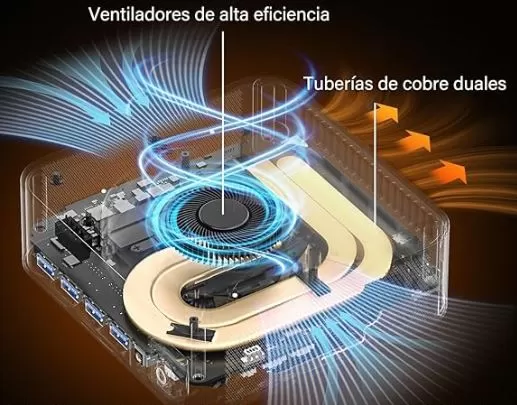
This is one of the most debated aspects of the A9 Max. The device includes a cooling system with an active fan and a copper heatsink.
-
At rest: Virtually inaudible — the fan spins slowly or almost stops
-
Moderate load: A soft hum that is barely noticeable in normal environments
-
Maximum load (Performance mode): The fan speed increases noticeably and can become annoying in quiet environments.
-
Maximum CPU temperature: Does not reach critical levels thanks to the thermal management system.
-
Comparison: According to Notebookcheck, it is "more audible than many other devices" at full load.
Recommendation: For daily professional use, Balanced or even Silent mode is more than sufficient in terms of performance, and the noise level becomes very tolerable. Only activate Performance mode if you need that extra power occasionally.
🔌 Connectivity and Extras
Connectivity is one of the A9 Max's greatest strengths and partly justifies its price.
Panel frontal:
-
3× USB 3.2 Gen 2 Type-A (incluido 1 Always-On para carga)
-
1× Jack 3,5mm (audio combo)
-
1× SD 4.0 (UHS-II) Reader
Rear panel:
-
2× USB4 40 Gbps Type-C (con DisplayPort Alt Mode y Power Delivery)
-
1× USB 3.2 Gen2 Type-A
-
1× USB 2.0 Type-A
-
2× HDMI 2.1 FRL
-
2× RJ45 2.5GbE
-
1× DC-in (120W)
-
1× Kensington Lock
Wireless:
-
Wi-Fi 7 (MediaTek MT7925) — up to 5.8 Gbps theoretical
-
Bluetooth 5.4
What's missing: There's no OcuLink (for high-speed eGPUs), no USB4 v2 (80 Gbps), and no front USB-C port. For most users, this won't be an issue, but demanding enthusiasts will notice.
🔧 Expansion and Upgrades
This is where the A9 Max shines against many competitors with soldered memory.
| Component | Base configuration | Maximum possible |
|---|---|---|
| RAM | 32 GB DDR5-5600 (2× SO-DIMM) | 128 GB DDR5 |
| SSD principal | 2TB NVMe PCIe 4.0 (M.2 2280) | Any M.2 2280 NVMe (up to 4+ TB) |
| Second SSD | Empty | 1× M.2 2230 NVMe PCIe 4.0 (up to 4 TB) |
| VRAM iGPU | 2 GB (default) | Up to 24 GB adjustable in BIOS |
| Wi-Fi | MediaTek Wi-Fi 7 | Replaceable (M.2) |
⚠️ Warning: Opening the device is not easy — the Wi-Fi antenna cables are very fragile and reassembly can be tricky. Do it carefully and patiently. There is no 2.5" SATA drive bay (only M.2), and there is no additional 2.5" hard drive bay either.
🆚 Comparison with Direct Competitors
| Feature | Geekom A9 Max | Minisforum AI X1 Pro | Geekom Mini IT15 | Beelink SER9 |
|---|---|---|---|---|
| CPU | Ryzen AI 9 HX 370 | Ryzen AI 9 HX 370 | Core Ultra 9 285H | Ryzen AI 9 HX 370 |
| Integrated GPU | Radeon 890M | Radeon 890M | Arc 140T | Radeon 890M |
| Base RAM | 32 GB DDR5 | 32 GB DDR5 | 32 GB DDR5 | 32 GB DDR5 |
| SSD | 2 TB | 2 TB | 2 TB | 1 TB |
| USB4 ports | 2× (40 Gbps) | 2× (40 Gbps) | 2× (40 Gbps) | 1× |
| OcuLink | ❌ | ✅ | ❌ | ❌ |
| Wi-Fi | Wi-Fi 7 | Wi-Fi 7 | Wi-Fi 7 | Wi-Fi 6E |
| Dual 2.5GbE | ✅ | ✅ | ✅ | ❌ |
| RAM max. | 128 GB | 96 GB | 96 GB | 64 GB |
| Approximate price | ~999 € | ~999 € | ~899 € | ~699 € |
The Minisforum AI X1 Pro is the most direct competitor: same chip, similar price, but it adds OcuLink (for connecting an external eGPU with higher bandwidth). The Geekom A9 Max compensates with better build quality, more maximum RAM (128 vs 96 GB), and a 36-month warranty.
🌐 Reviews on Specialized Websites
Major tech publications have thoroughly reviewed the A9 Max. Here's a summary of their verdicts:
🔬 NotebookCheck
"The Geekom A9 Max closes the gap with the Minisforum AI X1 Pro in performance. The design and build quality are premium. However, the fan noise under full load is its biggest weakness."
Use: ⭐⭐⭐⭐
🖥️ KitGuru
"The A9 Max is a compact, stylish, and versatile mini PC. It's not perfect, but it packs a punch despite its small size. It's worth buying."
Note: Recommended
💼 IT Pro
"The most expensive mini PC we've reviewed recently, but also the most capable. Ideal for replacing a traditional desktop."
Use: ⭐⭐⭐⭐½
🪟 Windows Central
"Small PC, big power. It's on the more expensive end of the spectrum, but when it easily replaces a desktop PC, even for gaming, it makes perfect sense."
Use: ⭐⭐⭐⭐
🏁 Neowin
"A fully qualified Copilot+ mini PC for under $1,000. Yes."
Note: Recommended
🧪 Technical Tests
Benchmarks place the A9 Max among the elite mini PCs with integrated graphics.
CPU (Cinebench 2024 — Normal mode 54W)
| Test | Geekom A9 Max | Minisforum AI X1 Pro | Geekom A8 Max |
|---|---|---|---|
| Single-Core | 119 pts | 121 pts | 106 pts |
| Multi-Core | 1.209 pts | 1.267 pts | 943 pts |
GPU — Radeon 890M (3DMark / AIDA64)
-
3DMark Time Spy: ~2,600 points (competitive iGPU)
-
AIDA64 FP32 Ray-Trace: ~34,200 KRay/s — absolute leader among iGPUs
Storage (NVMe Lexar)
-
Sequential read: ~7,000 MB/s
-
Sequential write speed: ~6,000 MB/s
Wi-Fi 7 (iperf3 a 6 GHz)
-
Reception: ~1.607 Mbps
-
Transmission: ~1,690 Mbps — excellent performance
Geekbench AI
-
Quantized (NPU+CPU): ~7.800 puntos
🔊 Temperature / Noise (measured)
-
At rest: <30 dB(A) — inaudible
-
Under load (Performance mode): up to ~45-47 dB(A) — audible
🎮 Gaming and Emulation
The Radeon 890M is the most powerful iGPU currently available in a mini PC, and its gaming performance is surprising for integrated graphics.
Games at 1080p (low/medium settings):
| Game | FPS aprox. | Configuration |
|---|---|---|
| CS2 (Counter-Strike 2) | 80-120 fps | Media 1080p |
| Valuing | 100+ fps | Media 1080p |
| League of Legends | 120+ fps | Alta 1080p |
| GTA V Enhanced | 45-60 fps | Media 1080p |
| Cyberpunk 2077 | 25-35 fps | Baja 1080p |
| Marvel Rivals | 40-55 fps | Media 1080p |
| Kingdom Come: Deliverance 2 | 30-40 fps | Baja 1080p |
| Minecraft (Java) | 80+ fps | Media 1080p |
| Hades | 60+ stable fps | Alta 1080p |
🕹️ Emulation:
The power of the HX 370 turns the A9 Max into a beast for emulation:
-
PlayStation 3 (RPCS3): Most games at 60fps
-
Nintendo Switch (Yuzu/Ryujinx): Excellent compatibility
-
PlayStation 2 / GameCube / Wii / WiiU: Perfectos al 100%
-
Dreamcast, PSP, 3DS: No problem at all
-
PS4 / Xbox One (Xemu/Spine): In development, results may vary
For retro and emulation gamers, this mini PC is perhaps the best option on the market in its price range.
❓ Frequently Asked Questions (FAQ)
❓ Does it come with Windows included?
Yes, it includes Windows 11 Pro 64-bit pre-installed, fully activated.
❓ Can I connect 4 monitors at once?
Yes: 2 via HDMI 2.1 + 2 via USB4 (DisplayPort Alt Mode). All at 4K/60Hz simultaneously.
❓ Does it support eGPU (external graphics card)?
Technically yes, via the USB4 ports at 40 Gbps, but without OcuLink the bandwidth is lower than ideal. eGPU performance will be functional but not optimal.
❓ Is it quiet enough to work from home?
At idle and under light load, practically yes. Under sustained heavy load (Performance mode), the fan is audible. In Balanced or Silent mode, it is perfectly tolerable.
❓ Can Linux be installed?
Yes. Ubuntu, Fedora, and other popular distributions work correctly. AMD driver support on Linux is mature.
❓ How much VRAM does the Radeon 890M have?
By default it uses ~2 GB of system RAM, but you can increase it to 24 GB from the BIOS, which significantly improves gaming performance.
❓ Is it worth it compared to the Geekom A8 Max?
If you already have the A8 Max, the improvement is substantial (~28% faster). If you're coming from something older, the leap is huge.
🏆 Final Conclusion
The Geekom A9 Max is the best mini PC Geekom has ever made, and one of the best on the market in its price range. It offers exceptional performance for productivity, creative content, local AI, and casual gaming, all in a form factor that fits behind any monitor.
Who is it ideal for?
-
👨💼 Professionals who need power in small spaces (home office, office, studio)
-
🎨 Content creators and video editors who don't require a dedicated GPU
-
🤖 AI enthusiasts who want to run local LLM models (LLaMA, DeepSeek, etc.)
-
🎮 Casual gamers and retro emulation fans
-
🖥️ Users who want to replace a bulky desktop without sacrificing performance
Is it worth it? If you have a budget of around €1,000 for a high-performance mini PC, then yes. If you're looking for something more affordable with the same chip, the Beelink SER9 (around €699) could be an interesting alternative, although it lacks the build quality and 128GB of RAM of the Geekom.