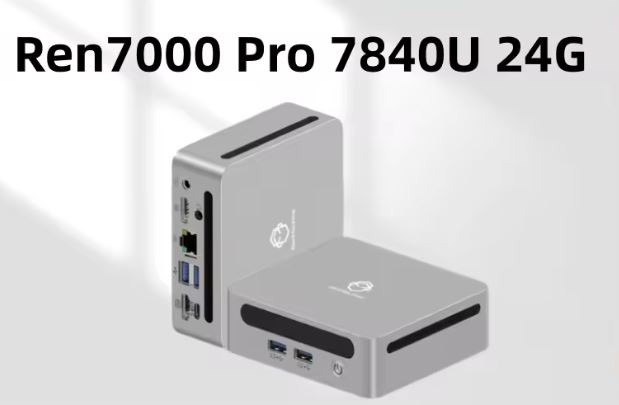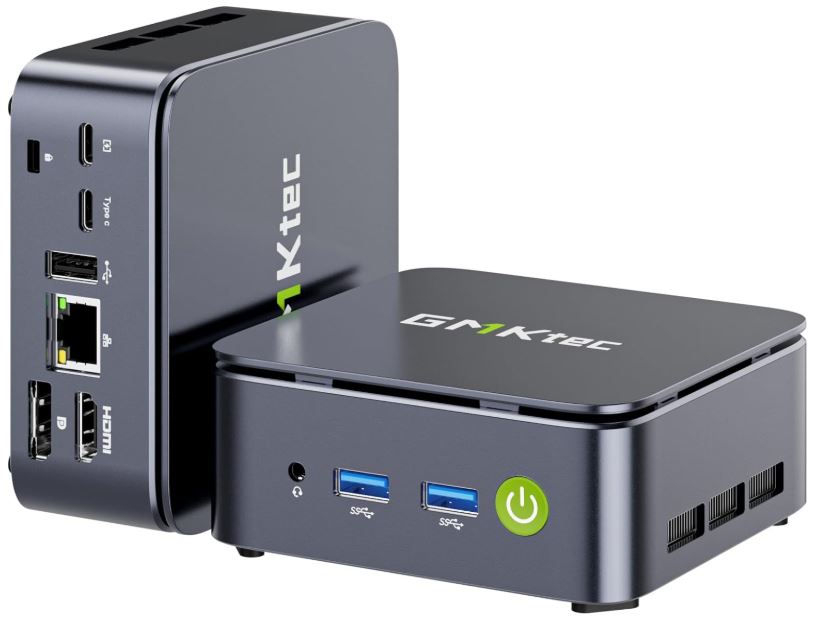
The GMKtec NucBox G10 is a compact mini PC with an AMD Ryzen 5 3500U processor that offers solid performance for office tasks, multimedia, and light emulation.
✅ Pros:
-
The AMD Ryzen 5 3500U processor is noticeably superior to similarly priced Intel N-series processors.
-
Dual M.2 Gen3x4 slots for storage expansion
-
Triple video output (HDMI 2.1 + DisplayPort 1.4 + USB-C)
-
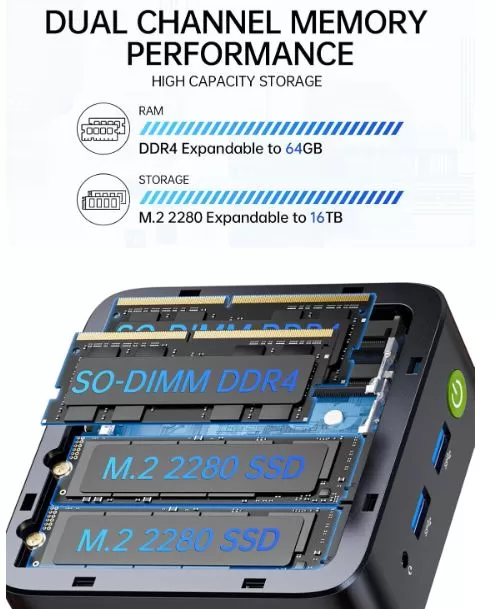
Dual-channel DDR4 RAM and support up to 64 GB
-
Windows 11 Pro pre-installed
-
Good value for money (~€165–€775)
❌ Contras:
-
2019 Architecture CPU
-
WiFi 5 only, no WiFi 6
-
No native OCuLink (although adaptable with accessories)
Quick conclusion: If you're looking for an affordable AMD mini PC for everyday work, office use, or retro emulation, and you don't mind tinkering with the BIOS, the G10 is a solid buy.
Take advantage of the following purchase options with the best available prices:
🛍️ Amazon — Fast delivery, warranty, and easy returns:
🛒 Buy GMKtec G10
💰 AliExpress — Lowest price, direct from the manufacturer:
👉 Check GMKtec G10 availability on AliExpress →
🌐 Alibaba - Price from €127
👉 Buy on Alibaba →
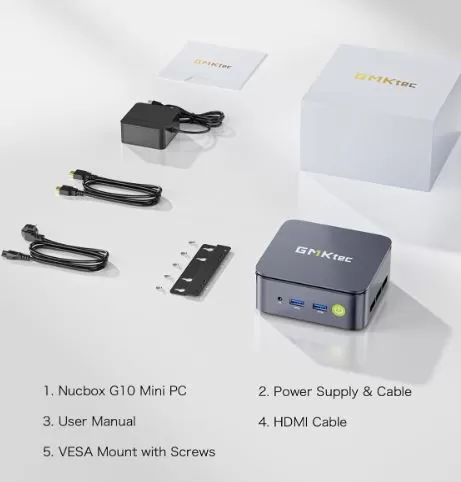
📦 Unboxing and Box Contents
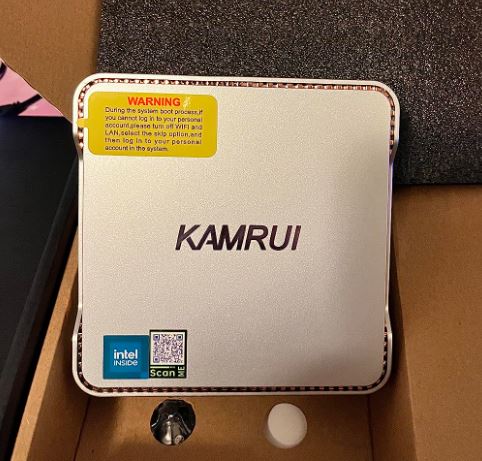
GMKtec NucBox G10 Mini PC retail box with power supply, HDMI cable, VESA mount, user manual
Upon opening the GMKtec G10 box, you'll find well-designed and quite comprehensive packaging for its price range. The contents include:
-
🖥️ Mini PC GMKtec NucBox G10
-
🔌 19V / 3.42A (64.98W) Power Adapter
-
📺 Cable HDMI
-
🔧 VESA mount for monitor mounting
-
📖 User manual and quick start guide
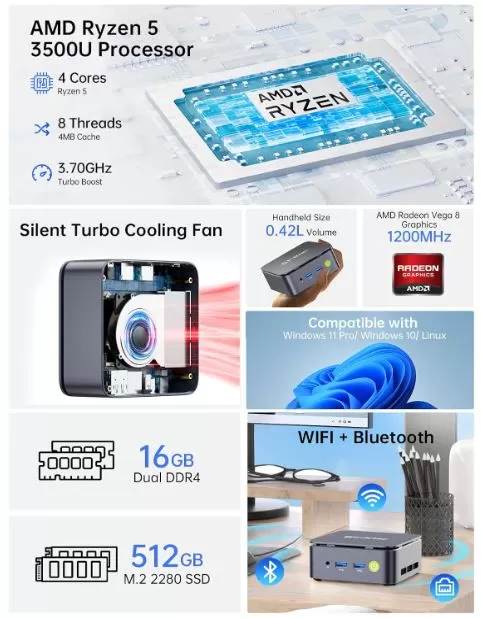
The unit comes with 16GB of DDR4 RAM and a 512GB NVMe SSD as standard configuration, which is a very generous starting point for the price. The power adapter is compact, and the included HDMI cable lets you connect it right away.
📋 Technical Specifications
| Component | Detail |
|---|---|
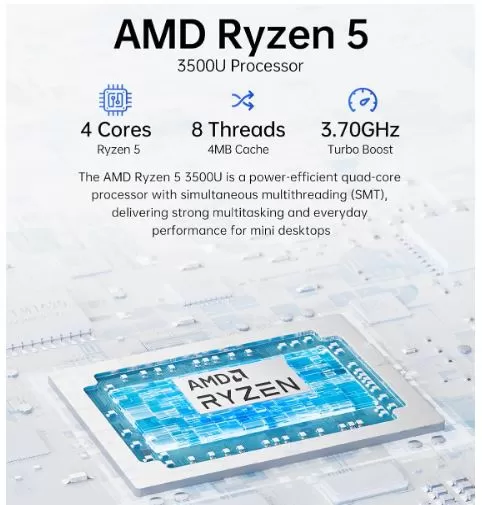
| Processor | AMD Ryzen 5 3500U (4 cores / 8 threads, up to 3.7 GHz) |
| Integrated GPU | AMD Radeon Vega 8 (8 CUs, 1200 MHz) |
| RAM | 16 GB DDR4-3200 (dual-channel, 2×8 GB) |
| Storage | 512GB M.2 PCIe Gen3x4 NVMe |
| Maximum RAM | 64 GB DDR4 |
| M.2 slots | 2× M.2 2280 PCIe Gen3x4 (up to 8 TB per drive) |
| Video outputs | HDMI 2.1 (4K@60Hz) + DP 1.4 (8K) + USB-C (DP 1.4, 4K@30Hz) |
| Red | 2.5 GbE LAN (Realtek 8125BG) |
| WiFi | WiFi 5 (802.11ac, up to 866.7 Mbps) |
| Bluetooth | 5.0 |
| USB | USB 3.2 Gen 1 (multiple ports) + 2× USB-C |
| TDP | 25–35W configurable (hasta 55W total) |
| Power supply | 19V / 3.42A (64.98W) |
| Dimensions | 103 × 98 × 32 mm |
| SO | Windows 11 Pro (pre-installed) |
🏗️ Design and Construction Quality
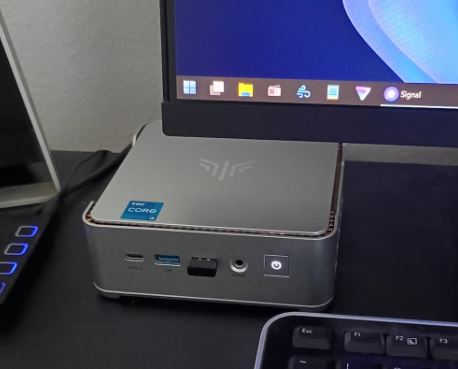
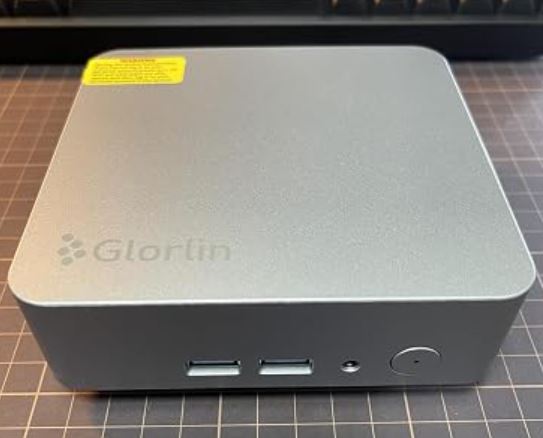
GMKtec G10 Mini PC with silver chassis, GMKtec branding, multiple USB ports, power button, and green LED
The GMKtec G10 has a compact silver/gray chassis measuring just 10.3 × 9.8 × 3.2 cm, with a minimalist design that blends seamlessly into any environment, be it an office, living room, or gaming setup. The casing is made of robust plastic with a matte finish, and the GMKtec logo appears on the top alongside a discreet green power LED.
Its size makes it virtually invisible on a desk or mounted behind a monitor thanks to the included VESA mount. Internal access is reasonably simple: just remove the screws on the base to access the motherboard and expansion slots.
🖥️ Screen and Multimedia
The G10 has triple video output. You can connect the following simultaneously:
-
Main monitor via HDMI 2.1 at 4K@60Hz
-
Second monitor via DisplayPort 1.4 (up to 8K)
-
Third monitor via USB-C (DP 1.4, 4K@30Hz)
4K video playback is smooth in multimedia environments. However, early firmware versions experienced issues with 4K YouTube playback, which were resolved after adjusting the BIOS to "Performance" mode. Audio is handled via HDMI/DP or external speakers/headphones (it does not have a built-in speaker).
⚙️ Performance and Software
The G10's performance is highly dependent on the BIOS configuration. It comes from the factory in "Balanced" mode (15W), where its performance is comparable to or slightly lower than that of an Intel N150. Switching to "Performance" mode (35W) substantially improves the results.
-
Speedometer (browserbench.org): 7.63 points (Balanced) → 11.2 points (Performance)
-
3DMark Time Spy: 394 puntos (Balanced) → 756 puntos (Performance)
Windows 11 Pro comes pre-installed and the system is quite clean, without significant bloatware beyond standard Microsoft software. It also works well with Linux: Ubuntu 25.04 correctly detects Ethernet, Wi-Fi, Bluetooth, audio, and video.
⚠️ Important note: If you don't adjust the BIOS settings when you first set up the computer, the actual performance will be far below its potential. This is the biggest "trick" of the G10.
🔋 Energy Consumption and Cables
The G10 has a configurable base power consumption of 25–35W, with a maximum of 55W under full load. The included power supply is 64.98W, providing ample headroom for maximum operation. This is very efficient power consumption for a desktop computer with this level of performance.
-
🔌 Balanced Mode: ~15–20W in use
-
🚀 Performance Mode: 35–45W under load
-
💤 Standby/idle: ~5–8W estimated
The power cable is standard and the connector from the power supply to the equipment is secure and compact.
🌡️ Temperature and Noise (Actual Thermal)
This is one of the G10's most critical points. In Balanced mode, the device runs quite quietly, but when switching to Performance mode, thermal problems appear.
-
In stress tests with 3DMark, the initial results in Performance Mode were inconsistent until the fan was forced to 100% manually from the BIOS.
-
With the fan at 100%, performance stabilized and benchmarks improved considerably.
-
For office and web use, the temperature is manageable and the noise is very low.
🔧 Tip: Enter the BIOS on the first boot, change the mode to "Performance" and adjust the fan curve to find the ideal balance between performance and noise according to your use case.
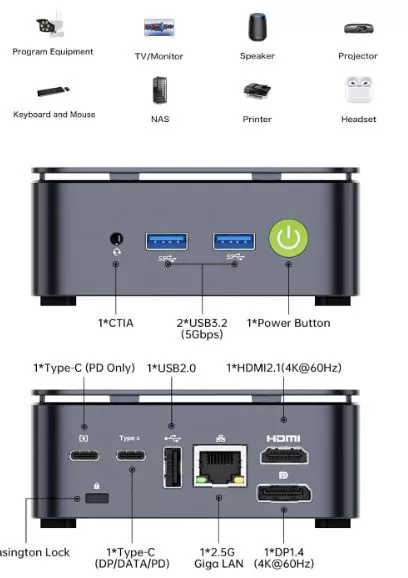
🔌 Connectivity and Extras
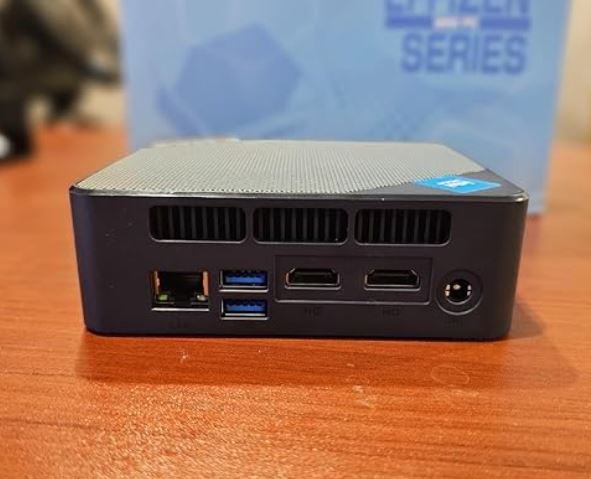
The G10 stands out for its generous connectivity for its size:
| Port/Function | Detail |
|---|---|
| USB-A | Multiple USB 3.2 Gen 1 ports |
| USB-C | 2x (data + video DP 1.4) |
| HDMI | 1× HDMI 2.1 (4K@60Hz) |
| DisplayPort | 1× DP 1.4 (8K) |
| Ethernet | 1× 2.5 GbE (Realtek 8125BG) |
| WiFi | WiFi 5 (802.11ac, 866.7 Mbps) |
| Bluetooth | 5.0 |
| Jack the audio | 3,5 mm combo |
| SD card reader | ❌ Not included |
| NFC | ❌ Not included |
| Fingerprint | ❌ Not included |
| IP Rating | ❌ No resistance certification |
| 5G/LTE | ❌ Not included |
🔧 Expansion and Upgrades
One of the great advantages of the G10 compared to other budget mini PCs is its expandability:
-
RAM: It currently comes with 16GB of dual-channel DDR4 RAM. A version without RAM is available on AliExpress starting at €165 (as of the date of this article's publication). You can upgrade to 64GB of DDR4 RAM using two SO-DIMM modules. Using dual-channel RAM is key to the performance of the integrated Vega 8 GPU.
-
Primary SSD: M.2 2280 PCIe Gen3x4 slot. Supports drives up to 8 TB. A version without SSD or RAM is available on AliExpress starting at €165 (as of the date of publication of this article).
-
Second SSD: ✅ It has a second M.2 2280 PCIe Gen3x4 slot, also supporting up to 8 TB, allowing a total storage expansion of up to 16 TB.
-
eGPU: It does not have native OCuLink, but some users have connected external OCuLink adapters to incorporate an inexpensive discrete GPU.
-
SO-DIMM: The RAM modules are standard DDR4 SO-DIMM, easily replaceable and upgradeable.
🆚 Comparison with Direct Competitors
| Feature | GMKtec G10 | Beelink S12 Pro | Beelink EQ13 | Minisforum UM350 |
|---|---|---|---|---|
| CPU | Ryzen 5 3500U | Intel N100 | Intel N305 | Ryzen 5 3550H |
| GPU | Radeon Vega 8 | Intel UHD | Intel UHD | Radeon Vega 8 |
| RAM | 16 GB DDR4 | 16 GB DDR4 | 16 GB DDR4 | 16 GB DDR4 |
| SSD | 512GB NVMe | 500GB NVMe | 512GB NVMe | 512GB NVMe |
| WiFi | WiFi 5 | WiFi 6 | WiFi 6 | WiFi 6 |
| M.2 slots | 2× Gen3x4 | 1× + 1× SATA | 1× + 1× SATA | 1× + 1× 2,5" |
| Maximum RAM | 64 GB | 32 GB | 32 GB | 32 GB |
| Approximate price | ~$189–$239 | ~$155–$180 | ~$175–$200 | ~$220–$260 |
| CPU performance | ⭐⭐⭐⭐ | ⭐⭐⭐ | ⭐⭐⭐ | ⭐⭐⭐⭐ |
| GPU performance | ⭐⭐⭐⭐ | ⭐⭐ | ⭐⭐ | ⭐⭐⭐⭐ |
🏆 The G10 clearly outperforms Intel N-series models in raw performance, especially in GPU performance. The UM350 is a more direct competitor but usually costs more.
💬 Reviews on Well-Known Pages
The G10's reviews on different platforms are mixed but generally positive once it's properly adjusted:
🔵 TechRadar — Highlights the excellent memory and storage configuration, and the triple-monitor capability. Notes that the use of DDR4 instead of DDR5 limits the performance ceiling. "For a budget offering, it's better than a low-end Intel machine. "
🟠 Lon.TV (Lon Seidman) — Very detailed review. Criticizes the initial performance in balanced mode, but confirms a notable improvement in Performance mode with the fan at 100%. Speedometer: 11.2 (Performance) vs 7.63 (Balanced).
🟡 Reddit r/MiniPCs — Users appreciate the two M.2 Gen3x4 slots, dual-channel RAM, and HDMI 2.1, features that many competitors don't offer. The possibility of connecting an eGPU via OCuLink is also mentioned.
🔴 Gizmodo — It positioned it as a recommended purchase when its price was reduced to $239 (-20%), highlighting its value as a complete desktop PC.
⚠️ Reddit alert: GMKtec has reportedly not published reviews below 4 stars on its official website. Keep this in mind and always consult independent third-party reviews before buying.
🟢 BuySave / Comparative Analysis — Confirms that the Ryzen 5 3500U offers "almost double the multi-core performance" compared to the Intel N150, and that the G10 excels in retro emulation.
🧪 Technical Tests
Real-world benchmarks conducted by several independent reviewers paint a clear picture:
| Proof | Balanced Mode | Performance Mode |
|---|---|---|
| Speedometer 3.0 | 7,63 | 11,2 |
| 3DMark Time Spy | 394 | 756 |
| TDP | ~15W | ~35W |
| GTA V (720p, low) | ~35-40 FPS | ~45-50 FPS |
| PS2 Emulation | Irregular | Irregular |
| Retro/16-bit emu | ✅ Fluid | ✅ Fluid |
In Time Spy, the score of 756 in Performance surpasses the Intel N150 on paper, but in practical emulation, the N150 sometimes gave more stable results because the Zen+ architecture uses shared DDR4 RAM without the bandwidth of DDR5.
Cinebench R23 multi-core performance ranges from 4,200 to 4,600 points depending on the TDP mode, comfortably placing it above any Intel N-series processor at the same price.
🎮 Gaming and Emulation
For fans of retro gaming and emulation, the G10 is an interesting proposition with some nuances:
✅ Works well:
-
🕹️ Retro console emulation (NES, SNES, GBA, PS1, Nintendo DS, N64)
-
🚀 Rocket League — 50-60 FPS on medium-low settings
-
🏎️ GTA V — 45-50 FPS at 720p on minimum settings
-
🎮 Fortnite — Playable on low settings
⚠️ With limitations:
-
🎮 PS2 (e.g., Burnout Revenge ) — Unstable, especially in Performance Mode
-
🎮 PS3/Xbox 360 — Not recommended
-
🕹️ GameCube/Wii — Acceptable with adjustments; requires optimized profile
💡 For emulation, set the GPU to "Auto" in the BIOS (instead of the factory default 3GB) so that the system dynamically allocates the necessary VRAM. This significantly improves performance in emulators.
❓ Frequently Asked Questions (FAQ)
Can I use the G10 as my main PC for office work?
Yes, absolutely. Browsing, office applications, video calls, light photo editing, and 1080p video recording run very smoothly in Performance mode.
What is the maximum RAM it supports?
Up to 64 GB DDR4 with two SO-DIMM modules.
Does it have a second storage slot?
Yes, it has two M.2 2280 PCIe Gen3x4 slots, each supporting up to 8 TB.
Does it work with Linux?
Yes. Ubuntu 25.04 correctly detects all the main components.
Does it have output for three simultaneous monitors?
Yes: HDMI 2.1 + DisplayPort 1.4 + USB-C (DP). Triple 4K supported.
Is it quiet?
In Balanced mode, yes. In Performance mode under sustained load, the fan becomes audible.
Can I connect an external GPU (eGPU)?
It doesn't have native OCuLink, but users have reported using external adapters.
🏁 Final Conclusion
The GMKtec NucBox G10 is a mini PC that delivers on its promises, but only if you know what you're buying. Its Ryzen 5 3500U processor, although outdated (2019 architecture), is still significantly more powerful than similarly priced Intel N-series processors, especially in GPU-intensive tasks.
Who is it ideal for?
-
👨💼 Office users who want a compact and capable PC
-
📺 Multimedia centers requiring triple video output
-
🎮 Fans of retro emulation up to PS2/GameCube
-
💻 Users who want to run Linux or Windows 11 on budget AMD hardware
-
🔧 Enthusiasts who enjoy tuning and optimizing their hardware
Is it worth it?
Yes. The key is to adjust the BIOS as soon as you turn it on and not expect it to be "perfect out of the box." If you're looking for something that works 100% without any modifications, the Beelink S12 Pro or the Minisforum UM350 might be more plug-and-play options.
🛒 Where to Buy?
Take advantage of the following purchase options with the best available prices:
🛍️ Amazon — Fast delivery, warranty, and easy returns:
🛒 Buy GMKtec G10
💰 AliExpress — Lowest price, direct from the manufacturer:
👉 Check GMKtec G10 availability on AliExpress →
🌐 Alibaba - Price from €127
👉 Buy on Alibaba →