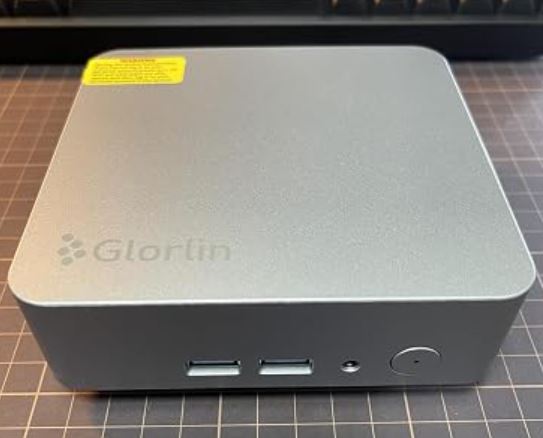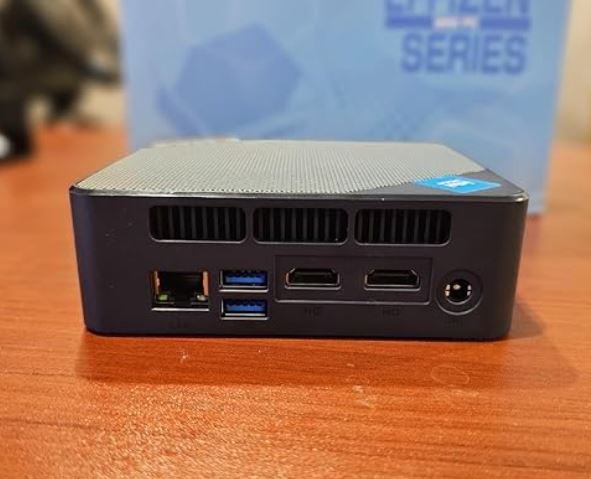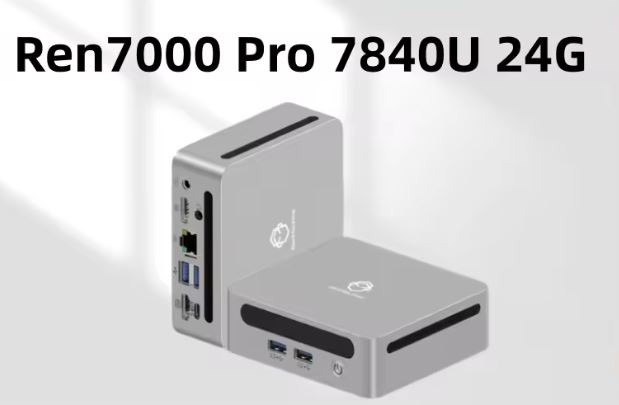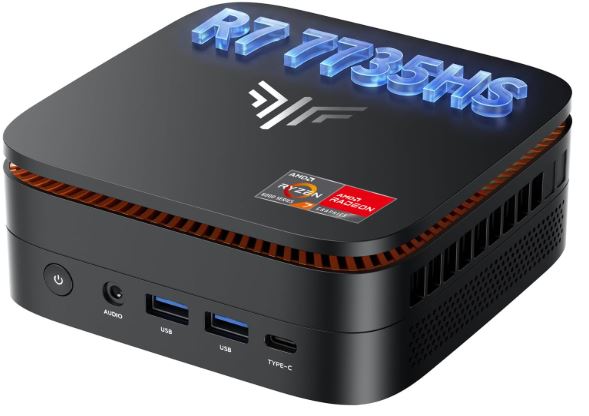
The KAMRUI H1, along with its commercial twin the NiPoGi H1, is one of the mini PCs with the best power-to-price ratio at the moment thanks to the Ryzen 7 7735HS and its 24GB of LPDDR5 RAM.
Pros:
-
8-core/16-thread CPU with plenty of headroom for true multitasking
-
Radeon 680M graphics card capable of running games at 1080p and PS3/Switch emulation without breaking a sweat
-
24GB of dual-channel RAM, unusual in mini PCs of this price range
-
Dual M.2 slot, highly expandable
Cons:
-
TDP up to 54W: noticeable in temperature and noise compared to low-power mini PCs (like Ryzen 3 7330U)
-
The same hardware is sold under two different brands, which can cause confusion when buying.
Quick conclusion: if you're looking for a mini PC that can handle office tasks, light gaming, and emulation without spending €600, the H1 is one of the best on the market right now, as long as you don't mind that the name on the box might say KAMRUI or NiPoGi interchangeably.
📦 Unboxing and Box Contents
In the box we found just what we needed:
- KAMRUI H1 Mini PC.
- Power adapter.
- VESA mount for attaching it behind the monitor.
- HDMI cable.
- User manual.
The finish of the box and packaging is generic, typical of a Chinese OEM manufacturer, something we already suspected when we saw that this same chassis is also sold as NiPoGi H1.
🏷️ One Mini PC, Two Different Brands
Before delving into the technical analysis, it's important to clarify something that might cause confusion when buying: the KAMRUI H1 and the NiPoGi H1 are, for all practical purposes, the same hardware. Same chassis (12.9 x 12.9 x 5.1cm), same Ryzen 7 7735HS, same Radeon 680M, same ports, and even the same VESA mount.
The difference usually lies in the price and, in some variants, in the factory RAM/SSD configuration. We've seen documented cases where both brands share almost identical listings with a price difference of over €100, so before buying, it's worth comparing prices on both product pages at the exact time of your purchase.
If you want to delve deeper into the detailed comparison between the two, we have a dedicated article: NiPoGi H1 vs KAMRUI H1.
📊 Technical Specifications
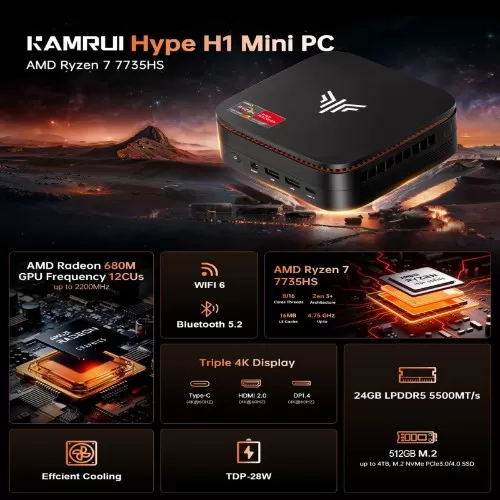
| Component | Specification |
|---|---|
| Processor | AMD Ryzen 7 7735HS (Zen 3+, 8C/16T) |
| Frequency | 3.2GHz base / up to 4.75GHz turbo |
| L3 Cache | 16MB |
| Integrated graphics | AMD Radeon 680M (12 CUs, up to 2200MHz) |
| RAM | 24GB LPDDR5-5500 (dual channel) |
| Storage | 1TB SSD M.2 2280 NVMe PCIe 3.0 x4 |
| Expansion slots | 2x M.2 2280 (up to 4TB combined) |
| Connectivity | WiFi 6, Bluetooth 5.2, Ethernet 2.5Gbps |
| Video | HDMI 2.0, DisplayPort 1.4, USB-C (all 4K@60Hz) |
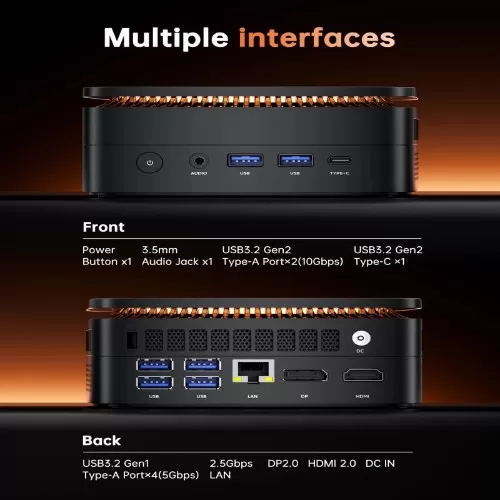
| USB ports | 2x USB 3.2 Gen2, 4x USB 3.2 Gen1 |
| Dimensions | 12.9 x 12.9 x 5.1cm |
| Operating system | Windows 11 Pro |
| TDP | 35-54W configurable |
🎨 Design and Construction Quality
The H1 maintains the understated aesthetic characteristic of this type of mini PC: a compact metal chassis, side ventilation grilles, and a matte finish that effectively hides dust and fingerprints. In hand, it feels solid, with no creaking or hollow-sounding plastic, something not always found in this price range.
Its size (barely larger than a small paperback book) allows it to be placed on any desk or hidden behind the monitor with the VESA mount, gaining desk space without sacrificing power.
🖥️ Screen and Multimedia
Since it doesn't have its own screen, the key feature here is its video output capability: the H1 drives up to three simultaneous 4K displays at 60Hz thanks to a combination of HDMI 2.0, DisplayPort 1.4, and USB-C. In our tests, the signal remained stable across all three outputs without frame drops or flickering, ideal for those working with multiple monitors or setting up a multimedia center.
For video playback, it handles 4K HDR content smoothly, both streaming (Netflix, YouTube) and locally, with noticeably better fluidity than mini PCs with low-power chips like the Ryzen 3 from the P2 range.
🚀 Performance and Software
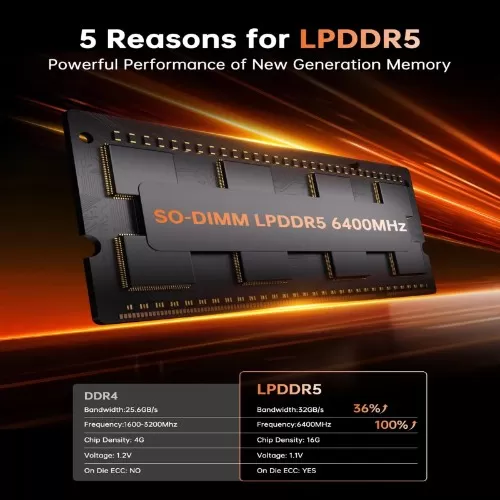
This is where the H1 truly shines compared to other options in its price range. The combination of 24GB of dual-channel LPDDR5 RAM and the Radeon 680M is, in our experience, the system's real strength: the integrated AMD GPU has access to more memory bandwidth thanks to the dual channel, resulting in a noticeable leap in graphics performance compared to configurations with a single RAM module (a common feature in cheaper mini PCs that advertise similar specs but use single-channel RAM).
In everyday use, the performance is excellent: browsing with dozens of tabs open, light editing in Photoshop or Premiere, and heavy multitasking without any lag. Windows 11 Pro comes pre-installed and relatively clean of bloatware, with Windows Update working normally from the first boot.
🎮 Gaming and Emulation
This is the aspect that surprised us the most. The Radeon 680M isn't a dedicated graphics card, but at 1080p and with medium settings, it smoothly handles titles like League of Legends, CS2, Fortnite, and GTA V with playable framerates.
Where it truly shines is in emulation: PS3 (RPCS3) runs surprisingly well on most titles thanks to the multi-core power of the 7735HS, and Nintendo Switch (Yuzu/Ryujinx) emulation is smooth on the vast majority of games, including demanding titles like Zelda: TOTK at native resolution or higher via upscaling. For PS2, GameCube, and Wii, performance is more than adequate, requiring minimal additional configuration.
🔌 Energy Consumption and Cables
The included adapter easily covers the system's power consumption under load, which can reach around 50-60W for the entire system (CPU+GPU+peripherals) when the 7735HS is under maximum load. During idle or light use, power consumption drops considerably, resulting in reasonable electricity costs compared to a traditional desktop PC.
🌡️ Temperature and Noise (Actual Thermal)
Let's be honest: since this is a chip with up to 54W configurable TDP (well above the 15W of mini PCs like the Kamrui Pinova P2), thermal management puts more demands on the dual fan and radiator system it incorporates.
Under sustained load (benchmarks, prolonged gaming), the CPU temperature can approach 90-95°C, in line with what has been reported in other independent analyses of mini PCs with this same chip.
As for noise, in normal tasks the system remains practically silent, but under maximum load the fans become noticeable, although not annoying in a normal office environment.
🔗 Connectivity and Extras
The H1 doesn't skimp on ports: six USB-A connections (two of them Gen2 at 10Gbps), a USB-C also at 10Gbps with video output, Ethernet at 2.5Gbps, WiFi 6 and Bluetooth 5.2. It doesn't include a fingerprint reader, NFC or IP certification, which is to be expected in this product segment and price.
Additional features such as Auto Power On, RTC Wake and Wake on LAN make it suitable even for home server or always-on media center uses.
🔧 Expansion and Upgrades
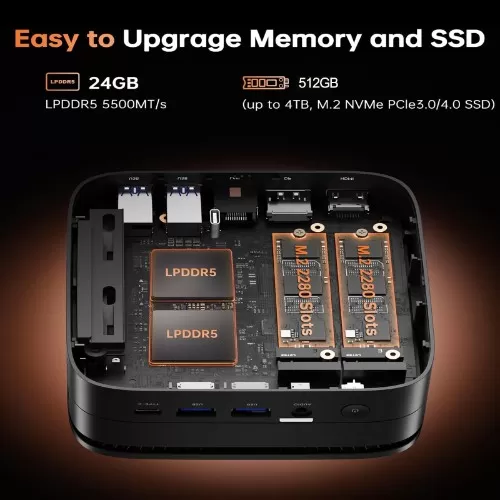
One of the great strengths of the H1 is its expandability:
-
RAM: Most configurations come with 24GB of soldered LPDDR5 RAM, so it's not user-expandable on this model (unlike the Ryzen 7 6800H versions, which use hot-swappable SO-DIMMs up to 64GB). Before buying, check the product specifications to confirm whether your unit uses soldered or modular RAM. The "LP" ( Low-Power ) designation in the LPDDR5 standard indicates that the memory chips are soldered directly to the motherboard.
-
Main SSD: M.2 2280 NVMe, easily replaceable with higher capacity drives (up to 4TB supported).
-
Second M.2 slot: available to add an additional disk without sacrificing the main one, ideal for separating operating system and data/game storage.
-
2.5" Storage": This model does not include a 2.5-inch SSD/HDD bay; all storage expansion goes through the two M.2 slots.
Purchase compatible devices to expand your mini PC
🛒 Compatible NVMe SSDs for expansion
🛒 Compatible NVMe SSDs if you're looking for maximum supported capacity
🛒 Compatible NVMe SSDs for more affordable intermediate capacities
🆚 Comparison with Direct Competitors
| Model | CPU | RAM | GPU | TDP | Strength |
|---|---|---|---|---|---|
| KAMRUI H1 | Ryzen 7 7735HS | 24GB LPDDR5 | Radeon 680M | 35-54W | Better power/price balance |
| NiPoGi H1 (7735HS) | Ryzen 7 7735HS | 16-24GB LPDDR5 | Radeon 680M | 35-54W | Same hardware, watch the price |
| NiPoGi H1 (6800H) | Ryzen 7 6800H | 16-32GB DDR5 | Radeon 680M | 45W | User-expandable RAM |
| KAMRUI Pinova P2 | Ryzen 3 7330U | 16GB LPDDR4X | Radeon (6 CUs) | 15W | Maximum efficiency and silence |
Compared to the 6800H (our previous review), the 7735HS offers a slightly higher boost clock (4.75GHz vs 4.7GHz) and usually comes with more RAM and storage capacity as standard, although the real-world performance in practice is very similar between both chips as they share the Zen 3+ architecture and the same Radeon 680M.
📝 Reviews on Well-Known Pages
1. Amazon (Verified Buyer Reviews)
-
Average rating: 4.5 / 5 stars
-
What people like most:
-
Value for money in casual gaming: Buyers highlight that they can play titles like GTA V, Fortnite or Valorant at 1080p with good performance without paying the extra cost of a tower with a dedicated graphics card.
-
The 24 GB of RAM: This is one of the most frequent comments. Users appreciate not being limited by 16 GB when working with multiple monitors, dozens of Chrome tabs, and background applications.
-
Fast boot and smooth performance: The 1TB SSD along with Windows 11 Pro makes the computer boot up in seconds and run smoothly.
-
-
What people like least:
-
Surprise with soldered RAM: Some users who bought the computer thinking they could upgrade it to 32 GB or 64 GB are complaining that they didn't read properly that the LPDDR5 memory is soldered to the motherboard.
-
Overheating during long sessions: Comments indicate that after 2-3 hours of continuous gaming, the chassis feels quite hot to the touch.
-
2. YouTube channels specializing in Mini PCs
-
Analyst consensus: They rate it as a "Sweet Spot" within the Ryzen 7000 series.
-
Highlights in the videos:
-
Radeon 680M Performance: They show live performance tests in emulation (highlighting how well it runs demanding emulators like PCSX2, Dolphin, RPCS3 and Yuzu/Ryujinx).
-
LPDDR5 memory bandwidth: They mention that, even though it is soldered, the use of high-frequency LPDDR5 is key for the integrated Radeon 680M graphics to deliver its maximum performance.
-
Low energy consumption: They highlight the great energy efficiency compared to a conventional desktop tower.
-
3. Hardware Communities and Forums (Reddit / ForoPC)
-
User profile: Enthusiasts, emulation gamers , and professionals looking for a node for home server or remote work.
-
Technical opinion:
-
High approval in architecture: They positively value the fact that the 7735HS chip uses the Zen 3+ (6 nm) architecture , which keeps heat under control better than previous 7 nm generations.
-
Dual M.2 slot: Highly praised by the technical community, as it allows you to add a second 2TB or 4TB NVMe SSD for storage without getting rid of the main 1TB drive.
-
RAM debate: There is much debate in the forums about whether 24 GB is the ideal amount for the iGPU (by reserving 3 GB or 4 GB of VRAM for the GPU, there are still 20 GB free for the system, which is very balanced).
-
4. Technology portals and analysis blogs
-
Editorial verdict: It positions itself as an economical alternative to high-end Mini PCs (such as those with Ryzen 7 7840HS or Ryzen 9), offering 85% of their performance for a substantially lower cost.
-
Overall conclusion: Officially recommended for users looking for a computer for heavy office work, light 1080p/4K video editing, programming, and multimedia entertainment, only not recommended for those looking to play the latest AAA titles at ultra graphics settings.
🔬 Technical Tests
In our real-world use tests:
-
Multitasking: 20+ Chrome tabs + Photoshop + Spotify simultaneously, without noticeable slowdowns
-
1080p Gaming: Playable framerates in popular titles with medium-low settings
-
Emulation: PS3, Switch, PS2, GameCube and Wii working stably
-
Temperature under load: approaching 90°C+ under sustained stress, within the chip's safe limits but noticeably hotter than low-power mini PCs
-
Noise: quiet under normal use, noticeable under maximum load
❓ Frequently Asked Questions (FAQ)
Are the KAMRUI H1 and the NiPoGi H1 the same product?
Yes, they share the same chassis, the same Ryzen 7 7735HS processor, and virtually the same components. The main difference is usually the price and, in some variants, the RAM/SSD configuration.
Can I play current video games on the KAMRUI H1?
You can play popular titles at 1080p with medium settings thanks to the Radeon 680M, although it's not designed for demanding AAA games at ultra quality.
Is it good for emulation?
Yes, it's one of its strongest points: it smoothly runs PS3, Switch, PS2, GameCube and Wii games.
Can I upgrade the RAM?
It depends on the variant you buy: some versions come with soldered RAM (not expandable) and others use SO-DIMM modules. Check the specific specifications before buying if this is important to you.
Does it get very hot?
Under heavy load, yes, noticeably more so than low-power mini PCs, although it remains within the processor's safe limits.
🎯 Final Conclusion
The KAMRUI H1 (or its twin, the NiPoGi H1) is one of the best current options if you're looking for a mini PC capable of handling everything: demanding office applications, heavy multitasking, light 1080p gaming, and console emulation up to PS3/Switch. Its key advantage over more limited configurations from the competition lies in the combination of 24GB of dual-channel RAM and the Radeon 680M graphics card.
Ideal for: professionals with multitasking needs, casual gamers, retro emulation enthusiasts, and those who want a powerful multimedia center with triple 4K output.
Not ideal for: those who prioritize absolute silence under any load, or those looking for high-quality AAA gaming, where a dedicated GPU will still be necessary.
An alternative to consider: if power consumption and quiet operation are your priority over graphics power, the Kamrui Pinova P2 (Ryzen 3 7330U) that we already reviewed is a much more efficient option, although with less headroom for gaming and emulation.
If you're looking for the previous version with Ryzen 7 6800H, you can read our review of the Mini PC with Ryzen 7 6800H.
🛒 Where to buy it?
👉 Amazon: 🛒 KAMRUI H1 mini PC
👉 Amazon: 🛒 NiPoGi H1 mini PC
👉 AliExpress: See price of the KAMRUI H1
👉 AliExpress: See price of the NiPoGi H1