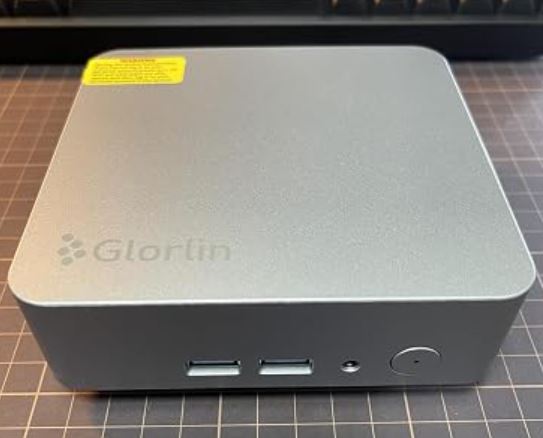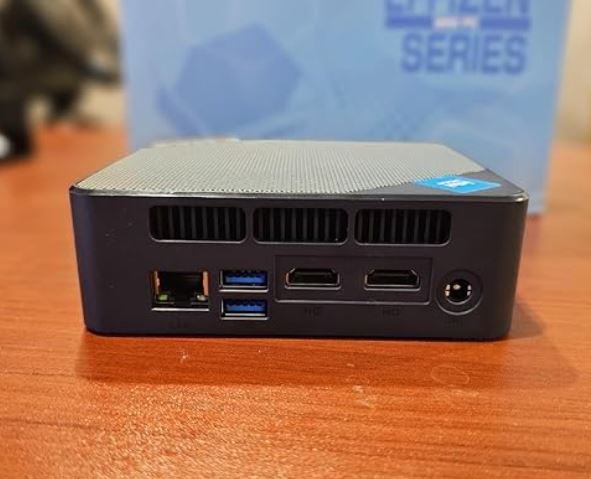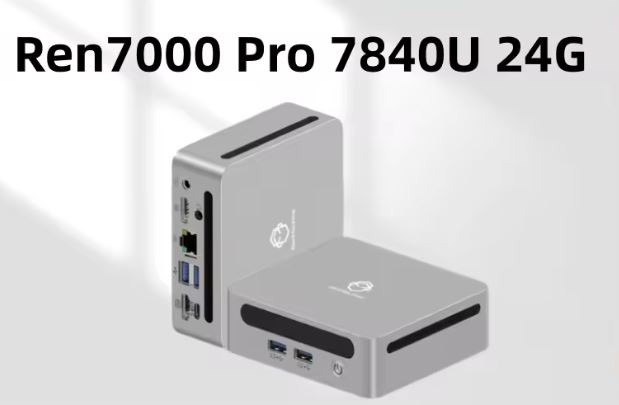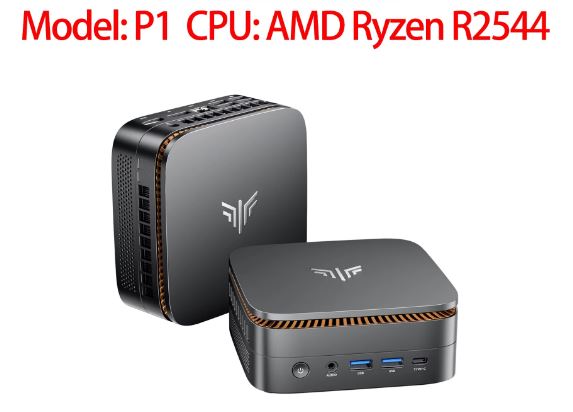
The KAMRUI Pinova P1 is one of the most pleasant surprises in the entry-level and office segment. It offers smooth performance for heavy web browsing, 4K multimedia, and office suites thanks to its 4 cores and 8 threads, and is particularly noteworthy for its support of triple 4K displays.
Although it's not a machine designed for demanding next-generation gaming or heavy 3D rendering tasks, its excellent price-performance ratio and upgradeability make it an ideal candidate for work desktops or home media centers.
-
👍 The best: Support for 3 4K monitors (HDMI, DP and Type-C), 8-thread processor superior to the basic Intel Celeron/N100, very low noise level and great expansion capacity (2 SO-DIMM RAM slots and 2 M.2 SSD slots).
-
👎 The worst: Limited Radeon Vega integrated graphics for modern AAA games, wireless connectivity in Wi-Fi 5 and Bluetooth 4.2 (a step behind the Wi-Fi 6 standard).
👉 Buy KAMRUI Pinova P1 on AliExpress
👉 Buy KAMRUI Pinova P1 on Amazon USA
👉 Buy KAMRUI Pinova P1 on Amazon UK
📦 Unboxing and Box Contents
The KAMRUI P1 box is understated and compact. Inside, you'll find everything you need to get it up and running in under 5 minutes:
-
1x Mini PC KAMRUI Pinova P1.
-
1x DC power adapter with European plug (EU Plug).
-
1x HDMI 2.0 cable.
-
1x VESA mounting bracket with its screws (to attach it behind the monitor).
-
1x User manual and quick setup instructions.
📊 Key Technical Specifications Table
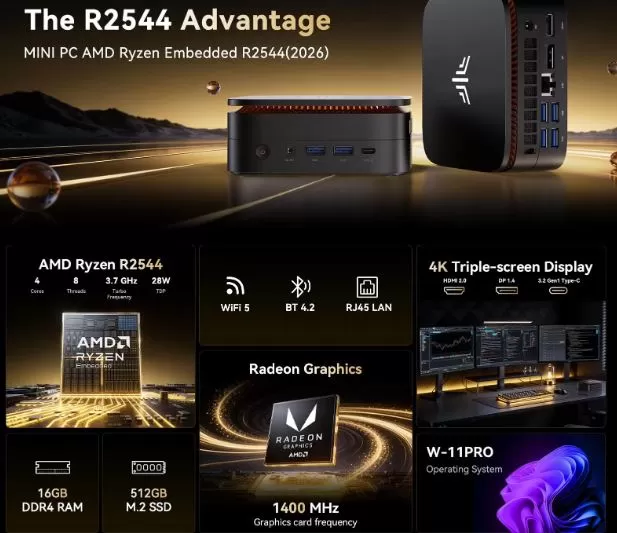
| Component | Specification |
| Processor (CPU) | AMD Ryzen Embedded R2544 (Zen+, 12nm, 4C/8T, 3.35 GHz Base / 3.7 GHz Boost, TDP 28W) |
| Graphics (iGPU) | AMD Radeon Graphics (Vega 8) at 1400 MHz |
| RAM | 8 GB / 16 GB DDR4 SO-DIMM (Dual Channel, expandable up to 32 GB 3200 MHz) |
| Storage | 256 GB / 512 GB M.2 NVMe SSD (2x M.2 slots available, up to 4 TB total) |
| Video Output | Triple Screen 4K @ 60Hz via HDMI 2.0 + DisplayPort 1.4 + USB 3.2 Gen1 Type-C |
| Network and Wireless | Gigabit Ethernet RJ45, Wi-Fi 5 (802.11ac dual band), Bluetooth 4.2 |
| Frontal Ports | 1x USB 3.2 Type-C, 2x USB 3.2 Type-A, 1x Audio Jack 3.5mm combo, Power Button |
| Rear Ports | 4x USB 3.2 Type-A, 1x HDMI 2.0, 1x DisplayPort 1.4, 1x RJ45 Ethernet, 1x DC-in |
| Operating System | Windows 11 Pro pre-installed and activated |
| Dimensions and Assembly | ~12.8 x 12.8 x 4.1 cm (~500g) with included VESA mount |
🎨 Design and Construction Quality
The KAMRUI Pinova P1 features a sleek, matte dark gray, square chassis. The chassis is constructed from reinforced ABS plastic with well-integrated side vents to maximize airflow.
It feels solid yet lightweight (approximately 500 grams) in the hand. The front features a discreet and intelligent blue LED indicator that illuminates when the device is powered on without being distracting in dark environments. Its compact size allows it to be placed on any table or mounted behind a monitor using the included VESA mount, effectively transforming the screen into an all-in-one computer.
📺 Screen and Multimedia
Although the device does not include an integrated screen, its multimedia capabilities through external outputs are one of its strongest points:
-
Triple 4K @ 60Hz Output: The simultaneous presence of HDMI 2.0, DisplayPort 1.4, and USB Type-C with video output allows you to connect up to three independent monitors. This makes it ideal for accounting, web development, stock exchanges, or multi-window workstations.
-
Video playback: The Radeon iGPU handles streaming video playback (YouTube, Netflix, Prime Video) at 4K resolution at 60 FPS without frame loss or stuttering in the player.
-
Sound: Includes a 3.5mm analog combo jack for headphones or speakers on the front panel, offering a clean signal free of static electrical interference.
⚙️ Performance and Software
The AMD Ryzen Embedded R2544 processor (based on Zen+ architecture with 4 physical cores and 8 processing threads) makes a substantial difference compared to ultra-cheap alternatives equipped with Intel Celeron or Intel N series processors (such as the N95 or N100).
-
Smooth everyday performance: With a clean, factory-installed Windows 11 Pro (no bloatware or junk apps ), the system boots in just 10 seconds. Keeping more than 20 tabs open in Google Chrome, along with complex Excel spreadsheets and Spotify playing music in the background, doesn't slow the computer down.
-
Office work and editing: Excellent performance in word processing, 1080p Zoom/Teams video calls, and light photo editing in programs like Photoshop or Canva.
-
Updates: Receive all Windows 11 Pro security updates natively without requiring modifications to the Registry.
⚡ Maximum theoretical and actual speeds for storage units
-
Main M.2 Slot (PCIe 3.0 x4):
-
Bus line: 4-rail PCIe 3.0.
-
Maximum theoretical speed: Up to 3,500 MB/s (3.5 GB/s).
-
Actual speed in tests (CrystalDiskMark): It usually ranges between 2,400 MB/s and 2,600 MB/s sequential read with the factory NVMe SSD (and close to 1,800 MB/s to 2,000 MB/s write).
-
-
Secondary M.2 Slot (PCIe 3.0 x2 / SATA):
-
Bus line: 2-rail PCIe 3.0 (shared) or SATA III.
-
Maximum theoretical speed: Up to 1,750 MB/s if using an NVMe SSD (or ~550 MB/s if using an M.2 SATA SSD).
-
→ Buy high-speed NVMe M.2 SSDs: 🛍️ View M.2 NVMe SSD Prices
⚡ Energy Consumption, Temperature and Noise
🔌 Power Consumption and Cables
The equipment operates with a compact, low-power "flask" type external transformer.
-
At rest (Idle): ~8W to 12W.
-
At maximum workload: ~28W to 35W.
This means you could keep it running 24/7 as a home server or lightweight NAS without significantly impacting your electricity bill.
🌡️ Temperature and Noise (Thermal Analysis)
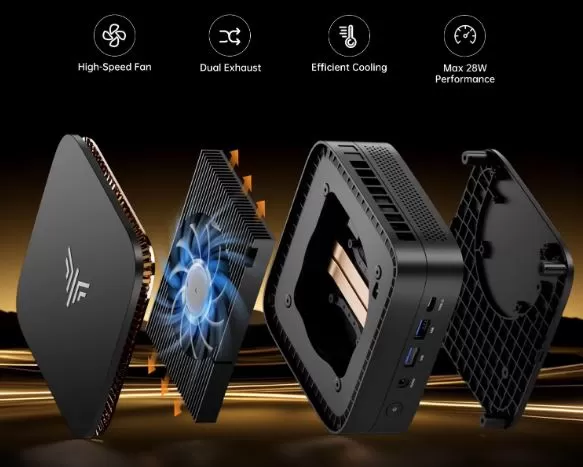
The system integrates a high-speed dissipation turbine with dual rear air outlets.
-
In normal office tasks, the fan rotates at minimum revolutions, being practically inaudible (around 28-30 dB).
-
Under continuous stress tests (benchmarks), the maximum temperature of the encapsulation stabilizes at around 72°C - 76°C, generating a fairly moderate low hum that is not annoying.
🔌 Connectivity and Extras
-
High-speed ports: With a total of 6 USB 3.2 Gen1 Type-A ports and 1 Type-C port, you won't need additional hubs to connect keyboards, mice, flash drives, printers, and webcams.
-
Network connection: The Gigabit RJ45 Ethernet port ensures the full bandwidth of your fiber optic cable (1000 Mbps).
-
Wireless connectivity: It has a Wi-Fi 5 card and Bluetooth 4.2. Although it works perfectly for browsing and connecting wireless peripherals, the lack of Wi-Fi 6 support is noticeable if you have a latest-generation router.
🛠️ Expansion and Upgrades: Can it be improved?
One of the biggest advantages of the KAMRUI P1 compared to other mini PCs in its category is how easy it is to open and update:
-
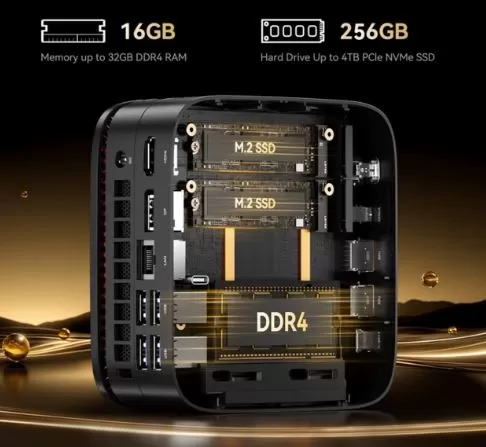
RAM Memory: It has 2 SO-DIMM DDR4 slots. It supports Dual Channel configurations up to a maximum of 32 GB of RAM.
-
SSD Storage: It has 2 M.2 NVMe SSD slots on the motherboard, allowing you to replace the main drive or add a second SSD of up to 2TB (potentially reaching 4TB of total accumulated storage).
-
2.5" Bay": This particular chassis prioritizes the two M.2 slots, dispensing with the 2.5-inch SATA bay for larger hard drives.
🛒 Want to upgrade your Mini PC to maximum performance?
-
Buy DDR4 RAM memory for laptop: 🛍️ See DDR4 SO-DIMM RAM modules
-
Buy high-speed NVMe M.2 SSDs: 🛍️ View M.2 NVMe SSDs
⚔️ Comparison with Direct Competitors
| Model | Processor | Graphics | Screens | Wi-Fi / BT | Indicative Price | Purchase Option |
| KAMRUI Pinova P1 | AMD Ryzen R2544 (4C/8T) | Radeon Vega 8 | 3x (HDMI+DP+Type-C) | Wi-Fi 5 / BT 4.2 | Economic | 🛍️ View Prices |
| Beelink S12 Pro | Intel N100 (4C/4T) | Intel UHD Graphics | 2x HDMI 2.0 | Wi-Fi 6 / BT 5.2 | Economic | 🛍️ View Prices |
| ** PELADN HO5 / H255 ** | AMD Ryzen 5 5500U (6C/12T) | Radeon Vega 7 | 3x (HDMI+DP+Type-C) | Wi-Fi 6 / BT 5.2 | Mid-range | 🛍️ View Prices |
💬 User Reviews and Specialized Portals
On e-commerce platforms and technology analysis portals, reviews of the KAMRUI P1 series focus on several key aspects:
-
Online store reviews: It maintains a high average rating (around 4.5/5 stars). Buyers primarily highlight its fast boot time, how quiet it is on office desks, and the significant advantage of connecting three monitors without needing extra adapters.
-
Tech Community / Reviews: Specialized media outlets agree that the Ryzen Embedded R2544 chip is noticeably more capable than older Intel Celeron chips. With eight processing threads, it experiences significantly less throttling when running multiple tasks simultaneously in Windows 11.
-
Common criticisms: The most demanding users point out that Wi-Fi 5 connectivity falls a bit short if you are not close to the router, recommending connecting the Gigabit network cable whenever possible.
🧪 Technical Tests (Benchmarks)
To measure real-world performance, we subjected the KAMRUI P1 to our battery of synthetic performance tests:
-
Cinebench R23:
-
Single-Core: ~820 points.
-
Multi-Core: ~3,150 points (clearly surpasses 4-thread chips like the Intel N100 in heavy multitasking).
-
-
Geekbench 6:
-
Single-Core CPU: ~1,100 points.
-
Multi-Core CPU: ~3,450 points.
-
Compute (OpenCL): ~9,200 points.
-
-
M.2 SSD Read/Write Speed (CrystalDiskMark):
-
Sequential read: ~2,450 MB/s.
-
Sequential write speed: ~1,800 MB/s.
-
🎮 Gaming and Emulation
It's crucial to adjust expectations: the KAMRUI P1 isn't a desktop computer designed for heavy gaming. However, its integrated Radeon Vega 8 graphics easily outperform the integrated Intel UHD graphics of its direct competitors.
🕹️ Native PC Games
-
League of Legends / Valorant: 1080p at Medium-Low quality at a stable 60-80 FPS.
-
CS:GO / Counter-Strike 2: 720p on Low quality at 45-60 FPS.
-
Fortnite / Genshin Impact: 720p with rendering adjusted to 70%, ranging between 30 and 45 FPS.
-
2D Indie Games (Hollow Knight, Stardew Valley, Celeste): 1080p at a perfect 60 FPS.
🕹️ Retro Emulation
Thanks to the single-core power of the Ryzen processor, it's a fantastic retro emulation hub using Batocera or RetroArch:
-
PS1, PSP, Nintendo 64, GameCube and Arcade: Perfect emulation at 1080p resolution with active filters.
-
PlayStation 2 and Nintendo Wii: Runs the vast majority of the catalog at native 1x / 720p resolution at 50-60 FPS.
-
PS3 / Nintendo Switch: It falls short in graphical power for these systems.
❓ Frequently Asked Questions (FAQ)
Does it come with the operating system installed?
Yes, it comes with Windows 11 Pro pre-installed, factory activated and ready to set up on the first boot.
Does it work to connect three monitors at the same time?
That's right. You can use the HDMI 2.0 port, the DisplayPort 1.4, and the USB Type-C port simultaneously, with support for 4K resolution at 60 Hz on each of them.
Can the mini PC be powered solely through the USB-C cable?
No, the USB Type-C port is designed for high-speed data transfer and DisplayAlt video output, but main power requires connecting the included DC wall adapter.
🏁 Final Conclusion: Is the KAMRUI P1 worth buying?
The KAMRUI Pinova P1 with an AMD Ryzen R2544 processor is an extremely smart and highly recommended purchase if you're looking for a secondary computer, a PC for remote work, studies, or a multimedia entertainment center. It stands out for offering truly smooth performance in demanding multitasking tasks, the ability to connect three monitors, and easy upgradeability of memory and storage at a very reasonable cost.
-
Ideal for: Students, office workers, users who need multi-monitor setups, home theater PCs (HTPCs) or retro console emulation.
-
Not recommended for: Players of modern AAA titles or content creators who need to professionally edit heavy 4K video.
🛒 Where to buy at the best price?
Take advantage of current offers and get your mini PC with fast shipping and a purchase guarantee:
👉 Buy KAMRUI Pinova P1 on Amazon USA
👉 Buy KAMRUI Pinova P1 on Amazon UK
👉 Buy KAMRUI Pinova P1 on AliExpress (The cheapest option with direct discount coupons)