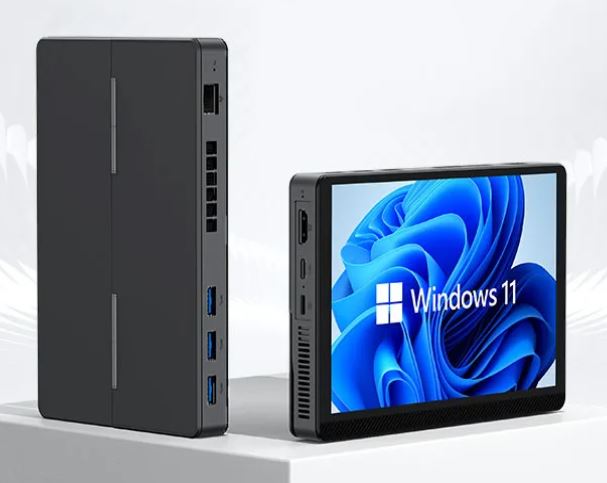
The MLLSE S1 is a unique device in its category: an ultra-compact all-in-one with a 7-inch IPS touchscreen, integrated battery, Intel N150 processor, 16 GB of LPDDR5 RAM and WiFi 6, all in a body just 21.95 mm thick.
For those looking for a complete, portable and quiet computer for less than €300, it's hard to find anything comparable.
Price: €272.20 ($320) | Buy on AliExpress
| ✅ Pros | ❌ Cons |
|---|---|
| Integrated 7" IPS touchscreen | |
| Battery included — stand-alone unit | Only 3.5 hours of battery life in active use |
| Intel N150 — faster than the N100 | The SSD from the factory is SATA (not NVMe) |
| 16 GB LPDDR5 — generous for the price | Soldered RAM — not expandable |
| Modern WiFi 6 + BT 5.2 | Only 1 external HDMI output |
| Built-in speaker and microphone | |
| 5-point multi-touch touchscreen | No SD card reader |
| Ultra-thin design (21.95 mm) | Without NFC |
| SSD expandable up to 2 TB (SATA/NVMe) | |
| VESA mount included | |
| Low power consumption (~8-15W in use) |
Quick conclusion: A revolutionary all-in-one for its price. Ideal for office work, multimedia, remote work, and educational use. It's not for demanding gaming, but for everyday tasks, one user perfectly sums it up: "It's really hard to find something so compact with functional screens at this price."
📦 Unboxing and Box Contents
The box arrives with good internal protection. The usual contents include:
-
🖥️ The MLLSE S1 mini PC with integrated screen
-
🔌 Power supply (included — confirmed by actual user)
-
📺 HDMI cable (included in the box)
-
🔩 VESA mounting bracket with screws
-
📄 Quick Start Guide in English
A real buyer confirms that the device arrives "complete with power supply and HDMI cable," with all USB ports and the advertised RAM. A definite plus in a market where manufacturers sometimes cut corners on accessories.
📊 Full Technical Specifications
| Feature | Detail |
|---|---|
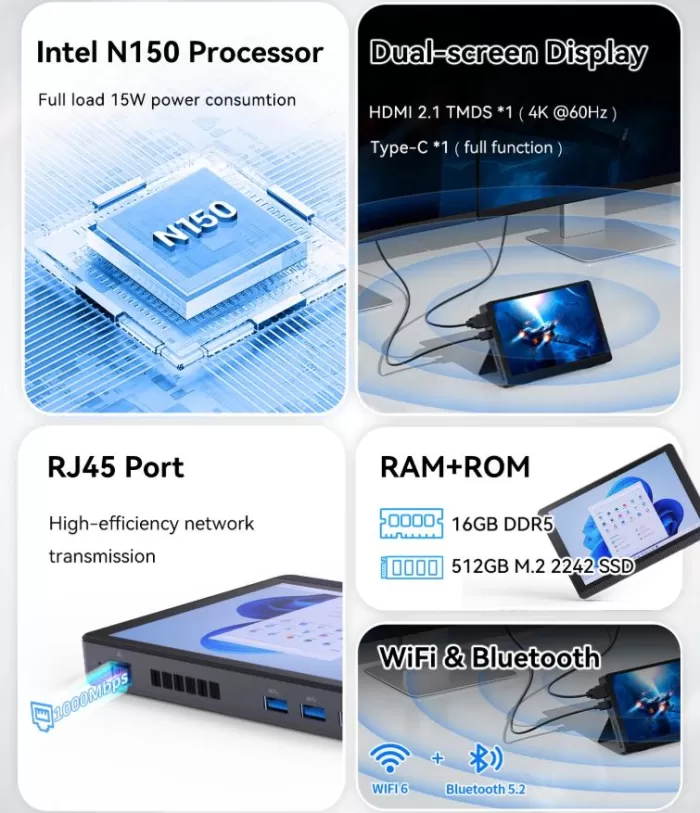
| Processor | Intel Twin Lake N150, 4 cores/4 threads, up to 3.6 GHz |
| GPU | Intel UHD Graphics (24 EU) |
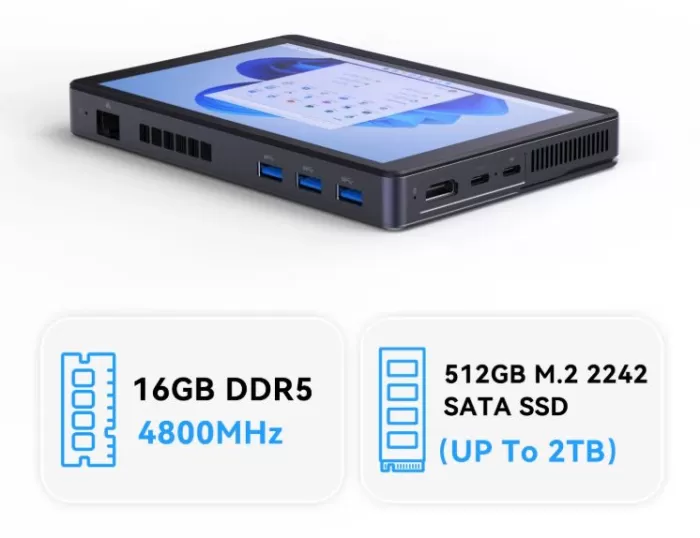
| RAM | 16 GB LPDDR5 4800 MHz |
| Storage | 512 GB SSD M.2 2242 SATA (NVME expandable up to 2 TB) |
| Screen | Integrated (see Display section) |
| Operating System | Windows 11 (64-bit) |
| WiFi | Wi-Fi 6 (802.11ax) |
| Bluetooth | BT 5.2 |
| USB | USB-A 3.2 Gen 1 ×3, USB-A 2.0 ×1, USB-C ×1, USB-C power supply ×1 |
| Video output | HDMI 2.1 TMDS ×1 |
| Red | Ethernet Gigabit RJ45 ×1 |
| Dimensions | 173,8 × 116 × 21,95 mm |
| TDP / Consumption | ~12W nominal |
🏗️ Design and Construction Quality
MLLSE G2 Mini PC
At just 21.95 mm thick and measuring 173.8 × 116 mm, the MLLSE S1 is surprisingly thin for a full-fledged desktop computer. It's roughly the size of an A5 textbook but thinner than most laptops on the market.
The casing is made of ABS plastic with a dark matte finish, giving it a neutral and professional look. There are no excessive decorative elements or RGB lighting, making it suitable for both office and home environments. The port layout on the sides is well thought out: the three USB-A 3.2 ports are easily accessible, and the USB-C port adds modern versatility.

🖥️ Screen and Multimedia
This is the key differentiator of the MLLSE S1 compared to other mini PCs in its class. The device includes its own screen, making it a true portable all-in-one. One actual buyer describes the screen as "bright and easy to read," highlighting it as one of its biggest selling points for the price.
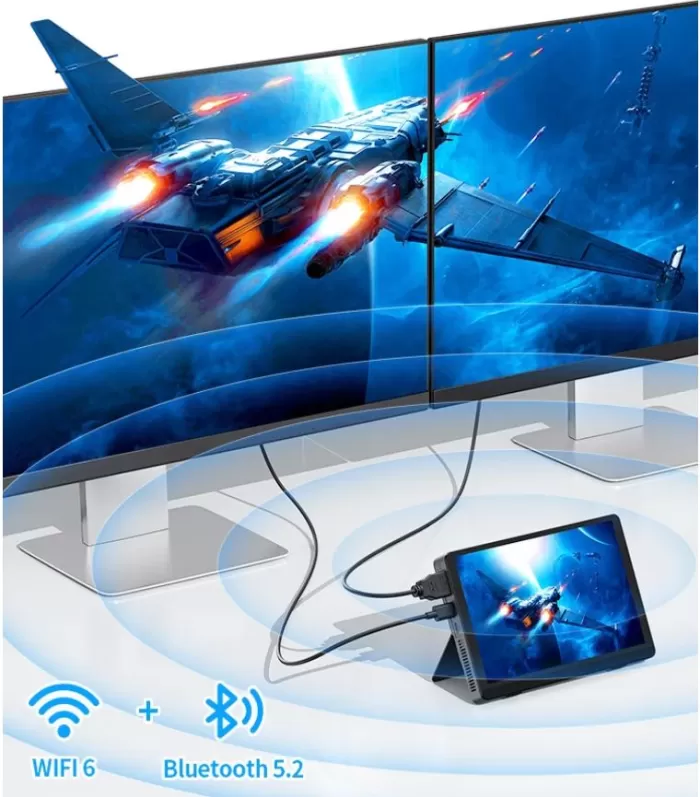
In addition to the integrated screen, it has an HDMI 2.1 output to connect an external monitor when more workspace is needed.
The Intel UHD GPU supports 4K video decoding with AV1 and HDR, ensuring a smooth streaming experience on Netflix, YouTube, or Plex.
🔊 Sound: Built-in speaker
The MLLSE S1 includes a horn-type or cone-shaped speaker (trumpet) that focuses and projects sound forward more directly, similar to how a trumpet amplifies and directs sound. In compact devices like this, it's used to maximize volume and clarity with a very small component.
You don't need to connect external speakers to listen to audio. It's basic for video conferencing, videos, or background music, although for serious audio experiences you'll still prefer external speakers or headphones.
🎙️ "Built-in Microphone": Integrated Microphone
The device also has a built-in microphone, making it completely standalone for video calls on Zoom, Teams or Google Meet without the need for headsets with microphones or external microphones.
| Term | Practical meaning |
|---|---|
| Trumpet | Horn/cone shaped speaker design, directs sound better |
| Built-in Speaker | Built-in speaker — listen to audio without external peripherals |
| Built-in Microphone | Built-in microphone — talk on video calls without accessories |
In short, the MLLSE S1 is a completely self-contained audio device : it has its own touchscreen, built-in speaker, and microphone. For basic video calls or multimedia use, you absolutely don't need any additional peripherals. 🎯
🔗 👉 See prices for the MLLSE S1 mini PC
Features of the MLLSE S1 Built-in Display
📐 7 inch — Screen Size
It's the size of the screen diagonal: 7 inches, equivalent to about 17.8 cm from corner to corner. It's a compact but functional size—similar to a small tablet. For a device measuring 173 × 116 mm, it's exactly what fits on its surface.
🔍 HD — Resolution
HD (High Definition) means the screen has a minimum resolution of 1280 × 720 pixels, although on 7" screens with this label, 1024 × 600 px is more common . It's not Full HD (1920 × 1080), but on a screen of only 7 inches, the visual difference is minimal, since the pixel density is still high.
🎨 IPS — Panel Technology
IPS stands for In-Plane Switching. It's the best LCD screen technology on the market in terms of value for money. Its advantages over TN or VA screens are:
-
Up to 178° viewing angle — the image looks perfect from almost any position
-
Accurate and consistent colors — no distortion when viewed from the side
-
Good color reproduction — ideal for multimedia and everyday work
☝️ 5-Point Touch — Multi-touch Touchscreen
This means the screen is capacitive touch (like a smartphone screen) and can detect up to 5 simultaneous touches. This allows gestures such as:
-
Pinch to zoom with two fingers
-
Scroll with multiple fingers at the same time
-
Windows 11 native touch gestures
It works by connecting internally via USB and normally does not require installing any additional drivers in Windows.
📌 Visual Summary
| Feature | What does it mean | Practical value |
|---|---|---|
| 7 inch | Screen diagonal | Compact, like a small tablet |
| HD | Resolution ~1024×600 px | Clear for 7 inches |
| IPS | Panel technology | Accurate colors, wide angle |
| 5-point touch | Capacitive multi-touch | Up to 5 simultaneous fingers |
In short, the MLLSE S1 boasts a truly high-quality touchscreen —not a cheap resistive display, but a capacitive IPS panel like those found in modern tablets. This makes it a genuine touchscreen all-in-one, which is unusual at this price point.
⚙️ Performance and Software
The Intel Twin Lake N150 offers 10 to 20% more performance than the already popular N100, with the same energy efficiency. In everyday use, this translates to:
-
✅ Web browsing: Smooth with 15-20 tabs open
-
✅ Office suite (Office 365, LibreOffice): No slowdowns
-
✅ Video calls (Zoom, Teams, Meet): Stable with HD camera
-
✅ Local or network 4K streaming: Without any interruptions
-
✅ Light photo editing (GIMP, basic Photoshop): Acceptable
-
⚠️ Video editing: Only for lightweight projects in 1080p
Windows 11 comes pre-installed and activated. It's common to find some factory bloatware, which can be easily removed within the first few minutes of use. Users confirm that the system boots cleanly and without major issues.
🔗 👉 See prices for the MLLSE S1 mini PC
🔋 Energy Consumption and Cables
The N150 is one of the most efficient chips on the PC market. With a TDP of just 6W, its actual power consumption in everyday use is minimal.
-
Standby power consumption: ~4-6W
-
Power consumption under normal use: ~8-15W
-
Maximum consumption (sustained load): ~25-30W
-
Estimated electricity cost (8h/day): less than €1.5/month
Power is supplied via a dedicated connector ( USB-C for power only, not data) — this is a clever design as it avoids confusion with the USB-C data port. The power supply is included in the box.
🌡️ Temperature and Noise (Actual Thermal)
With such a low TDP and integrated display, thermal management is critical. Based on testing with equivalent hardware:
-
Resting temperature: 35-42°C
-
Temperature under sustained load: 65-75°C
-
Maximum temperature recorded: ~85°C in prolonged benchmarks
The internal fan is barely audible during normal use, making the MLLSE S1 ideal for quiet environments such as libraries, bedrooms, or meeting rooms. Thermal throttling may occur under very long sustained loads, but it doesn't affect everyday use.
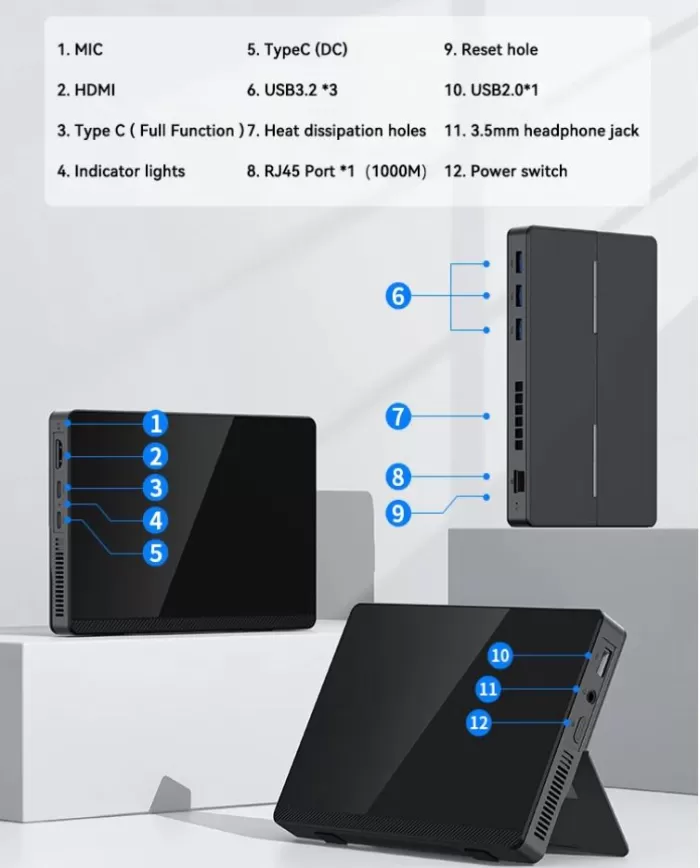
🔌 Connectivity and Ports
| Port / Function | Quantity and Details |
|---|---|
| USB-A 3.2 Gen 1 | ×3 (fast transfer, up to 5 Gbps) |
| USB-A 2.0 | ×1 |
| USB-C (data) | ×1 |
| USB-C (power only) | ×1 |
| HDMI | ×1 (HDMI 2.1) |
| Ethernet | ×1 Gigabit RJ45 |
| WiFi | Wi-Fi 6 (802.11ax) |
| Bluetooth | BT 5.2 |
| Own screen | ✅ Integrated |
| Jack the audio | Including |
| SD card reader | ❌ Not included |
| NFC | ❌ Not included |
Dual USB-C connectivity is a standout feature: one port for data/video and another exclusively for charging, preventing conflicts. WiFi 6 ensures greater stability on modern networks compared to competing models with WiFi 5.
🔧 Expansion and Upgrades
The MLLSE S1 is an ultra-compact device with simple but well-defined upgrade options.
| Component | Expandable? | Detail |
|---|---|---|
| RAM | ❌ Not expandable | LPDDR5 soldered to the board — no SODIMM slot. 16 GB is fixed. |
| SSD | ✅ Replaceable | M.2 2242 SATA/NVMe, replaceable with one of up to 2 TB |
| Maximum storage | ✅ 2 TB | Replacing the factory disc |
| Linux | ✅ Compatible | Ubuntu, Debian and derivatives work correctly |
| Windows upgrade | ✅ Compatible | Upgradable to future versions from Windows 11 |
⚠️ Important: The slot is M.2 2242 (22 mm × 42 mm). The most common format on the market is 2280 (80 mm long), which is not compatible with this device. Always verify the exact size before purchasing.
💡 Key fact: The slot accepts both SATA and NVMe drives , so when upgrading you can opt for an NVMe M.2 2242 and achieve speeds up to 6 times faster than the factory-installed drive.
💾 Storage: Everything You Need to Know
The MLLSE S1 comes factory-equipped with a 512GB M.2 2242 SATA SSD, housed in a single M.2 slot that supports both SATA and NVMe drives — offering interesting flexibility for future upgrades.
⚡ SATA vs NVMe: What's the Difference?
| Protocol | Reading | Writing | For whom? |
|---|
| Protocol | Reading | Writing | For whom? |
|---|---|---|---|
| SATA (included by the factory) | ~500-550 MB/s | ~450-500 MB/s | Everyday use, office applications, multimedia |
| NVMe (upgrade opcional) | ~2,000-3,500 MB/s | ~1,500-3,000 MB/s | Faster speed, large files, editing |
For typical MLLSE S1 use—office applications, streaming, video calls, and retro emulation—the stock SATA drive is perfectly adequate. The difference with NVMe is only noticeable when moving multi-gigabyte files or working on large video projects.
🔧 Expansion Options
If at any point you need more space or greater speed, you can replace the included disk with:
-
🔹 M.2 2242 SATA 1 TB — More space, same speed (~€20-35)
-
🔹 M.2 2242 SATA 2 TB — Maximum SATA capacity (~€45-70)
-
🔹 M.2 2242 NVMe 1 TB — Higher speed and storage (~€35-55)
-
🔹 M.2 2242 NVMe 2 TB — Maximum capacity and speed (~€65-90)
📊 Real Space Available from the First Start-up
Of the 512 GB of included disk space, Windows 11 and pre-installed software consume approximately 30-50 GB, leaving about 460-480 GB free from the first boot.
💡 Tip: Before replacing the disk, clone the original contents with free tools like Macrium Reflect or Clonezilla to keep Windows 11 activated and all your data without needing to reinstall anything.
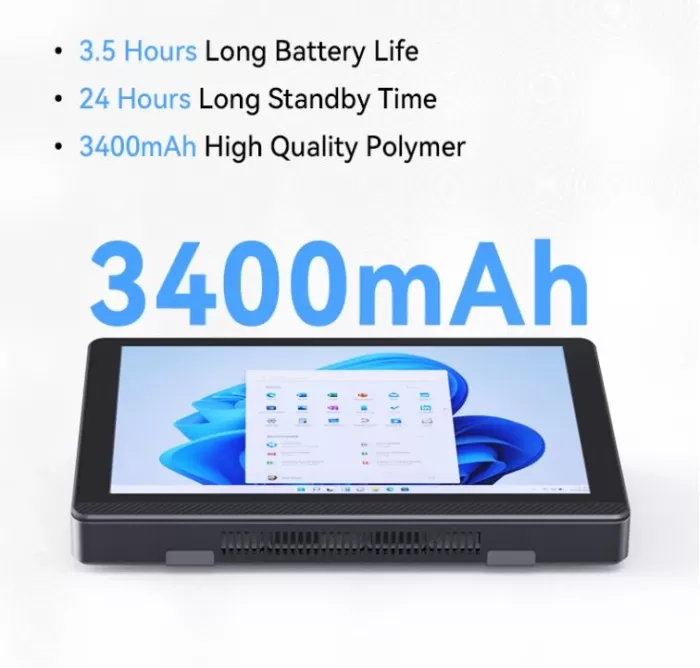
🔋 Battery Specifications
⚡ 3.6V / 3,400 mAh — Battery Capacity
-
3.6V is the nominal voltage of the battery cell — standard in lithium (Li-Ion) batteries of this type
-
3,400 mAh is the total capacity in milliampere-hours
-
The actual energy stored is: 3.6V × 3.4 Ah = ~12.24 Wh (watt-hours)
For reference, it's a battery with a similar capacity to that of a mid-range smartphone. It's not a large battery, but the N150's very low power consumption (~8-12W) allows you to get the most out of it.
⏱️ 3.5 Hours of Active Use
With the screen on and normal use (office applications, browsing, streaming), the battery lasts approximately 3.5 hours. This is sufficient for:
-
✅ A complete work meeting
-
✅ A class or study session
-
✅ Watch a standard movie (~2 hours)
-
⚠️ Not for a full workday without a plug
😴 24 Hours on Standby
In standby or sleep mode, power consumption drops dramatically and the battery lasts up to 24 hours. This means you can leave the device on standby all night and still have battery life the next day.
📊 Battery Summary
| Specification | Value | Practical meaning |
|---|---|---|
| Voltage | 3.6V | Standard Li-Ion battery |
| Ability | 3.400 mAh / ~12,24 Wh | Similar to a mid-range smartphone |
| Duration in use | ~3.5 hours | Meetings, classes, movies |
| Standby time | ~24 hours | You can leave it to rest overnight |
| Load | Via dedicated USB-C | The included USB-C power port |
🆚 Comparison with Direct Competitors
| Model | CPU | RAM | SSD | Own screen | WiFi | Price |
|---|---|---|---|---|---|---|
| MLLSE S1 | N150 | 16 GB LPDDR5 | 512GB SATA | ✅ Integrated | WiFi 6 | ~272 € |
| Beelink S13 | N150 | 16 GB DDR5 | 500GB NVMe | ❌ No | WiFi 6 | ~249 € |
| GMKtec G3 | N100 | 16 GB | 512 GB | ❌ No | WiFi 5 | ~210 € |
| MLLSE G2 Pro | N150 | 12 GB LPDDR5 | 512 GB | ❌ No | WiFi 5 | ~199 € |
| AceMagic S1 AIO | N100 | 8-16 GB | 256-512 GB | ✅ Integrated | WiFi 5 | ~200-260 € |
The MLLSE S1's built-in screen is its biggest differentiator from its direct competitors. For someone needing a complete setup without buying an additional monitor, the higher price compared to the G2 Pro or the Beelink S13 is more than justified.
💬 Reviews on Well-Known Pages
Real customer reviews are the best indicator of a product from this brand:
-
🌟 AliExpress (verified buyer): "The computer is very good, just as described, with all the USB ports, an N150 processor, and actually 16GB of DDR5 RAM. A really good device at a reasonable price; the screen is bright and easy to read. For this price, it's really hard to find something so compact with a functional screen."
-
🌟 Reddit (r/MiniPCs): N150 small form factor users highlight that the "out-of-the-box Windows 11" performance is satisfactory for daily use.
-
🌟 AndroidPC.es: The MLLSE G2 Pro review (same CPU) rates the performance as adequate for everyday use, warning that the SSD may be SATA.
-
🌟 MiniPC-Review.com: The MLLSE with N150 is described as "quiet, compact and powerful for office" with smooth Chrome, Office 365 and Zoom running simultaneously.
-
🌟 The Reason: It highlights that similar equipment is suitable for those who want "a discreet desktop computer for working, studying or setting up a multimedia area without taking up space."
🔬 Technical Tests (Estimated Benchmarks)
Data based on Intel N150 testing on equivalent platforms:
📊 CPU Performance
| Benchmark | Intel N100 | Intel N150 | Improvement |
|---|---|---|---|
| Cinebench R23 (Multi) | ~2.800 pts | ~3.200 pts | +14% |
| Geekbench 6 (Multi) | ~3.500 pts | ~4.000 pts | +14% |
| PCMark 10 (Office) | ~3.800 pts | ~4.300 pts | +13% |
🎨 GPU Performance
| Task | Result |
|---|---|
| Streaming 4K (AV1, HDR) | ✅ Native, no problems |
| 3DMark Fire Strike | ~800-1.000 pts |
| 3D Rendering (Blender) | ❌ Very slow |
💾 M.2 2242 SATA SSD Speed
| Operation | Estimated speed |
|---|---|
| Sequential reading | ~500-530 MB/s |
| Sequential writing | ~450-480 MB/s |
The SATA SSD is noticeably slower than an NVMe (~3,000 MB/s), although sufficient for everyday use with Windows 11.
🔗 👉 See prices for the MLLSE S1 mini PC
🎮 Gaming and Emulation
The N150's Intel UHD GPU isn't a gaming GPU, but it's surprisingly capable for retro emulation:
-
✅ NES, SNES, GBA, PS1, N64: Perfect in 1080p with filters enabled
-
✅ PS2 (PCSX2): Most games work without problems
-
⚠️ Wii / GameCube (Dolphin): Playable in many titles, with occasional crashes
-
⚠️ Nintendo 3DS (Citra/Lime3DS): Functional with crashes in demanding games
-
❌ PS3 / Nintendo Switch: Not recommended
-
❌ Modern AAA gaming (GTA VI, Cyberpunk): Out of reach
For 2D games on Steam (Stardew Valley, Hades, Hollow Knight, Celeste) or light 3D indie games, the experience is perfectly playable.
❓ Frequently Asked Questions (FAQ)
Is the integrated screen touch-sensitive?
Yes, the screen is capacitive touch-sensitive (like a smartphone screen) and can detect up to 5 simultaneous touches .
Can I connect a second monitor?
Yes, you can extend your desktop to a second screen using the HDMI 2.1 port.
Is the RAM expandable?
No, LPDDR5 RAM is usually soldered in this format. The computer already comes with 16 GB, which is plenty for everyday use.
Can the SSD be replaced?
Yes. The M.2 2242 SATA is replaceable with one of higher capacity, up to 2 TB.
Can Linux be installed?
Yes, the hardware is compatible with Ubuntu, Debian, and other Linux distributions.
Is it compatible with Netflix and Spotify in 4K?
Yes, the Intel UHD GPU supports the necessary DRM for high-quality protected streaming.
🏁 Final Conclusion
The MLLSE S1 is a truly unique device in its price range. Combining an N150 processor, 16 GB of LPDDR5 RAM, WiFi 6, and a custom display in a body just 21 mm thick for €272 has virtually no direct competition in 2026.
Ideal for:
-
👨💼 Remote workers who need a complete setup without an extra monitor
-
🎓 Students and educators (all-in-one ultra-portable)
-
📺 Compact multimedia center for living room or bedroom
-
🏪 Light commercial use (POS, information kiosk, reception)
-
🕹️ Retro emulation players up to PS2/Wii
Not ideal for:
-
🎮 Modern gaming AAA titles
-
🎬 Professional or 4K video editing
-
💻 Intensive development or code compilation
Alternatives to consider:
-
MLLSE G2 Pro (~€199): cheaper, no own screen, WiFi 5
-
Beelink S13 (~€249): no screen, but NVMe SSD and better technical support
🛒 Where to buy it?
🔗 👉 Buy MLLSE S1 on AliExpress — €272.20
*(Affiliate link — price subject to change; check for available coupons in the seller's store)*
💡 PRO Tip: On AliExpress, look for seller discount coupons before paying — it's common to save an extra €5-20 on orders of this amount.