The Beelink EQ14 is a compact, quiet, and extremely energy-efficient mini PC, ideal for office, HTPC, and network uses such as a home server or firewall.
With the new Intel Twin Lake N150 processor, it's a slight improvement over the popular N100, although it's not a revolution.
Its main differentiator is the dual 1 Gbps LAN port, which makes it a very attractive option for network projects.
✅ Pros: Ultra-quiet · Dual LAN · WiFi 6 · Two M.2 slots · No bloatware · Windows 11 Pro included
❌ Cons: Included SSD is SATA (not NVMe) · Single-channel memory (limits graphics performance)
🎯 Conclusion: If you're looking for a small, quiet machine with advanced network connectivity for home or light business use, the EQ14 is a solid choice. For gaming or demanding tasks, you'll need a different category.
📦 Unboxing and Box Contents
The EQ14's box follows Beelink's usual premium style: an outer cardboard box with an image of the device on the lid and specifications on the sides. Upon opening, the mini PC appears in a protective plastic mold; underneath lies the rest of the contents:
-
🖥️ 1× Beelink EQ14 Mini PC
-
🔌 1× Power cable (AC)
-
📺 1× HDMI Cable
-
📖 1× User Manual
-
👋 1× Welcome "Hello" Card
The interior design is clean and organized. A notable feature is that the power adapter is integrated into the chassis (there's no external transformer), minimizing cable clutter. You only need a standard power cord.
📋 Technical Specifications
| Component | Detail |
|---|---|
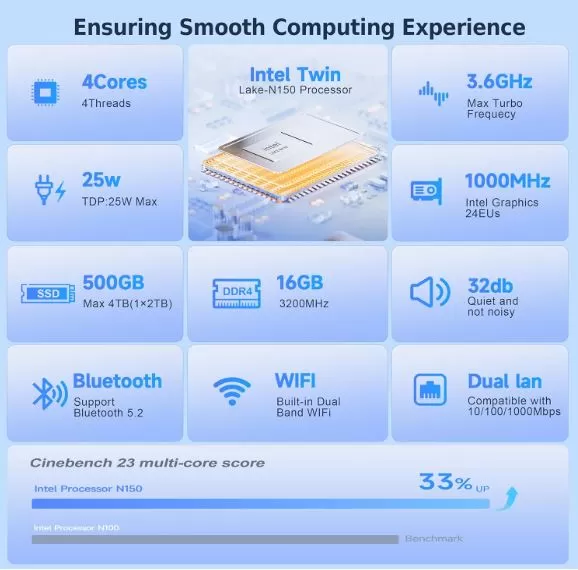
| Processor | Intel Twin Lake N150, 4 cores / 4 threads, up to 3.6 GHz, TDP 6W |
| RAM | 16 GB DDR4-3200 MHz, single channel (1× SODIMM) |
| Storage | 500 GB M.2 SATA III (PCIe 3.0 x4 slot available) |
| Graphics | Intel UHD Graphics 24 EUs at 1000 MHz |
| Connectivity | WiFi 6 (Intel AX101), Bluetooth 5.2 |
| Grid | 2× Gigabit LAN (1000 Mbps) |
| USB ports | 3× USB 3.2 Gen2 Type-A + 1× USB 3.2 Gen2 Type-C + 1× USB 2.0 |
| Video | 2× HDMI 2.0 (4K @ 60 Hz) |
| Audio | 1× 3.5 mm combo jack (output/input/microphone) |
| Operating System | Windows 11 Pro (license included) |
| Dimensions | 126 × 126 × 39 mm |
| Weight | ~490 g |
| Power supply | Integrated: 100–240V AC input; output 12V/4A (25W) |
| Extra features | Auto Power On, Wake on LAN, Unlocked BIOS |
🎨 Design and Construction Quality
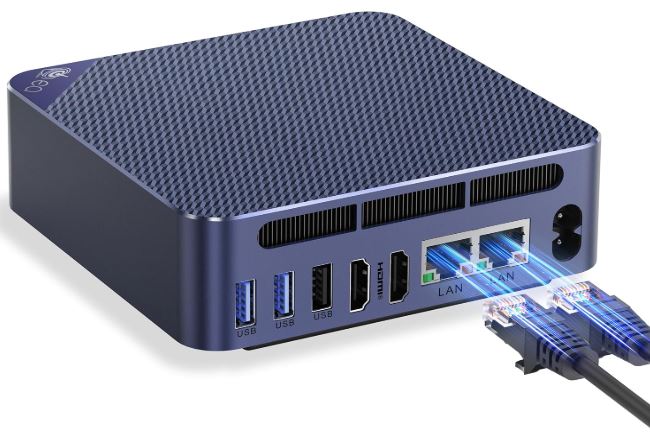
The EQ14 measures just 126 × 126 × 39 mm and weighs 490 grams, comparable to a thick paperback book. The casing is made of navy blue ABS plastic with a hexagonal texture on the lid and a matte finish that repels fingerprints. Despite being plastic, it doesn't feel cheap: it has sufficient rigidity and the corners are rounded without sharp edges.
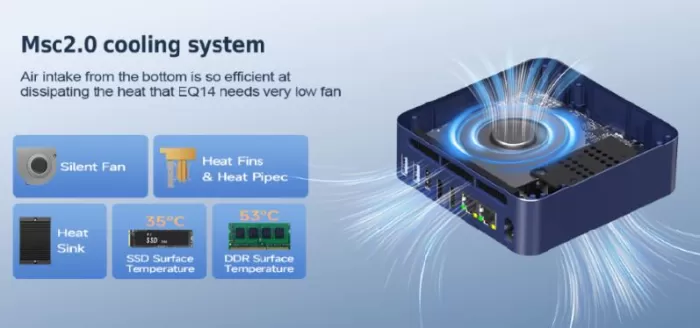
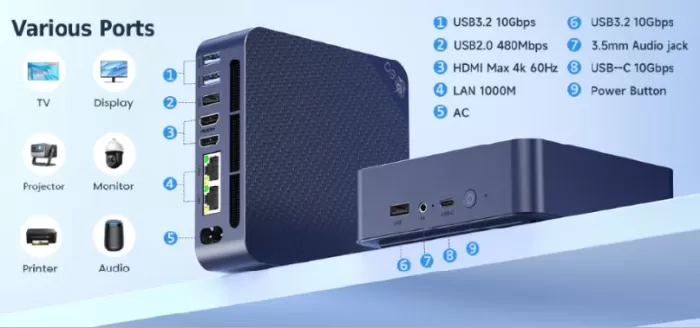
On the front, you'll find the USB ports and the power button. On the back: two HDMI ports, two LAN ports, more USB ports, and the power input. Ventilation is located on the bottom (for cool air intake) and the back (for heat exhaust), a clever design that facilitates airflow even in tight spaces. Rubber feet raise the device high enough to avoid blocking ventilation.
🖥️ Screen and Multimedia
The EQ14 supports two simultaneous 4K @ 60Hz displays via its two HDMI 2.0 ports. Ideal for dual-monitor office setups. Local or streaming 4K video playback (Netflix, YouTube) works flawlessly thanks to the N150's AV1 hardware decoder.
Audio is handled via the 3.5 mm jack or Bluetooth 5.2. The Bluetooth connection with Edifier speakers during testing was stable and without audible latency. Important: the front USB-C port is for data transfer only ; it does not support video output or device charging, something to keep in mind if you plan to use it to connect additional displays.
⚡ Performance and Software
The Intel N150 ("Twin Lake") is an incremental upgrade to the popular N100. It offers an approximately 18% improvement in single-core performance compared to the N100, according to Geekbench 6, although multi-core results are more modest. The BIOS is not locked, allowing adjustments to the power delivery (TDP) limits to squeeze out more performance.
Windows 11 Pro comes pre-installed and without bloatware, something Beelink takes special care with and which is much appreciated. The computer booted directly to the initial Windows 11 setup screen in version 24H2, which is relatively up-to-date. For office tasks (web browsing, spreadsheets, video conferencing, documents), the performance is completely satisfactory.
🔋 Energy Consumption and Cables
The N150 has a base TDP of 6W, which translates to extremely low real-world power consumption. At idle, the system can draw less than 5W; under medium load, it rarely exceeds 15–18W, and at maximum load, it approaches the limit of the integrated 25W power supply. Compared to a conventional desktop PC (200–400W), the annual electricity savings are very significant.
The big advantage is the integrated power supply: only one standard IEC C13 power cable connects the equipment to the wall, without external bricks, simplifying installation and reducing cable clutter.
🌡️ Temperature and Noise (Actual Thermal)
One of the EQ14's most notable features is its near-silent operation. The internal fan is barely noticeable during normal use and only increases its speed under prolonged loads. Even when forcing the TDP to 30W from the BIOS (a mode not recommended by Intel), the temperature remains under control without reaching thermal throttling.
The surface temperature of the chassis rises slightly in the upper rear area under load, but it never becomes uncomfortably hot to the touch. In a home server environment running 24/7, this thermal profile is ideal: quiet for everyday use and with thermal headroom for occasional spikes.
🔌 Connectivity and Extras
Connectivity, along with the compact design, is the EQ14's strong point:
-
2× Gigabit LAN — perfect for pfSense, OPNsense, routing, or channel aggregation
-
WiFi 6 (802.11ax) — 2.4 GHz and 5 GHz, real speeds up to 600 Mbps
-
Bluetooth 5.2 — low latency, compatible with headphones, mice, keyboards
-
USB: 3× USB 3.2 Gen2 Type-A (10 Gbps) + 1× USB-C 3.2 Gen2 (10 Gbps) + 1× USB 2.0
-
2× HDMI 2.0 — 4K @ 60 Hz on both ports simultaneously
-
3.5 mm combo jack
-
Auto Power On / Wake on LAN — essential for servers
-
BIOS unlocked (Aptio BIOS)
❌ Does not include: SD card reader, Kensington lock, Thunderbolt port, DisplayPort.
🔧 Expansion and Upgrades
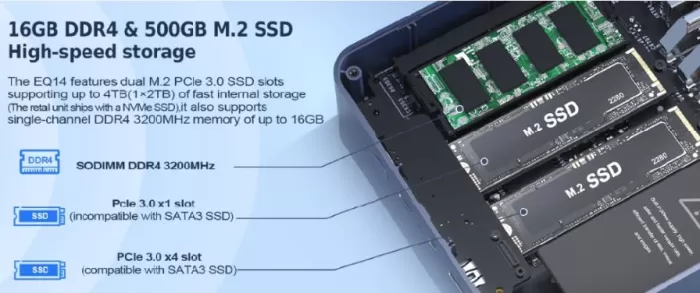
The EQ14 is designed with expansion in mind: tweaktown+1
-
RAM: 1 SODIMM DDR4 slot. Maximum supported: 16 GB (N150 processor limitation, does not support more). Dual channel is not possible, which limits graphics performance.
-
Primary SSD (slot 1): M.2 2280 PCIe 3.0 x4. The one included is SATA III, but you can replace it with an NVMe PCIe 3.0, improving the sequential read speed from ~500 MB/s to ~3500 MB/s.
-
Secondary SSD (slot 2): M.2 2280 PCIe 3.0 x1 (also compatible with M.2 SATA). Speeds are limited in PCIe (x1) mode. Capacity up to 4 TB per slot, so you can reach up to 8 TB of total storage.
-
2.5" Drive": ❌ No bay available. The chassis height (39 mm) does not allow for the addition of a 2.5" drive.
💡 Most cost-effective upgrade recommendation: Replace the included SSD with an NVMe like the WD Blue SN580 500GB (~€30-35) for an immediate jump in system speed.
🆚 Comparison with Direct Competitors
| Model | CPU | RAM | SSD | LAN | WiFi | Approx. price |
|---|---|---|---|---|---|---|
| Beelink EQ14 | N150 (3.6 GHz) | 16 GB DDR4 | 500 GB SATA | 2× 1GbE | WiFi 6 | ~199-361€ |
| Beelink EQ13 | N200 (3.7 GHz) | 16 GB DDR4 | 512 GB SATA | 1× 1GbE | WiFi 6 | ~180-200€ |
| Beelink Mini S12 Pro | N100 (3.4 GHz) | 16 GB DDR4 | 500 GB NVMe | 1× 1GbE | WiFi 5 | ~150-170€ |
| GMKtec NucBox G3 | N100 (3.4 GHz) | 16 GB DDR4 | 512 GB NVMe | 1× 1GbE | WiFi 6 | ~160-180€ |
| Minisforum UN100L | N100 (3.4 GHz) | 16 GB LPDDR5 | 256 GB NVMe | 1× 1GbE | WiFi 6 | ~150€ |
The EQ14 clearly wins in network connectivity with its dual LAN, being the only one in its category with this feature at this price. However, it falls short in terms of value for money compared to those that include NVMe as standard.
💬 Reviews on Well-Known Pages
Opinions in specialist media are generally positive with important nuances: tweaktown+1
-
TweakTown (69/100): "Viable for light office work, but the SATA III SSD and the price limit its appeal compared to competitors." Highlights include ultra-low power consumption, dual LAN, and near-zero noise emission.
-
Neowin: "Thumbs up. Ideal as a cloud office PC, compact workstation, or ultra-efficient HTPC." It points to single-channel memory as the main architectural limitation.
-
NotebookCheck: "Out-of-the-box HTPC for under $200. Multitasking users may be disappointed by the slow performance. "
-
Hostbor: "Silent mini PC with N150: slight speed improvement, reliable cooling. The compact design with integrated power supply is a real advantage. "
-
Reddit (r/MiniPCs): The community especially values it for OPNsense/pfSense projects thanks to the dual LAN, highlighting its low cost as a firewall machine and silent operation.
-
ComputerBase.de: It notes the good performance per watt, although it criticizes the overall speed for tasks beyond the basics.
🧪 Technical Tests
These are the benchmark scores obtained in different tests carried out by the reviewers:neowin+1
| Benchmark | EQ14 (N150) | EQ13 (N200) | N100 (reference) |
|---|---|---|---|
| Cinebench R23 Single | 941 | 994 | 899 |
| Cinebench R23 Multi | 2,861 | 3.017 | 2,556 |
| Geekbench 6 Single | 1.222–1.241 | 1.058 | 906 |
| Geekbench 6 Multi | 2,971–3,000 | 2,730 | 2,602 |
| PCMark 10 | 2.944–2.956 | 3.387 | 2,784 |
| 3DMark CPU Profile (1T) | ~408 | — | — |
| 3DMark Time Spy | 368 | — | — |
| SSD (CrystalDisk Seq. Read) | ~500 MB/s (SATA) | ~500 MB/s | ~2,500 MB/s (NVMe) |
| GPU Compute (OpenCL) | 3.270–4.383 | — | — |
Benchmarks confirm that the Intel N150 is a real, albeit modest, evolution within Intel's family of low-power processors. Its greatest achievement is single-core performance, where it surpasses both the N100 and the N200 thanks to its more refined Twin Lake architecture—a tangible advantage in everyday use, where most office applications and web browsing rely primarily on a single thread.
However, multi-core performance tells a different story: the N200 remains more balanced in parallel workloads, making it better for tasks like file compression, compilation, or light video transcoding. The EQ14 with the N150 occupies a curious position: faster than the N100, but without clearly dethroning the N200 in all metrics.
The Achilles' heel of these benchmarks isn't the processor, but the included SATA III SSD. With sequential read speeds of around 500 MB/s, system boot and application loading are noticeably slower than on similarly priced systems equipped with NVMe drives. Simply swapping the drive for an M.2 NVMe PCIe 3.0 (starting at around €30) would immediately transform the user experience and drastically improve the system's overall performance.
🎮 Gaming and Emulation
The EQ14 isn't a gaming machine, and Beelink doesn't market it as such. That said, it performs surprisingly well in emulation and light gaming.
-
✅ Retro emulation (up to PS2/Dreamcast/GameCube): Acceptable performance on PCSX2 and Dolphin with low settings.
-
✅ Lightweight 2D/indie games: No problems. Steam works properly.
-
⚠️ Valorant, CS2 (low settings, 720p): Playable, but with framerate limitations (~30-45 fps).
-
❌ Modern AAA, 1080p+: Not recommended.
The Intel UHD GPU with 24 EUs at 1000 MHz is noticeably faster than the N100's (750 MHz), resulting in a real improvement in emulation and video. It's a capable option for emulating 32/64-bit consoles.
❓ Frequently Asked Questions (FAQ)
Can I use the EQ14 as a NAS server?
Yes. With the two M.2 slots, you can achieve up to 8 TB of total storage. With dual LAN, setting up a basic NAS with TrueNAS or OMV is perfectly feasible.
Is it compatible with Linux?
Yes, Beelink confirms compatibility with Linux and Ubuntu. The community has also tested it with Debian and other distributions without any issues.
Can I upgrade the RAM to 32 GB?
No. The Intel N150 supports a maximum of 16 GB of single-channel RAM. It is not possible to upgrade it beyond 16 GB.
Is the included SSD NVMe or SATA?
SATA III, which limits speeds to approximately 500 MB/s. The second M.2 slot (PCIe 3.0 x4) allows for the installation of a much faster NVMe drive.
Can I use it as a firewall with pfSense or OPNsense?
Absolutely. It's one of the most recommended use cases by the community, thanks to its two Gigabit network interfaces.
Does the USB-C port charge devices or connect displays?
No, it's for data only (up to 10 Gbps). It does not support DisplayPort Alt Mode or device charging.
🏁 Final Conclusion
The Beelink EQ14 is the ideal mini PC for those seeking quiet operation, low power consumption, and advanced network connectivity in a tiny form factor. Its N150 processor, while not revolutionary, offers a real improvement over the N100 in single-threaded tasks, and its dual LAN ports set it apart from the competition in its price range.
Who is it ideal for?
-
🏠 Home server, NAS or HTPC
-
🔥 Home Firewall (pfSense, OPNsense)
-
💼 Office and light teleworking
-
🎓 Students who need Windows 11 Pro without a large budget
-
🌐 Low-power network projects
Alternatives to consider?
-
Beelink Mini S12 Pro (~€150): cheaper, includes NVMe, but without dual LAN
-
GMKtec NucBox G3 (~€160): N100 with NVMe, but without dual LAN
-
Beelink EQ13 (~€180): slightly slower in single-core, similar in all other respects
At €361 (European price), the EQ14 is at the limit of what can be justified compared to NVMe alternatives. If you find it on sale for under €230-250, the equation changes completely in its favor.
🛒 Where to buy it?
🟠 (Amazon) 🛒 Beelink Mini PC EQ14 — Fast shipping, standard warranty, easy returns.
💡 Tip: Look for discount coupons on the official Amazon page for the EQ14 — Beelink often includes discounts of up to €40 directly on the product page.