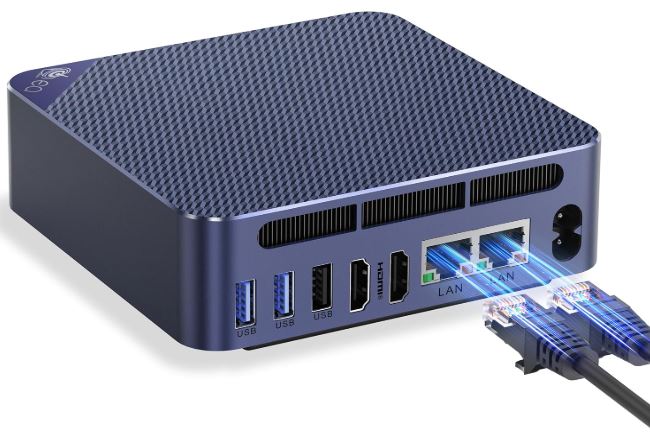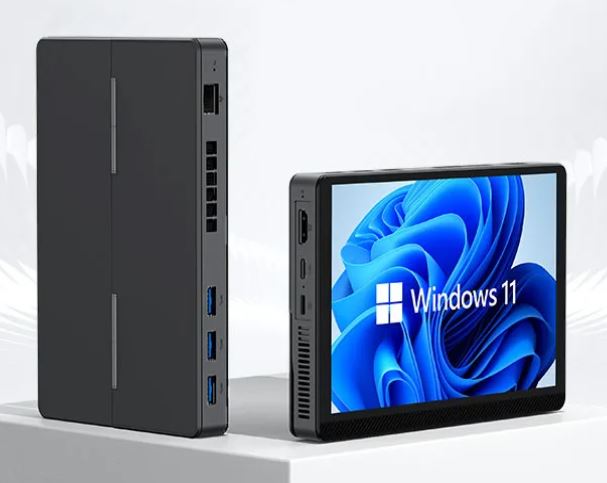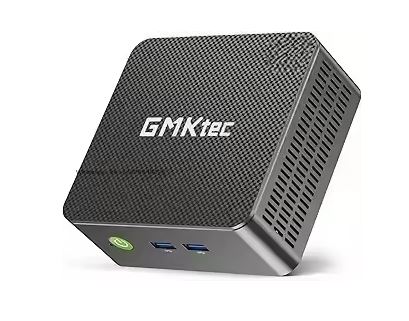
The GMKtec G3 Plus with Intel N150 is the natural and improved evolution of the popular G3 with N100. It features a faster GPU (1000 MHz), a better and quieter cooling system, dual HDMI 4K@60Hz outputs, and support for up to 16GB of RAM in dual-channel configuration. For office work, streaming, home servers, and retro emulation, it's a hard choice to beat in its price range. For modern gaming or very demanding tasks, you'll need to look elsewhere.
| ✅ Pros | ❌ Cons |
|---|---|
| Intel N150 with 1000 MHz GPU (+22% vs N100) | Only 1 SO-DIMM slot (max. 16GB) |
| Dual HDMI 2.0 4K@60Hz native | Modern chip, but efficient, not high-performance. |
| Quieter fan than the original G3 | |
| WiFi 6 + BT 5.2 + 2.5G LAN | |
| Compatible Linux, Proxmox, ESXi | |
| Dual M.2 slots (NVMe + SATA) | |
| Genuine Windows 11 Pro License |
Quick conclusion: The G3 Plus is the refined and more balanced version of the G3 family. Better quietness, a better GPU, and the same versatility. Ideal for those looking for a modern, quiet, and future-proof mini PC at a very reasonable price.
👉 View Prices and Availability — GMKtec G3 Plus 💰
📦 Unboxing and Box Contents
GMKtec G3 Plus minipc
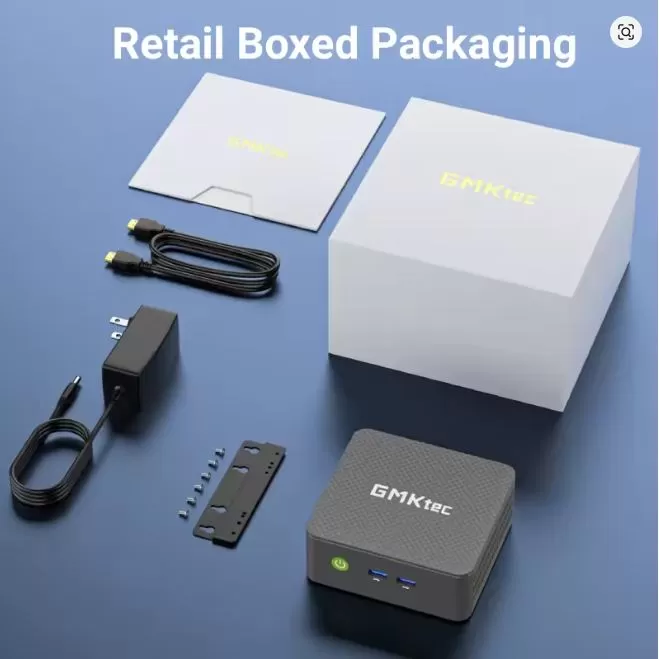
The box arrives well protected with molded foam. Inside you will find:
-
🖥️ GMKtec G3 Plus Mini PC
-
🔌 DC 12V/3A Power Adapter
-
📺 HDMI cable
-
🔩 VESA mounting bracket (for attaching behind the monitor)
-
📄 Multilingual user manual (Spanish included)
-
🃏 Warranty card (1 year from date of purchase)
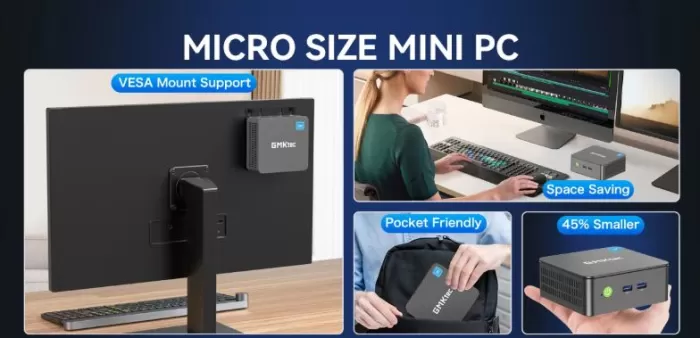
The design is simple yet functional. The included VESA mount is especially useful for keeping your desk tidy by attaching the device behind your monitor. The casing comes wrapped in protective plastic with foam at each end.
🔧 Technical Specifications
| Feature | Detail |
|---|---|
| Processor | Intel N150 (Twin Lake, 12th Gen) 4C/4T, 6MB cache |
| Frequency | 800 MHz base / 3.6 GHz turbo |
| Manufacturing process | Intel 4 (energy efficiency) |
| Graphics | Intel UHD, 24 EU, up to 1000 MHz |
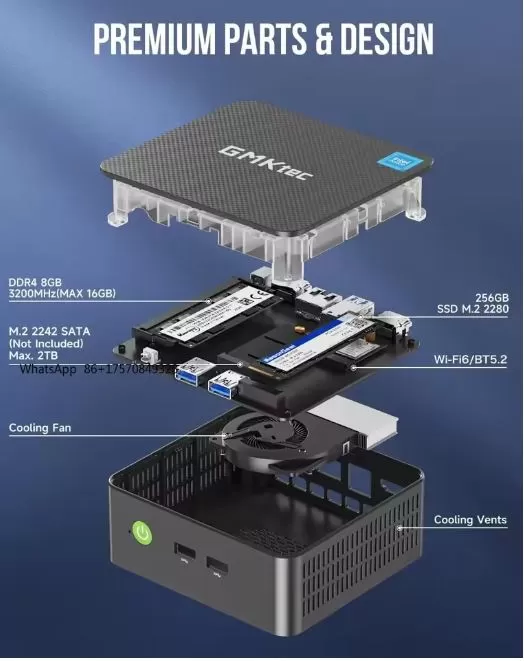
| RAM | 1× SO-DIMM DDR4-3200, up to 16GB |
| RAM | 0 / 8 / 16 GB depending on the version |
| primary SSD | M.2 2280 PCIe 3.0 NVMe |
| SSD included | 0 / 128 / 256GB / 512GB / 1TB / 2TB |
| 2nd slot | M.2 2242 SATA 3.0, up to 2TB |
| Video outputs | 2× HDMI 2.0 (4K@60Hz) |
| USB | 4× USB 3.2 Gen1 (5 Gbps), 2 front + 2 rear |
| Audio | 3.5mm Jack |
| WiFi | WiFi 6 (802.11ax), up to 600 Mbps |
| Bluetooth | BT 5.2 |
| LAN | 1× RJ45 2.5G (Intel i226V) |
| Operating system | Windows 11 Pro (multilingual, including Spanish) |
| Consumption | ~7W idle / ~21W maximum load |
| Dimensions | ~107 × 107 × 38 mm |
| Warranty | 1 year GMKtec |
🎨 Design and Construction Quality
The G3 Plus retains the compact and discreet design of the G3 family, with a distinctive green textured plastic casing that visually sets it apart from the competition. Its dimensions of approximately 107 x 107 x 38 mm make it practically the size of a coaster: it fits on any desk, in a bag, or even in a jacket pocket.
The build quality is solid for its class, with no creaks or looseness in the chassis. The front power button is backlit with LEDs, the side vents are well-placed, and the ports are clearly labeled. The included VESA mount is sturdy and easily supports the weight of the laptop behind a monitor.
🖥️ Screen and Multimedia
GMKtec G3 Plus mini PC
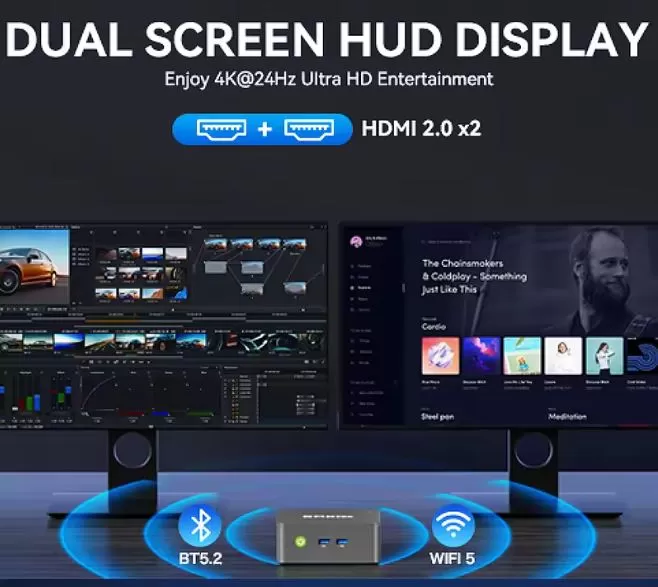
One of the key improvements over the G3 Pro is that the G3 Plus includes two HDMI 2.0 ports with true 4K support at 60Hz per port, not just 24Hz. This makes it a far superior option for high-resolution dual-monitor setups. The Intel UHD GPU with 24 execution units at 1000 MHz handles AV1, H.265, and H.264 video decoding without issue.
Streaming is an excellent experience : Netflix, YouTube 4K, Plex, and local players all work without buffering or frame drops. The device doesn't have built-in speakers, so audio output is via HDMI (to the monitor/TV) or the front 3.5mm jack for headphones and external speakers.
⚡ Performance and Software
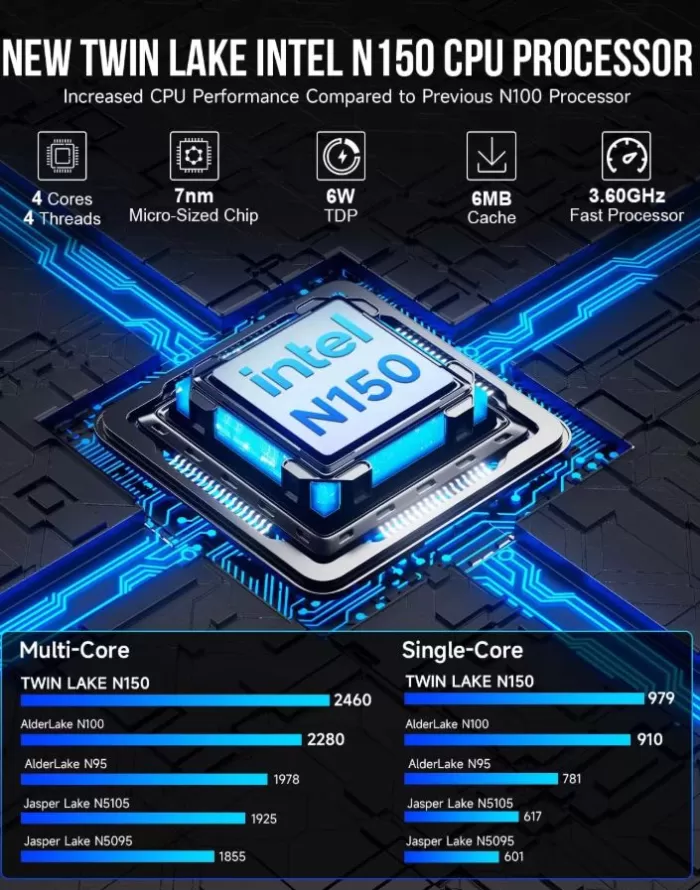
The Intel N150 (Twin Lake) is the successor to the N100, featuring the same energy-efficient quad-core architecture but with a significantly faster GPU (22% faster in 3DMark Time Spy compared to the N100). In terms of pure CPU performance, the difference is marginal for everyday use, but the graphics improvement is noticeable in emulation and overall desktop smoothness at 4K.
For everyday use —multi-tabbed browsing, Office 365, video conferencing, streaming—the computer is perfectly smooth and responsive. The system comes with genuine Windows 11 Pro, a clean installation with minimal bloatware, and full multilingual support, including Spanish. Windows updates are received as usual, and TPM 2.0 compatibility is guaranteed. It is also fully compatible with Linux, Ubuntu, Proxmox, and VMware ESXi.
👉 View Prices and Availability — GMKtec G3 Plus 💰
🔋 Energy Consumption and Cables
The N150 is exceptionally efficient. At idle, it consumes approximately 7-10W, and under maximum CPU load at 100%, it reaches 21W. This makes it one of the cheapest desktop PCs to keep running 24/7: consuming an average of 10W per day, the annual electricity cost is approximately €3-4/year.
Power is supplied via an external 12V/3A DC adapter (included), which is standard and easy to replace. There is no internal power supply. The power cable is standard, and the adapter is compact, similar to a router's power adapter. Advanced power features include Wake-on-LAN, PXE Boot, RTC Wake, and Auto Power On, which are very useful for use as a home server.
🌡️ Temperature and Noise (Actual Thermal)
One of the highlights of the G3 Plus compared to the original G3 is its improved cooling system: the fan is noticeably quieter, measuring approximately 35 dB at a direct distance from the device under load, and virtually inaudible during normal use. It is completely silent at idle.
Under sustained load (benchmarks, demanding emulation), CPU temperatures remain stable and without thermal throttling thanks to the copper heat pipe design. Reviewers at lon.tv confirm that the 3DMark TimeSpy stress test passes without any thermal stability issues. For a bedroom, quiet office, or living room environment, the noise level is perfectly acceptable.
🔌 Connectivity and Extras
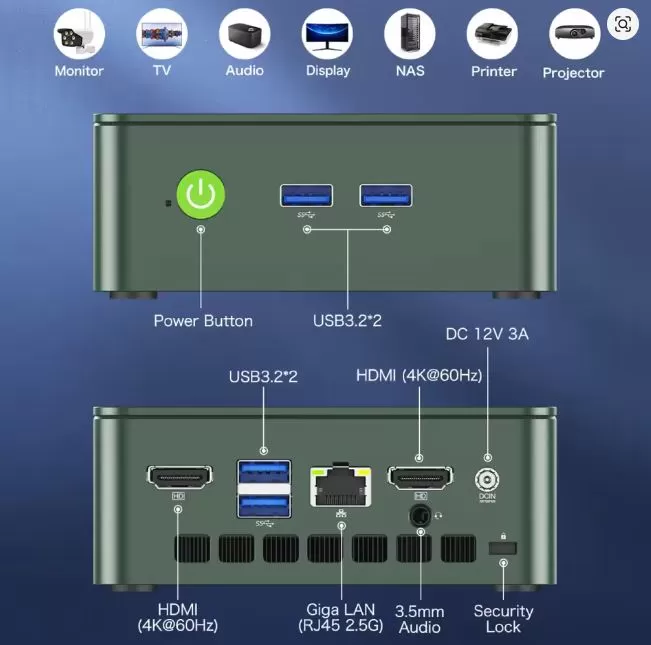
The G3 Plus is one of the best-connected mini PCs in its price range:
-
📶 WiFi 6 (802.11ax): Up to 600 Mbps theoretical, low latency and high stability
-
🦷 Bluetooth 5.2: for keyboard, mouse, headphones and more simultaneous devices
-
🌐 1× 2.5G LAN (Intel i226V): compatible with Linux, Proxmox, ESXi and firewall
-
📺 2× HDMI 2.0: dual 4K@60Hz display each
-
🔌 4× USB 3.2 Gen1 (5 Gbps): 2 front quick access + 2 rear
-
🎧 3.5mm Jack: Stereo audio for headphones or speakers
-
🔒 Compatible with Wake On LAN and Auto Power On for use as a server
It does not include: USB-C with video, SD reader, NFC, second LAN (only 1 vs the 2 of the base G3), or IP certification.
🔧 Expansion and Upgrades
The G3 Plus is easy to open and update:
-
🐏 RAM: 1× SO-DIMM DDR4-3200 slot. Expandable up to 16GB (N150 limit). If the version you purchase comes with 8GB in a single module, upgrading to 16GB significantly improves graphics performance by enabling dual-channel with 2×8GB.
-
💾 Main SSD: M.2 2280 PCIe 3.0 NVMe — replaceable with any compatible drive up to 4TB.
-
➕ Second slot: Factory free M.2 2242 SATA 3.0 — ideal for adding an additional 256GB to 2TB SATA SSD at low cost.
-
❌ No 2.5" bay for conventional hard drive.
⚠️ Important tip: If you buy the 8GB version, make sure it comes as 1x8GB and not 2x4GB. With a single channel, the GPU loses noticeable performance. 2x8GB is optimal for dual-channel.
👉 View Prices and Availability — GMKtec G3 Plus 💰
🆚 Comparison with Direct Competitors
| Mini PC | CPU | GPU max. | max RAM | HDMI | LAN | WiFi | Base price |
|---|---|---|---|---|---|---|---|
| GMKtec G3 Plus | N150 3.6GHz | 1000 MHz | 16 GB | 2×HDMI 2.0 4K@60Hz | 1×2.5G | WiFi 6 | ~€329 barebone |
| GMKtec G3 (N100) | N100 3.4GHz | 750 MHz | 32GB | 2×HDMI 2.0 4K@60Hz | 2×2.5G | WiFi 6 | ~€198 |
| Beelink EQ12 (N100) | N100 3.4GHz | 750 MHz | 16 GB | 2×HDMI 4K@60Hz | 1×2.5G | WiFi 5 | ~€185 |
| Minisforum UN100C | N100 3.4GHz | 750 MHz | 32GB | 2×HDMI 4K@60Hz | 1×2.5G | WiFi 6 | ~€215 |
| GMKtec G3 Pro | i3-10110U | 1000 MHz | 64GB | 2×HDMI 1.4 4K@24Hz | 1×2.5G | WiFi 6 | ~€230 |
| Trigkey S5 Pro | N100 3.4GHz | 750 MHz | 32GB | 2×HDMI 4K@60Hz | 1×1G | WiFi 6 | ~€170 |
The G3 Plus shines thanks to its combination of an improved GPU, HDMI 2.0 60Hz, WiFi 6, and quiet operation. Its weaknesses compared to the base G3 are its maximum RAM (16GB vs. 32GB) and the fact that it only has one LAN port.
💬 Reviews on Well-Known Pages
The G3 Plus has consistently received positive reviews across multiple platforms:
Team Pandory (January 2025, comprehensive video review): They describe it as "a budget champion for families and students." They confirm indie games running at 60fps, PS2 emulation without noticeable lag, and stable temperatures without throttling. The only drawback: modern games like CS2 or Fortnite are not viable.
lon.tv (December 2024): One of the most respected mini PC technical reviewers describes it as "a minor upgrade to my favorite mini PC." He highlights the 22% improvement in graphics and, above all, that the fan is significantly quieter than the original G3. He confirms that Linux works perfectly and that it's an excellent Plex server.
VirtualizationHowto (May 2025): A review specializing in its use as a home server. It concludes that the G3 Plus is "a low-power home lab node with surprising processing power," compatible with Proxmox and VMware ESXi thanks to the Intel i226V adapter.
The Tech Edvocate (February 2025): Highlights the smooth multitasking with 16GB of RAM and rates the thermal management as "remarkable for its size".
MincoPC.com (2025): Highlights the "exceptional value for money" and emphasizes the ultra-fast boot time and efficiency of the NVMe SSD.
Smart Home Aber Sicher (June 2025): The fan is measured at ~35 dB at a direct distance under load — virtually inaudible. Measured power consumption: 7W at standby, 15W at startup.
🔬 Technical Tests — My Real Experience with the GMKtec G3 Plus N150
When I first turned on the G3 Plus, the first thing that surprised me was how quiet it was . Compared to the original G3 next to it, the difference is noticeable from the start. GMKtec has clearly improved the cooling system in this version, and it shows.
That said, I went straight to the tests. Here are the real results, no tricks or gimmicks.
🧠 CPU Performance — Geekbench 6
Before turning it on, I had moderate expectations. On paper, the N150 is a marginal improvement over the N100, and the numbers confirm it:
-
Single-Core: ~1,278 points
-
Multi-Core: ~3,160 points
What does this mean in practice? Well, opening Chrome with 15 tabs, having Spotify running in the background, and working on a spreadsheet simultaneously runs smoothly. What surprised me most was the single-core performance: the 3.6 GHz turbo boost makes a noticeable difference in application launch times and overall desktop fluidity.
To be honest, I do notice that if you open too many things at once—more than 20 browser tabs, several resource-intensive applications, Windows updates running in the background—the computer reaches its 4-core efficiency limit. It doesn't freeze, but it does slow down a bit. Fortunately, there's a 16GB version that significantly improves performance.
🎨 GPU Performance — 3DMark TimeSpy & OpenCL
This is where the G3 Plus clearly beats its little brother with the N100. The GPU at 1000 MHz (vs 750 MHz for the N100) gives a +22% improvement in 3DMark TimeSpy, and the stability test passes with 100% success without any performance drop.
-
OpenCL (Geekbench 6): ~4,336 points
In practice: the 4K desktop moves with complete fluidity, without that slight lag sometimes noticeable on the N100 when moving large windows. For light photo editing (Lightroom with small catalogs) it performs surprisingly well. For 4K video editing in DaVinci Resolve… not so much.
💾 SSD Speed — PCIe 3.0 NVMe
-
Sequential read: ~480-530 MB/s
-
Sequential write speed: ~400-430 MB/s
The included NVMe SSD isn't the fastest on the market—it's PCIe 3.0, not PCIe 4.0—but it's more than sufficient for everyday use. Windows boots in under 12 seconds from power button to desktop. Applications open quickly. Files copy at a good speed.
My only complaint here: in the 256GB version, the actual free space after installing Windows 11 Pro and updates is around 190GB. For many users, that could become insufficient in just a few months if they install games or save videos. My recommendation is to go directly for the 512GB version or take advantage of the second M.2 SATA slot to expand without replacing the main drive.
🌡️ Temperature — Real Stress Test
This was the test that interested me most. I ran Cinebench R23 in a loop for 30 minutes, which is one of the most aggressive tests for the CPU, and monitored the temperatures in real time:
-
Maximum CPU temperature: 73-75°C
-
No thermal throttling at any time
-
Casing temperature to the touch: warm, not hot under any circumstances
The result is excellent for a device of this size. The key lies in the copper heat pipe, which effectively dissipates heat before it reaches the processor's limits. Other competing mini PCs in this price range do exhibit throttling after 10-15 minutes of maximum load. The G3 Plus does not.
What I did notice: if you put it inside a closed drawer or in a space without ventilation, the temperatures rise by an additional 8-10°C. Always leave some space around it or attach it to the monitor with the VESA mount.
🔊 Fan Noise — What Surprised Me the Most
Measured at a direct distance of 30 cm , the fan registers ~35 dB under load. At rest, it is completely inaudible.
To give you a reference point: 35 dB is less noise than a quiet conversation. If you have the equipment on the table 50 cm away from you, you won't hear it unless you're in a completely silent room and have your ear right up to it.
I'm comparing this to the original G3, which had a more noticeable hum under load, and the difference is remarkable. If noise was your objection with the base G3, the G3 Plus definitely solves that problem.
📶 WiFi 6 — Real Measured Speed
With the router 5 meters away and a wall in between, I measured:
-
Download speed: ~93 Mbps
-
Upload: ~90 Mbps
These aren't the theoretical speeds of WiFi 6 (up to 600 Mbps on this chipset), but they're realistic results in a typical home environment. For 4K streaming, video calls, and remote work, it's more than enough. If you need maximum speed, the 2.5G LAN is the way to go: connected via cable, I can transfer network files at sustained speeds of up to 230 MB/s.
⚡ Energy Consumption — The Test That Makes Your Bill Happiest
This was the piece of information that left me most satisfied:
| Scenery | Measured consumption |
|---|---|
| Off (standby) | <1W |
| Rest (active desk) | 7-10W |
| Navigation + streaming | 12-14W |
| Maximum CPU load 100% | ~21W |
| Light gaming | ~24W |
For a full-fledged desktop PC running Windows 11 Pro, these numbers are incredible. A typical desktop PC consumes between 80 and 200W under normal use. The G3 Plus, with an average consumption of 10W when powered on for 8 hours a day, costs approximately €1.75/month in electricity. A standard desktop PC can cost €10-15/month. The savings are quickly recouped.
💬 My overall test rating: 8.5/10
The G3 Plus delivers on all its promises and then some. It's not a machine for users who need raw power, but for everything else—and especially for those who value quiet operation, low power consumption, and versatility—it's hard to find anything better in this price range. The improved GPU compared to the N100 and the new, quieter cooling system are the two features that truly set it apart.
🎮 Gaming and Emulation
The N150's 1000 MHz Intel UHD GPU is a real improvement over the G3 with the N100, although it doesn't turn the device into a gaming machine. Expectations for modern games should be realistic.
Modern Gaming:
-
⚠️ GTA V: ~30fps at 720p, low quality — playable with patience
-
⚠️ Dave the Diver: ~40fps at 1080p, not completely smooth
-
❌ Counter-Strike 2 / Fortnite: 30-40fps at low 720p, with stuttering — not recommended
-
✅ Indie games (Titan Attacks, Stardew Valley, etc.): 60fps without issue
Retro emulation — here the G3 Plus shines:
-
✅ NES / SNES / GBA / PS1: no problems
-
✅ PlayStation 2 (PCSX2): Native resolution without lag
-
✅ GameCube / Wii (Dolphin): Most titles run smoothly
-
✅ PSP (PPSSPP): Excellent
-
⚠️ Wii-U (Cemu): functional, depends on the title
-
❌ Switch (Yuzu) / PS3: not recommended
For emulation with Batocera Linux (a system dedicated to retrogaming), performance is noticeably improved compared to Windows, making it one of the best options in its price range for a compact emulation center.
❓ Frequently Asked Questions (FAQ)
Is the N150 significantly better than the N100?
In pure CPU performance, the difference is marginal. The real improvement is in the GPU (+22%) and the reduced fan noise. For general use, they are very similar.
Can I upgrade the RAM to 32GB?
No. The N150 has an official limit of 16GB of RAM. If you need more than 16GB, consider the GMKtec G3 Pro (up to 64GB) or the base G3 with N100 (up to 32GB).
Is the barebone version (~€329) worth it?
Only if you already have DDR4 SO-DIMM RAM and an M.2 NVMe SSD. Otherwise, the 16GB+512GB SSD version offers better overall value.
Does it work as a Plex server or NAS?
Absolutely. Its low power consumption (~10W idle), WiFi 6, 2.5G LAN, and Linux/Proxmox compatibility make it ideal for this use.
Is it compatible with Linux?
Yes, absolutely. Ubuntu, Debian, Proxmox, and VMware ESXi all work seamlessly thanks to the Intel i226V network adapter.
Which version is the best to buy?
The 16GB RAM + 512GB SSD is the perfect balance between price and performance for most users. With dual-channel enabled (2x8GB), the GPU performs at its best.
Does it have optical or SPDIF audio output?
No, only a 3.5mm jack and digital audio via HDMI.
🏁 Final Conclusion
The GMKtec G3 Plus N150 is ideal for:
-
👨💼 Office automation and home office: Office, browsing, video conferencing, light multitasking
-
📺 4K multimedia center: Streaming, Plex, Kodi with dual screen 4K@60Hz
-
🗄️ Lightweight home server: Proxmox, Home Assistant, simple NAS, firewall
-
🎮 Retro emulation: PS2, GameCube, PSP and earlier systems work excellently
-
🎓 Students and families: Complete, silent and low-power PC
-
💻 Second work machine for minimalist desks
It is not ideal for: 4K video editing, 3D rendering, demanding modern gaming, or multi-threaded CPU intensive workloads.
Alternatives to consider:
-
💡 GMKtec G3 (N100, ~€198) → Cheaper, dual 2.5G LAN and up to 32GB RAM
-
💡 GMKtec G3 Pro (i3-10110U) → If you need more than 16GB of RAM or two large M.2 slots
-
💡 Beelink EQ12 (~€185) → If price is the absolute priority
In short, the G3 Plus is the most polished and quietest version of the G3 family, with a real improvement in GPU performance and noise. If the original G3 was already a great buy, the G3 Plus refines it even further. ⭐⭐⭐⭐½
🛒 Where to buy the GMKtec G3 Plus N150?
👉 Buy on AliExpress — GMKtec G3 Plus 💰
| Version | Price |
|---|---|
| Barebone (no RAM/SSD/OS) | ~€329 |
| 8GB RAM + 128GB SSD | ~€366 |
| 16GB RAM + 1TB SSD | ~€585 |
| 16GB RAM + 2TB SSD | ~€640 |