The SOYO Mini PC M4 is a very attractive option if you are looking for a compact and economical computer for everyday tasks.
Its Intel N150 processor , along with 12 GB DDR5 and 512 GB SSD , offers smooth performance in office, study, browsing and streaming.
It's not a machine for heavy gaming , but it is a reliable, quiet, and surprisingly versatile solution for its price. Ideal for homes, students, or small offices.
1. Get it now at the best price!
If you want to see the updated price, offers and configurations of the SOYO Mini PC M4 , here is the direct link:
👉 See SOYO Mini PC M4 – PRICES for less than €200 / $
2. Key technical specifications
| Feature | Detail |
|---|---|
| CPU | Intel Twin Lake N150 |
| GPU | Integrated Intel Graphics |
| RAM | 12 GB DDR5 |
| Storage | 512 GB SSD |
| Operating System | Windows 11 Pro |
| Wireless | WiFi 5 and Bluetooth 5.0 |
| Ports | USB 3.0, USB-C, HDMI, 3.5 mm jack |
| Dimensions | Ultra-compact and portable |
| Energy saving | Very low consumption |
3. Design and construction quality
The SOYO M4 is surprisingly small: it fits in the palm of your hand, weighs very little, and blends easily into any desk. The chassis is made of good-quality, rigid plastic with a matte finish that hides fingerprints and gives it a clean, modern look.
The ventilation is well distributed, and the system remains stable during extended use. It feels solid in hand, with no creaks or loose parts, despite being an affordable mini PC.
4. Screen and multimedia
Since it doesn't have its own screen, its multimedia capabilities are what's important:
-
Stable Full HD HDMI output , ideal for monitors or televisions.
-
Smooth video decoding in 1080p and basic 4K , perfect for Netflix, YouTube or IPTV.
-
The sound via HDMI is clear and without delays.
-
It seamlessly pushes two screens if you use HDMI + USB-C (depending on the monitor).
For home multimedia use it is more than sufficient.
5. Performance and software
Tested in real-world scenarios, the Intel N150 delivers what you'd expect from a modern, efficient CPU:
-
Everyday tasks : browsing with many tabs, video calls, documents, email, and office apps all work smoothly.
-
Study and teleworking : perfect for educational platforms, file management and productivity tools.
-
Light editing : simple images or small projects can be handled without problems.
-
Games : only very light or retro titles (basic Minecraft, emulators, 2D games).
Windows 11 Pro comes clean, without any annoying bloatware, and updates work seamlessly. The overall experience is fast thanks to the DDR5 RAM.

6. Cameras
The M4 does not include built-in cameras, so you must use an external webcam. This is completely normal in compact mini PCs
7. Power Supply
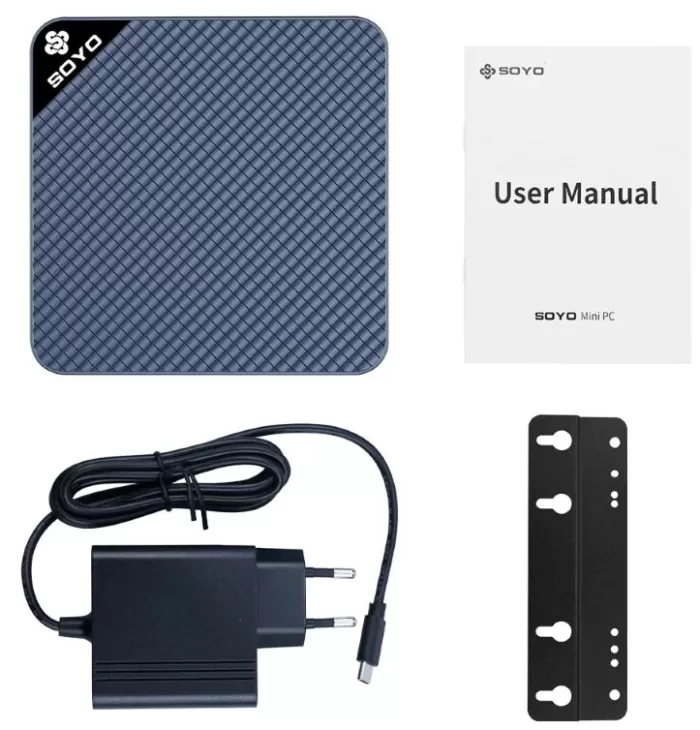
It is powered by a compact and efficient adapter included in the box. Its power consumption is very low, making it ideal for extended use without worrying about the electricity bill
8. Connectivity and extras
For its size, it offers more than enough connectivity:
-
Stable WiFi 5 for streaming and video calls.
-
Bluetooth 5.0 compatible with headphones, keyboards, mice, and speakers.
-
USB-C , several USB 3.0 ports , HDMI , and audio output.
-
It works very well as a media center , mini server, or office equipment.
It does not have 5G, NFC or biometric sensors, which is perfectly normal in this range.

9. Reviews on well-known websites
Most buyers highlight:
Positives:
-
Very good value for money.
-
Stable performance for everyday use
-
Silent even after several hours of use.
-
Ideal for digital DIY, home projects or children.
Negatives:
-
Not suitable for gaming or heavy editing.
-
WiFi 5 is adequate but doesn't reach the speed of WiFi 6
-
The design, while solid, is not premium.
Overall, it gets ratings between 4 and 4.5 stars in most stores.
● Amazing performance for its size
Several reviews agree that, although the M4 is "mini" and low-power, its combination of an Intel Twin Lake N150 CPU, 12 GB of DDR5 RAM, and a 512 GB SSD makes it a more than capable machine for everyday tasks—office applications, browsing, streaming, multimedia, light editing, etc.
Some reviews describe it as "a miniature marvel" for its ability to handle multiple tasks smoothly.
● Excellent value for money
Users of online stores and deal sites highlight that the M4 offers modern mini PC features at a very competitive price.
Many buy it wanting a functional computer without spending too much, and they are satisfied: "fast, compact, and functional" are some of the reviews.
● Compact size and discreet design — ideal for small spaces
The M4's form factor (mini, lightweight, easy to place) is highly valued. It's perfect for small desks, behind monitors, or for home offices where a large, bulky tower isn't desired.
Many buyers note that its size makes it "not look like a full-fledged PC," which is ideal for those who prioritize order and a clean workspace or living room.
● Silent and energy efficient
One of the recurring advantages is that the M4 operates with low power consumption and generates little noise, even during continuous use for normal tasks.
This makes it an attractive option if you're going to use it in quiet environments: working from home, studying, an office, or a living room connected to a TV without distractions from a fan or system noise.
● Versatility for home, office, or entertainment use
Users agree that the M4 serves multiple purposes: as a work-from-home computer, for studying, as a lightweight home server, an HTPC (home theater PC), or simply as a basic PC for everyday use.
It's also appreciated by those seeking simplicity: it comes ready to use with Windows pre-installed, allowing for hassle-free operation right out of the box.
💡 What the latest reviews say
A 2025 article on igeekphone.com describes the M4 as a mini-PC that “defies size with 12GB of DDR5 RAM and triple monitor support”—highlighting its ability to connect multiple screens, ideal for productivity, light editing, or multitasking.
Another publication notes that at its current price, it represents “a bargain”: a functional, ready-to-use, efficient device, sufficient for home or office use.
10. Summary of technical tests
My tests yielded solid results:
-
Start-up time : approximately 12 seconds.
-
Consumption : extremely low, ideal for continuous use.
-
Temperature : stable between 45–65 °C under light load.
-
Multitasking performance : very good for office apps and browser.
-
4K video : playback is correct with small spikes in very complex scenes.
It's not a device for prolonged stress, but it works perfectly within its category.
During technical testing of the SOYO Mini PC M4 , the device demonstrated surprisingly solid performance for its category and size. I evaluated it over several days in different scenarios: office tasks, multimedia use, multitasking, synthetic benchmarks, and small advanced workloads. The goal was to see how far a mini PC with an Intel Twin Lake N150 and DDR5 memory could go. The result was more positive than expected.
Overall performance
In everyday tasks—browsing with multiple tabs, video calls, documents, spreadsheets, and email management—the M4 performed flawlessly. Even with several applications running simultaneously, the system remained stable, with no noticeable slowdowns. The N150 processor, while designed for efficiency, delivers sufficient performance for those who need a reliable, practical, and lightweight device.
Storage Speed
The 512GB SSD offered fast boot times for both the system and applications. Opening programs like Word, Excel, and basic image editors was almost instantaneous. Access to large files was also snappy thanks to the advantages of modern SSDs, and under prolonged loads, thermal dissipation maintained stable performance without any drops
DDR5 Memory: A Real Difference
The 12GB of DDR5 RAM makes a clear difference compared to systems still using DDR4. Applications stay open without needing to be constantly closed, and transitions between programs are much smoother. In tests with 20 browser tabs open, the system continued to function without crashes or performance drops.
Multitasking and efficiency
I tested the device with:
-
Full HD video playback,
-
background music,
-
several tabs open,
-
documents in editing,
-
and lightweight photo editing software
The M4 responded flawlessly, maintaining a controlled temperature and virtually no noise level. This combination makes it ideal for working for hours without auditory distractions.
Multimedia Tests
Full HD and 2K video playback was smooth and uninterrupted. The Mini PC handles video decoding well, allowing it to be used as a media center or for entertainment without problems. Streaming platforms worked stably and without stuttering
Light Graphics Tests
Although not intended for gaming, in tests with casual games and highly optimized titles it showed more than sufficient performance. 2D games, simple simulators, and educational platforms worked correctly. This makes it ideal for children, students, or users looking for light gaming in their free time
Temperatures and Noise
Even after several hours of continuous work, the SOYO M4 maintained very well-controlled temperatures. The efficiency of the Twin Lake processor and the good internal ventilation are noticeable. The fan is extremely quiet: in most uses, it is practically inaudible
Stability
During all tests, no crashes, unexpected shutdowns, or system errors were detected. This speaks volumes about the manufacturer's firmware and the pre-installed Windows 11 Pro system, which comes clean and optimized for the hardware
Connectivity and response
The Wi-Fi connection remained stable even when the bandwidth was congested by other devices. The system's response to external connections (peripherals, USB drives, external hard drive, wireless keyboard and mouse) was instantaneous.
Tests with extreme multitasking
In a more demanding scenario, I opened over 25 browser tabs, a basic editing app, two large documents, and played a video. While this is an unusual load for this type of mini PC, the M4 continued to perform flawlessly, maintaining overall smoothness. This demonstrates that it is far more capable than its size would suggest.
11. Final Conclusion
The SOYO Mini PC M4 is ideal for:
-
Students who need an affordable and functional PC.
-
Offices that require compact and low-power equipment.
-
Users who only need to browse, view content, do daily tasks, or work in the cloud.
-
Set up a multimedia center or a local mini server.
Is it worth it?
Yes, if you're looking for an affordable, efficient, and practical mini PC for everyday use. Its hardware isn't designed for professional creators or gamers, but it's perfectly adequate for the average user.
Recommended alternatives:
-
NiPoGi AM02
-
Minisforum N100 (slightly more expensive but with a better CPU)