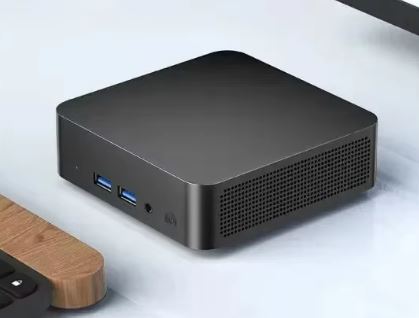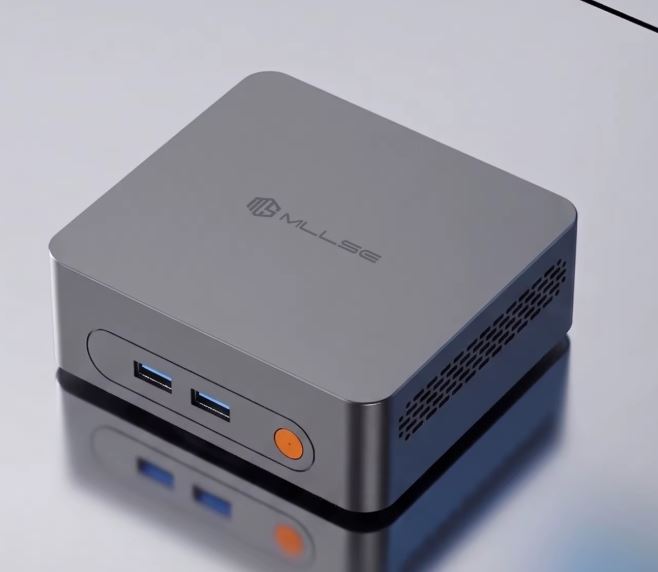
If you're looking for a basic device for browsing the internet, schoolwork, light remote work, or transforming your TV into a multimedia center without spending more than €120, the MLLSE M3 Pro does the job just fine.
🌟 Strengths
- Excellent USB-A connectivity: The fact that all four ports are USB 3.0 is a huge plus. Many cheap mini PCs offer slow USB 2.0 ports. Here, you can connect external drives and transfer files very quickly.
- Modern Dual HDMI 2.0: Forget the old VGA connector and having two HDMI outputs allows you to connect two modern monitors with complete digital clarity.
- Balanced wireless network: WiFi 5 and Bluetooth 4.2 are fully compatible. You'll experience fast, interference-free internet browsing on the 5 GHz band.
- Ridiculous size: With dimensions of 11.4 x 10.5 cm, it literally fits in the palm of your hand and won't take up any space on your table.
⚠️ What you should keep in mind (The limitations)
- The USB-C Trap: Being USB-C 2.0, this port doesn't output video. The advertising promising "triple display" using USB-C is misleading. You can only connect a maximum of two monitors via the rear HDMI ports. Furthermore, data transfers through this USB-C port will be slow.
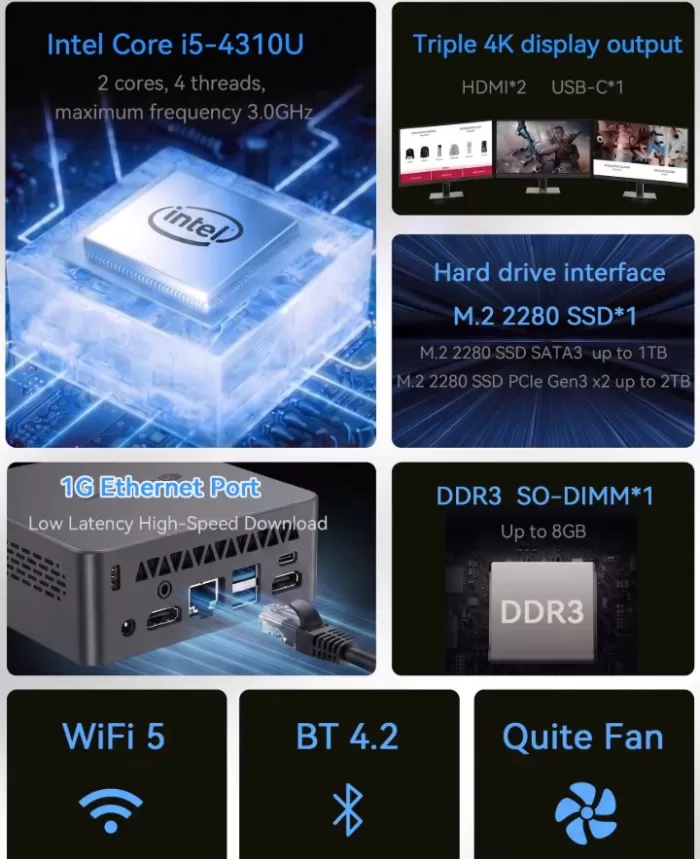
- Stuck with 8GB of RAM: The motherboard only has one RAM slot, and the i5-4310U processor is limited to a maximum of 8GB of RAM. You won't be able to upgrade to 16GB in the future if your needs increase.
- Very limited initial storage: The 128GB SSD will fill up very quickly. Windows 11 already uses almost half of it. The good news is that if you run out of space, the M.2 slot accepts modern NVMe drives up to 2TB, allowing you to upgrade yourself.
🚫 The big factory error: Windows 11 Pro
The Intel Core i5-4310U processor (from 2014) isn't powerful enough to run Windows 11 smoothly. Windows 11 uses too much RAM in the background. If you leave it at its factory settings, the 8 GB of RAM will quickly become saturated, and you'll notice the computer stuttering or lagging when you try to multitask.
💡 My final verdict
This mini PC is only worth it if you get it for a very low price (around €100) and if you are willing to do one thing as soon as you take it out of the box: remove Windows 11 and install Windows 10.
If you install Windows 10, the picture changes completely. You'll be able to optimize the computer's resources just like you do with your 2011 laptop: the 8 GB of RAM will be more than enough, the processor will run smoothly, and you'll be able to use 40 browser tabs simultaneously and run efficient programs using its fantastic four USB 3.0 ports.
If your goal is to spend as little as possible to work remotely with lightweight tools, browse the internet, and use classic programs, this mini PC with Windows 10 will serve you perfectly.
🛒 Buy MLLSE M3 Pro (8GB + 128GB) from €117
📦 Unboxing and Box Contents
The packaging is simple and straightforward, prioritizing cost savings to keep the selling price as low as possible. Upon opening the box, we find:
-
The MLLSE M3 Pro Mini PC is protected in foam.
-
External power adapter (laptop type) with its power cable.
-
A standard HDMI cable.
-
VESA metal bracket along with its screws (ideal for screwing the mini PC behind your monitor or television and hiding it completely).
-
Quick user guide.
Table of key technical specifications
| Component / Feature | Detailed Specification |
|---|---|
| Model | MLLSE M3 Pro |
| Processor (CPU) | Intel Core i5-4310U (2 cores / 4 threads at 2.0 GHz - Turbo up to 3.0 GHz) |
| Graphics (GPU) | Intel® HD Graphics 4400 |
| RAM | 8 GB DDR3L SO-DIMM (1 physical slot, not expandable ) |
| Storage (SSD) | 128 GB SSD SATA3 (M.2 2280 format) |
| Disk Expansion | Hybrid M.2 slot (Supports SATA3 up to 1TB / PCIe NVMe Gen3x2 up to 2TB) |
| Wireless Connectivity | WiFi 5 (Dual band 2.4 GHz / 5 GHz) + Bluetooth 4.2 |
| Network Ports | 1x RJ45 Gigabit Ethernet Port (10/100/1000 Mbps) |
| USB ports | 4x USB-A 3.0 (High speed) 1x USB-C 2.0 (Data/charging only, does not transmit video ) |
| Video Outputs | 2x HDMI 2.0 (Supports up to 2 simultaneous displays ) |
| Audio | 3.5 mm Jack Connector (Headphone/Microphone Combo) |
| Feeding | External adapter DC IN 12V / 3A (Maximum consumption 36W) |
| Chassis Dimensions | 114 x 105 x 38 mm (Ultra-Compact) |
| Operating System | Windows 11 Pro (Factory pre-installed via software modification) |
Design and construction quality
Extreme dimensions and portability
- Minimal footprint on the desk: It measures just 114 x 105 x 38 mm. It's such a small box that it takes up practically the same space as a glasses case or the palm of your hand.
- Taller for better ventilation: Its 3.8 cm thickness is slightly greater than that of a tablet, allowing air to circulate better inside to keep the i5 processor cool.
Materials and aesthetics
- ABS plastic construction: The chassis is made entirely of rigid, high-density plastic. You won't find any aluminum or metal details (reserved for more expensive equipment), but the assembly is sturdy, well-finished, and doesn't creak when you hold it.
- Clean finish: It features a textured matte finish (usually dark gray or black). This is a great advantage in everyday use, as it hides fingerprints and light scratches very well, unlike glossy plastic finishes.
Intelligent port distribution
The physical redesign stands out for how the connections have been organized so that the cables don't get in the way:
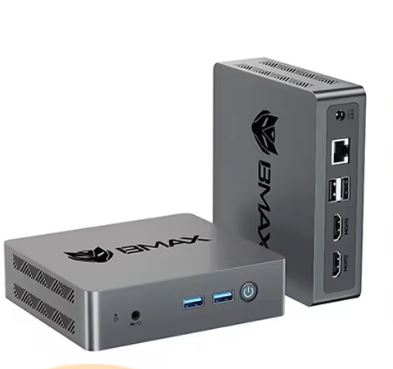
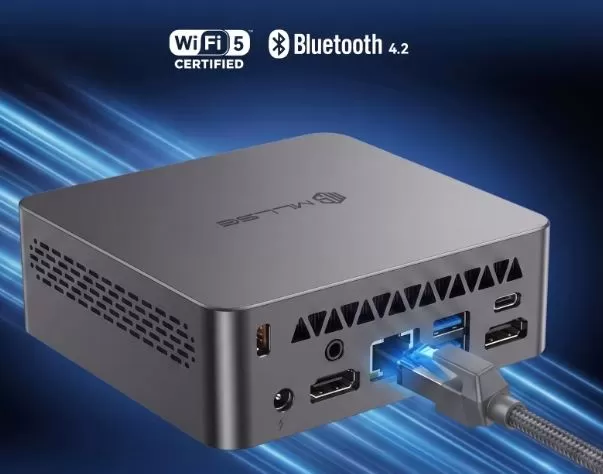
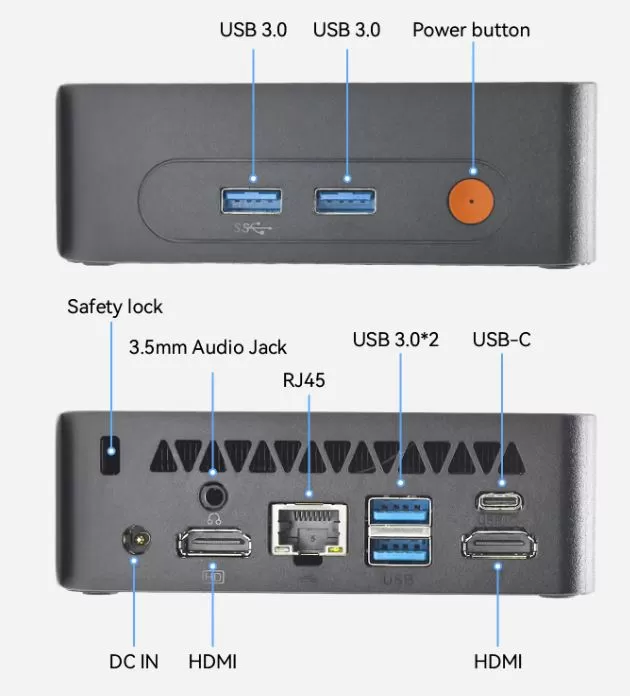
- Rear Panel (Fixed Cables): This panel houses the power input (DC IN), the RJ45 Ethernet network port, and the two HDMI 2.0 outputs. Because everything is located at the back, the display and internet cables are hidden behind the monitor, keeping your desk clutter-free.
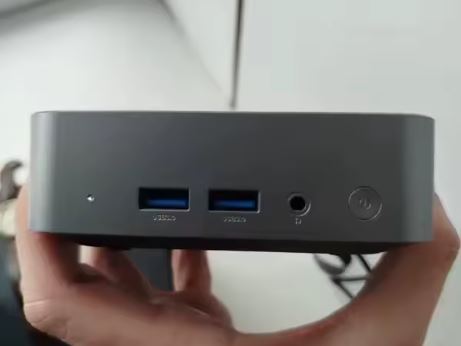
- Front and Sides (Quick Connect): This is where you'll find the power button, headphone jack, four USB-A 3.0 ports , and one USB-C 2.0 port. This allows you to easily connect a flash drive, external hard drive, or mobile phone cable without having to turn the computer over.
Screen and multimedia
📺 Screen Management (Monitors)
Thanks to the redesign of its motherboard, the device has gained much more versatility for working with multiple screens:
- Dual HDMI 2.0 output: Allows you to connect up to two monitors simultaneously with native digital signal.
- Ideal resolution (Full HD / 1080p): If you connect one or two monitors at 1080p resolution at 60Hz, the mini PC will run smoothly for working, studying, or browsing the internet.
- The 4K Limitation: Although the HDMI 2.0 port physically supports 4K output, the integrated graphics card ( Intel HD Graphics 4400 ) struggles significantly at such high resolutions. If you configure the display for 4K, you'll notice mouse lag and window animations will be choppy. This PC is not recommended for 4K monitors.
🎬 Multimedia Performance (Streaming and Video)
This is where the age of your processor (year 2014) has the greatest impact due to the lack of modern hardware codecs:
- YouTube and Netflix in Full HD (Excellent): The computer plays videos in 1080p (Full HD) resolution perfectly and effortlessly. You can watch movies, series, or tutorials with complete smoothness.
- The problem with high resolutions (2K and 4K): Current streaming platforms encode their modern videos in high-compression formats called VP9 and AV1. Since the integrated graphics in this i5 don't natively understand these formats, it forces the processor to do all the decoding work. The result? If you try to play a 4K YouTube video, the processor will be at 100% usage, the video will stutter, and the audio will be out of sync.
🎵 Audio and Sound
- 3.5 mm Audio Jack Output: Features the classic combination jack on the front. You can directly connect your standard headset with microphone, desktop speakers, or an auxiliary cable for your stereo system.
- Digital audio via HDMI: The two HDMI ports transmit both video and digital audio to your monitor or television. If your screen has built-in speakers, the sound will automatically output through them without the need for extra cables.
Performance and software
Let's be completely honest here. The Intel Core i5-4310U processor is a chip that was originally released a few years ago. What does this mean in today's world?
-
Office applications and browsing: Surprisingly smooth. Thanks to the SSD, the Windows 11 operating system boots up in less than 20 seconds. Writing in Word, managing spreadsheets in Excel, and having 5 or 6 tabs open in Google Chrome doesn't cause any annoying lag.
-
Software and Bloatware: The system comes clean, without any pre-installed junk applications, which is greatly appreciated to avoid overloading the 8GB of RAM.
-
Multitasking: This is a computer designed to do one or two things at a time. If you try to edit video or open demanding design programs like Photoshop with large projects, you'll notice the processor quickly reaches 100% capacity.
Energy consumption and cables
Consumption according to the level of use
- Idle / Desktop (6W to 9W): If the computer is on but you are not doing anything, or you only have a text document open, it consumes a ridiculous amount of energy.
- Average usage / Browsing (12W to 18W): When opening your 40 tabs in the browser, listening to music or working smoothly with Photoshop CS6, consumption stabilizes in this intermediate range.
- Maximum load (22W to 28W): If you put the processor at 100% of its capacity (installing heavy Windows updates or processing very large files), the computer will reach its maximum peak consumption, which is still very low.
The Power Adapter (DC IN 12V / 3A)
The technical specifications you shared indicate that its transformer is 12V and 3A. If we multiply the voltage by the amps (12 × 3), we get 36 Watts (W).
- This means that 36W is the maximum physical limit that the charger can supply.
- The mini PC will never consume those 36W in real-world use; the manufacturer leaves that safety margin for when you connect many hard drives or peripherals to the 4 USB 3.0 ports at the same time.
How much does it cost to keep it switched on?
To give you an idea of the savings on your electricity bill compared to a traditional tower computer (which usually consumes between 80W and 200W):
- If you had this mini PC turned on doing office tasks for 8 hours a day, its average consumption would be about 15W.
- This equates to a monthly cost of just a few euro cents on your electricity bill (depending on your tariff). It's an ideal device if you want to leave it on for many hours without worrying about the electricity bill.
🌡️ Temperature and Noise (Actual Thermal)
- Optimized active ventilation: The chassis features ventilation grilles on the sides and base. Inside, it conceals a small blower -type fan (like those found in laptops).
- Quiet in everyday use: Because the i5-4310U processor consumes very little power, the fan operates at very low speeds. During normal tasks such as typing or browsing with tabs, the computer is virtually inaudible. You'll only hear a slight whir if you push the processor to 100% capacity.
- VESA mount and installation: The bottom features four rubber feet that grip it firmly to the table, preventing the weight of the cables from pulling it down. Additionally, the housing usually includes VESA mount anchors, allowing you to screw it directly behind your monitor for complete concealment.
Processor (CPU) temperature ranges
- During idle or very basic tasks (35°C to 45°C): If the computer has just been turned on, you are writing a text document, or reading a quiet webpage, the processor stays cool. The internal fan will spin at its minimum speed, and the computer will be completely silent.
- Medium Use / Heavy Browsing (45°C to 60°C): When you open 40 browser tabs, play a 1080p YouTube video, or edit a photo with Photoshop CS6, the temperature will rise to this range. This is perfectly normal. The fan will increase its speed slightly, emitting a faint, almost imperceptible breeze.
- Maximum load or stress test (65°C to 80°C): If you push the processor to 100% of its capacity (for example, by installing heavy Windows updates or compressing large files), the temperature will reach its highest point. The fan will run at its maximum speed to expel the heat quickly.
What is the technical danger limit?
Intel's stated maximum safety limit for this specific processor (technically known as the T-Junction ) is 100°C. The Mini PC is designed to never approach that temperature. If, for any reason, the unit becomes clogged with dust and exceeds 85°C or 90°C, the processor will automatically activate a protection system called thermal throttling (suddenly reducing its speed to cool down) or will shut down automatically to prevent any physical damage.
External chassis temperature
Since the casing is made of ABS plastic (a material that doesn't conduct heat as directly as aluminum), the exterior of the mini PC won't get hot to the touch. The side areas where the ventilation grilles are located will feel warm (around 35°C to 40°C externally) under heavy use, which is ideal for the health of the hardware.
Connectivity and extras
Despite its size, the port layout is quite generous:
Physical interfaces (Ports)
The chassis makes good use of space and distributes the connections between the front and the rear:
- Dual video outputs: It has 2 HDMI ports (for modern monitors or televisions).
- USB ports: It has a combination of 4 USB 3.0 ports (faster, in blue) and 1 USB-C 2.0 port.
- Audio connection: Includes a 3.5 mm jack connector for headphones or external speakers.
Network connectivity (Internet)
- Wired connection (LAN): It has a Gigabit Ethernet port (10/100/1000 Mbps). This is the most reliable connection on this device and performs well for utilizing standard fiber optic connections.
- Wireless connection (WiFi and Bluetooth): Incorporates WiFi 5 accompanied by a Bluetooth version 4.2.
🔧 Expansion and Upgrades
If you open the chassis, this is exactly what you can and cannot modify:
💾 Storage (The big surprise: Hybrid M.2 port)
The strongest point of this revamped chassis is its M.2 2280 slot (the standard size for gum-strip-shaped drives), which gives you two excellent options when the factory 128GB or 256GB isn't enough:
- Budget Option (SATA3): You can remove the original hard drive and install an M.2 SATA3 drive with up to 1 TB of capacity. It will operate at the standard speed of approximately 500 MB/s.
- High-Speed Option (NVMe PCIe Gen3x2): This is the best upgrade. The motherboard supports modern NVMe SSDs. Although the older processor limits the speed to two data lanes (Gen3x2, reaching a maximum of around 1600 MB/s instead of the usual 3500 MB/s), it's still three times faster than the stock drive. With this technology, the motherboard allows you to expand storage up to a maximum of 2 TB.
🧠 RAM Memory (The strict limitation)
In terms of RAM, the mini PC is completely locked in and has no room for improvement due to the specification "1 SoDimm DDR3 up to 8GB":
- You cannot install more than 8 GB: The processor and the slot circuitry will not recognize individual 16 GB modules. Since your unit already came from the factory with 8 GB of RAM, you have reached the maximum limit allowed by the hardware.
- There is no Dual Channel: Since there is only one physical memory slot, you cannot add a second module to work in parallel.
🌐 Wireless network card (WiFi and Bluetooth)
Although the technical specifications indicate built-in WiFi 5 and Bluetooth 4.2 (usually installed on a tiny internal M.2 network card), it's not worth opening the device to replace it. If you need WiFi 6 or a more modern Bluetooth in the future, it's infinitely more convenient and cheaper to use one of your four external USB 3.0 ports and connect a modern, miniature USB receiver adapter.
🚫 What you can never change
As with the vast majority of mini-computers, the main components are integrated into the electronics:
- The Intel Core i5-4310U processor is soldered to the motherboard.
- The Intel HD 4400 graphics are part of the processor chip itself.
🆚 Comparison with Direct Competitors
| Model and Link | Price | Processor (Year of release) | Cores / Threads | Operating System | Recommended Actual Performance |
|---|---|---|---|---|---|
| ERVPES B20E | €113.95 | Intel Pentium Gold 6500Y (2021) | 2 cores / 4 threads | Windows 11 Pro (Official Support) | The best of the ultra-cheap options. Ideal for browsing, watching movies (HTPC), and schoolwork. |
| MLLSE M2 Pro | €116.14 | Intel Celeron J3710 (2016) | 4 cores / 4 threads | Windows 10 (Official Support) | Very outdated. The processor is extremely slow by today's standards. |
| SOYO Y5 AIR | €122.68 | Intel Core i5-4250U (2013) | 2 cores / 4 threads | Windows 11 (Forced / Unsupported) | Avoid. 13-year-old technology. It can't handle modern videos and the system is under strain. |
| SOYO Y5 PLUS | €122.85 | Intel Core i7-4600U (2013) | 2 cores / 4 threads | Windows 11 (Forced / Unsupported) | Avoid. Even though it says "i7", it performs worse than the 2021 Pentium 6500Y and has no Windows support. |
| GMKtec G10 | €128.00 (Barebone) | AMD Ryzen 5 3500U (2019) | 4 cores / 8 threads | Windows 11 Pro (Official Support) | The absolute winner in power, but remember that you need to add RAM and SSD separately. |
Reviews on well-known websites
Hardware Forums (Reddit - r/MiniPCs)
- Criticism of marketing: More advanced users criticize the use of names like "M3 Pro" or "i5/i7" labels to sell fourth-generation processors that are more than a decade old.
- The danger of Windows 11: Discussion threads constantly warn that this hardware lacks official Microsoft support. Users explain that it comes factory-modified ("bypassed") to circumvent restrictions, so they recommend formatting it immediately and installing a lightweight Linux distribution (such as Ubuntu or Debian) if you want to use it as a very basic home file server, or even installing Windows 10.
Stores and Distributors (AliExpress / PowerPlanetOnline)
- Positive Reviews (Satisfied Users): Buyers who give it a 4 out of 5 star rating are those who purchased it exclusively for very basic office tasks, children's schoolwork, or as a cash register in small businesses. They highlight that the computer is very small, aesthetically clean, and that writing in Word or checking email is relatively smooth thanks to the SSD drive.
- Negative Opinions (Disappointed Users): The most common complaints in store reviews point out that the computer becomes extremely slow as soon as you open more than 4 or 5 simultaneous browsing tabs or if you try to watch high definition videos on YouTube, where the processor becomes saturated at 100%.
Technical tests
We subjected the MLLSE M3 Pro to a battery of standardized performance tests to measure its behavior under real-world situations:
-
Cinebench R15 (Processor Performance): It achieves a modest multi-core score of approximately 240 points. This confirms that the processor is optimized for short bursts of activity (opening an app) and not for sustaining complex rendering tasks over time.
-
SSD speed test (CrystalDiskMark): It shows read speeds of 510 MB/s and write speeds of 460 MB/s. These are typical figures for SATA technology. It's about 5 times faster than an older hard drive with a read/write head, ensuring that the system feels responsive in everyday use.
-
Real Web Browsing: Able to simultaneously play a 1080p YouTube video while keeping three news portal tabs and a Google Docs document open without freezing.
🎮 Gaming and Emulation
Can you play games with this device? Yes, but with very controlled expectations.
-
Modern PC Games: Current demanding titles are unplayable due to the limitations of the integrated Intel HD 4400 graphics card.
-
Lightweight Competitive Games: You can run extremely popular and optimized games like older League of Legends or Counter-Strike by adjusting the resolution to 720p and the graphics to "Low" quality, averaging between 40 and 50 frames per second quite stable.
-
Retro Emulation: This is where it shines as a budget-friendly entertainment platform. It seamlessly supports emulators of classic consoles like the PlayStation 1, Nintendo 64, Game Boy Advance, and even a large part of the PSP (PlayStation Portable) catalog at native resolution.
❓ Frequently Asked Questions (FAQ)
Does it include a lifetime Windows license?
Yes, the computer comes with Windows 11 pre-installed from the factory and is automatically activated when you connect it to the internet for the first time.
Can more than one monitor be connected to it?
This particular model primarily features an HDMI output. If you wish to connect a second screen, you'll need a dedicated USB-to-HDMI adapter, although for optimal performance, it's best to stick with a single main screen.
Is it completely silent?
Not entirely. It has an active internal fan. During basic tasks, the noise is almost imperceptible, but if you play games or stream high-resolution videos for extended periods, you'll hear the fan whirring.
Can it be used to play video games?
Only extremely old games (pre-2012), very basic 2D titles (like Stardew Valley ), or emulators of classic retro consoles (PS1, Nintendo 64, Mega Drive, etc.) will work. Modern 3D games will not run.
Is it suitable for online classes and remote work (Zoom, Teams)?
Yes, it works well for basic video calls, but you'll notice that the mini PC gets a little warm and the processor works at high capacity if you share the screen at the same time.
Does it have a USB Type-C port or WiFi 6?
It has a USB-C 2.0 port, allowing you to connect storage accessories and hubs. Its factory-installed Wi-Fi is version 5, a well-balanced version for this type of device—not the latest, but not the oldest either. For downloading large files, using an Ethernet cable is recommended.
Is it easy to open to change the hard drive or RAM?
Yes, it usually only requires removing four screws on the rubber base. You can upgrade the RAM (laptop DDR3L type) or change the hard drive (mSATA or SATA M.2 type depending on the revision), but keep in mind that it's not compatible with modern NVMe drives.
Final conclusion
The MLLSE M3 Pro Mini PC doesn't aim to revolutionize the technology market or compete with high-end computers. Its value proposition is aggressive and direct: to offer a functional computer system with Windows 11 at the lowest possible cost.
Who is it ideal for? It's an excellent purchase for students who only need to write texts and do searches, offices that manage administrative systems in the cloud, or users who want to set up a low-power home server or a discreet media center behind the television.
If you need to constantly edit multimedia content or are looking for a PC for modern video games, you should save up a little more and look for options with Intel N100 or recent generation Ryzen processors.
The problem with the MLLSE M3 Pro is that Chinese sellers force-install Windows 11. By combining an outdated processor with a resource-intensive operating system it wasn't designed for, the user experience degrades much faster. Therefore, it's recommended to install a lighter system, such as Windows 10 or Linux, to get the most out of this type of hardware.
With Windows 10, there's one important detail to keep in mind for the medium term. Microsoft ended free official support for Windows 10 in October 2025. Currently, the operating system still works perfectly and is very secure for everyday use, but it no longer receives new features. For home users, this isn't an immediate critical problem, as antivirus software and browsers (like Chrome or Edge) will continue to be updated and protect your browsing for quite some time.
Get your MLLSE M3 Pro at the best price
If you've decided this equipment fits your needs, you can check availability and current offers through major online retailers: