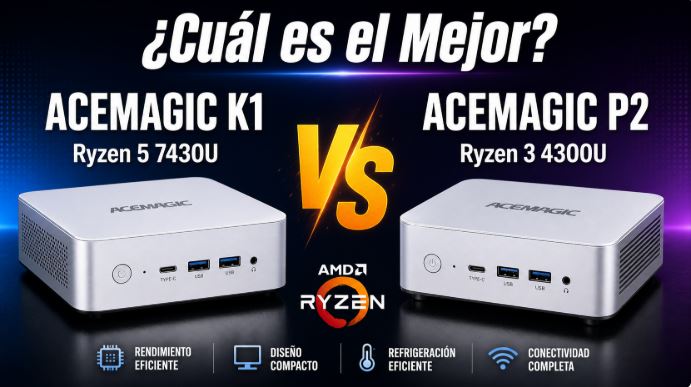
If you're looking for a compact, quiet mini PC with an AMD Ryzen processor, ACEMAGIC has two very interesting options in 2026: the ACEMAGIC K1 with Ryzen 5 7430U and the ACEMAGIC P2 with Ryzen 3 4300U.
They both share design, philosophy and brand, but their internal differences are notable.
Information about the ACEMAGIC K1 mini PC
The ACEMAGIC K1 is the more powerful of the two models. It features the AMD Ryzen 5 7430U processor (Zen 3 architecture, 6 cores/12 threads, up to 4.3 GHz), making it a very capable option for multitasking, advanced productivity, and next-generation emulation. It comes with 16 GB of single-channel DDR4 RAM (expandable to 64 GB), a 512 GB M.2 SATA SSD, and WiFi 6/6E with speeds up to 103 MB/s.
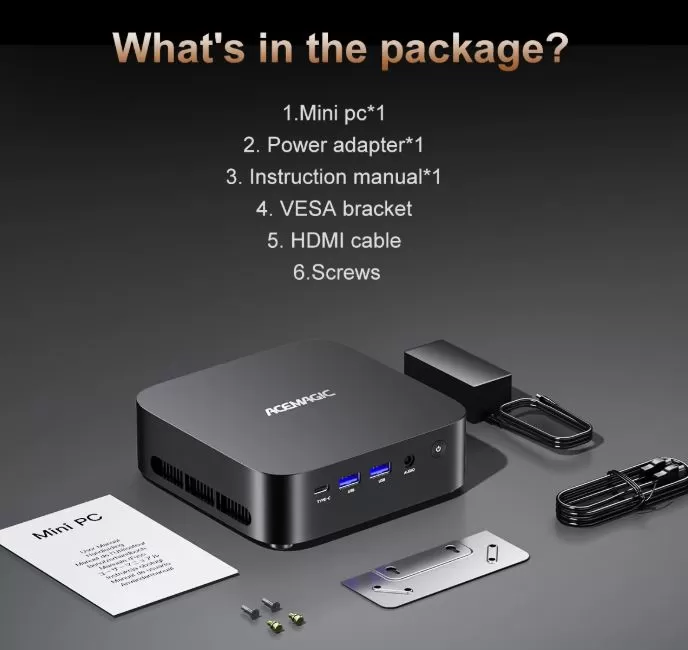
One of its great attractions is its triple 4K video output at 60 Hz simultaneously (HDMI 2.0 + DisplayPort 1.4b + USB-C), VESA support included and very low energy consumption: barely 6W in standby and a maximum of 47W under load.
👉 See ACEMAGIC K1 Prices and Availability
Information about the ACEMAGIC P2 mini PC
The ACEMAGIC P2 is the most affordable and efficient option in this comparison. It features an AMD Ryzen 3 4300U (Zen 2, 4 cores/4 threads without hyperthreading, up to 3.7 GHz), with an integrated Radeon Vega 5 GPU. It also offers 16 GB of DDR4 RAM, a 512 GB M.2 SSD, and triple 4K output at 60 Hz. Its strengths lie in its ultra-low power consumption (8–12W for office use) and price, although it comes at the cost of limited wireless connectivity with WiFi 5 and Bluetooth 4.2, which will be outdated by 2026.
The P2 is a quiet, compact device perfectly suited for remote work, studies, and retro emulation.
👉 View ACEMAGIC P2 Prices and Availability

Specifications Comparison
| Feature | ACEMAGIC K1 | ACEMAGIC P2 |
|---|---|---|
| Processor | Ryzen 5 7430U (Zen 3, 6C/12T) | Ryzen 3 4300U (Zen 2, 4C/4T) |
| Integrated GPU | Radeon RX Vega 7 (1800 MHz) | Radeon RX Vega 5 |
| RAM | 16 GB DDR4-3200 (single channel) | 16 GB DDR4 (2× SO-DIMM) |
| SSD | M.2 2280 SATA 512 GB | M.2 NVMe/SATA 512 GB |
| Video output | HDMI 2.0 + DP 1.4b + USB-C (4K×3) | HDMI 2.0 + DP 1.4 + USB-C (4K×3) |
| WiFi | Wi-Fi 6 / 6E | Wi-Fi 5 (802.11ac) |
| Bluetooth | BT 5.x | BT 4.2 |
| Ethernet | 2.5 GbE | 1 GbE |
| Resting consumption | ~6W | ~8W |
| Maximum consumption | ~47W | ~28W |
| maximum temperature | ~85°C (under load) | ~79°C (under load) |
| Dimensions | 128 × 128 × 41 mm | 128 × 128 × 44 mm |
| SW | Windows 11 Pro | Windows 11 Pro |
| Approx. price | ~250–300€ | ~€345 |
Performance: Which is faster?
In terms of CPU performance, the ACEMAGIC K1 is the clear winner. The Ryzen 5 7430U has 6 cores with hyperthreading (12 threads), compared to the 4 cores without HT in the P2's Ryzen 3 4300U. This translates directly to greater smoothness in heavy multitasking, video editing, code compilation, and demanding applications.
In PassMark, the Ryzen 5 7430U scores over 10,000 points, while the Ryzen 3 4300U in the P2 hovers around 7,500 points. The difference is approximately 33% in favor of the K1.
Regarding the integrated GPU, the K1's Vega 7 also outperforms the P2's Vega 5, although there's an important caveat: the K1 comes with single-channel RAM from the factory, which reduces its potential graphics performance by up to 68%. If you upgrade the K1 to dual-channel, its advantage over the P2 in GPU performance becomes enormous.
WiFi and Connectivity: A Big Difference
Here, the K1 is the clear winner. It boasts Wi-Fi 6E capable of reaching speeds of up to 103 MB/s (824 Mbps) and latencies of 2–3 ms, while the P2 is limited to Wi-Fi 5, which under real-world conditions and with walls in between can drop to only 140 Mbps. Furthermore, the K1 incorporates 2.5 GbE Ethernet compared to the P2's 1 GbE, a significant advantage for servers, NAS devices, or local network transfers.
What is each one used for?
The ACEMAGIC K1 is ideal for:
-
Demanding remote work with video calls, multitasking, and multiple monitors
-
Developers (PHP, Laravel, Node.js, compilation)
-
Advanced emulation (lightweight PS3, Nintendo Switch, GameCube/Wii at 1080p)
-
Home servers / homelab with fast network (2.5 GbE + WiFi 6E)
-
Environments with heavy WiFi traffic where WiFi 6E makes a difference
-
Triple 4K monitor setup in a professional office
The ACEMAGIC P2 is ideal for:
-
Basic and advanced office skills (Office, Chrome, Zoom, Teams)
-
Students and teleworkers with light-to-medium tasks
-
4K Media Center (H.265, H.264 100% Smooth)
-
Retro emulation (PS1, N64, PS2, PSP, GameCube at 1080p)
-
Areas with poor ventilation where ultra-low energy consumption is a priority
-
Users who want a clean and surprise-free Windows 11 Pro
Recommended Upgrades for Both
Both the K1 and P2 can be significantly improved with two simple upgrades:
-
Add a second DDR4 SO-DIMM module to enable dual-channel mode, especially critical in the K1 where the GPU gains up to 68% graphics performance.
-
Replace the SATA SSD with an NVMe PCIe SSD if your computer supports it, for 4–5x faster read speeds.
With these two improvements, the K1 especially becomes a completely different machine for less than €50 extra.
Price and Value for Money
Interestingly, at the time of this review, the ACEMAGIC P2 costs more (around €345) than the K1 (around €250–€300), which clearly tips the scales in favor of the K1 in terms of value for money. The K1 offers more cores, more threads, WiFi 6E, 2.5 GbE Ethernet, and better potential GPU performance, all at the same or lower price.
The P2 would only make sense compared to the K1 if you find a specific offer that puts it below €250, or if you prioritize the absolute minimum consumption in moderate loads.
Final Verdict: Which One to Buy?
The ACEMAGIC K1 is the winner of this comparison for the vast majority of users in 2026. It's faster, better connected, more scalable, and, on top of that, cheaper. The only essential requirement is adding a second DDR4 RAM module to take advantage of dual-channel memory and unleash its full graphics potential.
The ACEMAGIC P2 is still a good option if you already own one or find it at a very good price, but for a new purchase today, the K1 is the logical choice.
| ACEMAGIC K1 | ACEMAGIC P2 | |
|---|---|---|
| 🏆 CPU Performance | ✅ Better | ➖ Correct |
| 🎮 GPU Performance | ✅ Better (dual-ch) | ➖ Correct |
| 📶 WiFi Connectivity | ✅ Wi-Fi 6E | ❌ Wi-Fi 5 |
| 🔌 Ethernet | ✅ 2.5 GbE | ➖ 1 GbE |
| 💰 Price | ✅ ~250–300€ | ❌ ~€345 |
| 🏆 Winner | ✅ Recommended | ➖ Second option |