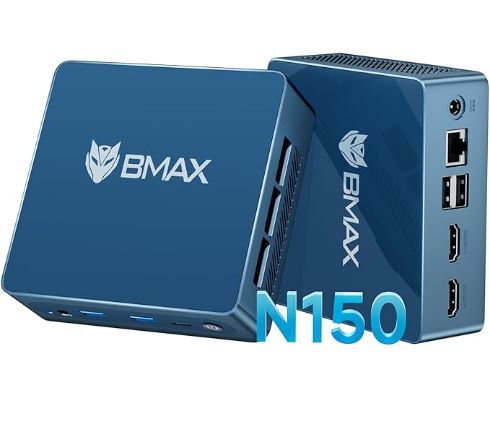
The BMAX B4 Ultra is a very solid option for those looking for an affordable mini PC for office, home, or HTPC (Home Theater PC). It offers a price-to-performance ratio that's hard to beat in its price range.
| ✅ Pros | Very competitive price (under $150-175 USD) · Dual HDMI 4K@60Hz · Supports secondary 2.5" SATA hard drive · Easy to open and expand · Very low power consumption (7W idle) · Comes with Windows 11 pre-installed |
| ❌ Contras | SATA SSD (no NVMe) |
| 🏁 Conclusion | Ideal for light office work, browsing, Full HD streaming, and retro emulation. It's not a PC for video editing or modern gaming, but it's more than adequate for its price and size. |
Where to Buy (Prices)
| 🛒 Amazon | 🛒 See Price | Fast delivery, simple warranty |
| 🛒 AliExpress | View on AliExpress → | Best price |
| 🛒 Alibaba | View on Alibaba → | Best Price |
📦 Unboxing and Box Contents
Upon opening the BMAX B4 Ultra box, you will find a clean and functional presentation:
-
🖥️ The Mini PC
-
🔌 DC 12V/2A power adapter with standard plug
-
📺 HDMI cable included
-
🔩 VESA mount for mounting behind the monitor
-
📄 User manual in English and Chinese
The power cable is a weak point noted in the Notebookcheck review: it's quite short, which can be inconvenient depending on your desk setup.
📋 Technical Specifications
| Component | Detail |
|---|---|
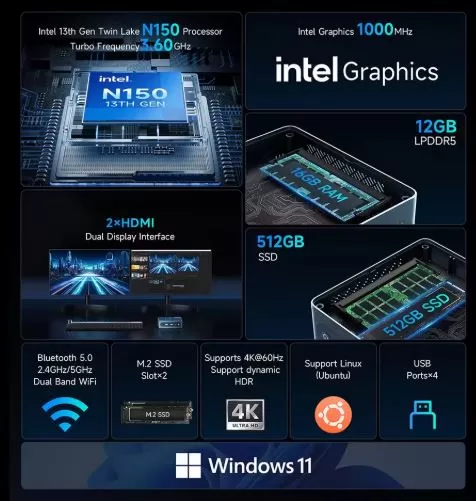
| Processor | Intel N150 "Twin Lake" 13th Gen, 4 cores / 4 threads, up to 3.6 GHz |
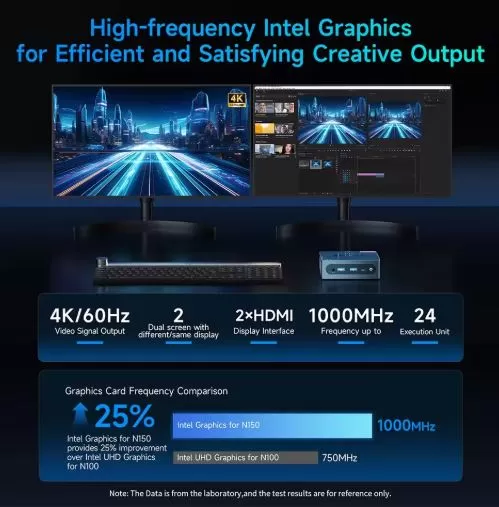
| Graphics | Intel UHD Graphics 24 EUs, 1000 MHz |
| RAM | 12 GB LPDDR5 @ 4400 MHz (single channel) |
| Storage | 512 GB SSD M.2 SATA (no NVMe) |
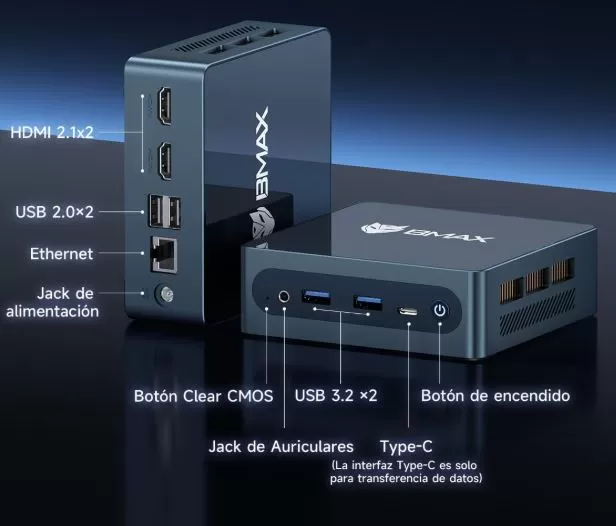
| Video outputs | 2 x HDMI 2.1, 1 x USB-C (data + video) |
| Max resolution | 4K@60Hz |
| USB | 2× USB 3.0, 2× USB 2.0 |
| Red | Ethernet Gigabit 1000 Mbps, Wi-Fi 5 (802.11ac), Bluetooth 5.0 |
| Operating system | Windows 11 Home |
| Consumption | ~6W typical / 15W PL1 sustained / 20W PL2 burst |
| Dimensions | 108 × 105 × 36 mm |
| Weight | ~260 g |
| Warranty | 12 months |
🎨 Design and Construction Quality
The BMAX B4 Ultra features a compact plastic chassis with a glossy top cover that, while aesthetically pleasing, easily accumulates fingerprints.
Its dimensions of just 108 × 105 × 36 mm make it smaller than a paperback book: it fits perfectly behind a monitor thanks to the included VESA mount.
The construction is functional and competent for its price, although without the level of metallic solidity of more expensive options.
🖥️ Screen and Multimedia
The BMAX B4 Ultra can connect to up to three monitors simultaneously: 2× HDMI and 1× USB-C.
It supports 4K@60Hz resolution on all ports.
For 1080p streaming, it works smoothly and stably.
For audio, it has a 3.5 mm jack for combined headphones/microphone.
⚙️ Performance and Software
The Intel N150 processor outperforms the popular N100 by 15-25% in single-core and multi-core tasks, respectively. In practice, this translates to a smoother experience browsing, with multiple tabs open, using office applications, and playing multimedia.
The benchmarks speak for themselves:
-
Cinebench R23 Multi: ~2,424 points (comparable to the Beelink EQ14 with the same chip)
-
PCMark 10: ~3,050 points (acceptable for everyday tasks)
-
Geekbench 6 Single-Core: ~1.218 puntos
Windows 11 comes pre-installed and generally without excessive bloatware, although it's recommended to review the pre-installed apps after the first boot. Windows updates work normally.
🔋 Energy Consumption and Cables
One of the great strengths of this mini PC is its ultra-efficient energy consumption:
-
🟢 Idle: ~7W measured at the power outlet
-
🔵 Sustained charge: 15W (PL1)
-
🔴 Maximum peak power: 20W (PL2)
This translates into a virtually imperceptible electricity bill, even if you leave it on all day. The included adapter is 12V/2A (24W), sufficient for peak consumption. As mentioned, the cable is short, so keep an extension cord handy.
🌡️ Temperature and Noise (Actual Thermal)
The N150 is designed to consume only 6W typically, so temperatures remain low under normal conditions.
The integrated fan, however, never completely stops ; it's always active, albeit at low speed. At idle or during light use, it's almost inaudible; under sustained load, it becomes slightly noticeable, though not bothersome.
For a living room or bedroom environment, noise shouldn't be an issue. No thermal throttling (performance reduction due to heat) has been reported under normal usage conditions.
🔌 Connectivity and Extras
The B4 Ultra offers very complete connectivity for its price:
-
Video: 2× HDMI 2.1 (4K@60Hz) + 1× USB-C (data and video)
-
USB: 2× USB 3.0 + 2× USB 2.0 (frontal: 2× USB + 1× USB-C + jack 3.5mm)
-
Red: Ethernet Gigabit RJ-45 + Wi-Fi Dual Band 2.4/5 GHz (Wi-Fi 5, 802.11ac)
-
Bluetooth: 5.0
-
Audio: 3.5 mm combo headphone/microphone jack
❌ Does not include: NFC, fingerprint reader, SD card reader, Wi-Fi 6, or IP water resistance rating. Wi-Fi 5 is the weakest point in connectivity: real-world tests show only ~251 Mbps transfer speed on iperf3, compared to 965 Mbps for the Asus NUC 14 Essential.
🔧 Expansion and Upgrades
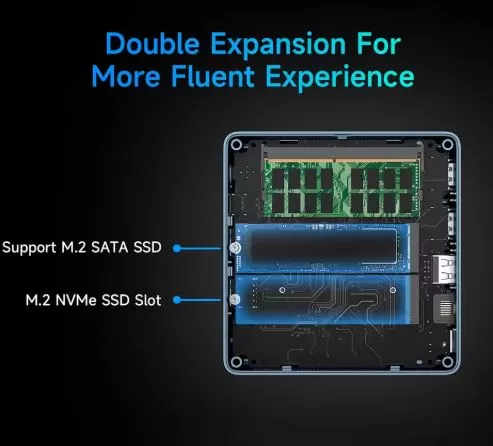
The B4 Ultra is surprisingly easy to open (just a Phillips screwdriver) and offers several expansion options:
| Component | Expandable? | Detail |
|---|---|---|
| RAM | ⚠️ Limited | 1 SO-DIMM slot available, currently 12GB |
| SSD principal | ✅ Yes | M.2 2280 PCIe 3.0x2 (NVMe) slot — although the one included is SATA |
| secondary SSD | ✅ Yes | Additional M.2 2280 SATA slot |
| Disco 2.5" | ✅ Yes | 2.5" SATA III HDD or SSD support bracket with included cable |
💡 If you want to improve performance, the best option is to replace the SATA SSD with an M.2 NVMe (the slot supports it even though the one included is SATA). Adding a 2.5" drive is ideal for extra multimedia storage.
🆚 Comparison with Direct Competitors
| Feature | BMAX B4 Ultra | Beelink EQ14 | Acemagic S1 | Asus NUC 14 Essential |
|---|---|---|---|---|
| CPU | Intel N150 | Intel N150 | Intel N97 | Intel Core 3 N355 |
| RAM | 12 GB LPDDR5 | 16 GB DDR5 | 16 GB DDR4 | 8-16 GB DDR5 |
| SSD | 512GB SATA | 500GB NVMe | 512GB NVMe | 512GB NVMe |
| Wi-Fi | Wi-Fi 5 | Wi-Fi 6 | Wi-Fi 5 | Wi-Fi 6E |
| Video outputs | 2×HDMI + USB-C | 2×HDMI + USB-C | 2×HDMI + USB-C | 2×HDMI + USB-C |
| Disco 2.5" | ✅ | ❌ | ❌ | ❌ |
| Approx. price | ~$140-175 | ~$180-200 | ~$160-180 | ~$250+ |
| Cinebench R23 | ~2.424 pts | ~2.753 pts | ~2.913 pts | ~5.262 pts |
The Beelink EQ14 has a faster SSD (NVMe) and Wi-Fi 6, but the BMAX wins on price and for being the only one that includes a 2.5" bay.
💬 Reviews on Well-Known Pages
User reviews and expert media provide a consistent view:
🔵 Notebookcheck (professional review of the B4 Turbo model, same N150 chip): Rates it as "ideal for a basic HTPC", highlighting its support for a secondary 2.5" drive and ease of maintenance, but criticizing the slow Wi-Fi and the always-on fan. Overall rating: 58/100.
🟢 HobbyConsolas: Describes it as "the best-selling Mini PC on AliExpress, and rightly so" — highlighting its value for money with a 13th gen Intel N150, triple 4K output and Windows 11 Pro.
🟡 ItemsArena (IT): In their review, they call it "Il piccolo gigante" (the little giant), highlighting that it is more than adequate for daily use, although they acknowledge its limitations in heavy tasks.
🔵 bmaxbuy.com (official blog): Presents it as a "Compact Powerhouse for Modern Productivity", highlighting the N150 processor, 12GB LPDDR5 RAM, and 4K connectivity.
🟢 AliExpress users: Average rating of 4.5/5 with thousands of units sold, praising the size, relative quietness, and ease of setup.
🧪 Technical Tests
Based on data from Notebookcheck (model B4 Turbo, same platform as N150):
🔵 CPU:
| Test | BMAX N150 | Intel N100 (reference) | Improvement |
|---|---|---|---|
| Cinebench R23 Multi | ~2.424 pts | ~1.946 pts | +25% |
| Cinebench R23 Single | ~912 pts | ~843 pts | +8% |
| 7-Zip Multi | ~11.373 MIPS | ~8.725 MIPS | +30% |
| Geekbench 6 Multi | ~2.849 pts | ~2.780 pts | +2.5% |
🔵 SSD (included, SATA):
| Test | Speed |
|---|---|
| Sequential reading | ~555 MB/s |
| Sequential writing | ~505 MB/s |
| Random 4K reading | ~29 MB/s |
⚠️ SATA SSD speeds are significantly lower than those of an NVMe PCIe, which can exceed 2,000 MB/s read speeds.
🔵 Memory:
-
~20,280 MB/s in memory copy (single channel, limiting for the integrated GPU)
🎮 Gaming and Emulation
The Intel UHD Graphics GPU (24 EUs at 1000 MHz) isn't a graphics powerhouse, but it offers much more than it seems:
✅ What you CAN do:
-
🕹️ Retro emulation: SNES, GBA, PS1, N64, PS2 (PCSX2) and even GameCube/Wii with Dolphin at moderate resolutions — they work very well
-
🎮 Lightweight games: Minecraft (60 fps at 720p), Stardew Valley, Among Us, 2D indie games
-
🎮 Classic PC games: GTA Vice City/San Andreas, CS:GO (low settings), Dota 2 at 720p (~44-80 fps)
-
🎮 GTA V: 44-59 fps at 768p with minimum settings (playable)
❌ What you CAN'T do:
-
Gaming moderno: Cyberpunk 2077, Hogwarts Legacy, Alan Wake 2
-
Smooth PS3/Xbox 360 emulation
-
4K video editing with real-time rendering
❓ Frequently Asked Questions (FAQ)
❓ Can I use the BMAX B4 Ultra as my main PC?
Yes, perfectly for office work, browsing, email, and video streaming. Not for heavy graphic design or video editing.
❓ Does it support 3 monitors simultaneously?
Yes: 2× HDMI + 1× USB-C, all capable of 4K@60Hz.
❓ Is Wi-Fi enough for 4K streaming?
For 4K streaming, you need approximately 25 Mbps. The B4 Ultra's Wi-Fi 5 can reach approximately 251 Mbps in favorable environments, which is sufficient for streaming. For better speeds, use a Gigabit Ethernet cable.
❓ Does it come with Windows 11 activated?
Yes, it comes with a pre-activated Windows 11 Home license.
❓ Can I connect it to a TV and use it as a media center?
Absolutely, it's one of its most recommended uses. It plays 1080p without any problems and 4K with only occasional, minimal drops.
❓ Can more RAM be added?
There is only one SO-DIMM slot. You can replace the current module with one of higher capacity (up to 16 GB in the standard version).
📅 Price History
Approximate price evolution of the BMAX B4 Ultra / B4 Turbo (12GB-16GB + 512GB) in the main marketplaces:
| Period | Approximate price (Amazon) | Approximate price (AliExpress) |
|---|---|---|
| Launch (Q3 2024) | ~199 € | ~149 € |
| Black Friday 2024 | ~149 € | ~129 € |
| Q1 2025 | ~169 € | ~139 € |
| Q2-Q3 2025 | ~175-199 € | ~135-150 € |
| Q1 2026 (actual) | ~159-175 € | ~130-145 € |
💡 The best time to buy is usually during 11.11 (Singles' Day) and Black Friday, when prices drop by up to 20-25% on AliExpress.
🏁 Final Conclusion
The BMAX B4 Ultra is ideal for:
-
👨💼 Remote workers who need a lightweight PC for office work and video calls
-
🎬 Users looking for a compact HTPC (media center) for the living room
-
🏠 Second PC for bedrooms, kitchen or secondary uses
-
🕹️ Fans of retro emulation (up to PS2/GameCube)
-
💻 Lightweight home servers (Plex, Pi-hole, basic NAS)
Is it worth it? At under €150 with Windows 11 included, the N150, 12GB of RAM, and a 512GB SSD, it's hard to find anything better in its price range. The only real drawbacks are the SATA SSD (which is replaceable) and the Wi-Fi 5 (which can be improved with an Ethernet cable).
Alternatives to consider:
-
🔵 Beelink EQ14 — same chip, NVMe SSD and Wi-Fi 6, but ~€30 more expensive
-
🟢 Acemagic S1 — better multi-core performance with N97, similar price
-
🟡 Asus NUC 14 Essential — much more powerful (N355), but almost twice the price
🛒 Where to Buy?
You can purchase the BMAX B4 Ultra at the following links:
| Store | Link | Advantage |
|---|---|---|
| 🛒 Amazon | 🛒 See Price | Fast delivery, simple warranty |
| 🛒 AliExpress | View on AliExpress → | Best price |
| 🛒 Alibaba | View on Alibaba → | Best Price |