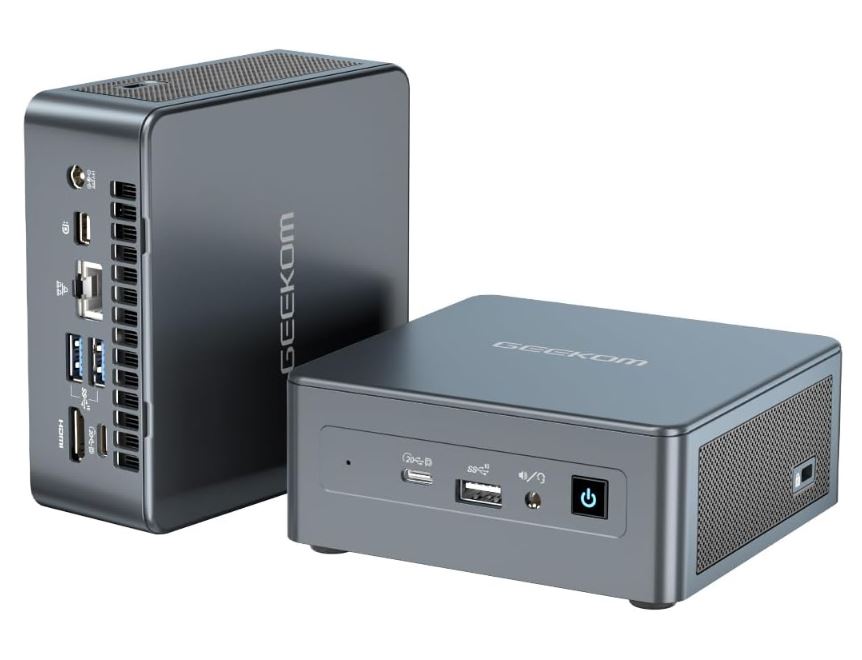
The GEEKOM Mini IT11 is a compact mini PC (117 x 112 x 45.6 mm) that features 11th generation Intel processors (from the i5-1135G7 to the i7-1195G7 or i7-11390H, all 4 cores/8 threads) with Iris Xe graphics, designed for demanding office tasks, multitasking, and home projects such as camera servers or lightweight NAS.
Pros: construction with a very sturdy internal metal frame, easy RAM/SSD upgrade, low power consumption, quiet operation under normal use, and a 3-year warranty, which is unusual in this segment.
Cons: The first boot requires Windows updates that can take between 40 minutes and 2 hours, the graphics performance falls short for demanding gaming, and there is some risk of factory-defective units according to buyer reviews.
Conclusion: If you're looking for a small, quiet, and capable PC for office work, light editing, or a home project, the IT11 is more than adequate; if your priority is serious gaming, there are better alternatives like the GMKtec K8 Plus.
📦 Unboxing and Box Contents
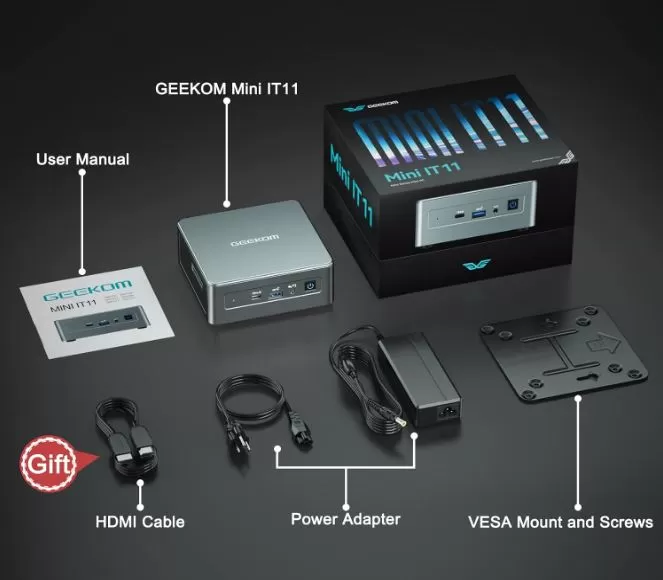
Upon opening the IT11 box we found:
-
The mini PC (Black+Silver colors depending on region)
-
VESA mount for mounting behind a monitor or TV
-
65W (19V/3.42A) power adapter with 1.5m cable
-
HDMI cable
-
Multi-language user manual
-
Carrying case (market dependent)
-
GEEKOM Thank You Card
Everything comes protected in a cardboard box reinforced with molded foam, with no surprises or accessories more or less than expected in this product category.
📋 Key Technical Specifications
| Component | Specification |
|---|---|
| CPU | Intel Core i5-1135G7 / i5-1155G7 / i7-1165G7 / i7-1195G7 / i7-11390H (4C/8T, up to 5.0GHz) |
| GPU | Intel Iris Xe (96 EU) |
| RAM | DDR4 dual-channel, 3200MT/s, 16-32GB factory installed, expandable up to 64GB |
| Storage | M.2 2280 PCIe 512GB-1TB (expandable to 2TB) + 2.5" free 7mm SATA bay (up to 2TB) |
| Wi-Fi / Bluetooth | Wi-Fi 6 (Intel AX201) + Bluetooth 5.2, multidirectional antenna |
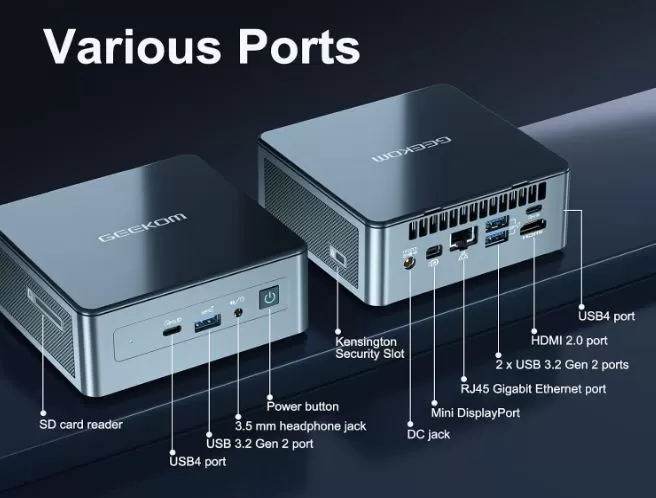
| Ports | 2x USB4 (20Gbps, with Power Delivery), 3x USB 3.2 Gen 2, HDMI 2.0, Mini DisplayPort 1.4, SD reader, 3.5mm jack, RJ45 Gigabit |
| Video | Up to 4 simultaneous displays, maximum 8K@30Hz via USB4 |
| Chassis | ABS/PC + internal metal frame, resistant to 200kg of static pressure |
| Dimensions / Weight | 117 x 112 x 45.6 mm / 564.9 g |
| Operating system | Windows 11 Pro preinstalled (Linux compatible) |
| Certifications | FCC, UL, ENERGY STAR, CE, RoHS |
| Warranty | 3 years |
🏗️ Design and Construction Quality
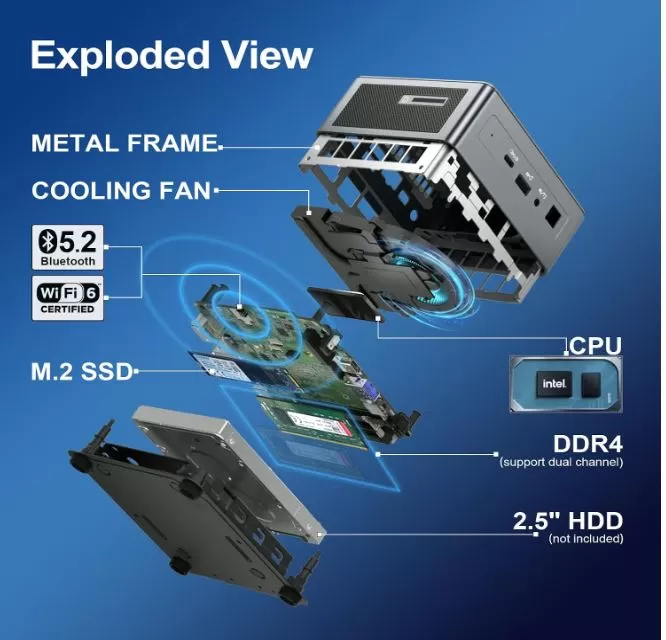
The IT11 visually resembles the Intel NUC 11 Pro in size and port layout, but with an extra feature that makes all the difference: a precision-machined metal frame and motherboard, tested to withstand up to 200kg of static pressure, something not commonly found in mini PCs in this price range, where a 100% plastic chassis is the norm.
The exterior combines ABS and polycarbonate with a matte finish, shock-absorbing feet, and a multidirectional Wi-Fi antenna that protrudes slightly at the rear to improve reception.
In hand, it feels solid, with no creaking or flexing when you press the casing, and internal access for upgrading RAM or drives is tool-free: simply open the base without needing a screwdriver to reach the slots. It also includes a Kensington Lock slot, a feature designed for office or educational environments where the computer is permanently installed at a workstation.
🖥️ Screen and Multimedia
Since this is a mini PC without its own screen, the key feature here is the quality of the video and sound output it can deliver to your monitor or TV. The combination of 2x USB4 + HDMI 2.0 + Mini DisplayPort 1.4 allows you to connect up to 4 displays simultaneously, with a maximum resolution of 8K at 30Hz via USB4 (the HDMI and Mini DP outputs are limited to 4K at 60Hz, which is the most common resolution for home and office monitors).
For multimedia playback, the Iris Xe smoothly handles 4K video without stuttering, streaming on platforms like YouTube or Netflix without buffering, and light photo editing tasks. Audio is output via the 3.5mm jack or the video outputs (HDMI/DP), without built-in speakers, as is typical for this type of device.
⚙️ Performance and Software
The IT11 comes with Windows 11 Pro pre-installed and factory-activated, with no added bloatware beyond what Microsoft includes by default—a welcome feature compared to other brands that clutter the system with third-party software. One point to keep in mind before the initial setup: the computer typically needs to download and install Windows updates (including recent builds like 25H2) before you can use it normally, a process that, according to real users, can take between 40 minutes and almost 2 hours the first time. Once this initial step is completed, the daily user experience is smooth in both Windows and Linux, which is also fully compatible.
In terms of pure performance, the 4 cores and 8 real threads of these 11th generation processors allow for solid multitasking: browsing with many tabs open, simultaneous video calls, office work, heavy spreadsheets, or even background backup tasks without the system suffering.
🔋 Energy Consumption and Cables
One of the IT11's strengths is its energy efficiency. The included adapter is rated at 65W, but actual consumption measured in independent tests is around 8W at idle and up to 70W under maximum load, leaving plenty of headroom in the adapter itself.
One user who uses it as a 24/7 camera server confirms an actual power consumption of approximately 30W with all services running, well below the adapter's 65W limit. This makes it an attractive option for keeping connected to a UPS for extended periods in case of a power outage, or for leaving it on continuously without significantly increasing the electricity bill.
🌡️ Temperature and Noise (Actual Thermal)
The maximum fan noise is between 30 and 45 dB under full load, but in normal office use it is virtually inaudible.
A user who subjects it to sustained loads (video surveillance server + backups with Acronis running in parallel) highlights that it barely gives off heat despite the continuous effort, thanks to the cooling system and the dissipation provided by the internal metal frame, which not only provides rigidity but also helps to distribute the heat generated by the CPU.
🔌 Connectivity and Extras
-
2x USB4 (20Gbps, with Power Delivery to charge other devices, according to seller)
-
3x USB 3.2 Gen 2
-
1x HDMI 2.0
-
1x Mini DisplayPort 1.4
-
1x SD card reader
-
1x 3.5mm audio jack
-
1x Gigabit Ethernet (RJ45)
-
Wi-Fi 6 + Bluetooth 5.2
-
Kensington Lock Slot
It lacks 5G, NFC, a fingerprint reader, and IP certification, which is to be expected in a mini PC of this segment geared towards office use rather than mobility or environmental resistance.
🛠️ Expansion and Upgrades
This is one of the strongest points of the IT11 for any user who wants to extend the lifespan of the equipment:
-
RAM: comes with 16GB or 32GB DDR4 from the factory (2 SODIMM slots), expandable up to 64GB in total.
-
Main SSD: M.2 2280 PCIe slot, standard with 512GB or 1TB, expandable up to 2TB.
-
Additional storage: Includes a free 2.5" SATA bay (7mm high) to add a second SSD or HDD of up to 2TB.
-
Access is tool-free, requiring no screwdriver for basic upgrades.
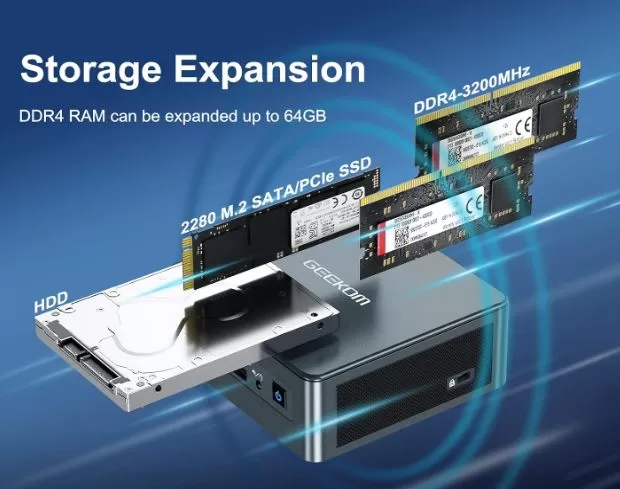
If you want to expand your IT11, these are common compatible modules available in online stores:
⚖️ Comparison with Direct Competitors
| GEEKOM IT11 | GEEKOM Air12 (2026) | GMKtec K8 Plus | |
|---|---|---|---|
| CPU | Intel i5/i7 11th gen (4C/8T) | Pentium Gold 7505/N95-N150 (2-4 cores) | AMD Ryzen 7 8845HS (8C/16T) |
| GPU | Iris Xe | Basic UHD | Radeon 780M (RDNA3) |
| max RAM | 64GB DDR4 | 32-64GB DDR4 | 96GB DDR5 |
| Storage | 2TB M.2 + 2TB SATA 2.5" | 2TB M.2 (single slot) | 8TB (2x M.2 PCIe 4.0) |
| Gaming | Limited, office/multitasking | Very limited | 1080p on medium settings, very competent |
| Indicative price | 🛍️ View Prices | 🛍️ View Prices | 🛍️ View Prices |
| Ideal use | Demanding office, multitasking, lightweight server | Basic office automation, navigation | Light gaming, editing, advanced productivity |
👉 If your priority is gaming or heavy video editing, the GMKtec K8 Plus offers significantly more graphics capabilities.
👉 If you only need to browse the web and perform very basic office tasks, the GEEKOM Air12 is a more economical option.
💬 Reviews on Well-Known Pages
Specialized media outlets agree that the IT11 is a solid alternative to the Intel NUC 11 Pro. XDA Forums describes it as "the best NUC 11 Pro alternative," highlighting that its reinforced ABS/PC chassis with a metal frame is more durable than the conventional plastic of other mini PCs, and that its size and port layout are almost identical to Intel's original NUC.
TechRadar, in its test unit with an i7-1195G7, 16GB of RAM and a 512GB NVMe SSD, positively assessed the polished performance for office tasks and multitasking, although it noted that its Iris Xe graphics card falls short compared to solutions with dedicated GPUs when it comes to demanding gaming.
Reviews from real buyers on Amazon (certainly attributable to the IT11 due to its specific technical features, such as the additional 2.5" SATA bay) describe the experience of using it as a video surveillance camera server, reporting performance "roughly 3 times more" than a Dell OptiPlex 3060 it replaced, actual power consumption of just 30W under full load, ease of opening the unit and expanding memory/storage, and no noticeable overheating even when running several simultaneous tasks (camera server, wireless control and backup with Acronis at the same time).
🧪 Technical Tests
Benchmarks recorded on a test unit with i7-1165G7, 32GB of RAM and 1TB SSD (performance equivalent to or slightly lower than the i7-1195G7 that the final commercial version has, already improved by GEEKOM before launch):
Geekbench 5 — Single-Core: 1,540 points.
This test measures the performance of a single CPU core in tasks that cannot be distributed across multiple processors, such as opening programs, responding to clicks, or running most office software. A score of 1,540 points places the IT11 in the mid-to-high-end range of office laptops: sufficient for Windows, the browser, and Office apps to run smoothly, without the typical stuttering of older or lower-power processors (such as the N95/N100 in the Air12, which score around half this figure).
Geekbench 5 — Multi-Core: 5,133 points.
This measures how the 4 cores and 8 threads work together, which is crucial for exporting video, compressing large files, or running multiple programs simultaneously. With 5,133 points, the IT11 performs solidly in moderate multitasking, although it falls short of 8-core processors like the Ryzen 7 8845HS in the GMKtec K8 Plus (which can easily double this score). In practice, this means the IT11 is perfect for having 20 tabs, a video call, and a spreadsheet open at the same time, but it's not the best choice if your daily work involves heavy video rendering.
Geekbench 5 — OpenCL: 16,969 points.
This section measures the capacity for accelerated graphics computing, used, for example, in accelerating effects in Photoshop, Premiere, or Handbrake when exporting video. A score close to 17,000 points confirms that the Iris Xe can truly assist the CPU in these tasks, accelerating video exports or editing filters, although without reaching the level of an entry-level dedicated GPU.
PCMark 10: 4,661 points.
This is probably the most relevant figure for an office equipment buyer, because it simulates a real workflow: web browsing, video calls, document editing, and spreadsheets combined into a single score. A score of 4,000-4,500 points is generally considered "comfortable" for daily office use without bottlenecks; the IT11, with 4,661 points, falls right into that range of reliable equipment for demanding office work, without being a professional workstation.
3DMark Time Spy: 1,594 points.
Time Spy measures graphics performance in DirectX 12, the standard for modern games. A score of 1,594 points is low compared to a dedicated GPU (an entry-level graphics card like the GTX 1650 typically scores over 5,000 points), confirming that the IT11 is not designed for demanding gaming, but rather for lighter or older titles.
3DMark Fire Strike: 4,332 points.
Fire Strike uses DirectX 11 and typically delivers higher scores than Time Spy for integrated graphics. This result reinforces the same conclusion: there's room for undemanding games at 1080p with low-to-medium settings, but not for current AAA titles at high quality.
3DMark Sky Diver: 13,710 points.
Sky Diver is a test specifically designed for laptops and computers with integrated graphics, and this is where the IT11 stands out the most: its result clearly surpasses very low-end, older discrete GPUs, such as the Nvidia MX350, which is relevant if you're coming from an office laptop from several years ago and want to notice a real improvement in overall fluidity and multimedia capabilities.
Power consumption: 8W at idle / up to 70W under maximum load.
This figure measures how much electricity the device draws in two extreme scenarios: idle and under maximum load on both the CPU and GPU simultaneously. An 8W idle consumption is excellent, comparable to that of an LED bulb, making it ideal for leaving on 24/7 without a noticeable impact on your electricity bill. The 70W peak under maximum load is significantly lower than the 65W adapter... although in practice this isn't a problem because that peak is momentary and the device rarely sustains both components at 100% for extended periods; the manufacturer itself certifies the adapter for this real-world usage scenario, not for continuous synthetic lab testing.
In summary: the numbers confirm what we already suspected from its specifications: the IT11 is an outstanding office and multitasking machine for its category, with extra graphics power that allows it to handle 4K video and light creative tasks without breaking a sweat, but it falls short in the realm of serious gaming compared to more modern chips like the Ryzen 7 8845HS in the GMKtec K8 Plus.
These numbers confirm that, although it doesn't compete with the latest AMD solutions like the Radeon 780M in the GMKtec K8 Plus, the IT11 performs above expectations for an 11th generation chip in productivity tasks and moderate multitasking.
🎮 Gaming and Emulation
In real-world gaming, recorded tests show:
-
League of Legends: 115 fps stable in 1080p
-
Genshin Impact: around 44 fps at medium quality 1080p
-
Conqueror's Blade: 31 fps with occasional drops in demanding moments
In emulation, the Iris Xe performs well with older generation consoles (PS2, GameCube, Wii, PSP) and can smoothly run most of the Nintendo Switch library on emulators like Ryujinx in less demanding titles, although graphically intensive Switch games may experience framerate drops. It's not a machine designed primarily for gaming, but it works perfectly well as a secondary option for occasional sessions or retro gaming.
❓ Frequently Asked Questions (FAQ)
Can I play games on the GEEKOM IT11?
Yes, but it's limited to light gaming or low-to-medium settings at 1080p. It's not a mini gaming PC like the GMKtec K8 Plus.
What is the maximum RAM it supports?
Up to 64GB DDR4 in dual-channel configuration (2 SODIMM slots).
Does it come with Windows 11 factory activated?
Yes, Windows 11 Pro pre-installed and activated, no additional license required.
What warranty does GEEKOM offer?
3 years, higher than the average of 1 year usually offered by most mini PCs.
Can I install Linux instead of Windows?
Yes, it is fully compatible with Linux distributions, as well as Android x86 and FydeOS in dual-boot configuration.
Can I expand the storage beyond the main SSD?
Yes, it includes an additional free 2.5" SATA bay for a second drive of up to 2TB.
🏁 Final Conclusion
The GEEKOM IT11 is a highly recommended option if you're looking for a compact, quiet mini PC with real room for expansion, suitable for office tasks, moderate multitasking, or home projects like a camera server or lightweight NAS. Its metal frame construction and 3-year warranty provide an extra level of reliability rarely seen in this price range.
It's not the right choice if your priority is serious gaming or heavy video editing: for that, the GMKtec K8 Plus with its Radeon 780M offers much more graphics power. And if your budget is very tight and you only need to browse the web and do basic office work, the GEEKOM Air12 will save you money without requiring that much power.